[Near Protocol] Near开发Demo浅析-Gamble Game Near(二):Dapp
[Near Protocol] Near开发Demo浅析-Gamble Game Near
Dapp
接着上一期继续分享
源代码在Github上可以找到,以下是Dapp链接:
https://github.com/Yang94J/Gamble_Game_Near_Front
简介
本项目依托Vue,搭建前端应用,调用near-api-js与部署好的合约进行交互,完成掷骰子功能。环境搭建
- Prerequisite : 系统中应当已经安装好Nodejs,Vue3
- 项目搭建:
vue create gamble_gamble_near_front
最终代码框架如下:
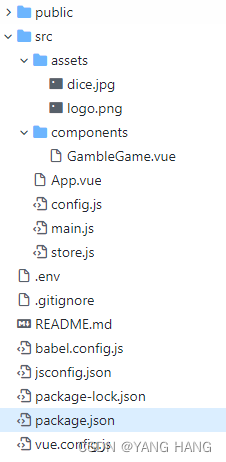
主要对/components/GambleGame.vue、App.vue、config.js、main.js、store.js、.env、package.json及vue.config.js进行介绍。
代码解析
package.json
以下是package.json重点部分
"dependencies": {"@rollup/plugin-inject": "^4.0.4","buffer": "^6.0.3","core-js": "^3.8.3","near-api-js": "^0.44.2","vue": "^3.2.13","vuex": "^4.0.2"},
此处指明了对buffer、near-api-js、vue、vuex等依赖(尤其是buffer,必须要引入并显式声明,否则工程会出现类似Can't find variable: Buffer之类的错误)
.env
VUE_APP_CONTRACT_NAME=gamble_game1.XXX.testnet
指明dapp所需调用的合约名称(测试网)
main.js
import { createApp } from 'vue'
import App from './App.vue'
import store from './store'import { Buffer } from "buffer";
global.Buffer = Buffer;createApp(App).use(store).mount('#app')
请注意此处显式声明了global.Buffer
config.js
const CONTRACT_NAME = process.env.VUE_APP_CONTRACT_NAME;
从.env文件中读取合约名称
case 'testnet':return {networkId: 'testnet',nodeUrl: 'https://rpc.testnet.near.org',contractName: CONTRACT_NAME,walletUrl: 'https://wallet.testnet.near.org',helperUrl: 'https://helper.testnet.near.org',explorerUrl: 'https://explorer.testnet.near.org',};
根据用户输入环境,选择对应的网络配置(此处为测试网)。
store.js
store.js存储数据到本地浏览器,获取缓存等,可以参考该链接
state: {contract: null,currentUser: null,wallet: null,nearConfig: null},
存储状态包括合约、当前用户、钱包和near配置
mutations: {setupNear(state, payload) {state.contract = payload.contract;state.currentUser = payload.currentUser;state.wallet = payload.wallet;state.nearConfig = payload.nearConfig;}}
设置state对象
async initNear({ commit }) {const nearConfig = getConfigurations('testnet');const near = await nearApi.connect({deps: {keyStore: new nearApi.keyStores.BrowserLocalStorageKeyStore()},...nearConfig});const wallet = new nearApi.WalletConnection(near);console.log(wallet)let currentUser;if (wallet.getAccountId()) {currentUser = {accountId: wallet.getAccountId(),balance: (await wallet.account().state()).amount,balanceInNear : (await wallet.account().state()).amount / (10 ** 24),}}console.log(currentUser)const contract = await new nearApi.Contract(wallet.account(), process.env.VUE_APP_CONTRACT_NAME || 'gamble_game1.young_cn.testnet', {viewMethods: ['get_maximum_gamble_price'],changeMethods: ['gamble','sponsor'],sender: wallet.getAccountId()});console.log(contract);// Commit and send to mutation.commit('setupNear', { contract, currentUser, wallet, nearConfig });}}
此处initNear函数获取测试网配置,生成合约、钱包信息(需要用户登录)、用户信息等。
GambleGame.vue
Dice Gamble game
根据当前用户情况,生成登入登出按钮
Hi, {{currentUser.accountId}}, your balance is {{currentUser.balanceInNear}} Near
显示当前用户id,当前余额(CurrentUser信息参见store.js)
显示当前最大投注量,通过refresh函数访问智能合约刷新最大投注量
投注按钮,调用gamblegame方法进行投注
赞助按钮,调用sponsorus方法进行赞助
async created(){console.log("created")console.log(sessionStorage.getItem('gambleLimit'))if (sessionStorage.getItem('gambleLimit')) {this.gambleLimit = sessionStorage.getItem('gambleLimit')}},
用created钩子函数来自动获取最大投注量(否则数据将丢失)
async mounted() {var that = thisconsole.log("Mount")setInterval(() => {console.log("refresh")that.refresh()},3000)},
使用mounted钩子函数来设置自动更新最大投注量-考虑合约的并发。
signIn() {this.wallet.requestSignIn(this.nearConfig.contractName,'Near Gamble Game');},signOut() {this.wallet.signOut();window.location.replace(window.location.origin + window.location.pathname)},
signIn和signOut方法调用near.api.js实现与钱包的交互
async gamblegame(){try{await this.contract.gamble({},this.gas,Big(this.gamble).times(10**24).toFixed());}catch (e) {console.log(e);}},async sponsorus(){try{await this.contract.sponsor({},this.gas,Big(this.sponsor).times(10**24).toFixed());}catch (e) {console.log(e);alert('Something went wrong! Check the console.');}},async refresh(){this.gambleLimit = await this.contract.get_maximum_gamble_price()this.gambleLimit = this.gambleLimit / (10 ** 24)sessionStorage.setItem('gambleLimit',this.gambleLimit)}}
gambleGame、sponsorus和refresh都是异步方法。具体contract方法信息在store.js里通过以下进行声明:
viewMethods: ['get_maximum_gamble_price'],changeMethods: ['gamble','sponsor'],
部署
- vue.config.js修改其配置如下:
const { defineConfig } = require('@vue/cli-service')
module.exports = defineConfig({transpileDependencies: true,publicPath:'./',
})
将路径改为相对路径
- 构建
npm run build
- 运行
npm run serve
效果展示
至此,Dapp部分完成。
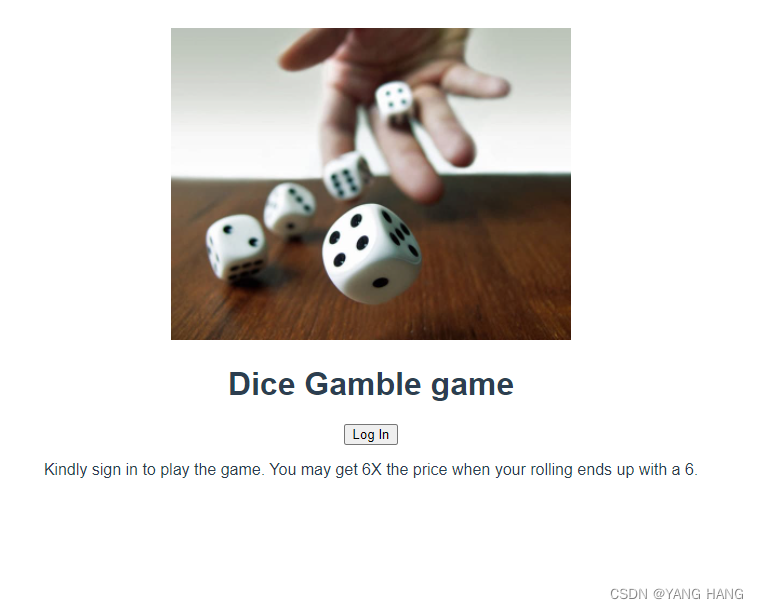
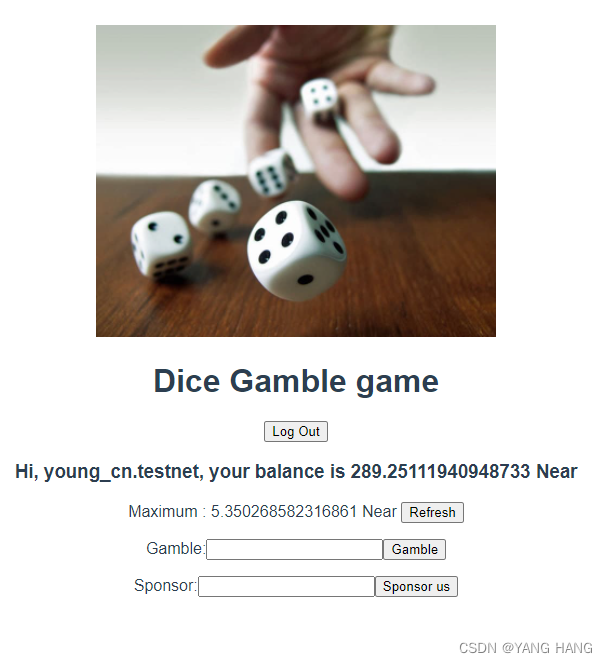
诚然,这个demo很明显还有很多不足的地方,但也算一个不错的开始。大家有想法也欢迎和我一起讨论。互相交流,共同进步。
本文来自互联网用户投稿,文章观点仅代表作者本人,不代表本站立场,不承担相关法律责任。如若转载,请注明出处。 如若内容造成侵权/违法违规/事实不符,请点击【内容举报】进行投诉反馈!