uniapp 微信小程序 自定义弹框+picker下拉选择列表+输入表单:拒绝-选择理由弹窗
效果:
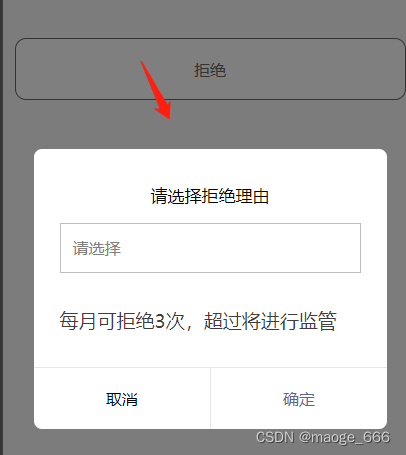
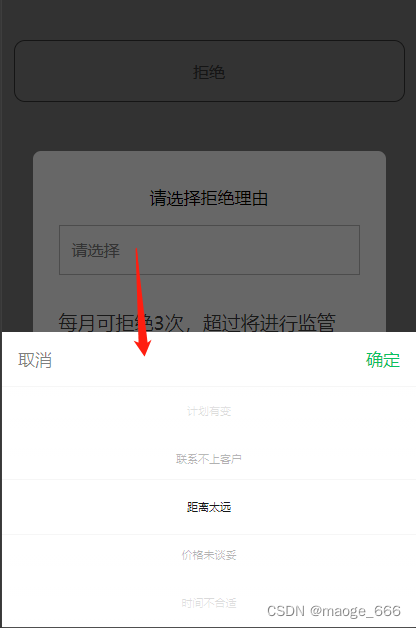
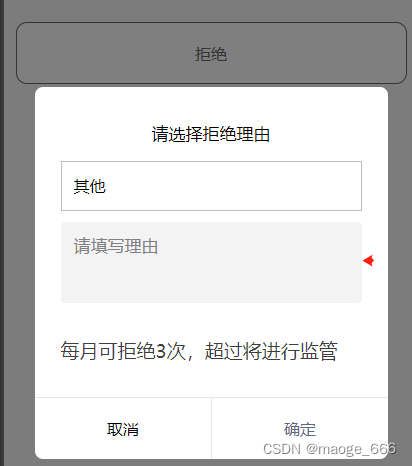
1、template
<!-- 拒绝-选择理由弹窗-->
<view class="reason-popover" v-if="showReasonDialog"><view class="reason-modal"><view class="reason-title"><text>请选择拒绝理由</text></view><view class="reason-bd"><view class="select-picker"><picker @change="bindPickerChangeReason" :value="itemIndex" :range="listArray"range-key="dictLabel"><input class="select-input" type="text" placeholder="请选择" disabled="disabled"v-if="itemIndex == -1"></input><view class="select-input" v-else :value="listArray[itemIndex].dictLabel">{{listArray[itemIndex].dictLabel}}</view></picker></view><textarea placeholder="请填写理由" v-model="otherReason" class="other-reason"v-if="showOther"></textarea><text class="tips">每月可拒绝3次,超过将进行监管</text></view><view class="reason-bottom-btn"><view class="common-btn" @click="closeReasonDialog">取消</view><view class="common-btn confirm-btn" @click="toConfirm">确定</view></view></view>
</view>
2、data:
data() {return {// 拒绝理由itemIndex: -1,listArray: [],reasonName:'',//理由文本showReasonDialog: false, //是否显示拒绝弹框otherReason: '', //输入的理由showOther: false, //是否显示输入文本框}
}
3、methods:
// 点击拒绝-请求拒绝理由列表接口
toCancel: function() {uni.showLoading();var params = {url: "/***/***",method: "GET",data: {},callBack: res => {uni.hideLoading()this.listArray = res.datathis.showReasonDialog = true //显示拒绝弹框}};http.request(params);
},
// 理由下拉列表
bindPickerChangeReason: function(e) {this.itemIndex = e.detail.valuethis.reasonIds = this.listArray[this.itemIndex].dictValuethis.reasonName = this.listArray[this.itemIndex].dictLabel//当选择其他时,文本输入框显示,当选择非其他时输入框隐藏if (this.reasonName == "其他") {this.showOther = true}else{this.showOther = false }
},
// 拒绝点击确定
toConfirm: function() {if (this.reasonName.length == 0) {uni.showToast({icon: 'none',title: "请选择拒绝理由",})return}//当选择其他时,如果未输入文本,则理由默认传“其他”,否则就传输入的文本值if (this.reasonName == "其他") {if(!this.otherReason){this.reasonName = "其他"}else{this.reasonName = this.otherReason}}uni.showLoading();var params = {url: "/****/****",method: "PUT",data: {orderId: this.orderId,driverRefuseReason: this.reasonName},callBack: res => {uni.hideLoading()this.showReasonDialog = falseuni.showModal({title: "拒绝成功",content: "",confirmText: "确定",showCancel: false,success: (res) => {if (res.confirm) {//拒绝成功跳转订单列表页uni.reLaunch({url: '/pages/order/order'})}}})}};http.request(params);
},
// 关闭弹框
closeReasonDialog() {this.showReasonDialog = false
},
4、style
.reason-popover {position: fixed;top: 0;left: 0;width: 100%;height: 100%;z-index: 10000;display: flex;display: -webkit-flex;justify-content: center;align-items: center;background-color: rgba(0, 0, 0, 0.5);
}.reason-popover .reason-modal {position: relative;width: 640rpx;/* height: 575rpx; */border-radius: 16rpx;background: #fff;margin: 0 auto;padding: 64rpx 48rpx 112rpx 48rpx;box-sizing: border-box;
}.reason-popover .reason-title {/* width: 313rpx;height: 90rpx; */margin: 0 auto;font-size: 32rpx;/* line-height: 45rpx; */text-align: center;color: #000;margin-bottom: 32rpx;
}/* .close-img {position: absolute;top: 12rpx;right: 12rpx;width: 44rpx;height: 44rpx;
}.close-img image {width: 100%;height: 100%;
} */
.reason-bd{/* width: 420rpx; */width: 100%;/* height: 640rpx; */margin: 0 auto;margin-bottom: 64rpx;/* line-height: 36rpx; */}
.reason-bd .bd-title{color: #3DB86D;
}
.tips{margin: 0 auto;font-size: 36rpx;color: #3D3D3D;margin-top: 64rpx;
}
.reason-bd text{display: block;
}
.reason-bottom-btn{width: 100%;border-top:1rpx solid #E7E7E7;position: absolute;left: 0;bottom: 0;display: flex;justify-content: space-around;height: 112rpx;line-height: 112rpx;text-align: center;
}
.common-btn{width:320rpx;}
.confirm-btn {border-left: 1rpx solid #E7E7E7;color: #5b6987;box-sizing: border-box;
}
.other-reason{width: 100%;height: 147rpx;border-radius: 8rpx;background: #F3F3F3;padding: 24rpx 24rpx 27rpx 24rpx;box-sizing: border-box;color: #3D3D3D;font-size: 32rpx;margin-top:20rpx;
}
.select-input{width:100%;height: 88rpx;line-height: 88rpx;border-radius: 10rpx;border: 1rpx solid #BDBDBD;padding-left: 22rpx;box-sizing:border-box;
}
.select-picker{border: 1rpx solid #BDBDBD;
}
.select-picker .select-input{border:none !important
}
本文来自互联网用户投稿,文章观点仅代表作者本人,不代表本站立场,不承担相关法律责任。如若转载,请注明出处。 如若内容造成侵权/违法违规/事实不符,请点击【内容举报】进行投诉反馈!