实验一:直线与画圆算法
目录
- 实验内容
- 代码介绍
实验内容
• 实现DDA和Bresenham画线算法。(80%)
• 实现画圆算法。(90%)
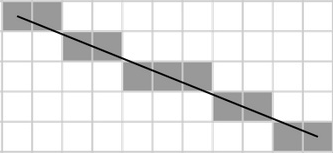
• 请勿直接调用OpenGL库中提供的绘制线段和圆的函数,需手动模拟如何通过绘制像素来显示几何图形,效果可参考下图。(界面显示的是“虚拟的像素”)
• 可通过交互操作来确定线段的起点和终点。(100%)
代码介绍
相关算法在课堂上已经讲过,这里只介绍相关代码。
要注意的是课本上的Bresenham算法只对于角度在沿x轴正方向选择45°的范围的直线适用,因此在实现该算法使需要将其他角度的直线映射到该角度范围内进行处理。
在以下代码中按下L为画直线模式,按下C为画圆模式。通过鼠标左键单击,采出第一个点,在鼠标摁住左键拖拽时,读取鼠标所在的坐标实施绘制直线,在鼠标松开左键时采出第二点,使用该调用Bresenham函数绘制直线。
#include "shader.h"using namespace std;
const unsigned int SCR_WIDTH = 800;
const unsigned int SCR_HEIGHT = 600;
const unsigned int maxn = 800 * 600 * 2;
float verticesLine[maxn];
unsigned int VAO;
unsigned int VBO;
unsigned int theSize;//坐标变换为标准化设备坐标,即[-1.0,1.0]
float transX(int x) { return (float) ((float) (2 * x) - SCR_WIDTH) / (SCR_WIDTH * 1.0f); }float transY(int y) { return (float) (SCR_HEIGHT - 2 * (float) y) / (SCR_HEIGHT * 1.0f); }bool click1, click2;
bool LineORCircle;
struct Point {int x, y;
} Line[2];vector<float> TheLine;//存储需要绘制的像素顶点void framebuffer_size_callback(GLFWwindow *window, int width, int height) {glViewport(0, 0, width, height);//0,0为左下角位置,后两参数为窗口高度和宽度
}void drawPixel(int x, int y) {//将要涂色的点加入队列TheLine.push_back(transX(x));TheLine.push_back(transY(y));TheLine.push_back(1.0f);//z轴
}void DDALine(int x0, int y0, int x1, int y1) {//DDA绘制直线float d = 0;if (abs(x1 - x0) >= abs(y1 - y0))d = abs(float(x1 - x0));elsed = abs(float(y1 - y0));float dx = (float) (x1 - x0) / d;float dy = (float) (y1 - y0) / d;float x = x0 + 0.5;float y = y0 + 0.5;float i = 0;while (i < d) {drawPixel((int) x, (int) y);x += dx;y += dy;i++;}
}void BresenhamLine(int x0, int y0, int x1, int y1) {//Bresenham绘制直线int dx = x1 - x0, dy = y1 - y0;//控制符号int ux = 1, uy = 1;if (dx < 0) ux = -1;if (dy < 0) uy = -1;int x = x0, y = y0;dx = abs(dx);dy = abs(dy);//取绝对值,看作在第一象限if (dx > dy) {int e = -dx;for (x = x0; x != x1; x += ux) {drawPixel(x, y);e += 2 * dy;if (e >= 0) {y += uy;e -= 2 * dx;}}} else {int e = -dy;for (y = y0; y != y1; y += uy) {drawPixel(x, y);e += 2 * dx;if (e >= 0) {x += ux;e -= 2 * dy;}}}}void MIdPointDrawCircle(int x0, int y0, int r) {//中点画圆法int x = 0;int y = r;double d = 1.25 - r;drawPixel(x0, y0);//画圆心drawPixel(x0 + x, y0 + y);while (x <= y) {if (d < 0)d += 2 * x + 3;else {d += 2 * (x - y) + 5;y--;}x++;//八个方向画圆//在原点上计算,然后加上x0 y0作为偏移量drawPixel(x + x0, y + y0);drawPixel(y + x0, x + y0);drawPixel(-x + x0, y + y0);drawPixel(y + x0, -x + y0);drawPixel(x + x0, -y + y0);drawPixel(-y + x0, x + y0);drawPixel(-x + x0, -y + y0);drawPixel(-y + x0, -x + y0);}
}void processInput(GLFWwindow *window) {if (click1) {if (!LineORCircle) {//绘制直线cout << "Drawing Line" << endl;TheLine.clear();BresenhamLine(Line[0].x, Line[0].y, Line[1].x, Line[1].y);//DDALine(Line[0].x,Line[0].y,Line[1].x,Line[1].y);GLfloat *tempVec = TheLine.data();theSize = TheLine.size();glBindBuffer(GL_ARRAY_BUFFER, VBO);//绑定缓冲glBufferSubData(GL_ARRAY_BUFFER, 0, theSize * sizeof(GLfloat), tempVec);} else {//绘制圆cout << "Drawing Circle\n";TheLine.clear();float r = sqrt(pow(Line[1].x - Line[0].x, 2) + pow(Line[1].y - Line[0].y, 2));MIdPointDrawCircle(Line[0].x, Line[0].y, r);GLfloat *tempVec = TheLine.data();theSize = TheLine.size();glBindBuffer(GL_ARRAY_BUFFER, VBO);glBufferSubData(GL_ARRAY_BUFFER, 0, theSize * sizeof(GLfloat), tempVec);}}
}//设定按键相应
void key_CallBack(GLFWwindow *window, int key, int scancode, int action, int mod) {if (key == GLFW_KEY_ESCAPE && action == GLFW_PRESS) {//ESC退出glfwSetWindowShouldClose(window, true);return;}if (key == GLFW_KEY_L && action == GLFW_PRESS) {//L画直线//直线模式LineORCircle = false;}if (key == GLFW_KEY_C && action == GLFW_PRESS) {//C画圆//画圆模式LineORCircle = true;}
}//设定鼠标点击响应
void mouse_click_callBack(GLFWwindow *window, int button, int action, int mod) {if (button == GLFW_MOUSE_BUTTON_LEFT && action == GLFW_PRESS) {//按下鼠标//第一个点double xPos, yPos;glfwGetCursorPos(window, &xPos, &yPos);Line[0].x = static_cast<int>(xPos);Line[0].y = static_cast<int>(yPos);//初始化Line[1].x = static_cast<int>(xPos);Line[1].y = static_cast<int>(yPos);click1 = true;click2 = false;cout << xPos << " " << yPos << endl;}if (button == GLFW_MOUSE_BUTTON_LEFT && action == GLFW_RELEASE) {//松开鼠标//第二个点double xPos, yPos;glfwGetCursorPos(window, &xPos, &yPos);cout << xPos << " " << yPos << endl;Line[1].x = static_cast<int>(xPos);Line[1].y = static_cast<int>(yPos);click2 = true;click1 = false;}}void cursePosCallBack(GLFWwindow *window, double x, double y) {if (!click2) {Line[1].x = static_cast<int>(x);Line[1].y = static_cast<int>(y);}
}int main() {//初始化并配置glfwInit();glfwWindowHint(GLFW_CONTEXT_VERSION_MAJOR, 3);glfwWindowHint(GLFW_CONTEXT_VERSION_MINOR, 3);glfwWindowHint(GLFW_OPENGL_PROFILE, GLFW_OPENGL_CORE_PROFILE);//窗口创建GLFWwindow *window = glfwCreateWindow(SCR_WIDTH, SCR_HEIGHT, "Bresenham", nullptr, nullptr);if (window == nullptr) {cout << "Failed to create GLFW window" << endl;glfwTerminate();return -1;}glfwMakeContextCurrent(window);glfwSetFramebufferSizeCallback(window, framebuffer_size_callback);glfwSetKeyCallback(window, key_CallBack);//设定按键功能glfwSetMouseButtonCallback(window, mouse_click_callBack);//设置鼠标点击glfwSetCursorPosCallback(window, cursePosCallBack);if (!gladLoadGLLoader((GLADloadproc) glfwGetProcAddress)) {//使用glad加载函数指针cout << "Filed initialize GLAD" << endl;}Shader ourShader("../shader.vs", "../shader.fs");//着色器类,前者为顶点着色器,后者为片段着色器//顶点缓冲对象glGenVertexArrays(1, &VAO);glGenBuffers(1, &VBO);glBindVertexArray(VAO);//将创建的缓冲绑定glBindBuffer(GL_ARRAY_BUFFER, VBO);//将数据复制到缓冲内存glBufferData(GL_ARRAY_BUFFER, sizeof(verticesLine), verticesLine, GL_STATIC_DRAW);glVertexAttribPointer(0, 3, GL_FLOAT, GL_FALSE, 3 * sizeof(float), (void *) nullptr);glEnableVertexAttribArray(0);while (!glfwWindowShouldClose(window)) {//输入processInput(window);//清空屏幕glClearColor(0.2f, 0.3f, 0.3f, 1.0f);glClear(GL_COLOR_BUFFER_BIT);ourShader.use();glBindVertexArray(VAO);glDrawArrays(GL_POINTS, 0, theSize / 3);//检查并调用事件,交换缓冲glfwSwapBuffers(window);glfwPollEvents();}glDeleteVertexArrays(1, &VAO);glDeleteBuffers(1, &VBO);glfwTerminate();return 0;
}
本文来自互联网用户投稿,文章观点仅代表作者本人,不代表本站立场,不承担相关法律责任。如若转载,请注明出处。 如若内容造成侵权/违法违规/事实不符,请点击【内容举报】进行投诉反馈!