【李峋的跳动的爱心,你值得拥有】
阿瑟爱心,确实很强·
李峋的跳动的爱心,你值得拥有
git原地址: https://github.com/star-start/Beating_heart/blob/main/Beating_heart.py
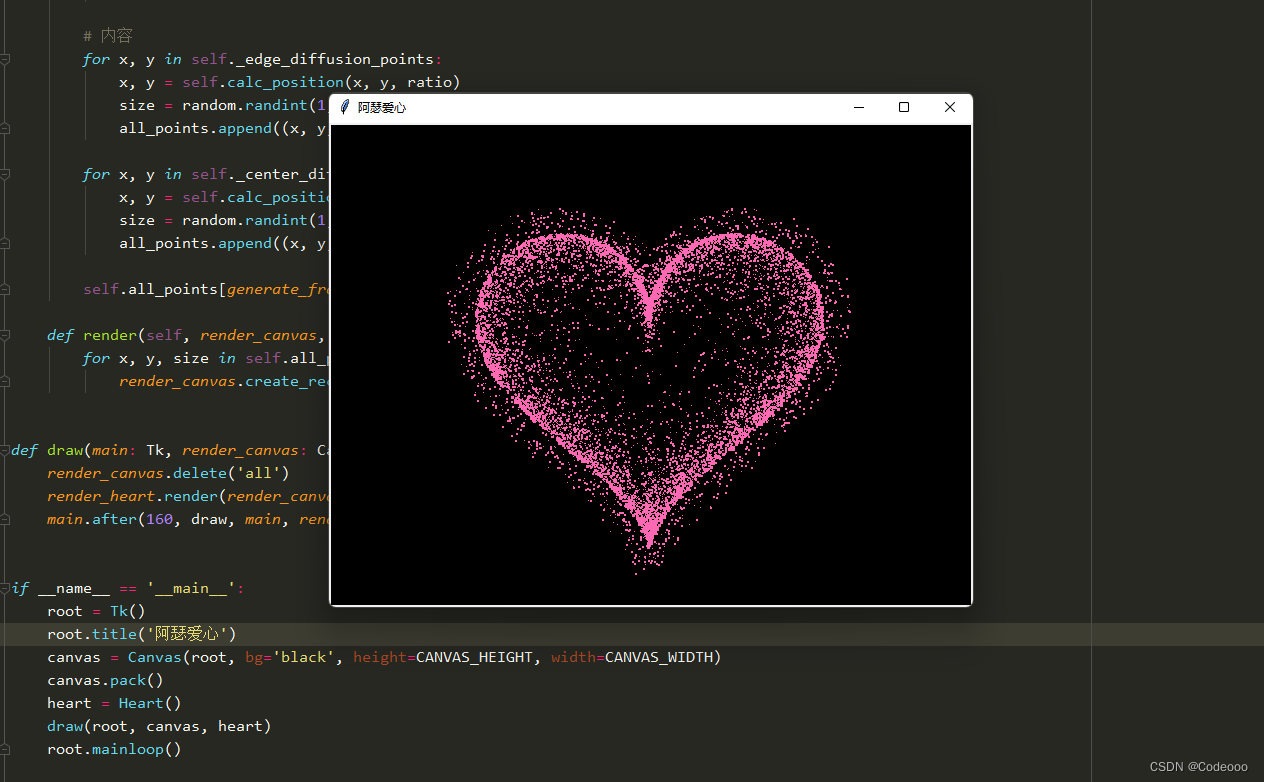
# -*- coding: utf-8 -*-
# @Author  : Codeooo
# @Time    : 2022-11-16import random
from math import sin, cos, pi, log
from tkinter import *CANVAS_WIDTH = 640  # 画布的宽
CANVAS_HEIGHT = 480  # 画布的高
CANVAS_CENTER_X = CANVAS_WIDTH / 2  # 画布中心的X轴坐标
CANVAS_CENTER_Y = CANVAS_HEIGHT / 2  # 画布中心的Y轴坐标
IMAGE_ENLARGE = 11  # 放大比例
HEART_COLOR = "#FF69B4"  # 心的颜色def heart_function(t, shrink_ratio: float = IMAGE_ENLARGE):"""“爱心函数生成器”:param shrink_ratio: 放大比例:param t: 参数:return: 坐标"""# 基础函数x = 16 * (sin(t) ** 3)y = -(13 * cos(t) - 5 * cos(2 * t) - 2 * cos(3 * t) - cos(4 * t))# 放大x *= shrink_ratioy *= shrink_ratio# 移到画布中央x += CANVAS_CENTER_Xy += CANVAS_CENTER_Yreturn int(x), int(y)def scatter_inside(x, y, beta=0.15):"""随机内部扩散:param x: 原x:param y: 原y:param beta: 强度:return: 新坐标"""ratio_x = - beta * log(random.random())ratio_y = - beta * log(random.random())dx = ratio_x * (x - CANVAS_CENTER_X)dy = ratio_y * (y - CANVAS_CENTER_Y)return x - dx, y - dydef shrink(x, y, ratio):"""抖动:param x: 原x:param y: 原y:param ratio: 比例:return: 新坐标"""force = -1 / (((x - CANVAS_CENTER_X) ** 2 + (y - CANVAS_CENTER_Y) ** 2) ** 0.6)  # 这个参数...dx = ratio * force * (x - CANVAS_CENTER_X)dy = ratio * force * (y - CANVAS_CENTER_Y)return x - dx, y - dydef curve(p):"""自定义曲线函数,调整跳动周期:param p: 参数:return: 正弦"""# 可以尝试换其他的动态函数,达到更有力量的效果(贝塞尔?)return 2 * (2 * sin(4 * p)) / (2 * pi)class Heart:"""爱心类"""def __init__(self, generate_frame=20):self._points = set()  # 原始爱心坐标集合self._edge_diffusion_points = set()  # 边缘扩散效果点坐标集合self._center_diffusion_points = set()  # 中心扩散效果点坐标集合self.all_points = {}  # 每帧动态点坐标self.build(2000)self.random_halo = 1000self.generate_frame = generate_framefor frame in range(generate_frame):self.calc(frame)def build(self, number):# 爱心for _ in range(number):t = random.uniform(0, 2 * pi)  # 随机不到的地方造成爱心有缺口x, y = heart_function(t)self._points.add((x, y))# 爱心内扩散for _x, _y in list(self._points):for _ in range(3):x, y = scatter_inside(_x, _y, 0.05)self._edge_diffusion_points.add((x, y))# 爱心内再次扩散point_list = list(self._points)for _ in range(6000):x, y = random.choice(point_list)x, y = scatter_inside(x, y, 0.17)self._center_diffusion_points.add((x, y))@staticmethoddef calc_position(x, y, ratio):# 调整缩放比例force = 1 / (((x - CANVAS_CENTER_X) ** 2 + (y - CANVAS_CENTER_Y) ** 2) ** 0.520)  # 魔法参数dx = ratio * force * (x - CANVAS_CENTER_X) + random.randint(-1, 1)dy = ratio * force * (y - CANVAS_CENTER_Y) + random.randint(-1, 1)return x - dx, y - dydef calc(self, generate_frame):ratio = 10 * curve(generate_frame / 10 * pi)  # 圆滑的周期的缩放比例halo_radius = int(4 + 6 * (1 + curve(generate_frame / 10 * pi)))halo_number = int(3000 + 4000 * abs(curve(generate_frame / 10 * pi) ** 2))all_points = []# 光环heart_halo_point = set()  # 光环的点坐标集合for _ in range(halo_number):t = random.uniform(0, 4 * pi)  # 随机不到的地方造成爱心有缺口x, y = heart_function(t, shrink_ratio=11.5)  # 魔法参数x, y = shrink(x, y, halo_radius)if (x, y) not in heart_halo_point:# 处理新的点heart_halo_point.add((x, y))x += random.randint(-14, 14)y += random.randint(-14, 14)size = random.choice((1, 2, 2))all_points.append((x, y, size))# 轮廓for x, y in self._points:x, y = self.calc_position(x, y, ratio)size = random.randint(1, 3)all_points.append((x, y, size))# 内容for x, y in self._edge_diffusion_points:x, y = self.calc_position(x, y, ratio)size = random.randint(1, 2)all_points.append((x, y, size))for x, y in self._center_diffusion_points:x, y = self.calc_position(x, y, ratio)size = random.randint(1, 2)all_points.append((x, y, size))self.all_points[generate_frame] = all_pointsdef render(self, render_canvas, render_frame):for x, y, size in self.all_points[render_frame % self.generate_frame]:render_canvas.create_rectangle(x, y, x + size, y + size, width=0, fill=HEART_COLOR)def draw(main: Tk, render_canvas: Canvas, render_heart: Heart, render_frame=0):render_canvas.delete('all')render_heart.render(render_canvas, render_frame)main.after(160, draw, main, render_canvas, render_heart, render_frame + 1)if __name__ == '__main__':root = Tk()root.title('阿瑟爱心')canvas = Canvas(root, bg='black', height=CANVAS_HEIGHT, width=CANVAS_WIDTH)canvas.pack()heart = Heart()draw(root, canvas, heart)root.mainloop()
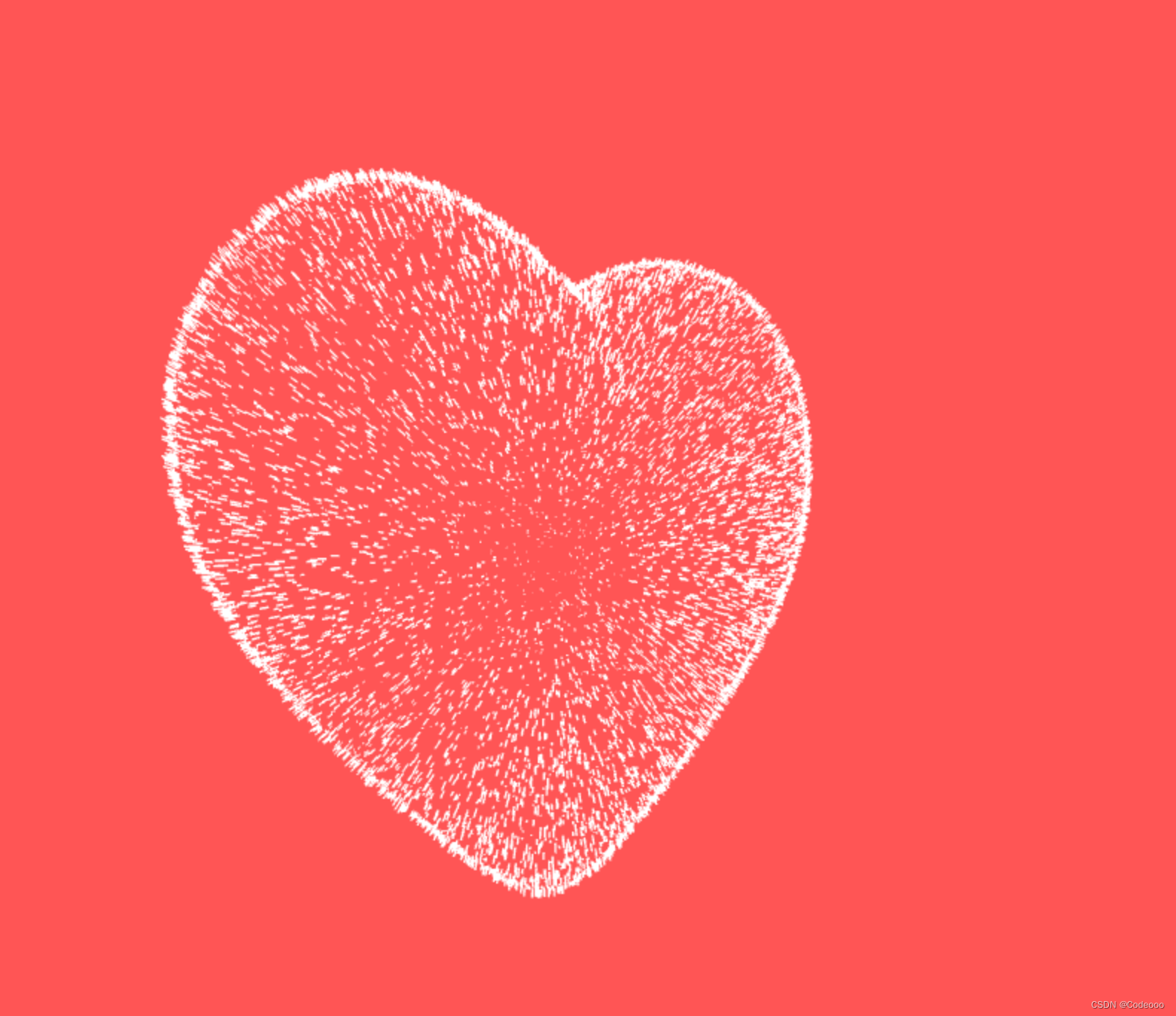
html:
DOCTYPE html>
<html><head><title>title><script src="js/jquery.min.js">script>head><style>* {padding: 0;margin: 0;}html,body {height: 100%;padding: 0;margin: 0;background: #000;}.aa {position: fixed;left: 50%;bottom: 10px;color: #ccc;}.container {width: 100%;height: 100%;}canvas {z-index: 99;position: absolute;width: 100%;height: 100%;}style><body><div id="jsi-cherry-container" class="container"><audio autoplay="autopaly"><source src="renxi.mp3" type="audio/mp3" />audio><img class="img" src="./123.png" alt="" /><canvas id="pinkboard" class="container"> canvas>div>body>
html>
<script>/** Settings*/var settings = {particles: {length: 500, // maximum amount of particlesduration: 2, // particle duration in secvelocity: 100, // particle velocity in pixels/seceffect: -0.75, // play with this for a nice effectsize: 30, // particle size in pixels},};(function () {var b = 0;var c = ["ms", "moz", "webkit", "o"];for (var a = 0; a < c.length && !window.requestAnimationFrame; ++a) {window.requestAnimationFrame = window[c[a] + "RequestAnimationFrame"];window.cancelAnimationFrame =window[c[a] + "CancelAnimationFrame"] ||window[c[a] + "CancelRequestAnimationFrame"];}if (!window.requestAnimationFrame) {window.requestAnimationFrame = function (h, e) {var d = new Date().getTime();var f = Math.max(0, 16 - (d - b));var g = window.setTimeout(function () {h(d + f);}, f);b = d + f;return g;};}if (!window.cancelAnimationFrame) {window.cancelAnimationFrame = function (d) {clearTimeout(d);};}})();/**Point class*/var Point = (function () {function Point(x, y) {this.x = typeof x !== "undefined" ? x : 0;this.y = typeof y !== "undefined" ? y : 0;}Point.prototype.clone = function () {return new Point(this.x, this.y);};Point.prototype.length = function (length) {if (typeof length == "undefined")return Math.sqrt(this.x * this.x + this.y * this.y);this.normalize();this.x *= length;this.y *= length;return this;};Point.prototype.normalize = function () {var length = this.length();this.x /= length;this.y /= length;return this;};return Point;})();/** Particle class*/var Particle = (function () {function Particle() {this.position = new Point();this.velocity = new Point();this.acceleration = new Point();this.age = 0;}Particle.prototype.initialize = function (x, y, dx, dy) {this.position.x = x;this.position.y = y;this.velocity.x = dx;this.velocity.y = dy;this.acceleration.x = dx * settings.particles.effect;this.acceleration.y = dy * settings.particles.effect;this.age = 0;};Particle.prototype.update = function (deltaTime) {this.position.x += this.velocity.x * deltaTime;this.position.y += this.velocity.y * deltaTime;this.velocity.x += this.acceleration.x * deltaTime;this.velocity.y += this.acceleration.y * deltaTime;this.age += deltaTime;};Particle.prototype.draw = function (context, image) {function ease(t) {return --t * t * t + 1;}var size = image.width * ease(this.age / settings.particles.duration);context.globalAlpha = 1 - this.age / settings.particles.duration;context.drawImage(image,this.position.x - size / 2,this.position.y - size / 2,size,size);};return Particle;})();/** ParticlePool class*/var ParticlePool = (function () {var particles,firstActive = 0,firstFree = 0,duration = settings.particles.duration;function ParticlePool(length) {// create and populate particle poolparticles = new Array(length);for (var i = 0; i < particles.length; i++)particles[i] = new Particle();}ParticlePool.prototype.add = function (x, y, dx, dy) {particles[firstFree].initialize(x, y, dx, dy);// handle circular queuefirstFree++;if (firstFree == particles.length) firstFree = 0;if (firstActive == firstFree) firstActive++;if (firstActive == particles.length) firstActive = 0;};ParticlePool.prototype.update = function (deltaTime) {var i;// update active particlesif (firstActive < firstFree) {for (i = firstActive; i < firstFree; i++)particles[i].update(deltaTime);}if (firstFree < firstActive) {for (i = firstActive; i < particles.length; i++)particles[i].update(deltaTime);for (i = 0; i < firstFree; i++) particles[i].update(deltaTime);}// remove inactive particleswhile (particles[firstActive].age >= duration &&firstActive != firstFree) {firstActive++;if (firstActive == particles.length) firstActive = 0;}};ParticlePool.prototype.draw = function (context, image) {// draw active particlesif (firstActive < firstFree) {for (i = firstActive; i < firstFree; i++)particles[i].draw(context, image);}if (firstFree < firstActive) {for (i = firstActive; i < particles.length; i++)particles[i].draw(context, image);for (i = 0; i < firstFree; i++) particles[i].draw(context, image);}};return ParticlePool;})();/** Putting it all together*/(function (canvas) {var context = canvas.getContext("2d"),particles = new ParticlePool(settings.particles.length),particleRate =settings.particles.length / settings.particles.duration, // particles/sectime;// get point on heart with -PI <= t <= PIfunction pointOnHeart(t) {return new Point(160 * Math.pow(Math.sin(t), 3),130 * Math.cos(t) -50 * Math.cos(2 * t) -20 * Math.cos(3 * t) -10 * Math.cos(4 * t) +25);}// creating the particle image using a dummy canvasvar image = (function () {var canvas = document.createElement("canvas"),context = canvas.getContext("2d");canvas.width = settings.particles.size;canvas.height = settings.particles.size;// helper function to create the pathfunction to(t) {var point = pointOnHeart(t);point.x =settings.particles.size / 2 +(point.x * settings.particles.size) / 350;point.y =settings.particles.size / 2 -(point.y * settings.particles.size) / 350;return point;}// create the pathcontext.beginPath();var t = -Math.PI;var point = to(t);context.moveTo(point.x, point.y);while (t < Math.PI) {t += 0.01; // baby steps!point = to(t);context.lineTo(point.x, point.y);}
context.closePath();// create the fillcontext.fillStyle = "#ea80b0";context.fill();// create the imagevar image = new Image();image.src = canvas.toDataURL();return image;})();// render that thing!function render() {// next animation framerequestAnimationFrame(render);// update timevar newTime = new Date().getTime() / 1000,deltaTime = newTime - (time || newTime);time = newTime;// clear canvascontext.clearRect(0, 0, canvas.width, canvas.height);// create new particlesvar amount = particleRate * deltaTime;for (var i = 0; i < amount; i++) {var pos = pointOnHeart(Math.PI - 2 * Math.PI * Math.random());var dir = pos.clone().length(settings.particles.velocity);particles.add(canvas.width / 2 + pos.x,canvas.height / 2 - pos.y,dir.x,-dir.y);}// update and draw particlesparticles.update(deltaTime);particles.draw(context, image);}// handle (re-)sizing of the canvasfunction onResize() {canvas.width = canvas.clientWidth;canvas.height = canvas.clientHeight;}window.onresize = onResize;// delay rendering bootstrapsetTimeout(function () {onResize();render();}, 10);})(document.getElementById("pinkboard"));script><script>var RENDERER = {INIT_CHERRY_BLOSSOM_COUNT: 30,MAX_ADDING_INTERVAL: 10,init: function () {this.setParameters();this.reconstructMethods();this.createCherries();this.render();
if (navigator.userAgent.match(/(phone|pod|iPhone|iPod|ios|Android|Mobile|BlackBerry|IEMobile|MQQBrowser|JUC|Fennec|wOSBrowser|BrowserNG|WebOS|Symbian|Windows Phone)/i)) {// var box = document.querySelectorAll(".box")[0];// console.log(box, "移动端");// box.style.marginTop = "65%";}},setParameters: function () {this.$container = $("#jsi-cherry-container");this.width = this.$container.width();this.height = this.$container.height();this.context = $("").attr({ width: this.width, height: this.height }).appendTo(this.$container).get(0)var rate = this.FOCUS_POSITION / (this.z + this.FOCUS_POSITION),x = this.renderer.width / 2 + this.x * rate,y = this.renderer.height / 2 - this.y * rate;return { rate: rate, x: x, y: y };},
re}} else {this.phi += Math.PI / (axis.y == this.thresholdY ? 200 : 500);this.phi %= Math.PI;}if (this.y <= -this.renderer.height * this.SURFACE_RATE) {this.x += 2;this.y = -this.renderer.height * this.SURFACE_RATE;} else {this.x += this.vx;this.y += this.vy;}return (this.z > -this.FOCUS_POSITION &&this.z < this.FAR_LIMIT &&this.x < this.renderer.width * 1.5);},};$(function () {RENDERER.init();});script>
本文来自互联网用户投稿,文章观点仅代表作者本人,不代表本站立场,不承担相关法律责任。如若转载,请注明出处。 如若内容造成侵权/违法违规/事实不符,请点击【内容举报】进行投诉反馈!