Spring-视图解析
文章目录
- 一、转发
- 二、重定向
- 三、国际化
一、转发
第一种
@RequestMapping("/hello")public String hello(){// 默认WEB-INF/pages/hello.jsp 想要的目标页面:hello.jsp 处理方法:../../return "../../hello";}
第二种
forward:转发到一个页面
/hello.jsp:转发当前项目下的hello.jsp
一定要加/,不加/为相对路径,易出错
@RequestMapping("/handle01")public String handle01(){return "forward:/hello.jsp";}
多级转发
@RequestMapping("/handle02")public String handle02(){return "forward:/handle01";}
二、重定向
三、国际化
1.导包

2.配置

<bean id="messageSource" class="org.springframework.context.support.ResourceBundleMessageSource"><property name="basename" value="i18n">property>bean><mvc:view-controller path="/toLoginPage" view-name="login"/><mvc:annotation-driven>mvc:annotation-driven>
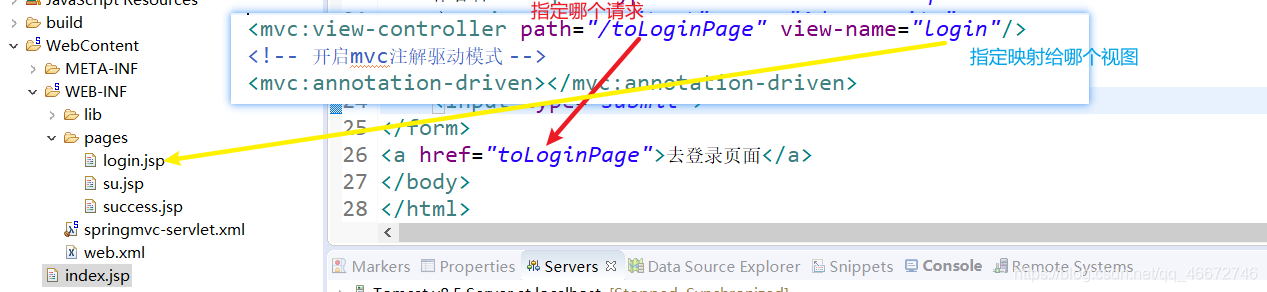
3.页面
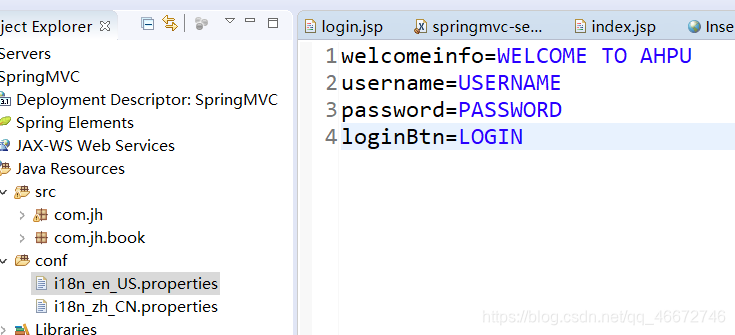
login.jsp
<%@ taglib prefix="fmt" uri="http://java.sun.com/jsp/jstl/fmt"%><body>
<fmt:message key="welcomeinfo"/>
<form action=""><fmt:message key="username"/>:<input><br><fmt:message key="password"/>:<input><br><input type="submit" value=""/>" >
</form>
</body>
本文来自互联网用户投稿,文章观点仅代表作者本人,不代表本站立场,不承担相关法律责任。如若转载,请注明出处。 如若内容造成侵权/违法违规/事实不符,请点击【内容举报】进行投诉反馈!