Linux-shell
文章目录
- 一、变量
- 二、菜单
- 三、算数运算
- 3.1 while加法
- 3.2 for加法
- 3.3 整数加减乘除
- 3.3 浮点数加减乘除
- 排序
- 四、循环
一、变量
调试下列 shell 程序,写出变量$#,$0,$1,$2,$3, $@的含义。
echo “所有参数: $@”
echo “前三个参数:$1 $2 $3”
shift
echo “程序名:$0”
echo “所有参数: $@”
echo “前三个参数:$1 $2 $3”
shift 3
echo “程序名:$0”
echo “所有参数: $@”
echo “前三个参数:$1 $2 $3”
exit 0
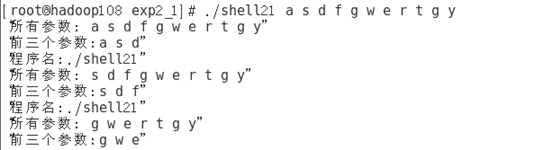
$#:传给脚本的参数个数
$0:脚本名称
$1:传给脚本的第1个参数
$2: 传给脚本的第2个参数.
$3: 传给脚本的第3个参数
$@:参数列表
修改程序,程序运行时从键盘输入文件名,判断文件是否存在,如果存在,显示文件 内容
echo "input:"
read DORF
if [ -d $DORF ]
then
ls $DORF
elif [ -f $DORF ]
then
cat $DORF
else
echo "input error"
fi

二、菜单
调度下列程序,使用 shell 编写一个菜单,分别实现列出以下内容:(1)目录内容、(2)切换目录、(3)创建文件、(4)编辑文件、(5)删除文件的功能。在此例 中将用到循环语句 until、分支语句 case、输入输出语句 read 和 echo。
while true
doecho "(1)List you selected directory"echo "(2)Change to you selected directory" echo "(3)Creat a new file"echo "(4)Edit you selected file"echo "(5)Remove you selected file" echo "(6)Exit Menu"read inputif test $input = 6; then
exit 0ficase $input in1) ls;;2) echo -n "Enter target directory:" read dircd $dir;;3) echo -n "Enter a file name:" read filetouch $file;;4) echo -n "Enter a file name:" read filevi $file;; 5) echo -n "Enter a file name:"read filerm $file;;*) echo "Please selected 1\2\3\4\5\6 " ;; esac
done
修改以上程序,用菜单形式完成算术四则混合运算。
while true
doecho "(1)+"echo "(2)-" echo "(3)*"echo "(4)/"echo "(5)Exit Menu"read inputif test $input = 5; then
exit 0ficase $input in1) total=0read aread blet total=`expr $a+$b` echo "a+b=$total";;2) total=0read aread b let total=`expr $a-$b`echo "a-b=$total";;3) total=0read aread blet total=`expr $a*$b`echo "a*b=$total";;4) total=0read aread blet total=`expr $a/$b`echo "a/b=$total";; *) echo "Please selected 1\2\3\4\5\6 " ;; esac
done
三、算数运算
3.1 while加法
(1) 用 while 循环求 1 到 100 的和。
total=0
num=0
while((num<=100));
dototal=`expr $total + $num` ((num+=1))
done
echo "The result is $total"
3.2 for加法
1.用 for 语句完成 1+1/2+1/3+1/4+….+1/n。
read n
temp=0.000
sum=0.000
for((i=1; i<=$n; i++));doj=$iif [ $j != 0 ]thentemp=`echo "scale=3;1.000/$j" | bc`sum=`echo "scale=3;$sum+$temp" | bc`fi
done
echo "sum=$sum"
2.编写一个shell脚本,包含两个数组array1和array2,分别初始化为{1,2,3,4,5}和{1,4,9,16,25}。脚本生成并显示一个数组,其中的元素是这两个数组中对应元素的和,数组中第一个元素是1+1=2,第二个元素2+4=6,依此类推。
declare -a array3=()
declare -a array1=(1 2 3 4 5)
declare -a array2=(1 4 9 16 25)
for((i=0;i<=4;i++));
do
array3[i]=$((${array1[i]}+${array2[i]}))
done
echo ${array3[*]}
3.3 整数加减乘除
用菜单形式完成算术四则混合运算。
read a
read b
let t=`expr $a+$b`
let t2=`expr $a-$b`
let t3=`expr $a*$b`
let t4=`expr $a/$b`
echo $t $t2 $t3 $t4
注意:字符串拼接or算术运算 let
3.3 浮点数加减乘除
read a
read b
total=$(printf "%0.2f" `echo "scale=2; $a+$b"|bc`)
total2=$(printf "%0.2f" `echo "scale=2; $a-$b"|bc`)
total3=$(printf "%0.2f" `echo "scale=2; $a*$b"|bc`)
total4=$(printf "%0.2f" `echo "scale=2; $a/$b"|bc`)
echo $total $total2 $total3 $total4

排序
编写shell脚本,完成从键盘输入三个数,脚本对这三个数进行升序排序,并打印输出。
read -ep "input:" num1
read -ep "input:" num2
read -ep "input:" num3
echo -e "$num1\n$num2\n$num3"|sort -nr
四、循环
编写一个bash脚本程序,用for循环实现将当前目录下的所有.c文件移到指定的目录下,最后在显示器上显示指定目录下的文件和目录。
echo -n "input:"
read dir
for i in `ls | grep -E "*\.c"`
do
mv $i $dir
done
ls -IS $dir
编写shell脚本,通过循环的形式在终端上打印出等腰三角形。
for ((i = 1; i < 10; i++))
dofor ((j = 10; j > i; j--))do  echo -n " ";donefor ((m = 1; m <= i; m++))do  echo -n "* "doneecho ""
done
编写shell脚本,通过循环的形式在终端上打印出等腰梯形。
for ((a=1;a<=9;a++))
do for ((b=9;b>=$a;b--))doecho -n " "donefor ((c=1;c<=$a;c++))doecho -n "*"donefor ((d=2;d<=$a;d++))doecho -n "*"donefor ((e=1;e<=9;e++))doecho -n "*"done
echo ""
done
本文来自互联网用户投稿,文章观点仅代表作者本人,不代表本站立场,不承担相关法律责任。如若转载,请注明出处。 如若内容造成侵权/违法违规/事实不符,请点击【内容举报】进行投诉反馈!