登录页图形验证码插件
identify是一款使用使用canvas来生成图形验证码的vue插件。
npm i identify --save
可以全局引入
- import SIdentify from './components/page/identify'
- Vue.use(SIdentify)
也可以局部引入,本文采用局部引入
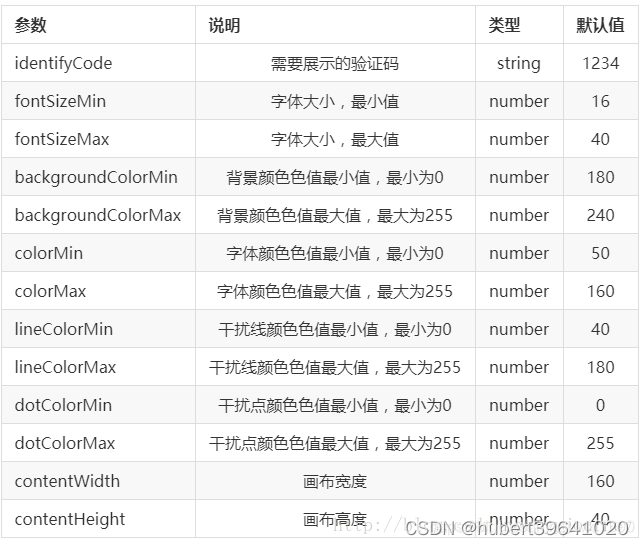
下面是实现的代码:
子组件
- <template>
- <div class="s-canvas">
- <canvas id="s-canvas" :width="contentWidth" :height="contentHeight"></canvas>
- </div>
- </template>
- <script>
- export default {
- name: 'SIdentify',
- props: {
- identifyCode: {
- type: String,
- default: '1234'
- },
- fontSizeMin: {
- type: Number,
- default: 18
- },
- fontSizeMax: {
- type: Number,
- default: 40
- },
- backgroundColorMin: {
- type: Number,
- default: 180
- },
- backgroundColorMax: {
- type: Number,
- default: 240
- },
- colorMin: {
- type: Number,
- default: 50
- },
- colorMax: {
- type: Number,
- default: 160
- },
- lineColorMin: {
- type: Number,
- default: 40
- },
- lineColorMax: {
- type: Number,
- default: 180
- },
- dotColorMin: {
- type: Number,
- default: 0
- },
- dotColorMax: {
- type: Number,
- default: 255
- },
- contentWidth: {
- type: Number,
- default: 111
- },
- contentHeight: {
- type: Number,
- default: 38
- }
- },
- methods: {
- // 生成一个随机数
- randomNum(min, max) {
- return Math.floor(Math.random() * (max - min) + min)
- },
- // 生成一个随机的颜色
- randomColor(min, max) {
- let r = this.randomNum(min, max)
- let g = this.randomNum(min, max)
- let b = this.randomNum(min, max)
- return 'rgb(' + r + ',' + g + ',' + b + ')'
- },
- drawPic() {
- let canvas = document.getElementById('s-canvas')
- let ctx = canvas.getContext('2d')
- ctx.textBaseline = 'bottom'
- // 绘制背景
- ctx.fillStyle = this.randomColor(this.backgroundColorMin, this.backgroundColorMax)
- ctx.fillRect(0, 0, this.contentWidth, this.contentHeight)
- // 绘制文字
- for (let i = 0; i < this.identifyCode.length; i++) {
- this.drawText(ctx, this.identifyCode[i], i)
- }
- // this.drawLine(ctx) // 绘制干扰线
- // this.drawDot(ctx) // 绘制干扰点
- },
- // 绘制文本
- drawText(ctx, txt, i) {
- ctx.fillStyle = this.randomColor(this.colorMin, this.colorMax)
- ctx.font = this.randomNum(this.fontSizeMin, this.fontSizeMax) + 'px SimHei'
- let x = (i + 1) * (this.contentWidth / (this.identifyCode.length + 1))
- let y = this.randomNum(this.fontSizeMax, this.contentHeight - 5)
- var deg = this.randomNum(-30, 30) // 字符旋转角度(不超过45度比较好)
- // 修改坐标原点和旋转角度
- ctx.translate(x, y)
- ctx.rotate(deg * Math.PI / 180)
- ctx.fillText(txt, 0, 0)
- // 恢复坐标原点和旋转角度
- ctx.rotate(-deg * Math.PI / 180)
- ctx.translate(-x, -y)
- },
- drawLine(ctx) {
- // 绘制干扰线
- for (let i = 0; i < 8; i++) {
- ctx.strokeStyle = this.randomColor(this.lineColorMin, this.lineColorMax)
- ctx.beginPath()
- ctx.moveTo(this.randomNum(0, this.contentWidth), this.randomNum(0, this.contentHeight))
- ctx.lineTo(this.randomNum(0, this.contentWidth), this.randomNum(0, this.contentHeight))
- ctx.stroke()
- }
- },
- drawDot(ctx) {
- // 绘制干扰点
- for (let i = 0; i < 100; i++) {
- ctx.fillStyle = this.randomColor(0, 255)
- ctx.beginPath()
- ctx.arc(this.randomNum(0, this.contentWidth), this.randomNum(0, this.contentHeight), 1, 0, 2 * Math.PI)
- ctx.fill()
- }
- }
- },
- watch: {
- identifyCode() {
- this.drawPic()
- }
- },
- mounted() {
- this.drawPic()
- }
- }
- </script>

父组件
- <template>
- <div>
- <div>验证码测试</div>
- <div @click="refreshCode()" class="code" style="cursor:pointer;" title="点击切换验证码">
- <s-identify :identifyCode="identifyCode"></s-identify>
- </div>
- </div>
- </template>
- <script>
- import { defineComponent } from 'vue';
- import sIdentify from "../../src/components/Sidentify.vue";
- // import axios from 'axios'
- export default defineComponent({
- name: 'list',
- components: { sIdentify },
- data() {
- return {
- identifyCode: "",
- identifyCodes: ['0','1','2','3','4','5','6','7','8','9','a','b','c','d'], //根据实际需求加入自己想要的字符
- }
- },
- mounted() {
- this.refreshCode()
- },
- unmounted() {
-
- },
- methods: {
- // 生成随机数
- randomNum(min, max) {
- max = max + 1
- return Math.floor(Math.random() * (max - min) + min);
- },
- // 更新验证码
- refreshCode() {
- this.identifyCode = "";
- this.makeCode(this.identifyCodes, 4);
- console.log('当前验证码:',this.identifyCode);
- },
- // 随机生成验证码字符串
- makeCode(data, len) {
- console.log('data, len:', data, len)
- for (let i = 0; i < len; i++) {
- this.identifyCode += this.identifyCodes[this.randomNum(0, this.identifyCodes.length-1)]
- }
- },
- },
- });
- </script>
- <style lang="less" scoped>
- .code{
- width: 500px;
- height: 31.25rem;
- border: 1px solid #ddd;
- }
- </style>
效果图

本文来自互联网用户投稿,文章观点仅代表作者本人,不代表本站立场,不承担相关法律责任。如若转载,请注明出处。 如若内容造成侵权/违法违规/事实不符,请点击【内容举报】进行投诉反馈!