前端后端一锅端3
前端后端一锅端3
-
混入,Decorators,不太好理解。2022/12/27
-
合并:啥东东?
-
RxJS?:RxJS 是一个库,它通过使用 observable 序列来编写异步和基于事件的程序
-
Immutable.js, 推送模型 2022/12/28
-
List item
-
dierctives, modules, data binding, components,templates, services, injection
-
AngularJS是Angular 1, Angular: 模块、组件和服务;如果僅僅用於PC 端的WEB開發, Angular 1.x足以應對; 如果是用於 mobile app ,在用戶體驗方面,略顯捉襟見肘;Angular 1 代碼是基於 JavaScript 寫的;在 Angular 1 中,最為常用的是 $scope 在 Angular 2和4中被去掉了。在新版本中,更多推崇的是 directive 和 controller, 通過對 component 組件的split(分割),從而實現代碼的復用,directive就是ng-开头的,controller就是三套架构里的其中之一;
-
Angular和Angular.js介绍
Angular1.x统称为Angular.js,而Angular2及其以后的版本都命名为angular。
从两种项目开发上来看区别有以下几点:
第一点: 编程语言不同,在1中用的是JavaScript,可以在浏览器环境直接运行;在2中用的是typescript,它是JavaScript的超集,需要用构建工具编译后才可以执行。
第二点: 结构不同,在1中一般是一个html(视图)文件和一个js文件(控制器controller)组成一个小组件,在module.js文件注册controller;在2中用多个ts文件构成一个小组件。
第三点: 作用域不同,在1中$scope控制作用域,在2中用zone.js监控。
第四点: 指令不同,在1中用ng-model,ng-xxx一系列规定属性,也类似与vue的v-model
在2中用*ngIf等格式描述。
第五点: 依赖注入,在2中有了constructor,依赖注入有点类似于java中spring注解用法。
第六点: 在2中有了明确的生命周期。 -
2010年,Google发行了Angular 1.0也就是Angular JS(用JS写的开源框架),是专门为了单页面网页app设计的
-
2013年10月宣布初版-2016年9月发布Angular
2.0最终版本;2.0并非是AngularJS/1.0的升级版,而是完全重新编写的一个版本。它支持兼容移动设备,且允许开发者选择诸如ES5, ES6或则TypeScript的开发语言来编码 -
never: never只能被never赋值, never可以赋值给其它类型
-
任意类型,null, undefined,
-
let, const, 解构:其实广义上的赋值,形式上满足即可
-
rest参数语法(“…变量名”),实现可变长参数
-
函数默认参数,如果放在必传参数之前则必须显式传入undefined
-
javascript 和 typescript中的this的概念, 箭头函数对this的绑定实在定义时
-
参数属性:声明跟赋值放一块 2022/12/29
-
模块的默认导出: 模块导出??再细看
-
使用模块包装进行扩展
-
函数类型接口:参数个数一样,类型一样,名称可以不一样
-
索引签名:
-
类类型接口,接口扩展
-
装饰器:这种设计,短时间还接受不了…
-
属性绑定,事件绑定,插值:数据流动单向
-
双向绑定
-
https://docs.npmjs.com/cli/v6/commands/npm-install/ 2022/12/30,2022年最后一天工作日
-
npm install --f //-f or --force argument will force npm to fetch remote resources even if a local copy exists on disk
-
ng serve --open ng serve 命令会启动开发服务器、监视文件,并在这些文件发生更改时重建应用–open(或者只用 -o 缩写)选项会自动打开你的浏览器,并访问 http://localhost:4200/
-
tsconfig.app.json. it’s just an additional config file that allows you to adjust your configuration on an app basis. this is e.g. useful when you have multiple apps in the same angular-cli workspace.you could have the root folder with the tsconfig.json and then a sub folder app-a with a tsconfig.app.json file and another app in the sub-folder app-b with it’s own tsconfig.app.json, which contains a variation of the global configuration.
-
tsconfig.spec.json: TypeScript configuration for the application tests.
-
组件
一个以该组件命名的文件夹
一个组件文件 .component.ts
一个模板文件 .component.html
一个 CSS 文件,.component.css
测试文件 .component.spec.ts
组件文件 .component.ts
import { Component } from '@angular/core';
@Component({ //装饰器selector: 'app-soap-ws', //选择一个 CSS 选择器templateUrl: './soap-ws.component.html', //HTML 外部模板 或者直接在这里定义template: 'Hello World!
',//让模板跨越多行,可以使用反引号(`)styleUrls: ['./soap-ws.component.css'] //为组件的模板选择样式, 直接写这里styles 属性styles: ['h1 { font-weight: normal; }'] ,styles 属性接受一个包含 CSS 规则的字符串数组
})
export class SoapWsComponent { //导出
}
- 组件的声明周期
- 每个接口都有唯一的一个钩子方法,它们的名字是由接口名再加上 ng 前缀构成的
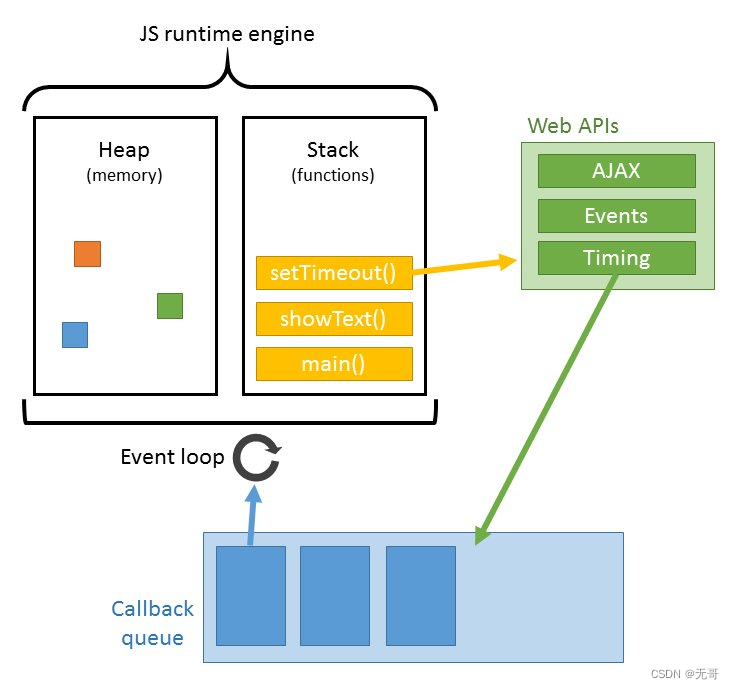
- 浏览器的工作原理 “https://developer.mozilla.org/zh-CN/docs/Web/Performance/How_browsers_work” JavaScript 编译
- https://developer.mozilla.org/zh-CN/docs/Learn/JavaScript/Asynchronous/Promises
- javascript的闭包:一个函数工厂 - `
function showHelp(help) { document.getElementById('help').innerHTML= help; }function makeHelpCallback(help) { return function() {showHelp(help); }; }function setupHelp() { var helpText = [{'id': 'email', 'help': 'Your e-mail address'},{'id': 'name', 'help': 'Your full name'},{'id': 'age', 'help': 'Your age (you must be over 16)'}];for (var i = 0; i < helpText.length; i++) {var item = helpText[i];document.getElementById(item.id).onfocus = makeHelpCallback(item.help); } } //能正确的显示点击的help,这样写是不是多循环了几次?做了无用功呢?setupHelp();
- 继承与原型链
其它知识: 浏览器工作原理 HTML 的思维模型 CSS 的思维模型 JS 的思维模型
V8 is Google’s open source high-performance JavaScript and WebAssembly engine, written in C++,It is used in Chrome and in Node.js, among others. It implements ECMAScript and WebAssembly, and runs on Windows 7 or later, macOS 10.12+, and Linux systems that use x64, IA-32, ARM, or MIPS processors. V8 can run standalone, or can be embedded into any C++ application.
The V8 engine is written in C++ and used in Chrome and Nodejs.
It implements ECMAScript as specified in ECMA-262.
The V8 engine can run standalone we can embed it with our own C++ program
- 如果彻底要搞懂node.js,需要看看v8的代码
本文来自互联网用户投稿,文章观点仅代表作者本人,不代表本站立场,不承担相关法律责任。如若转载,请注明出处。 如若内容造成侵权/违法违规/事实不符,请点击【内容举报】进行投诉反馈!