QT+Opengl ES2.0显示立方体
好嘞,这一次是一个不错的突破。前几次的文章中已经将点云用QT结合opengl显示出来了,但是所用的opengl为固定管线绘制方式。这种方式效率低下,比方说你有一块100W的点云,那么每次paint的时候都要循环绘制100W个点在屏幕上,这也就是为什么传统opengl显示800W的点云就开始卡B了。
笔者寄希望于QT中的OpenglES2.0,这种采用顶点缓存和索引缓存的绘制方式大大提升了效率。
无奈的是,OpenglES2.0的绘制管线本来就十分复杂,再加上QT这个虚架子,网上的例子少而又少,导致很多人望而却步。
笔者研究了QT Creator自带的所有的Opengl例程,这些例程无一例外地使用了OpenglES2.0的可编程管线,但是却没有一个例子符合我的要求,它们全部都进行了纹理加载和显示,因此着色器也显得相当复杂,而在这之前作者一点着色器的编程经验也没有。我们知道绘制点云是不需要纹理坐标的,那么就有必要官方例子进行改进。
笔者这才决定,先把官方的纹理立方体修改为彩色立方体,然后再从彩色立方体过渡到点云。实际上修改为彩色立方体之后,再修改为显示点云已经是小菜一碟了。
但这时我发现噩梦才刚刚开始。我必须先须学习glsl语言,然后重新定义顶点缓存和索引缓存进行绘制,只要有微小的错误都有可能导致错误的结果。
为了这点事情,作者不得不每天下班坐一个多小时的车回寝室然后开始研究。本人查遍了网上几乎所有相关博文,但是一篇能用的都没有。作者在这一点上是很失望的。
还好本人有着打不死的小强精神,经过线索的拼凑,这一问题终于在第四个夜晚——今天告破了。
QT+opengl ES 2.0的彩色立方体终于被本人无情地显示出来了。同时也感叹求学不易,少年仍需努力。
下面我就把代码全部分享出来,打上必要的注释。
老规矩,我们先上效果。
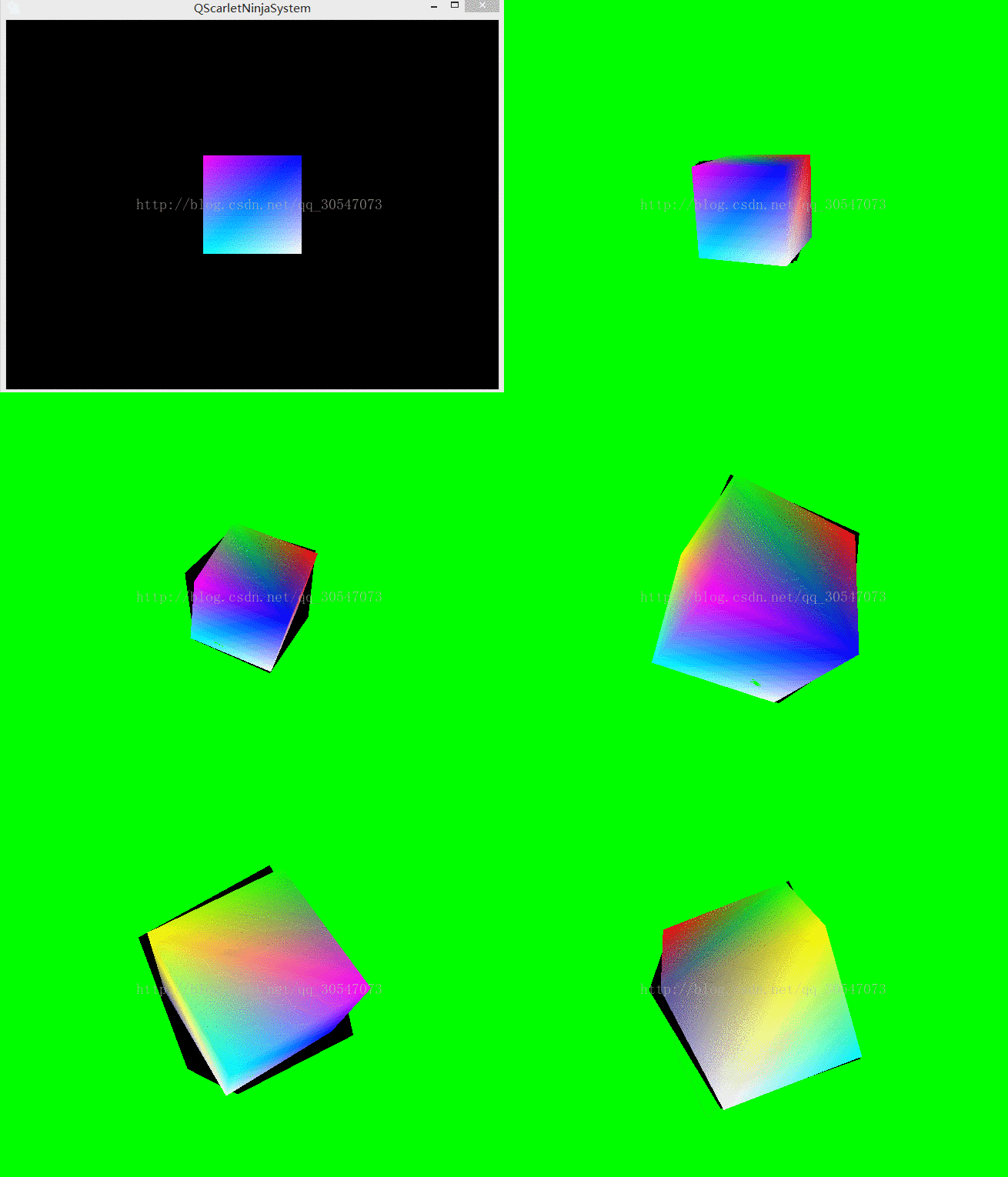
这个GIF是不是显示有点问题啊。。。不过不管了。关键的地方我用红色标注了。
上代码。
首先是一个点云发动机,我们在这里面进行索引和缓存的定义,它继承自QOpenGLFunctions
class qScarlet_GLCloudEngin_ES2 : protected QOpenGLFunctions
{
public:qScarlet_GLCloudEngin_ES2();virtual ~qScarlet_GLCloudEngin_ES2();void drawCubeGeometry(QOpenGLShaderProgram *program);private:void initCubeGeometry();QOpenGLBuffer arrayBuf;QOpenGLBuffer indexBuf;
};
qScarlet_GLCloudEngin_ES2::qScarlet_GLCloudEngin_ES2(): indexBuf(QOpenGLBuffer::IndexBuffer)
{initializeOpenGLFunctions();// Generate 2 VBOsarrayBuf.create();indexBuf.create();// Initializes cube geometry and transfers it to VBOsinitCubeGeometry();
}
qScarlet_GLCloudEngin_ES2::~qScarlet_GLCloudEngin_ES2()
{arrayBuf.destroy();indexBuf.destroy();
}
void qScarlet_GLCloudEngin_ES2::initCubeGeometry()
{// For cube we would need only 8 vertices but we have to// duplicate vertex for each face because texture coordinate// is different.
//这里是八个顶点的存储位置CubeVertexData vertices[] = {// Vertex data for face 0{QVector3D(1.0f,  1.0f,  1.0f), QVector3D(0.0f, 0.0f,1.0f)},  // v0{QVector3D(-1.0f, 1.0f,  1.0f), QVector3D(1.0f, 0.0f,1.0f)}, // v1{QVector3D(-1.0f, -1.0f,  1.0f), QVector3D(0.0f, 1.0f,1.0f)},  // v2{QVector3D( 1.0f, -1.0f,  1.0f), QVector3D(1.0f, 1.0f,1.0f)}, // v3// Vertex data for face 1{QVector3D( 1.0f, 1.0f,  -1.0f), QVector3D( 1.0f, 0.0f,0.0f)}, // v4{QVector3D( -1.0f, 1.0f,  -1.0f), QVector3D(0.0f,1.0f, 0.0f)}, // v5{QVector3D( -1.0f,  -1.0f,  -1.0f), QVector3D(1.0f, 1.0f,0.0f)},  // v6{QVector3D( 1.0f,  -1.0f,  -1.0f), QVector3D(0.33f, 0.30f,0.60f)}, // v7};
//它们的索引缓存。GLushort indices[] = {0,1,2,0,2,3,4,0,3,4,3,7,5,4,7,5,7,6,1,5,6,1,6,2,5,1,0,5,0,4,6,7,3,6,3,2};// Transfer vertex data to VBO 0arrayBuf.bind();arrayBuf.allocate(vertices, 8 * sizeof(CubeVertexData));//这里放置顶点缓存的个数,立方体一共有八个顶点,而不是六个。。。// Transfer index data to VBO 1indexBuf.bind();indexBuf.allocate(indices, 36 * sizeof(GLushort));//面片有3*2*6一共36个顶点。
}void qScarlet_GLCloudEngin_ES2::drawCubeGeometry(QOpenGLShaderProgram *program)
{// Tell OpenGL which VBOs to usearrayBuf.bind();indexBuf.bind();// Offset for positionquintptr offset = 0;// Tell OpenGL programmable pipeline how to locate vertex position dataint vertexLocation = program->attributeLocation("a_position");//这个名字一定要和glsl对应好,下面的colAttr也是。,他们是作为输入参数在glsl中被存储的。program->enableAttributeArray(vertexLocation);program->setAttributeBuffer(vertexLocation, GL_FLOAT, offset, 3, sizeof(CubeVertexData));// Offset for texture coordinateoffset += sizeof(QVector3D);// Tell OpenGL programmable pipeline how to locate vertex texture coordinate dataint texcoordLocation = program->attributeLocation("colAttr");program->enableAttributeArray(texcoordLocation);program->setAttributeBuffer(texcoordLocation, GL_FLOAT, offset,3, sizeof(CubeVertexData));// Draw cube geometry using indices from VBO 1//GL_TRIANGLE_FAN  GL_TRIANGLE_STRIP GL_QUADS  GL_TRIANGLE_STRIP GL_POINTSglDrawElements(GL_TRIANGLES, 36, GL_UNSIGNED_SHORT, 0);
}class qScarlet_GLWidget_ES2 : public QOpenGLWidget, protected QOpenGLFunctions
{Q_OBJECTpublic:explicit qScarlet_GLWidget_ES2(QWidget *parent = 0);~qScarlet_GLWidget_ES2();protected:void mousePressEvent(QMouseEvent *e) Q_DECL_OVERRIDE;void mouseReleaseEvent(QMouseEvent *e) Q_DECL_OVERRIDE;void mouseMoveEvent(QMouseEvent *e) Q_DECL_OVERRIDE;void timerEvent(QTimerEvent *e) Q_DECL_OVERRIDE;void wheelEvent(QWheelEvent *e);void initializeGL() Q_DECL_OVERRIDE;void resizeGL(int w, int h) Q_DECL_OVERRIDE;void paintGL() Q_DECL_OVERRIDE;void initShaders();void initTextures();private:QBasicTimer timer;QOpenGLShaderProgram program;qScarlet_GLCloudEngin_ES2 *geometries;QOpenGLTexture *texture;//we don't use texture but we leave it along.QMatrix4x4 projection;QVector2D mousePressPosition;QVector3D rotationAxis;qreal angularSpeed;QQuaternion rotation;GLfloat zoom;
};
qScarlet_GLWidget_ES2::qScarlet_GLWidget_ES2(QWidget *parent) :QOpenGLWidget(parent),geometries(0),texture(0),angularSpeed(0)
{//resourcescarlet2.qrc//也不知道这句话是不是有用//Q_INIT_RESOURCE(resourcescarlet2);
}qScarlet_GLWidget_ES2::~qScarlet_GLWidget_ES2()
{// Make sure the context is current when deleting the texture// and the buffers.makeCurrent();delete texture;delete geometries;doneCurrent();
}
void qScarlet_GLWidget_ES2::mousePressEvent(QMouseEvent *e)
{// Save mouse press positionmousePressPosition = QVector2D(e->localPos());
}
void qScarlet_GLWidget_ES2::mouseMoveEvent(QMouseEvent *e)
{// Mouse release position - mouse press positionQVector2D diff = QVector2D(e->localPos()) - mousePressPosition;// Rotation axis is perpendicular to the mouse position difference// vectorQVector3D n = QVector3D(diff.y(), diff.x(), 0.0).normalized();// Accelerate angular speed relative to the length of the mouse sweepqreal acc = diff.length() / 100.0;// Calculate new rotation axis as weighted sumrotationAxis = (rotationAxis * angularSpeed + n * acc).normalized();angularSpeed += acc;
}
void qScarlet_GLWidget_ES2::mouseReleaseEvent(QMouseEvent *e)
{angularSpeed=0;
}
void qScarlet_GLWidget_ES2::timerEvent(QTimerEvent *)
{// Decrease angular speed (friction)angularSpeed *= 0.79;//使用乘法来降低速度666// Stop rotation when speed goes below thresholdif (angularSpeed < 0.01){angularSpeed = 0.0;}else{// Update rotationrotation = QQuaternion::fromAxisAndAngle(rotationAxis, angularSpeed) * rotation;}update();
}
void qScarlet_GLWidget_ES2::initializeGL()
{initializeOpenGLFunctions();glClearColor(0, 0, 0, 1);initShaders();initTextures();zoom =-5;// Enable depth bufferglEnable(GL_DEPTH_TEST);// Enable back face cullingglEnable(GL_CULL_FACE);geometries = new qScarlet_GLCloudEngin_ES2();// Use QBasicTimer because its faster than QTimertimer.start(12, this);
}
void qScarlet_GLWidget_ES2::initShaders()//加载shader,这里必须注意,新加入glsl文件后必须把QTcreator生成的Release文件夹删掉然后重新编译一下才会识别,作者为这个问题活活憋了一个晚上才知道,原来这是QT的bug。马丹。。。。
{// Compile vertex shaderif (!program.addShaderFromSourceFile(QOpenGLShader::Vertex, ":/glsl/glsl/qScarlet_vshader.glsl"))close();// Compile fragment shaderif (!program.addShaderFromSourceFile(QOpenGLShader::Fragment, ":/glsl/glsl/qScarlet_fshader.glsl"))close();// Link shader pipelineif (!program.link())close();// Bind shader pipeline for useif (!program.bind())close();
}
void qScarlet_GLWidget_ES2::initTextures()
{// Load cube.png imagetexture = new QOpenGLTexture(QImage(":/logo/alllogo/OfficialOpenglCube.png").mirrored());// Set nearest filtering mode for texture minificationtexture->setMinificationFilter(QOpenGLTexture::Nearest);// Set bilinear filtering mode for texture magnificationtexture->setMagnificationFilter(QOpenGLTexture::Linear);// Wrap texture coordinates by repeating// f.ex. texture coordinate (1.1, 1.2) is same as (0.1, 0.2)texture->setWrapMode(QOpenGLTexture::Repeat);
}
void qScarlet_GLWidget_ES2::resizeGL(int w, int h)
{// Calculate aspect ratioqreal aspect = qreal(w) / qreal(h ? h : 1);// Set near plane to 3.0, far plane to 7.0, field of view 45 degreesconst qreal zNear = 0.001, zFar = 1000.0, fov = 45.0;// Reset projectionprojection.setToIdentity();// Set perspective projectionprojection.perspective(fov, aspect, zNear, zFar);
}
void qScarlet_GLWidget_ES2::paintGL()
{// Clear color and depth bufferglClear(GL_COLOR_BUFFER_BIT | GL_DEPTH_BUFFER_BIT);texture->bind();// Calculate model view transformationQMatrix4x4 matrix;matrix.translate(0.0, 0.0, -5.0);//zoommatrix.translate(0.0, 0.0, zoom);//matrix.rotate(rotation);// Set modelview-projection matrixprogram.setUniformValue("mvp_matrix", projection * matrix);// Use texture unit 0 which contains cube.png//program.setUniformValue("texture", 0);// Draw cube geometrygeometries->drawCubeGeometry(&program);
}
void qScarlet_GLWidget_ES2::wheelEvent(QWheelEvent *e)
{
//    当鼠标滑轮在滚动时用于返回滑动的距离,该值等于鼠标旋转角度的8倍。正数值表示滑轮相对于用户在向前滑动,
//    相反,负数值表示滑轮相对于用户是向后滑动的。//int mydelta2 = e->delta();double ZoomSlowDown =2.5;zoom += (double)(e->delta())/8.0/15.0/ZoomSlowDown;update();
}
最后把两个最关键的Shader放上来:
顶点着色器:
#ifdef GL_ES
precision mediump int;
precision mediump float;
#endif
uniform mat4 mvp_matrix;
attribute vec4 a_position; //解释一下,attribute代表这是一个可由外部传入的变量
attribute lowp vec4 colAttr;
varying lowp vec4 col;//varying代表opengl的传出变量,这个变量会由顶点着色器传出,然后传入像素着色器。
void main()
{gl_Position = mvp_matrix * a_position;//col = colAttr;
}
然后下面是像素着色器。简单一句话就没了,但是记住这个传出的col的名字一定要和上面相同才行。
#ifdef GL_ES
precision mediump int;
precision mediump float;
#endif
varying lowp vec4 col;
void main()
{gl_FragColor = col;
}
//至此所有代码完毕。本文来自互联网用户投稿,文章观点仅代表作者本人,不代表本站立场,不承担相关法律责任。如若转载,请注明出处。 如若内容造成侵权/违法违规/事实不符,请点击【内容举报】进行投诉反馈!