vue中富文本编辑器 vue-ueditor-wrap 的使用
最近的vue项目中用到了编辑器,刚开始使用的wangeditor,但后来由于满足不了更多的需求,现换成了百度的UEditor,踩了很多坑,现在记录一下
1.下载UEditor相关静态文件
链接:https://pan.baidu.com/s/15bUMrmCBt8I69P4lzNZtIA
提取码:5ybv
2.修改UEditor目录 并引入项目
顺利解压完之后,将文件直接放到到项目的public文件中。
下载完之后,还会有ueditor.all.js和ueditor.parse.js方便查看源代码(我这里要放到线上,所以就删除了)
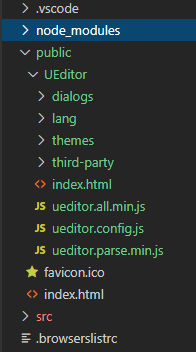
3.将vue-ueditor-wrap引入你要使用的组件中
3.1.下载vue-ueditor-wrap
npm i vue-ueditor-wrap
# 或者
yarn add vue-ueditor-wrap
3.2.引入VueUeditorWrap组件
import VueUeditorWrap from 'vue-ueditor-wrap' // ES6 Module
// 或者
const VueUeditorWrap = require('vue-ueditor-wrap') // CommonJS
3.3.注册组件
components: {VueUeditorWrap
}
// 或者在 main.js 里将它注册为全局组件
Vue.component('vue-ueditor-wrap', VueUeditorWrap)
4.页面调用 v-model绑定数据 config配置数据
完整配置选项查看 ueditor.config.js 源码或 官方文档
UEditor 官网
UEditor API 文档
UEditor Github 地址
data(){return{msg:'',myConfig: {toolbars: [['fullscreen', 'source', '|', 'undo', 'redo', '|','bold', 'italic', 'underline', 'fontborder', 'strikethrough', 'superscript', 'subscript', 'removeformat', 'formatmatch', 'autotypeset', 'blockquote', 'pasteplain', '|', 'forecolor', 'backcolor', 'insertorderedlist', 'insertunorderedlist', 'selectall', '|','rowspacingtop', 'rowspacingbottom', 'lineheight', '|','customstyle', 'paragraph', 'fontfamily', 'fontsize', '|','directionalityltr', 'directionalityrtl', 'indent', '|','justifyleft', 'justifycenter', 'justifyright', 'justifyjustify', '|', 'touppercase', 'tolowercase', '|','imagenone', 'imageleft', 'imageright', 'imagecenter', '|','emotion', 'map', 'insertcode', 'background', '|','horizontal', 'date', 'time', 'spechars', '|','inserttable', 'deletetable', 'insertparagraphbeforetable', 'insertrow', 'deleterow', 'insertcol', 'deletecol', 'mergecells', 'mergeright', 'mergedown', '|','print', 'preview',]],autoHeightEnabled: false,// 编辑器不自动被内容撑高initialFrameHeight: 600, // 初始容器高度initialFrameWidth: '100%',// 初始容器宽度serverUrl:'',UEDITOR_HOME_URL: '/UEditor/',maximumWords:'100000000'}}},
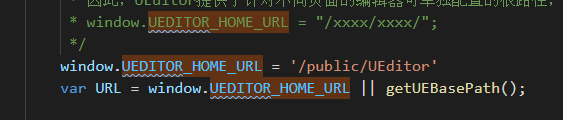
5.修改UEditor中的配置文件ueditor.config.js中的UEDITOR_HOME_URL
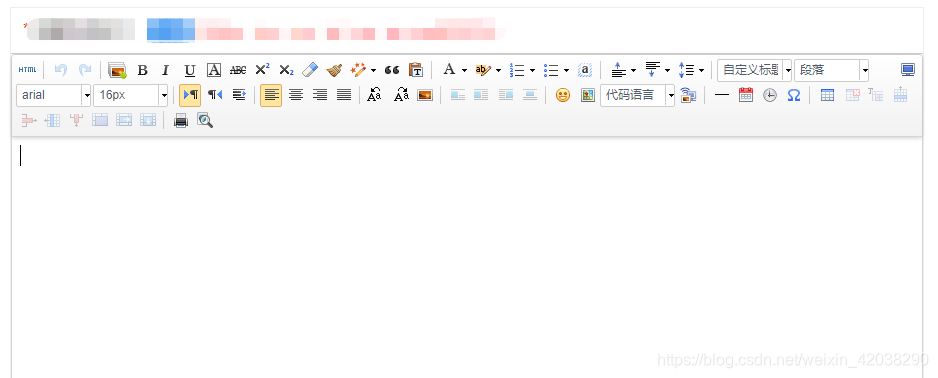
这样编辑器就可以正常使用了,看下效果吧~~~
本文来自互联网用户投稿,文章观点仅代表作者本人,不代表本站立场,不承担相关法律责任。如若转载,请注明出处。 如若内容造成侵权/违法违规/事实不符,请点击【内容举报】进行投诉反馈!