IOS 同步异步请求JSON数据
IOS SDK为HTTP请求提供了同步和异步两种请求这种不同的API,而且可以使用Get或POST等请求方法。
1.同步Get请求
在贴代码之前先对项目有个整体的说明:如图所示
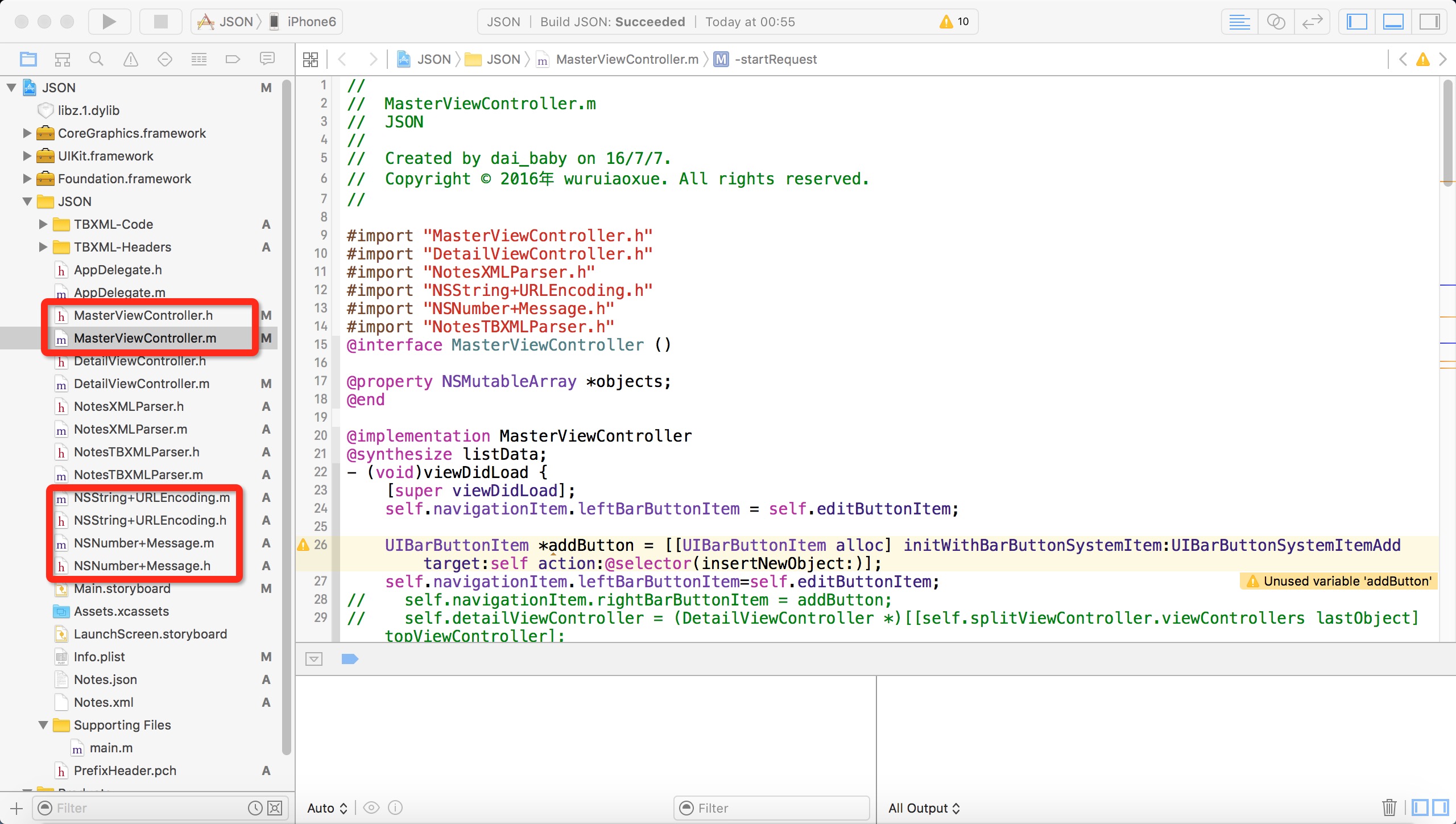
首先新建Master-Detail Application类型项目,我们可以看到会自动帮我们新建一些类,然后通过手动添加NSString_URLEncoding.h和NSNumber+Message.h类库主要用于对URL编码和对消息进行处理。
在MasterViewController类里添加如下变量以及方法
类接口
#import 类实现
#import "MasterViewController.h"
#import "DetailViewController.h"
#import "NotesXMLParser.h"
#import "NSString+URLEncoding.h"
#import "NSNumber+Message.h"
#import "NotesTBXMLParser.h"
@interface MasterViewController ()@property NSMutableArray *objects;
@end@implementation MasterViewController
@synthesize listData;
- (void)viewDidLoad {[super viewDidLoad];self.navigationItem.leftBarButtonItem = self.editButtonItem;UIBarButtonItem *addButton = [[UIBarButtonItem alloc] initWithBarButtonSystemItem:UIBarButtonSystemItemAdd target:self action:@selector(insertNewObject:)];self.navigationItem.leftBarButtonItem=self.editButtonItem;
//    self.navigationItem.rightBarButtonItem = addButton;
//    self.detailViewController = (DetailViewController *)[[self.splitViewController.viewControllers lastObject] topViewController];self.detailViewController=(DetailViewController *)[[self.splitViewController.viewControllers lastObject]topViewController];[[NSNotificationCenter defaultCenter]addObserver:self selector:@selector(reloadView:) name:@"reloadViewNotification" object:nil];
//    NotesXMLParser *parser=[NotesXMLParser new];
//    [parser start];
//    NSString *path=[[NSBundle mainBundle]pathForResource:@"Notes" ofType:@"json"];
//    NSData *jsonData=[[NSData alloc]initWithContentsOfFile:path];
//
//    NSError *error;
//    id jsonObj=[NSJSONSerialization JSONObjectWithData:jsonData options:NSJSONReadingMutableLeaves error:&error];
//
//    if(!jsonObj||error)
//    {
//        NSLog(@"JSON解码失败");
//    }
//    self.listData=[jsonObj objectForKey:@"Record"];[self startRequest];
//    NotesTBXMLParser *parser=[NotesTBXMLParser new];
//    [parser start];
}
-(void)reloadView:(NSDictionary *)res
{NSNumber *resultCodeObj=[res objectForKey:@"ResultCode"];if([resultCodeObj integerValue]>=0){self.listData=[res objectForKey:@"Record"];[self.tableView reloadData];}else{NSString *errorStr=[resultCodeObj errorMessage];UIAlertView *alterView=[[UIAlertView alloc]initWithTitle:@"错误信息" message:errorStr delegate:nil cancelButtonTitle:@"OK" otherButtonTitles: nil];[alterView show];}
}
-(void)startRequest
{NSString *strURL=[[NSString alloc]initWithFormat:@"http://www.51work6.com/service/mynotes/WebService.php?email=%@&type=%@&action=%@",@"784087156@qq.com",@"JSON",@"query"];
//    NSURL *url=[strURL stringByAddingPercentEscapesUsingEncoding:NSUTF8StringEncoding];NSURL *url=[NSURL URLWithString:[strURL URLEncodedString]];NSURLRequest *request=[[NSURLRequest alloc]initWithURL:url];NSDate *data=[NSURLConnection sendSynchronousRequest:request returningResponse:nil error:nil];NSLog(@"请求完成…");NSDictionary *resDict=[NSJSONSerialization JSONObjectWithData:data options:NSJSONReadingMutableLeaves error:nil];[self reloadView:resDict];
}
//-(void)reloadView:(NSNotification *)notification
//{
//    NSMutableArray *resList=[notification object];
//    self.listData=resList;
//    [self.tableView reloadData];
//}
- (void)viewWillAppear:(BOOL)animated {self.clearsSelectionOnViewWillAppear = self.splitViewController.isCollapsed;[super viewWillAppear:animated];
}- (void)didReceiveMemoryWarning {[super didReceiveMemoryWarning];// Dispose of any resources that can be recreated.
}- (void)insertNewObject:(id)sender {if (!self.objects) {self.objects = [[NSMutableArray alloc] init];}[self.objects insertObject:[NSDate date] atIndex:0];NSIndexPath *indexPath = [NSIndexPath indexPathForRow:0 inSection:0];[self.tableView insertRowsAtIndexPaths:@[indexPath] withRowAnimation:UITableViewRowAnimationAutomatic];
}#pragma mark - Segues- (void)prepareForSegue:(UIStoryboardSegue *)segue sender:(id)sender {if ([[segue identifier] isEqualToString:@"showDetail"]) {NSIndexPath *indexPath = [self.tableView indexPathForSelectedRow];NSDate *object = self.objects[indexPath.row];DetailViewController *controller = (DetailViewController *)[[segue destinationViewController] topViewController];[controller setDetailItem:object];controller.navigationItem.leftBarButtonItem = self.splitViewController.displayModeButtonItem;controller.navigationItem.leftItemsSupplementBackButton = YES;}
}#pragma mark - Table View- (NSInteger)numberOfSectionsInTableView:(UITableView *)tableView {return 1;
}- (NSInteger)tableView:(UITableView *)tableView numberOfRowsInSection:(NSInteger)section {return self.listData.count;
}- (UITableViewCell *)tableView:(UITableView *)tableView cellForRowAtIndexPath:(NSIndexPath *)indexPath {UITableViewCell *cell = [tableView dequeueReusableCellWithIdentifier:@"Cell" forIndexPath:indexPath];NSMutableDictionary *dict=self.listData[indexPath.row];//NSDate *object = self.objects[indexPath.row];cell.textLabel.text = [dict objectForKey:@"Content"];cell.detailTextLabel.text=[dict objectForKey:@"CDate"];return cell;
}- (BOOL)tableView:(UITableView *)tableView canEditRowAtIndexPath:(NSIndexPath *)indexPath {// Return NO if you do not want the specified item to be editable.return YES;
}- (void)tableView:(UITableView *)tableView commitEditingStyle:(UITableViewCellEditingStyle)editingStyle forRowAtIndexPath:(NSIndexPath *)indexPath {if (editingStyle == UITableViewCellEditingStyleDelete) {[self.objects removeObjectAtIndex:indexPath.row];[tableView deleteRowsAtIndexPaths:@[indexPath] withRowAnimation:UITableViewRowAnimationFade];} else if (editingStyle == UITableViewCellEditingStyleInsert) {// Create a new instance of the appropriate class, insert it into the array, and add a new row to the table view.}
}@end
其中startRequest是请求Webservice服务器连接服务的方法
-(void)startRequest
{NSString *strURL=[[NSString alloc]initWithFormat:@"http://www.51work6.com/service/mynotes/WebService.php?email=%@&type=%@&action=%@",@"784087156@qq.com",@"JSON",@"query"];
//    NSURL *url=[strURL stringByAddingPercentEscapesUsingEncoding:NSUTF8StringEncoding];NSURL *url=[NSURL URLWithString:[strURL URLEncodedString]];NSURLRequest *request=[[NSURLRequest alloc]initWithURL:url];NSDate *data=[NSURLConnection sendSynchronousRequest:request returningResponse:nil error:nil];NSLog(@"请求完成…");NSDictionary *resDict=[NSJSONSerialization JSONObjectWithData:data options:NSJSONReadingMutableLeaves error:nil];[self reloadView:resDict];
}
通过NSJSONSerialization类解析返回的数据,并将数据给tableView.
结果如图所示:
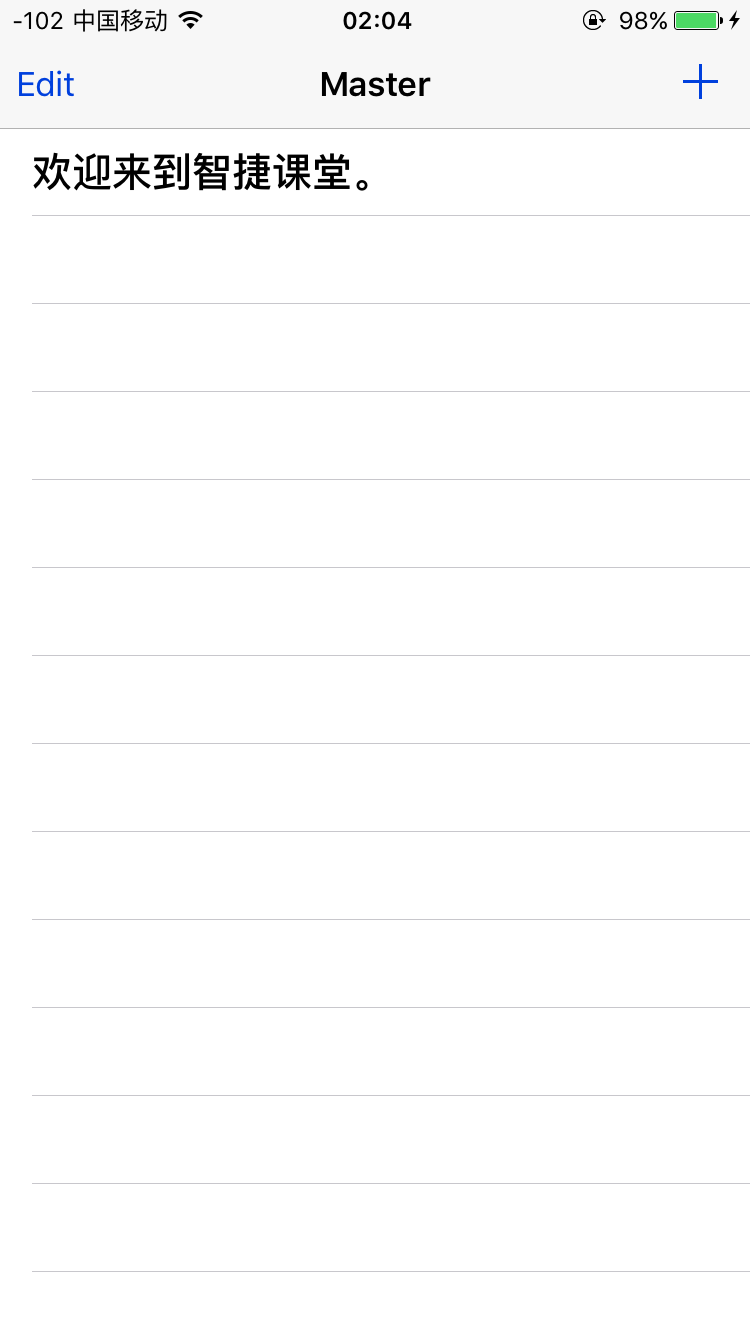
通过浏览器返回的JSON对象是这样的:
{"ResultCode":0,"Record":[{"ID":4290,"CDate":"2016-05-18","Content":"欢迎来到智捷课堂。"}]}2.异步Get请求
还有一点需要说明的是:
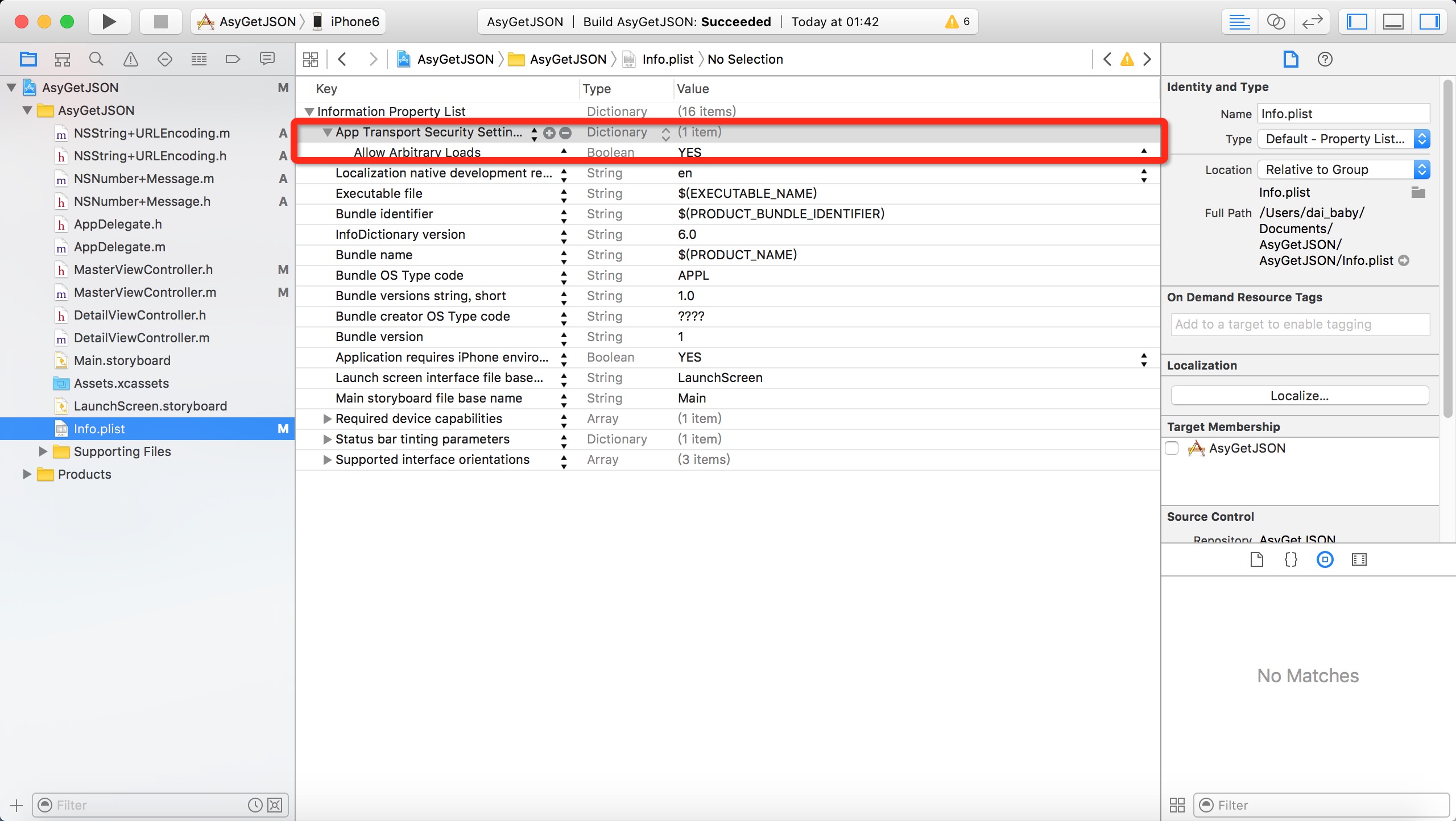
Google后查证,iOS9引入了新特性App Transport Security (ATS)。详情:App Transport Security (ATS)新特性要求App内访问的网络必须使用HTTPS协议。
但是现在公司的项目使用的是HTTP协议,使用私有加密方式保证数据安全。现在也不能马上改成HTTPS协议传输。
需要在Info.plist里添加如下选项,如图所示:
同步请求的用户体验不是很好,因此很多情况我们会采用异步调用。iOS SDK也提供了异步请求的方法,而异步请求会使用NSURLConnection委托协议NSURLConnectionDataDelegate.在请求的不同阶段会回调委托对象的不同方法。NSURLConnectionDataDelegate协议如下:
/* NSURLConnection.hCopyright (c) 2003-2015, Apple Inc. All rights reserved. Public header file.
*/#import An NSURLConnection may be used for loading of resource datadirectly to memory, in which case anNSURLConnectionDataDelegate should be supplied, or fordownloading of resource data directly to a file, in which casean NSURLConnectionDownloadDelegate is used. The delegate isretained by the NSURLConnection until a terminal condition isencountered. These two delegates are logically subclasses ofthe base protocol, NSURLConnectionDelegate.
A terminal condition produced by the loader will result in aconnection:didFailWithError: in the case of an error, orconnectiondidFinishLoading: or connectionDidFinishDownloading:delegate message.
The -cancel message hints to the loader that a resource loadshould be abandoned but does not guarantee that more delegatemessages will not be delivered. If -cancel does cause theload to be abandoned, the delegate will be released withoutfurther messages. In general, a caller should be prepared for-cancel to have no effect, and internally ignore any delegatecallbacks until the delegate is released.Scheduling of an NSURLConnection specifies the context inwhich delegate callbacks will be made, but the actual IO mayoccur on a separate thread and should be considered animplementation detail.
When created, an NSURLConnection performs a deep-copy of theNSURLRequest. This copy is available through the-originalRequest method. As the connection performs the load,this request may change as a result of protocolcanonicalization or due to following redirects.-currentRequest can be used to retrieve this value.
An NSURLConnections created with the+connectionWithRequest:delegate: or -initWithRequest:delegate:methods are scheduled on the current runloop immediately, andit is not necessary to send the -start message to begin theresource load.
NSURLConnections created with-initWithRequest:delegate:startImmediately: are notautomatically scheduled. Use -scheduleWithRunLoop:forMode: or-setDelegateQueue: to specify the context for delegatecallbacks, and -start to begin the load. If you do notexplicitly schedule the connection before -start, it will bescheduled on the current runloop and mode automatically.
The NSURLConnectionSynchronousLoading category adds+sendSynchronousRequest:returningResponse:error, which blocksthe current thread until the resource data is available or anerror occurs. It should be noted that using this method on anapplications main run loop may result in an unacceptably longdelay in a user interface and its use is stronglydiscourage.
The NSURLConnectionQueuedLoading category implements+sendAsynchronousRequest:queue:completionHandler, providingsimilar simplicity but provides a mechanism where the currentrunloop is not blocked.
Both of the immediate loading categories do not provide forcustomization of resource load, and do not allow the caller torespond to, e.g., authentication challenges.
*/
@interface NSURLConnection : NSObject
{@privateNSURLConnectionInternal *_internal;
}/* Designated initializer */
- (nullable instancetype)initWithRequest:(NSURLRequest *)request delegate:(nullable id)delegate startImmediately:(BOOL)startImmediately NS_DEPRECATED(10_5, 10_11, 2_0, 9_0, "Use NSURLSession (see NSURLSession.h)") __WATCHOS_PROHIBITED;- (nullable instancetype)initWithRequest:(NSURLRequest *)request delegate:(nullable id)delegate NS_DEPRECATED(10_3, 10_11, 2_0, 9_0, "Use NSURLSession (see NSURLSession.h)") __WATCHOS_PROHIBITED;
+ (nullable NSURLConnection*)connectionWithRequest:(NSURLRequest *)request delegate:(nullable id)delegate NS_DEPRECATED(10_3, 10_11, 2_0, 9_0, "Use NSURLSession (see NSURLSession.h)") __WATCHOS_PROHIBITED;@property (readonly, copy) NSURLRequest *originalRequest NS_AVAILABLE(10_8, 5_0);
@property (readonly, copy) NSURLRequest *currentRequest NS_AVAILABLE(10_8, 5_0);- (void)start NS_AVAILABLE(10_5, 2_0);
- (void)cancel;- (void)scheduleInRunLoop:(NSRunLoop *)aRunLoop forMode:(NSString *)mode NS_AVAILABLE(10_5, 2_0);
- (void)unscheduleFromRunLoop:(NSRunLoop *)aRunLoop forMode:(NSString *)mode NS_AVAILABLE(10_5, 2_0);
- (void)setDelegateQueue:(nullable NSOperationQueue*) queue NS_AVAILABLE(10_7, 5_0);/*! @method canHandleRequest:@abstractPerforms a "preflight" operation that performssome speculative checks to see if a connection canbe initialized, and the associated I/O that isstarted in the initializer methods can begin.@discussionThe result of this method is valid only as long asno protocols are registered or unregistered, andas long as the request is not mutated (if therequest is mutable). Hence, clients should beprepared to handle failures even if they haveperformed request preflighting by calling thismethod.@param request The request to preflight.@resultYES if it is likely that the given request can be used toinitialize a connection and the associated I/O can bestartedNO
*/
+ (BOOL)canHandleRequest:(NSURLRequest *)request;@end/*!@protocol NSURLConnectionDelegate@abstract Delegate methods that are common to all forms ofNSURLConnection. These are all optional. Thisprotocol should be considered a base class for theNSURLConnectionDataDelegate andNSURLConnectionDownloadDelegate protocols.@discussionconnection:didFailWithError: will be called atmost once, if an error occurs during a resourceload. No other callbacks will be made after.
connectionShouldUseCredentialStorage: will becalled at most once, before a resource load begins(which means it may be called during constructionof the connection.) The delegate should returnTRUE if the connection should consult the sharedNSURLCredentialStorage in response toauthentication challenges. Regardless of theresult, the authentication challenge methods maystill be called.connection:willSendRequestForAuthenticationChallenge:is the preferred (Mac OS X 10.7 and iOS 5.0 orlater) mechanism for responding to authenticationchallenges. See formore information on dealing with the various typesof authentication challenges.connection:canAuthenticateAgainstProtectionSpace:connection:didReciveAuthenticationChallenge:connection:didCancelAuthenticationChallenge: aredeprected and new code should adoptconnection:willSendRequestForAuthenticationChallenge.The older delegates will still be called forcompatability, but incur more latency in dealingwith the authentication challenge.
*/
@protocol NSURLConnectionDelegate
@optional
- (void)connection:(NSURLConnection *)connection didFailWithError:(NSError *)error;
- (BOOL)connectionShouldUseCredentialStorage:(NSURLConnection *)connection;
- (void)connection:(NSURLConnection *)connection willSendRequestForAuthenticationChallenge:(NSURLAuthenticationChallenge *)challenge;
- (BOOL)connection:(NSURLConnection *)connection canAuthenticateAgainstProtectionSpace:(NSURLProtectionSpace *)protectionSpace NS_DEPRECATED(10_6, 10_10, 3_0, 8_0, "Use -connection:willSendRequestForAuthenticationChallenge: instead.");
- (void)connection:(NSURLConnection *)connection didReceiveAuthenticationChallenge:(NSURLAuthenticationChallenge *)challenge NS_DEPRECATED(10_2, 10_10, 2_0, 8_0, "Use -connection:willSendRequestForAuthenticationChallenge: instead.");
- (void)connection:(NSURLConnection *)connection didCancelAuthenticationChallenge:(NSURLAuthenticationChallenge *)challenge NS_DEPRECATED(10_2, 10_10, 2_0, 8_0, "Use -connection:willSendRequestForAuthenticationChallenge: instead.");
@end/*!@protocol NSURLConnectionDataDelegate@abstract Delegate methods used for loading data to memory.These delegate methods are all optional.@discussionconnection:willSendRequest:redirectResponse: iscalled whenever an connection determines that itmust change URLs in order to continue loading arequest. This gives the delegate an opportunityinspect and if necessary modify a request. Adelegate can cause the request to abort by eithercalling the connections -cancel method, or byreturning nil from this callback.There is one subtle difference which results fromthis choice. If -cancel is called in the delegatemethod, all processing for the connection stops,and no further delegate callbacks will be sent. Ifthe delegate returns nil, the connection willcontinue to process, and this has specialrelevance in the case where the redirectResponseargument is non-nil. In this case, any data thatis loaded for the connection will be sent to thedelegate, and the delegate will receive a finishedor failure delegate callback as appropriate.
connection:didReceiveResponse: is called whenenough data has been read to construct anNSURLResponse object. In the event of a protocolwhich may return multiple responses (such as HTTPmultipart/x-mixed-replace) the delegate should beprepared to inspect the new response and makeitself ready for data callbacks as appropriate.
connection:didReceiveData: is called with a singleimmutable NSData object to the delegate,representing the next portion of the data loadedfrom the connection. This is the only guaranteedfor the delegate to receive the data from theresource load.
connection:needNewBodyStream: is called when theloader must retransmit a requests payload, due toconnection errors or authentication challenges.Delegates should construct a new unopened andautoreleased NSInputStream. If not implemented,the loader will be required to spool the bytes tobe uploaded to disk, a potentially expensiveoperation. Returning nil will cancel theconnection.connection:didSendBodyData:totalBytesWritten:totalBytesExpectedToWrite:is called during an upload operation to provideprogress feedback. Note that the values maychange in unexpected ways if the request needs tobe retransmitted.
connection:willCacheResponse: gives the delegatean opportunity to inspect and modify theNSCachedURLResponse which will be cached by theloader if caching is enabled for the originalNSURLRequest. Returning nil from this delegatewill prevent the resource from being cached. Notethat the -data method of the cached response may
return an autoreleased in-memory copy of the truedata, and should not be used as an alternative toreceiving and accumulating the data throughconnection:didReceiveData:
connectionDidFinishLoading: is called when allconnection processing has completed successfully,before the delegate is released by theconnection.
*/@protocol NSURLConnectionDataDelegate
@optional
- (nullable NSURLRequest *)connection:(NSURLConnection *)connection willSendRequest:(NSURLRequest *)request redirectResponse:(nullable NSURLResponse *)response;
- (void)connection:(NSURLConnection *)connection didReceiveResponse:(NSURLResponse *)response;- (void)connection:(NSURLConnection *)connection didReceiveData:(NSData *)data;- (nullable NSInputStream *)connection:(NSURLConnection *)connection needNewBodyStream:(NSURLRequest *)request;
- (void)connection:(NSURLConnection *)connection didSendBodyData:(NSInteger)bytesWrittentotalBytesWritten:(NSInteger)totalBytesWrittentotalBytesExpectedToWrite:(NSInteger)totalBytesExpectedToWrite;- (nullable NSCachedURLResponse *)connection:(NSURLConnection *)connection willCacheResponse:(NSCachedURLResponse *)cachedResponse;- (void)connectionDidFinishLoading:(NSURLConnection *)connection;
@end/*!@protocol NSURLConnectionDownloadDelegate@abstractDelegate methods used to perform resourcedownloads directly to a disk file. All themethods are optional with the exception ofconnectionDidFinishDownloading:destinationURL:which must be implemented in order to inform thedelegate of the location of the finished download.This delegate and download implementation iscurrently only available on iOS 5.0 or later.@discussionconnection:didWriteData:totalBytesWritten:expectedTotalBytes:provides progress information about the state ofthe download, the number of bytes written sincethe last delegate callback, the total number ofbytes written to disk and the total number ofbytes that are expected (or 0 if this is unknown.)connectionDidResumeDownloading:totalBytesWritten:expectedTotalBytes:is called when the connection is able to resume anin progress download. This may happen due to aconnection or network failure.connectionDidFinishDownloading:destinationURL: isa terminal event which indicates the completion ofa download and provides the location of the file.The file will be located in the applications cachedirectory and is guaranteed to exist for theduration of the delegate callback. Theimplication is that the delegate should copy ormove the download to a more persistent location ifdesired.
*/@protocol NSURLConnectionDownloadDelegate
@optional
- (void)connection:(NSURLConnection *)connection didWriteData:(long long)bytesWritten totalBytesWritten:(long long)totalBytesWritten expectedTotalBytes:(long long) expectedTotalBytes;
- (void)connectionDidResumeDownloading:(NSURLConnection *)connection totalBytesWritten:(long long)totalBytesWritten expectedTotalBytes:(long long) expectedTotalBytes;@required
- (void)connectionDidFinishDownloading:(NSURLConnection *)connection destinationURL:(NSURL *) destinationURL;
@end/*!@category NSURLConnection(NSURLConnectionSynchronousLoading)@abstractThe NSURLConnectionSynchronousLoading category onNSURLConnection provides the interface to performsynchronous loading of URL requests.
*/
@interface NSURLConnection (NSURLConnectionSynchronousLoading)/*! @method sendSynchronousRequest:returningResponse:error:@abstract Performs a synchronous load of the given request,returning an NSURLResponse in the given outparameter.@discussionA synchronous load for the given request is built ontop of the asynchronous loading code made availableby the class. The calling thread is blocked whilethe asynchronous loading system performs the URL loadon a thread spawned specifically for this loadrequest. No special threading or run loopconfiguration is necessary in the calling thread inorder to perform a synchronous load. For instance,the calling thread need not be running its run loop.@paramrequest The request to load. Note that the request isdeep-copied as part of the initializationprocess. Changes made to the request argument afterthis method returns do not affect the request that isused for the loading process.@paramresponse An out parameter which is filled in with theresponse generated by performing the load.@paramerror Out parameter (may be NULL) used if an error occurswhile processing the request. Will not be modified if the load succeeds.@result The content of the URL resulting from performing the load,or nil if the load failed.
*/
+ (nullable NSData *)sendSynchronousRequest:(NSURLRequest *)request returningResponse:(NSURLResponse * __nullable * __nullable)response error:(NSError **)error NS_DEPRECATED(10_3, 10_11, 2_0, 9_0, "Use [NSURLSession dataTaskWithRequest:completionHandler:] (see NSURLSession.h") __WATCHOS_PROHIBITED;@end/*!@category NSURLConnection(NSURLConnectionQueuedLoading)The NSURLConnectionQueuedLoading category on NSURLConnectionprovides the interface to perform asynchronous loading of URLrequests where the results of the request are delivered to ablock via an NSOperationQueue.Note that there is no guarantee of load ordering implied by thismethod.*/
@interface NSURLConnection (NSURLConnectionQueuedLoading)/*!@method sendAsynchronousRequest:queue:completionHandler:@abstract Performs an asynchronous load of the givenrequest. When the request has completed or failed,the block will be executed from the context of thespecified NSOperationQueue.@discussionThis is a convenience routine that allows forasynchronous loading of an url based resource. Ifthe resource load is successful, the data parameterto the callback will contain the resource data andthe error parameter will be nil. If the resourceload fails, the data parameter will be nil and theerror will contain information about the failure.@paramrequest The request to load. Note that the request isdeep-copied as part of the initializationprocess. Changes made to the request argument afterthis method returns do not affect the request thatis used for the loading process.@param queue An NSOperationQueue upon which the handler block willbe dispatched.@paramhandler A block which receives the results of the resource load.*/
+ (void)sendAsynchronousRequest:(NSURLRequest*) requestqueue:(NSOperationQueue*) queuecompletionHandler:(void (^)(NSURLResponse* __nullable response, NSData* __nullable data, NSError* __nullable connectionError)) handler NS_DEPRECATED(10_7, 10_11, 5_0, 9_0, "Use [NSURLSession dataTaskWithRequest:completionHandler:] (see NSURLSession.h") __WATCHOS_PROHIBITED;@endNS_ASSUME_NONNULL_END
需要实现的主要方法有如下几个:
connection:didReceiveData
connection:didFailWithError:
connectionDidFinishLoading:
具体使用代码中会介绍。
MasterViewController接口:
#import MasterViewController实现:
#import "MasterViewController.h"
#import "DetailViewController.h"
#import "NSNumber+Message.h"
@interface MasterViewController ()<NSURLConnectionDataDelegate>@end@implementation MasterViewController- (void)viewDidLoad {[super viewDidLoad];// Do any additional setup after loading the view, typically from a nib.self.navigationItem.leftBarButtonItem = self.editButtonItem;UIBarButtonItem *addButton = [[UIBarButtonItem alloc] initWithBarButtonSystemItem:UIBarButtonSystemItemAdd target:self action:@selector(insertNewObject:)];self.navigationItem.rightBarButtonItem = addButton;self.detailViewController = (DetailViewController *)[[self.splitViewController.viewControllers lastObject] topViewController];[self startRequest];
}
-(void)startRequest
{NSString *strURL=[[NSString alloc]initWithFormat:@"http://www.51work6.com/service/mynotes/WebService.php?email=%@&type=%@&action=%@",@"784087156@qq.com",@"JSON",@"query"];strURL=[strURL stringByAddingPercentEscapesUsingEncoding:NSUTF8StringEncoding];NSURL *url=[NSURL URLWithString:strURL];NSURLRequest *request=[[NSURLRequest alloc]initWithURL:url];NSURLConnection *connection=[[NSURLConnection alloc]initWithRequest:request delegate:self];if(connection){self.datas=[NSMutableData new];}
}- (void)connection:(NSURLConnection *)connection didReceiveData:(NSData *)data
{[self.datas appendData:data];
}
- (void)connection:(NSURLConnection *)connection didFailWithError:(NSError *)error
{NSLog(@"%@",[error localizedDescription]);
}
- (void)connectionDidFinishLoading:(NSURLConnection *)connection
{NSDictionary *dict=[NSJSONSerialization JSONObjectWithData:self.datas options:NSJSONReadingMutableLeaves error:nil];[self reloadView:dict];
}
-(void)reloadView:(NSDictionary *)res
{NSNumber *resultCode=[res objectForKey:@"ResultCode"];if([resultCode integerValue]>=0){self.objects=[res objectForKey:@"Record"];[self.tableView reloadData];}else{NSString *errorStr=[resultCode errorMessage];UIAlertView *alertView=[[UIAlertView alloc]initWithTitle:@"错误信息" message:errorStr delegate:nil cancelButtonTitle:@"OK" otherButtonTitles: nil];[alertView show];}
}
- (void)viewWillAppear:(BOOL)animated {self.clearsSelectionOnViewWillAppear = self.splitViewController.isCollapsed;[super viewWillAppear:animated];
}- (void)didReceiveMemoryWarning {[super didReceiveMemoryWarning];// Dispose of any resources that can be recreated.
}- (void)insertNewObject:(id)sender {if (!self.objects) {self.objects = [[NSMutableArray alloc] init];}[self.objects insertObject:[NSDate date] atIndex:0];NSIndexPath *indexPath = [NSIndexPath indexPathForRow:0 inSection:0];[self.tableView insertRowsAtIndexPaths:@[indexPath] withRowAnimation:UITableViewRowAnimationAutomatic];
}#pragma mark - Segues- (void)prepareForSegue:(UIStoryboardSegue *)segue sender:(id)sender {if ([[segue identifier] isEqualToString:@"showDetail"]) {NSIndexPath *indexPath = [self.tableView indexPathForSelectedRow];NSDate *object = self.objects[indexPath.row];DetailViewController *controller = (DetailViewController *)[[segue destinationViewController] topViewController];[controller setDetailItem:object];controller.navigationItem.leftBarButtonItem = self.splitViewController.displayModeButtonItem;controller.navigationItem.leftItemsSupplementBackButton = YES;}
}#pragma mark - Table View- (NSInteger)numberOfSectionsInTableView:(UITableView *)tableView {return 1;
}- (NSInteger)tableView:(UITableView *)tableView numberOfRowsInSection:(NSInteger)section {return self.objects.count;
}- (UITableViewCell *)tableView:(UITableView *)tableView cellForRowAtIndexPath:(NSIndexPath *)indexPath {UITableViewCell *cell = [tableView dequeueReusableCellWithIdentifier:@"Cell" forIndexPath:indexPath];NSMutableDictionary *dict=self.objects[indexPath.row];cell.textLabel.text = [dict objectForKey:@"Content"];cell.detailTextLabel.text=[dict objectForKey:@"CDate"];return cell;
}- (BOOL)tableView:(UITableView *)tableView canEditRowAtIndexPath:(NSIndexPath *)indexPath {// Return NO if you do not want the specified item to be editable.return YES;
}- (void)tableView:(UITableView *)tableView commitEditingStyle:(UITableViewCellEditingStyle)editingStyle forRowAtIndexPath:(NSIndexPath *)indexPath {if (editingStyle == UITableViewCellEditingStyleDelete) {[self.objects removeObjectAtIndex:indexPath.row];[tableView deleteRowsAtIndexPaths:@[indexPath] withRowAnimation:UITableViewRowAnimationFade];} else if (editingStyle == UITableViewCellEditingStyleInsert) {// Create a new instance of the appropriate class, insert it into the array, and add a new row to the table view.}
}@end
调用结果和之前一样。至此所有的功能描述都已经结束,希望能给大家帮助!
本文来自互联网用户投稿,文章观点仅代表作者本人,不代表本站立场,不承担相关法律责任。如若转载,请注明出处。 如若内容造成侵权/违法违规/事实不符,请点击【内容举报】进行投诉反馈!