Swagger Codegen与Openapi Generator分别的使用过程以及导出SDK
Swagger Codegen与Openapi Generator生成SDK的分别的使用过程
文章目录
- Swagger Codegen与Openapi Generator生成SDK的分别的使用过程
- Swagger Codegen
- 一、Swagger Codegen的安装
- 二、 Swagger Codegen的使用
- Openapi Generator
- 一、Openapi Generator的安装
- petstore.yaml文件
Swagger Codegen
参考链接:
https://github.com/swagger-api/swagger-codegen
https://www.jianshu.com/p/14a35d6f7b1a
https://www.cnblogs.com/shamo89/p/7680771.html
可以有很多个版本以及系统(mac,window,linux)可以选择
https://github.com/swagger-api/swagger-codegen
中有,根据情况而定:
这里主要说的linux下的使用和安装:

一、Swagger Codegen的安装
1.直接命令下载:
wget https://repo1.maven.org/maven2/io/swagger/swagger-codegen-cli/2.4.15/swagger-codegen-cli-2.4.15.jar -O swagger-codegen-cli.jar
2.下载好了,运行
java -jar swagger-codegen-cli.jar
3.下载之后查看帮助:
java -jar swagger-codegen-cli.jar help
根据返回结果可以看到Swagger Codegen支持的语言有很多:
[android, aspnet5, async-scala,
cwiki, csharp, cpprest, dart, flash, python-flask, go, groovy, java,
jaxrs, jaxrs-cxf, jaxrs-resteasy, jaxrs-spec, inflector, javascript,
javascript-closure-angular, jmeter, nancyfx, nodejs-server, objc,
perl, php, python, qt5cpp, ruby, scala, scalatra, silex-PHP, sinatra,
rails5, slim, spring, dynamic-html, html, html2, swagger,
swagger-yaml, swift, tizen, typescript-angular2, typescript-angular,
typescript-node, typescript-fetch, akka-scala, CsharpDotNet2, clojure,
haskell, lumen, go-server]
二、 Swagger Codegen的使用
查看Swagger Codegen支持的具体某个语言的使用帮助,拿java举例
「注意在 swagger-codegen-cli.jar的安装路径下执行,否则找不到」:
java -jar swagger-codegen-cli.jar config-help -l java
就会出来很多java语言相关的使用文档:
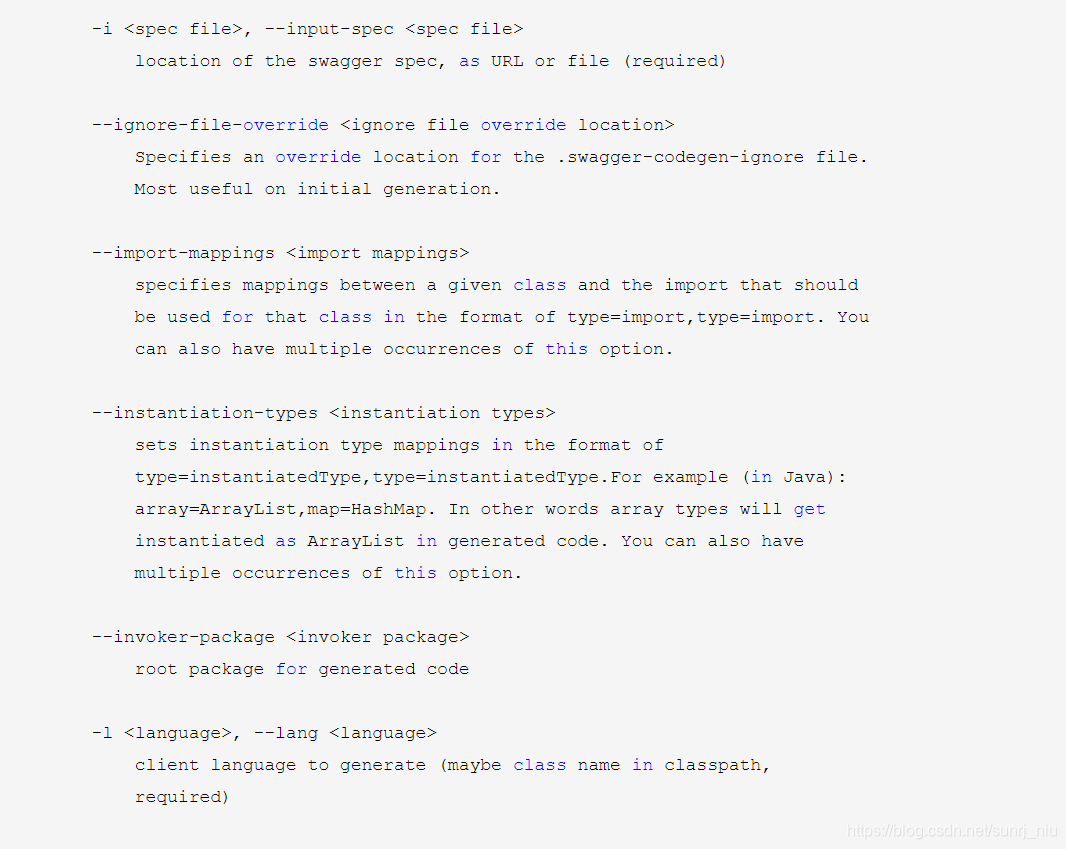
利用Swagger Codegen根据服务生成客户端代码
必须要在导入该jar的目录下执行
检测是否可以正常导入:
我这里是把swagger导出的json数据导出来
java -jar swagger-codegen-cli.jar generate -i http://[你的IP地址或者数据存放地址]:8080/v2/api-docs -l java -o /usr/local/swagger
-i http://10.2.0.126:8080/v2/api-docs 代表你要导入的数据
-o /usr/local/swagger 代表导出的地址
在上面这段代码里,使用了三个参数,分别是-i和-l和-o。
-i指定swagger描述文件的路径,url地址或路径文件;该参数为必须(http://petstore.swagger.io/v2/swagger.json是官方的一个例子,我们可以改成自己的服务)
-l指定生成客户端代码的语言,该参数为必须
-o指定生成文件的位置(默认当前目录)
除了可以指定上面三个参数,还有一些常用的:
-c json格式的配置文件的路径;文件为json格式,支持的配置项因语言的不同而不同
-a 当获取远程swagger定义时,添加授权头信息;URL-encoded格式化的name,逗号隔开的多个值
–api-package 指定生成的api类的包名
–artifact-id 指定pom.xml的artifactId的值
–artifact-version 指定pom.xml的artifact的版本
–group-id 指定pom.xml的groupId的值
–model-package 指定生成的model类的包名
-s 指定该参数表示不覆盖已经存在的文件
-t 指定模版文件所在目录
生成好的客户端代码
如图:
生成的这些文件里,src文件下的文件和pom.xml文件是对我们最有用的。把它们导入到我们习惯用的java编辑器里,这里以idea为例:

model中就是我们的实体类
test也就是测试类。可以进行测试
api所有的controller层都会有
我们会发现生成的默认包是io.swagger.client.api/module,而我们可能想要自己的包,怎么办呢
只需要生成代码的时候指定–api-package这个选项就好了。
java -jar swagger-codegen-cli.jar generate -i http://xxxx:8807/static/swagger.json -l java -o /usr/local/swagger/project --api-package com.xxxx.client --invoker-package com.xxxx.client.invoker --model-package com.xxxx.client.model
Openapi Generator
注意:安装Openapi Generator必须安装nodejs
一、Openapi Generator的安装
npm install @openapitools/openapi-generator-cli -g
npm install @openapitools/openapi-generator-cli@cli-4.3.1 -g
npm install @openapitools/openapi-generator-cli -D
petstore.yaml上一份json文件,类似于swagger生成的json文件,最下边有复制一份,有需要可直接复制,或者用自己的json文件也可以
npx @openapitools/openapi-generator-cli generate -i petstore.yaml -g java -o /tmp/test/
-i指定要生成的json的文件的路径
-o文件导出的路径
-g指定要生成的语言
然后就完成了
导出的文件:与 swagger-codegen是一样的
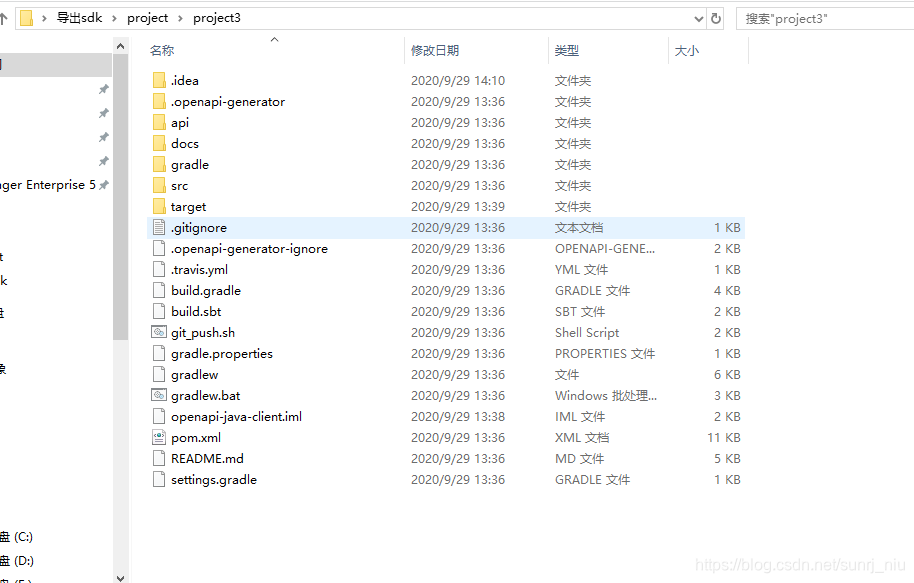
导入idea进行测试就可以了
petstore.yaml文件
swagger: '2.0'
info:description: 'This is a sample server Petstore server. For this sample, you can use the api key `special-key` to test the authorization filters.'version: 1.0.0title: OpenAPI Petstorelicense:name: Apache-2.0url: 'https://www.apache.org/licenses/LICENSE-2.0.html'
host: petstore.swagger.io
basePath: /v2
tags:- name: petdescription: Everything about your Pets- name: storedescription: Access to Petstore orders- name: userdescription: Operations about user
schemes:- http
paths:/pet:post:tags:- petsummary: Add a new pet to the storedescription: ''operationId: addPetconsumes:- application/json- application/xmlproduces:- application/xml- application/jsonparameters:- in: bodyname: bodydescription: Pet object that needs to be added to the storerequired: trueschema:$ref: '#/definitions/Pet'responses:'405':description: Invalid inputsecurity:- petstore_auth:- 'write:pets'- 'read:pets'put:tags:- petsummary: Update an existing petdescription: ''operationId: updatePetconsumes:- application/json- application/xmlproduces:- application/xml- application/jsonparameters:- in: bodyname: bodydescription: Pet object that needs to be added to the storerequired: trueschema:$ref: '#/definitions/Pet'responses:'400':description: Invalid ID supplied'404':description: Pet not found'405':description: Validation exceptionsecurity:- petstore_auth:- 'write:pets'- 'read:pets'/pet/findByStatus:get:tags:- petsummary: Finds Pets by statusdescription: Multiple status values can be provided with comma separated stringsoperationId: findPetsByStatusproduces:- application/xml- application/jsonparameters:- name: statusin: querydescription: Status values that need to be considered for filterrequired: truetype: arrayitems:type: stringenum:- available- pending- solddefault: availablecollectionFormat: csvresponses:'200':description: successful operationschema:type: arrayitems:$ref: '#/definitions/Pet''400':description: Invalid status valuesecurity:- petstore_auth:- 'write:pets'- 'read:pets'/pet/findByTags:get:tags:- petsummary: Finds Pets by tagsdescription: 'Multiple tags can be provided with comma separated strings. Use tag1, tag2, tag3 for testing.'operationId: findPetsByTagsproduces:- application/xml- application/jsonparameters:- name: tagsin: querydescription: Tags to filter byrequired: truetype: arrayitems:type: stringcollectionFormat: csvresponses:'200':description: successful operationschema:type: arrayitems:$ref: '#/definitions/Pet''400':description: Invalid tag valuesecurity:- petstore_auth:- 'write:pets'- 'read:pets'deprecated: true'/pet/{petId}':get:tags:- petsummary: Find pet by IDdescription: Returns a single petoperationId: getPetByIdproduces:- application/xml- application/jsonparameters:- name: petIdin: pathdescription: ID of pet to returnrequired: truetype: integerformat: int64responses:'200':description: successful operationschema:$ref: '#/definitions/Pet''400':description: Invalid ID supplied'404':description: Pet not foundsecurity:- api_key: []post:tags:- petsummary: Updates a pet in the store with form datadescription: ''operationId: updatePetWithFormconsumes:- application/x-www-form-urlencodedproduces:- application/xml- application/jsonparameters:- name: petIdin: pathdescription: ID of pet that needs to be updatedrequired: truetype: integerformat: int64- name: namein: formDatadescription: Updated name of the petrequired: falsetype: string- name: statusin: formDatadescription: Updated status of the petrequired: falsetype: stringresponses:'405':description: Invalid inputsecurity:- petstore_auth:- 'write:pets'- 'read:pets'delete:tags:- petsummary: Deletes a petdescription: ''operationId: deletePetproduces:- application/xml- application/jsonparameters:- name: api_keyin: headerrequired: falsetype: string- name: petIdin: pathdescription: Pet id to deleterequired: truetype: integerformat: int64responses:'400':description: Invalid pet valuesecurity:- petstore_auth:- 'write:pets'- 'read:pets''/pet/{petId}/uploadImage':post:tags:- petsummary: uploads an imagedescription: ''operationId: uploadFileconsumes:- multipart/form-dataproduces:- application/jsonparameters:- name: petIdin: pathdescription: ID of pet to updaterequired: truetype: integerformat: int64- name: additionalMetadatain: formDatadescription: Additional data to pass to serverrequired: falsetype: string- name: filein: formDatadescription: file to uploadrequired: falsetype: fileresponses:'200':description: successful operationschema:$ref: '#/definitions/ApiResponse'security:- petstore_auth:- 'write:pets'- 'read:pets'/store/inventory:get:tags:- storesummary: Returns pet inventories by statusdescription: Returns a map of status codes to quantitiesoperationId: getInventoryproduces:- application/jsonparameters: []responses:'200':description: successful operationschema:type: objectadditionalProperties:type: integerformat: int32security:- api_key: []/store/order:post:tags:- storesummary: Place an order for a petdescription: ''operationId: placeOrderproduces:- application/xml- application/jsonparameters:- in: bodyname: bodydescription: order placed for purchasing the petrequired: trueschema:$ref: '#/definitions/Order'responses:'200':description: successful operationschema:$ref: '#/definitions/Order''400':description: Invalid Order'/store/order/{orderId}':get:tags:- storesummary: Find purchase order by IDdescription: 'For valid response try integer IDs with value <= 5 or > 10. Other values will generated exceptions'operationId: getOrderByIdproduces:- application/xml- application/jsonparameters:- name: orderIdin: pathdescription: ID of pet that needs to be fetchedrequired: truetype: integermaximum: 5minimum: 1format: int64responses:'200':description: successful operationschema:$ref: '#/definitions/Order''400':description: Invalid ID supplied'404':description: Order not founddelete:tags:- storesummary: Delete purchase order by IDdescription: For valid response try integer IDs with value < 1000. Anything above 1000 or nonintegers will generate API errorsoperationId: deleteOrderproduces:- application/xml- application/jsonparameters:- name: orderIdin: pathdescription: ID of the order that needs to be deletedrequired: truetype: stringresponses:'400':description: Invalid ID supplied'404':description: Order not found/user:post:tags:- usersummary: Create userdescription: This can only be done by the logged in user.operationId: createUserproduces:- application/xml- application/jsonparameters:- in: bodyname: bodydescription: Created user objectrequired: trueschema:$ref: '#/definitions/User'responses:default:description: successful operation/user/createWithArray:post:tags:- usersummary: Creates list of users with given input arraydescription: ''operationId: createUsersWithArrayInputproduces:- application/xml- application/jsonparameters:- in: bodyname: bodydescription: List of user objectrequired: trueschema:type: arrayitems:$ref: '#/definitions/User'responses:default:description: successful operation/user/createWithList:post:tags:- usersummary: Creates list of users with given input arraydescription: ''operationId: createUsersWithListInputproduces:- application/xml- application/jsonparameters:- in: bodyname: bodydescription: List of user objectrequired: trueschema:type: arrayitems:$ref: '#/definitions/User'responses:default:description: successful operation/user/login:get:tags:- usersummary: Logs user into the systemdescription: ''operationId: loginUserproduces:- application/xml- application/jsonparameters:- name: usernamein: querydescription: The user name for loginrequired: truetype: string- name: passwordin: querydescription: The password for login in clear textrequired: truetype: stringresponses:'200':description: successful operationschema:type: stringheaders:X-Rate-Limit:type: integerformat: int32description: calls per hour allowed by the userX-Expires-After:type: stringformat: date-timedescription: date in UTC when toekn expires'400':description: Invalid username/password supplied/user/logout:get:tags:- usersummary: Logs out current logged in user sessiondescription: ''operationId: logoutUserproduces:- application/xml- application/jsonparameters: []responses:default:description: successful operation'/user/{username}':get:tags:- usersummary: Get user by user namedescription: ''operationId: getUserByNameproduces:- application/xml- application/jsonparameters:- name: usernamein: pathdescription: 'The name that needs to be fetched. Use user1 for testing.'required: truetype: stringresponses:'200':description: successful operationschema:$ref: '#/definitions/User''400':description: Invalid username supplied'404':description: User not foundput:tags:- usersummary: Updated userdescription: This can only be done by the logged in user.operationId: updateUserproduces:- application/xml- application/jsonparameters:- name: usernamein: pathdescription: name that need to be deletedrequired: truetype: string- in: bodyname: bodydescription: Updated user objectrequired: trueschema:$ref: '#/definitions/User'responses:'400':description: Invalid user supplied'404':description: User not founddelete:tags:- usersummary: Delete userdescription: This can only be done by the logged in user.operationId: deleteUserproduces:- application/xml- application/jsonparameters:- name: usernamein: pathdescription: The name that needs to be deletedrequired: truetype: stringresponses:'400':description: Invalid username supplied'404':description: User not found
securityDefinitions:petstore_auth:type: oauth2authorizationUrl: 'http://petstore.swagger.io/api/oauth/dialog'flow: implicitscopes:'write:pets': modify pets in your account'read:pets': read your petsapi_key:type: apiKeyname: api_keyin: header
definitions:Order:title: Pet Orderdescription: An order for a pets from the pet storetype: objectproperties:id:type: integerformat: int64petId:type: integerformat: int64quantity:type: integerformat: int32shipDate:type: stringformat: date-timestatus:type: stringdescription: Order Statusenum:- placed- approved- deliveredcomplete:type: booleandefault: falsexml:name: OrderCategory:title: Pet categorydescription: A category for a pettype: objectproperties:id:type: integerformat: int64name:type: stringxml:name: CategoryUser:title: a Userdescription: A User who is purchasing from the pet storetype: objectproperties:id:type: integerformat: int64username:type: stringfirstName:type: stringlastName:type: stringemail:type: stringpassword:type: stringphone:type: stringuserStatus:type: integerformat: int32description: User Statusxml:name: UserTag:title: Pet Tagdescription: A tag for a pettype: objectproperties:id:type: integerformat: int64name:type: stringxml:name: TagPet:title: a Petdescription: A pet for sale in the pet storetype: objectrequired:- name- photoUrlsproperties:id:type: integerformat: int64category:$ref: '#/definitions/Category'name:type: stringexample: doggiephotoUrls:type: arrayxml:name: photoUrlwrapped: trueitems:type: stringtags:type: arrayxml:name: tagwrapped: trueitems:$ref: '#/definitions/Tag'status:type: stringdescription: pet status in the storeenum:- available- pending- soldxml:name: PetApiResponse:title: An uploaded responsedescription: Describes the result of uploading an image resourcetype: objectproperties:code:type: integerformat: int32type:type: stringmessage:type: string
本文来自互联网用户投稿,文章观点仅代表作者本人,不代表本站立场,不承担相关法律责任。如若转载,请注明出处。 如若内容造成侵权/违法违规/事实不符,请点击【内容举报】进行投诉反馈!