Vue实现WebSocket通信以及webSocket通信的ws代理配置
Vue实现WebSocket通信以及webSocket通信ws代理配置
问题描述:最近项目业务上需要使用WebSocket来进行通信,这里简单记录一下实现的方法。
1、进行ws代理配置
webSocket的代理配置区别于普通的http代理配置,配置如下:在vue.config.js文件中proxy代理配置:
proxy: {'/parkingServer': {//普通的http代理target: 'http://你的服务器地址/parkingServer', // 内网(目前在用)如10.2.40.119:10014/*target: 'http://你的服务器地址/parkingServer', // 外网(目前在用)*//*target: 'http://你的服务器地址/parkingServer',//蒋涛本地 网线*/changeOrigin: true,pathRewrite: {'^/parkingServer': '/'}},'/socket': {//webSocket代理target: 'ws://你的服务器地址/parkingServer', // 内网/*target: 'ws://你的服务器地址/parkingServer', // 外网*//*target: 'ws://你的服务器地址/parkingServer',//本地测试*/ws:true,//开启ws, 如果是http代理此处可以不用设置changeOrigin: true,pathRewrite: {'^/socket': '/'}}}
2、使用xuex的全局通信变量进行watch监听:
stores下的index.js定义通信变量:
const stores = new Vuex.Store({state:{globalUserId:'',//登录后存储用户id 建立webSocket连接globalMessageTipInfo:[],//存放通过webSocket推送过来的消息webSocketTotal:'',//webSocket推送的数据条数},modules: {app,user,permission},getters
})
组件内进行watch监听:
watch:{"$store.state.globalUserId":function (val,old) {console.log(val);},"$store.state.globalMessageTipInfo":function (val,old) {console.log(val);},},
3、组件内建立webSocket通信,如在用户登录时即建立webSocket连接:
//存储用户id 建立webSocket连接this.$store.state.globalUserId = res.info.id;/*webSocket开始连接*/var socket;var globalMessageTip=[];//接收webSocket推送过来的数据if (typeof WebSocket == "undefined") {console.log("您的浏览器不支持WebSocket");} else {console.log("您的浏览器支持WebSocket");//实现化WebSocket对象,指定要连接的服务器地址与端口 建立连接var socketUrl = "ws:"+location.host+ "/socket/webSocket/reporting/"+ this.$store.state.globalUserId;/*var socketUrl = "ws:"+location.host+ "/socket/webSocket/reporting/"+ this.$store.state.globalUserId;*/socketUrl = socketUrl.replace("https", "ws").replace("http", "ws");console.log(socketUrl);if (socket != null) {socket.close();socket = null;}socket = new WebSocket(socketUrl);//打开事件socket.onopen = function() {console.log("websocket已打开");//socket.send("这是来自客户端的消息" + location.href + new Date());socket.send(res.info.id)};//获得消息事件socket.onmessage = function(msg) {console.log(msg.data,'服务器通过webSocket推送的消息');//发现消息进入 开始处理前端触发逻辑//中间过渡函数接收webSocket数据func1(msg.data);};//中间过渡函数处理webSocket数据let func2 = function func3(val) {//在此处即可同时使用websocket的数据和data数据,method函数this.$store.state.globalMessageTipInfo = val;this.$store.state.webSocketTotal = (JSON.parse(this.$store.state.globalMessageTipInfo)).total;}let func1 = func2.bind(this);//关闭事件socket.onclose = function() {console.log("websocket已关闭");};//发生了错误事件socket.onerror = function() {console.log("websocket发生了错误");};/*webSocket开始连接*/}
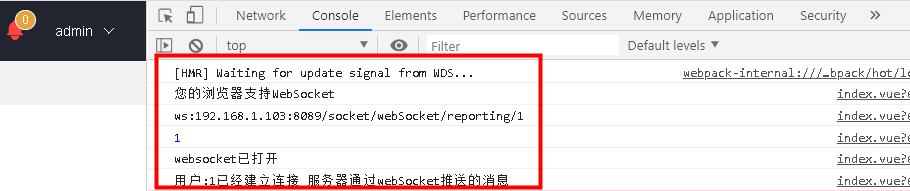
4、webSocket连接成功:
本文来自互联网用户投稿,文章观点仅代表作者本人,不代表本站立场,不承担相关法律责任。如若转载,请注明出处。 如若内容造成侵权/违法违规/事实不符,请点击【内容举报】进行投诉反馈!