自定义的环形进度条样式
1、在style.xml中声明好自定义的环形进度条样式
2、环形进度条的进度样式(progressstyleshape.xml.xml,放到drawable目录下)
<rotate xmlns:android="http://schemas.android.com/apk/res/android"android:fromDegrees="0"android:toDegrees="360"android:pivotX="50%"android:pivotY="50%"><shape
        xmlns:android="http://schemas.android.com/apk/res/android"android:innerRadiusRatio="3"android:shape="ring"android:thicknessRatio="10" android:useLevel="false" ><gradient
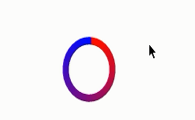
            android:endColor="#0000ff"android:type="sweep"android:startColor="#ff0000" >gradient>shape>rotate>
3、修改布局文件中进度条控件的style值
<ProgressBar
    android:id="@+id/progressBar1"style="@style/CicleProgressBar"android:layout_width="wrap_content"android:layout_height="wrap_content" />
效果:
本文来自互联网用户投稿,文章观点仅代表作者本人,不代表本站立场,不承担相关法律责任。如若转载,请注明出处。 如若内容造成侵权/违法违规/事实不符,请点击【内容举报】进行投诉反馈!