Angular2.js——数据显示
显示数据,即属性绑定机制把数据显示到用户界面上。
在Angular中最典型的数据显示方式,就是把HTML模板中的控件绑定到Angular组件的属性。
接下来介绍几种数据显示的语法和代码片段。
使用插值表达式显示组件属性
要显示组件的属性,最简单的方式就是通过插值表达式来绑定属性名。要使用插值表达式,就把属性名包裹在双花括号里放进视图模板。
app.component.ts
import { Component } from '@angular/core';
@Component({
selector: 'my-app',
template: `   //模板My second Angular App is {{name}}   //双花括号包裹属性名{{title}}
    `/*templateUrl:"/app/template.html"*/
})
export class AppComponent1 {//直接赋值name='Angular';title='Tour of Heros';hero='Windstorm';
先把title name hero三个属性添加到空白的组件中,之后修改模板,使用花括号形式的插值表达式来显示这两个模板属性。
模板是包在ECMAScript2015反引号中的一个多行字符串。
Angular自动从组件中提取属性的值,并把这些值插入到浏览器中。当这些属性发生变化时,Angular会自动刷新显示。
@Component装饰器中指定的CSS选择器selector,它指定了一个叫my-app的元素。该元素是index.html的body里的占位符。
当我们通过main.ts中的AppComponent类启动时,Anjular在index.html中查找一个
使用构造函数来声明和初始化属性
app.component.ts
import { Component } from '@angular/core';
@Component({
selector: 'my-app',
template: `My second Angular App
{{title}}
`
})
export class AppComponent1 {//使用构造函数
title:string;hero:string;constructor(){this.title='Tour of Heros2';this.hero='Windstorm2';}
}
使用ngFor显示数组属性
app.component.ts
import { Component } from '@angular/core';
import {Heroo} from "./hero";
@Component({
selector: 'my-app',
template: `My second Angular App
{{title}}
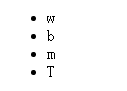
英雄如下:
- {{city}}
这个界面使用了
- 和
- 标签组成的无序列表。
- 元素里的*ngFor是Angular的迭代指令。他将
- 元素及其子标签标记为迭代模板。
*ngFor表达式中city是一个模板输入变量。Angular为列表中的每一个条目复制一个
- 元素,在每个迭代中,把city变量设置为当前条目。Angular把city变量作为花括号插值表达式的上下文。
效果如下:
为数据创建一个类
在app目录下创建一个hero.ts的新文件
hero.ts
export class Heroo{constructor(public id:number,//声明了一个构造函数参数及其类型;// 声明了一个同名的公共属性//当我们new出该类的一个实例时,把该属性初始化为相应的参数值?
        public name:string){}
}
定义了一个类,有两个属性 id和name。
使用这个类Heroo
首先导入这个类,组件的heros属性就可以返回一个类型化的数组了。更新模板,显示英雄的name属性即可。
app.component.ts
import { Component } from '@angular/core'; import {Heroo} from "./hero"; //导入Heroo类 @Component({ selector: 'my-app', template: `My second Angular App
{{title}}
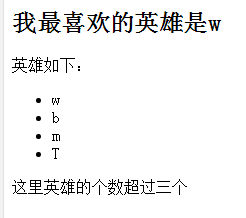
我最喜欢的英雄是{{myhero.name}}
//显示name属性英雄如下:
- {{hero.name}} //显示name属性
使用*ngIf进行条件显示
在模板的
- 标签下面可以添加一个
标签
template: `
My second Angular App
{{title}}
我最喜欢的英雄是{{myhero.name}}
英雄如下:
- {{hero.name}}
这里英雄的个数超过三个
`标签中的表达式意思为如果heros数组的长度大于3,
标签就会显示 这里的英雄的个数超过三个。如果不超过三个,该消息就会消失。
题外话,上述的模板文件是内联的,使用template属性定义成内联得了。除此之外,我们可以把模板文件定义成一个独立的HTML文件中,再通过@Component装饰器的templateUrl属性,在组件元数据中把它链接到组件。
我们可以在app目录下新建一个template.html文件,内容如下
template.html
Title


My second Angular App
{{title}}
我最喜欢的英雄是{{myhero.name}}
英雄如下:
- {{hero.name}}
这里英雄的个数超过三个
之后修改app.component.ts文件
import { Component } from '@angular/core';
import {Heroo} from "./hero"; //导入Heroo类
@Component({
selector: 'my-app',
templateUrl:"/app/template.html"   //相对路径
})
export class AppComponent1 {heros=[new Heroo(1,'w'),new Heroo(2,'b'),new Heroo(3,'m'),new Heroo(4,'T')]myhero=this.heros[0];
}
写的比较简单,希望可以明白。
参考 https://angular.cn/docs/ts/latest/guide/displaying-data.html
转载于:https://www.cnblogs.com/zhaixr/p/6558010.html
本文来自互联网用户投稿,文章观点仅代表作者本人,不代表本站立场,不承担相关法律责任。如若转载,请注明出处。 如若内容造成侵权/违法违规/事实不符,请点击【内容举报】进行投诉反馈!
