Vue2 Vue3对比
先上一个Vue3组件实例
<div id="root">{{counter}}</div>
<script type="module">const Counter = {data() {return {counter: 0}}}const app = Vue.createApp(Counter)app.mount('#root')</script>
组件Counter挂载在根组件root节点上,你发现了什么?
根组件的data也变成了一个函数,通过return 返回一个变量定义状态值,vue2根组件是一个对象;vue3通过暴露createApp方法,便于我们创建根组件
接着往下看:
const TodoItem = {props: ['todo'],template: `{{todo.text}} `}const TodoList = {data() {return {list: [{id: 0, text: 'html'},{id: 1, text: 'javascript'},{id: 3, text: 'css'}]}},components: {TodoItem}}Vue.createApp(TodoList).mount('#root')app.mount('#root')
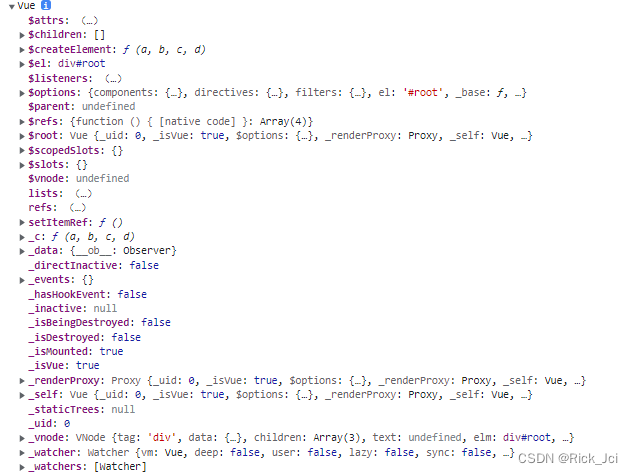
在Vue3实例化后的根组件对象比vue2更简洁了,vue2是一个Vue对象,Vue3是一个object对象 准确的来说应该是一个proxy
vue2对象实例:
Vue3对象
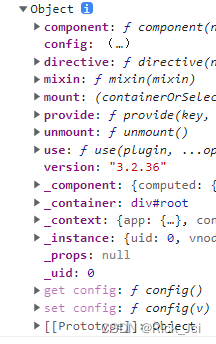
应用和组件实例
每个 Vue 应用都是通过用 createApp 函数创建一个新的应用实例开始的:
const app = Vue.createApp({/* 选项 */
})
该应用实例是用来在应用中注册“全局”组件的。
const app = Vue.createApp({})
//注册组件
app.component('SearchInput', SearchInputComponent)
//自定义指令
app.directive('focus', FocusDirective)
//使用插件
app.use(LocalePlugin)
应用实例暴露的大多数方法都会返回该同一实例,允许链式:
Vue.createApp({}).component('SearchInput', SearchInputComponent).directive('focus', FocusDirective).use(LocalePlugin)
Vue3中组件的使用:
<script>const TodoItem = {props: ['todo'],template: `{{todo.text}} `}const TodoList = {data() {return {list: [{id: 0, text: 'html'},{id: 1, text: 'javascript'},{id: 3, text: 'css'}]}},//可以通过this.$options.components获取到子组件components: {TodoItem},mounted(){console.log(this.$options.components)}}
Vue.createApp(TodoList).mount('#root')
</script>
三、Vue3中插件封装和自定义指令
index.html
<div id="app"><my-component></my-component><input type="text" v-focus /></div><script type="module">import i18nPlugin from './i18n.js'const app = Vue.createApp({mounted() {console.log(this.$translate('greetings.hello'))}})// 全局定义的组件app.component('my-component', {template: `自定义全局组件
`})// 自定义指令(全局)app.directive('focus', {mounted(el) {el.focus() }})// 使用插件const i18nString = {greetings: {hello: '你好'},oparator: {open: '打开',close: '关闭'}}app.use(i18nPlugin, i18nString)app.mount('#app')</script>
i18n.js
export default {install: (app, options) => {// 这里options是app中 i18nString // 挂载一个全局属性到 app.config.globalProperties// key是$translate传进来的 greetings.hello 这个参数app.config.globalProperties.$translate = key => {return key.split('.').reduce((o, i) => {if (o) {return o[i]}}, options)}// app.component()// app.directive()}
}
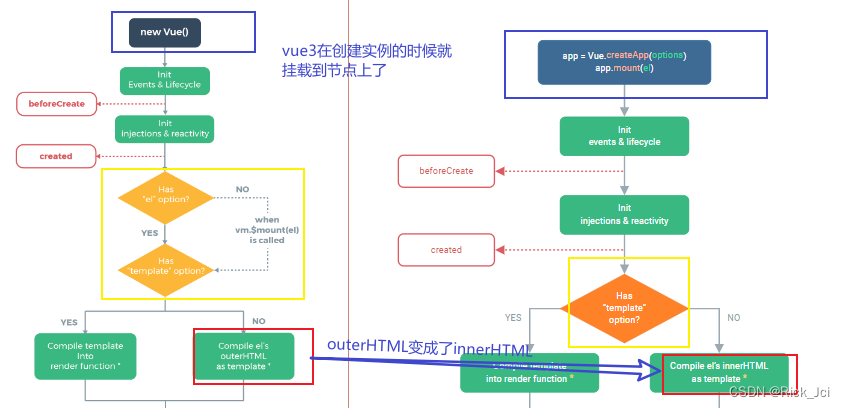
生命周期对比
图一:
图二:
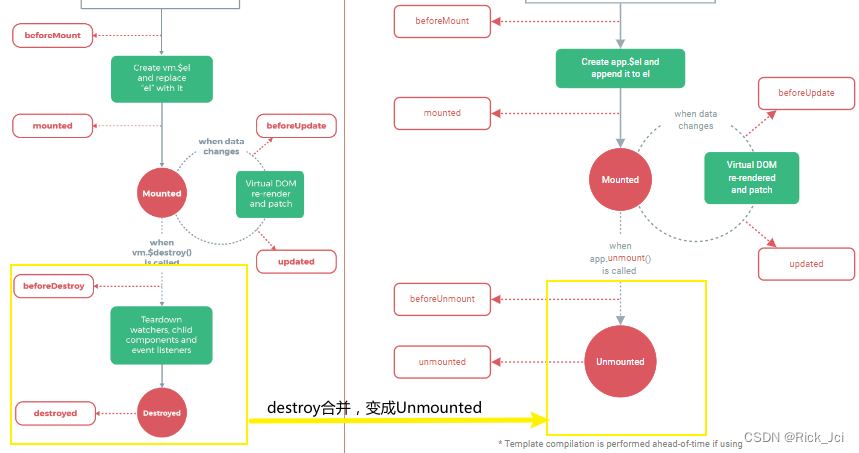
beforeUnmount、unmouted 是 Vue3 调整的钩子。并且通过 app.unmount() 函数触发组件销毁。
v-for/v-if的区别
Vue2中v-for 优先级高于v-if Vue3中v-if优先级高于v-for,在Vue3中v-for遍历的对象可以通过ref绑定函数,将每个处理一遍,vue2无法处理
vue3示例:
<div id="root"><ul v-if="!list2"><!-- <li v-for="li in lists" v-if="li!=='🥕'">{{ li }}</li> --><li v-for="li in lists" :ref="setItemRef">{{ li }}</li></ul><my-component v-for="i in 3">{{i}}</my-component></div><script>const app = Vue.createApp({data() {return {lists: ['🍒', '🍊', '🍇', '🥕'],refs: 'lists',itemRefs: []}},// vue3中这样的使用方法被刨除了通过const list2 = computed({get(){},set(){}})设置computed: {list2() {return this.lists.every(value => {return value !== '🥕'})}},methods: {setItemRef(el) {if (el) {this.itemRefs.push(el)}}},mounted() {// console.log(this.$refs.lists);console.log(this.itemRefs[0])},})app.component('my-component', {template: `my-component
`})app.mount('#root')console.log(app)
Vue3中的多事件处理器
事件处理程序中可以有多个方法,这些方法由逗号运算符分隔:<!-- 这两个 one() 和 two() 将执行按钮点击事件 -->
<button @click="one($event), two($event)">Submit
</button>
// ...
methods: {one(event) {// 第一个事件处理器逻辑...},two(event) {// 第二个事件处理器逻辑...}
}
Vue3中的事件处理封装得更加简便
<div id="root"><input type="text" @keyup.13="handleClick"></div><script>Vue.createApp({methods: {handleClick() {console.log('click.')}},}).mount('#root')</script>
vue3非 Prop 的 Attribute
一个非 prop 的 attribute 是指传向一个组件,但是该组件并没有相应 props 或 emits 定义的 attribute。常见的示例包括 class、style 和 id attribute。可以通过 attrs property 访问那些 attribute。
vue2中会将style,class等默认挂载到组件的根节点上,Vue3中通过 组件内设置 inheritAttrs: false,不会将这些挂载到组件的根节点上,但是可以通过this.$attrs获取
<div id="root"><date-picker data-status="activated" class="a"></date-picker></div><script>const app = Vue.createApp({})app.component('date-picker', {inheritAttrs: false,template: ``,created() {// console.log(this.$attrs.class)}})app.mount('#root')
vue3中的自定义事件,父组件给子组件权利修改父组件的值
<div id="root">{{counted}}<counter v-model:total="counted"></counter></div><script>const app = Vue.createApp({data() {return {counted: 0,}},updated(){console.log("fatherupdated",this.counted)}})app.component('counter', {//相当于父组件给子组件权利修改父组件的值,不破坏数据流的传递// v-model绑定total到父组件的counted,相当于给父组件发消息,让父组件去更新值props: ['total'],//自定义事件,根据父组件data变化响应式渲染,如果emits接收了浏览器默认事件,则浏览器默认事件不执行,这里把他理解为自定义事件emits: ['update:total'],data() {return {count: 0,}},updated(){console.log("sonupdated",this.count)},methods: {handleClick() {this.count++console.log("son")this.$emit('update:total', this.count)}},template: ``})app.mount('#root')</script>
Vue3中的插槽
匿名插槽
    Default slot content
具名插槽
    Footer content
V-slot:可以用#代理
    Footer content
具名插槽接收参数
<todo-list #list="{ index, item }"><span>{{index}}</span> -<span>{{item}}</span></todo-list>template: `
`
provide-inject
//父组件provideprovide() {return {msg: Vue.computed(() => this.str)}},//子组件inject 接收app.component('TodoListStatistics', {inject: ['msg'],template: `{{msg}} TodoListStatistics`,})
异步组件defineAsyncComponent
<div id="root"><suspense><template #default><async-example></async-example></template><template #fallback><div>loading...</div></template></suspense></div><script>const { createApp, defineAsyncComponent } = Vueconst app = createApp({})const AsyncComp = defineAsyncComponent(() => new Promise((resolve, reject) => {setTimeout(() => {resolve({template: 'I am async!'})}, 3000)}))app.component('async-example', AsyncComp)app.mount('#root')
Vue3抛出了$children,通过ref 获取组件
<div id="root"><div><my-button ref="btn">Change logo</my-button></div></div><script>const app = Vue.createApp({mounted() {console.log(this.$refs.btn) // [VueComponent]}})app.component('my-button', {template: ``})app.mount('#root')</script>
Vue3自定义指令
<input type="range" min="0" max="500" v-model="pinPadding"><p v-pin:[direction]="pinPadding">text</p>const app = Vue.createApp({data() {return {pinPadding: 200,direction: 'right'}}})app.directive('pin', (el, binding) => {el.style.position = 'fixed'const s = binding.arg || 'top'el.style[s] = binding.value + 'px'})
自定义标签
<table><tr is="vue:mytr"></tr>
</table>app.component('mytr', {template: `abc 本文来自互联网用户投稿,文章观点仅代表作者本人,不代表本站立场,不承担相关法律责任。如若转载,请注明出处。 如若内容造成侵权/违法违规/事实不符,请点击【内容举报】进行投诉反馈!