在Vue项目中获取当前日期的农历(阴历)
chinese-lunar-calendar
npm安装
npm install --save chinese-lunar-calendar
在vue中的使用
<script>
import { getLunar } from 'chinese-lunar-calendar'
export default {data() {return {getLunarDay: '',year: new Date().getFullYear(),month: new Date().getMonth() + 1,date: new Date().getDate()}},mounted() {// 获取农历this.getLunarDay = getLunar(this.year, this.month, this.date)console.log(this.getLunarDay)}
}
</script>
输出
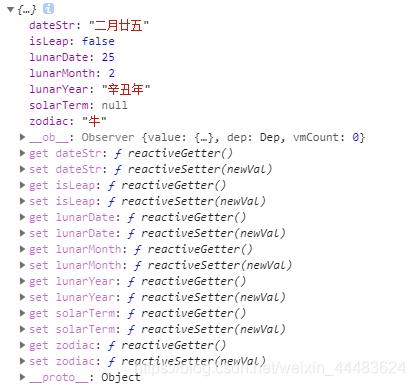
需要哪个值就取哪个值哦O(∩_∩)O
dateStr: “二月廿五” //农历中文
isLeap: false //是否闰月
lunarDate: 25 //农历日期
lunarMonth: 2 //农历月份
lunarYear: “辛丑年” //农历年份,年以正月初一开始
solarTerm: null //节气,null代表没有
zodiac: “牛” //生肖,生肖以正月初一开始
原理
这个库是通过抓取香港天文台 (http://data.weather.gov.hk/gts/time/calendar/text/T2019c.txt) 的数据, 把每年闰月月份和每月的大小保存下来编码压缩,先解压生成数据表,再通过查表算出农历日期和节气
附:chinese-lunar-calendar地址
本文来自互联网用户投稿,文章观点仅代表作者本人,不代表本站立场,不承担相关法律责任。如若转载,请注明出处。 如若内容造成侵权/违法违规/事实不符,请点击【内容举报】进行投诉反馈!