JAVA基于POI的excel模板的导出!
最近学习了点新知识,关于excel的模板,向模板中插入数据然后在导出,就此记录一下。原理和freemarker有点类似,基于POI的基础上进行实现的excel模板导出。实现的功能是前端通过导出按钮调用后台的模板,然后把模板中的数据进行替换。
首先是工具类
AutoExcel
package com.jiuyisoft.utils.excelUtils;import org.apache.poi.xssf.usermodel.XSSFSheet;
import org.apache.poi.xssf.usermodel.XSSFWorkbook;import java.io.*;public class AutoExcel {protected XSSFWorkbook workbook = null;public AutoExcel(String patternPath) throws IOException {loadWorkbook(patternPath);}protected void loadWorkbook(String path) throws IOException {FileInputStream fis = new FileInputStream(path);workbook = new XSSFWorkbook(fis);fis.close();OutputStream output = new FileOutputStream(path);workbook.write(output);output.flush();output.close();}public ExcelSheetGenerator getSheetGenerator(int patternSheetIndex, Object entity) {ExcelSheetGenerator result = null;XSSFSheet newSheet = workbook.cloneSheet(patternSheetIndex);result = new ExcelSheetGenerator(newSheet, entity);return result;}public void removeSheetRange(int startIndex, int count) {for (int i = 0; i < count; i++) {workbook.removeSheetAt(startIndex);}}public void save(String path) throws IOException {FileOutputStream fos = null;fos = new FileOutputStream(path);workbook.write(fos);fos.close();workbook.close();}public XSSFWorkbook getWorkbook() {return workbook;}
}
ExcelSheetGenerator
package com.jiuyisoft.utils.excelUtils;import java.util.List;import org.apache.poi.ss.usermodel.FillPatternType;
import org.apache.poi.xssf.usermodel.*;
import org.apache.poi.ss.usermodel.CellCopyPolicy;
import org.openxmlformats.schemas.drawingml.x2006.main.CTNonVisualDrawingProps;
import org.openxmlformats.schemas.drawingml.x2006.spreadsheetDrawing.CTMarker;
import org.openxmlformats.schemas.drawingml.x2006.spreadsheetDrawing.CTTwoCellAnchor;@SuppressWarnings(value = "all")
public class ExcelSheetGenerator {public static class PatternAction {public enum ActionEnum {Replace, ForEach, Unknown}public ActionEnum action;public String field;public PatternAction(ActionEnum action, String field) {this.action = action;this.field = field;}public static boolean isAction(String text) {return (text.indexOf("{{") != -1) && (text.indexOf("}}") != -1);}public static PatternAction generateAction(String text) {if (!isAction(text)) {return null;}ActionEnum actionEnum = ActionEnum.Unknown;String[] items = text.replace("{{", "").replace("}}", "").split("#");if (items.length < 2) {return null;}if (items[0].equals("replace")) {actionEnum = ActionEnum.Replace;} else if (items[0].equals("foreach")) {actionEnum = ActionEnum.ForEach;}
// else if (items[0].equals("SpecialStyle")) actionEnum = ActionEnum.SpecialStyle;return new PatternAction(actionEnum, items[1].trim());}}protected CellCopyPolicy cellCopyPolicy;protected XSSFSheet patternSheet = null;protected Object entity = null;protected int increaseRows = 0;public ExcelSheetGenerator(XSSFSheet sheet, Object entity) {patternSheet = sheet;this.entity = entity;initConfig();}protected void initConfig() {cellCopyPolicy = (new CellCopyPolicy.Builder()).copyHyperlink(true).cellFormula(true).cellStyle(true).cellValue(true).condenseRows(true).mergedRegions(true).mergeHyperlink(true).rowHeight(true).build();}public static void setCellValue(XSSFCell cell, Object obj) {if (obj instanceof Integer) {cell.setCellValue((Integer) obj);} else if (obj instanceof Double) {cell.setCellValue((Double) obj);} else {cell.setCellValue(String.valueOf(obj));}}public int processPattern(XSSFCell cell, PatternAction action) {try {if (action.action == PatternAction.ActionEnum.Replace) {//cell.setCellValue(entity.getStringByName(action.field));setCellValue(cell, ReflectUtils.getObjectByName(entity, action.field));return 0;
// } else if(action.action == PatternAction.ActionEnum.SpecialStyle) {
// setCellValue(cell, ReflectUtils.getObjectByName(entity, action.field));
// XSSFCellStyle xssfCellStyle = new XSSFCellStyle(null);
// xssfCellStyle.setFillForegroundColor(IndexedColors.GREY_40_PERCENT.getIndex());
// cell.setCellStyle(xssfCellStyle);
// return 0;} else if (action.action == PatternAction.ActionEnum.ForEach) {int startIndex = cell.getRowIndex();XSSFSheet sheet = cell.getSheet();XSSFRow patternRow = sheet.getRow(startIndex + 1);/*int startColIndex = -1, endColIndex = -1;for (int i = cell.getColumnIndex(); i < patternRow.getLastCellNum(); i++) {if (startColIndex == -1) {if (PatternAction.isAction(patternRow.getCell(i).toString())) startColIndex = i;} else {if (PatternAction.isAction(patternRow.getCell(i).toString())) endColIndex = i;else}}String[] fieldPattern = getFieldPattern(patternRow);*/List因为在项目中使用的是基于SpringBoot JPA框架运作的,所以我们在Service层、实现层和Resource层中进行我们数据的替换
Service层
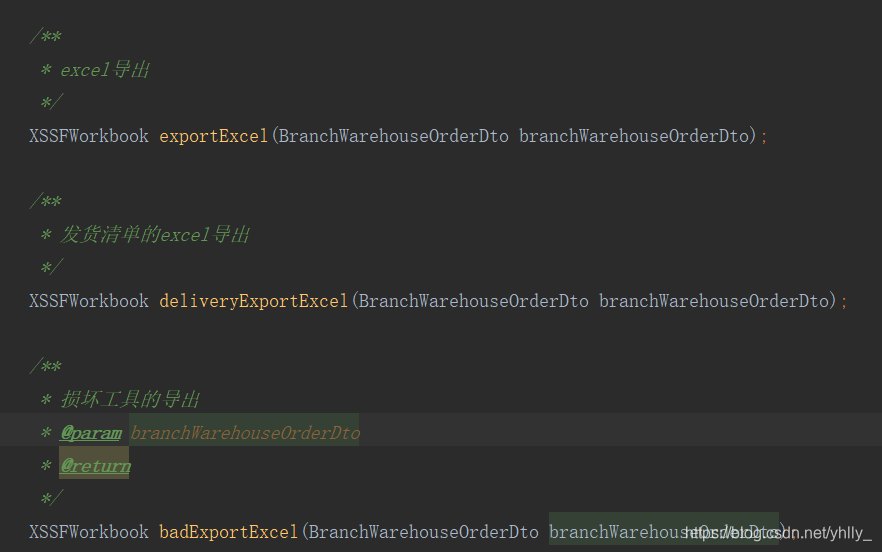
ServiceImpl层
 /*** @Description: 订单excel生成* @Author: YiZhiqiang* @Params: branchWarehouseOrderDto 页面传递的实体类* @Return:* @Date: 2019/11/8 3:54 下午*/@Overridepublic XSSFWorkbook exportExcel(BranchWarehouseOrderDto branchWarehouseOrderDto) {File path = null;String templatePath = "";Warehouse warehouseName = this.warehouseService.findOne(branchWarehouseOrderDto.getApplicationWarehouseId());Institution institution = this.institutionService.findOne(Long.parseLong(branchWarehouseOrderDto.getDeliveryInstitutionId()));try {//根据仓库id获取仓库名branchWarehouseOrderDto.setApplicationWarehouseId(warehouseName.getName());//根据组织id获取组织名branchWarehouseOrderDto.setDeliveryInstitutionId(institution.getOrganizationName());if(branchWarehouseOrderDto.getToolsType().equals("PackageTools")){path = new File(ResourceUtils.getURL("classpath").getPath());if (!path.exists()) {path = new File("");}templatePath = path.getAbsolutePath() + "\\target\\classes\\excelTemplate\\成套调拨申请单模板.xlsx";}else if(branchWarehouseOrderDto.getToolsType().equals("ScatteringTools")){path = new File(ResourceUtils.getURL("classpath").getPath());if (!path.exists()) {path = new File("");}templatePath = path.getAbsolutePath() + "\\target\\classes\\excelTemplate\\散件调拨申请单模板.xlsx";}//获取模板AutoExcel autoExcel = new AutoExcel(templatePath);//生成excelExcelSheetGenerator generator = autoExcel.getSheetGenerator(0, branchWarehouseOrderDto);generator.generate("Page 1");autoExcel.removeSheetRange(0, 1);//返回文件XSSFWorkbook workbook = autoExcel.getWorkbook();return workbook;} catch (Exception e) {e.printStackTrace();return null;}}/*** @Description: 发货订单excel生成* @Author: Yuanhl* @Params: branchWarehouseOrderDto 页面传递的实体类* @Return:* @Date: 2019-11-15 10:14:08*/@Overridepublic XSSFWorkbook deliveryExportExcel(BranchWarehouseOrderDto branchWarehouseOrderDto) {File path = null;String templatePath = "";Institution institution = this.institutionService.findOne(Long.parseLong(branchWarehouseOrderDto.getDeliveryInstitutionId()));try {
//            //发货方 根据组织id获取组织名branchWarehouseOrderDto.setDeliveryInstitutionId(institution.getOrganizationName());
//            //发货方 根据公司名称获取公司地址branchWarehouseOrderDto.setDeliveryCompanyAddress(institution.getAddress());System.out.println("institution.getAddress = " + institution.getAddress());
//            //发货方 根据公司名获取公司联系电话branchWarehouseOrderDto.setCompanyTel(institution.getPhoneNumber());System.out.println("公司联系电话 = " + institution.getPhoneNumber());path = new File(ResourceUtils.getURL("classpath").getPath());if (!path.exists()) {path = new File("");}templatePath = path.getAbsolutePath() + "\\target\\classes\\excelTemplate\\发货清单模板.xlsx";//获取模板AutoExcel autoExcel = new AutoExcel(templatePath);//生成excelExcelSheetGenerator generator = autoExcel.getSheetGenerator(0, branchWarehouseOrderDto);generator.generate("Page 1");autoExcel.removeSheetRange(0, 1);//返回文件XSSFWorkbook workbook = autoExcel.getWorkbook();return workbook;} catch (Exception e) {e.printStackTrace();return null;}}/*** @Description: 损坏工具excel导出* @Author: Yuanhl* @Params: branchWarehouseOrderDto 页面传递的实体类* @Return:* @Date: 2019-11-15 10:14:08*/@Overridepublic XSSFWorkbook badExportExcel(BranchWarehouseOrderDto branchWarehouseOrderDto) {File path = null;String templatePath = "";Institution institution = this.institutionService.findOne(Long.parseLong(branchWarehouseOrderDto.getDeliveryInstitutionId()));try {//发货方 根据组织id获取组织名branchWarehouseOrderDto.setDeliveryInstitutionId(institution.getOrganizationName());// 根据组织id获去组织架构简称path = new File(ResourceUtils.getURL("classpath").getPath());if (!path.exists()) {path = new File("");}templatePath = path.getAbsolutePath() + "\\target\\classes\\excelTemplate\\损坏工具评审模板.xlsx";//获取模板AutoExcel autoExcel = new AutoExcel(templatePath);//生成excelExcelSheetGenerator generator = autoExcel.getSheetGenerator(0, branchWarehouseOrderDto);generator.generate("Page 1");autoExcel.removeSheetRange(0, 1);//返回文件XSSFWorkbook workbook = autoExcel.getWorkbook();return workbook;} catch (Exception e) {e.printStackTrace();return null;}}
Resource层
@PostMapping("/exportExcel")@ApiOperation("导出订单信息Excel")@Action(action = "exportExcel",description = "导出订单信息Excel",dataAccessType = "export")public void exportExcel(@RequestBody BranchWarehouseOrderDto branchWarehouseOrderDto, HttpServletResponse response) {try {XSSFWorkbook workbook = branchWarehouseOrderService.exportExcel(branchWarehouseOrderDto);// 导出数据 设置要导出的文件的名字String fileName = "调拨申请单.xlsx";response.setContentType("application/octet-stream");response.setHeader("Content-disposition", "attachment;filename=" + fileName);response.flushBuffer();workbook.write(response.getOutputStream());} catch (IOException e) {e.printStackTrace();}}@PostMapping("/deliveryExportExcel")@ApiOperation("导出订单信息Excel")@Action(action = "deliveryExportExcel",description = "导出发货清单信息Excel",dataAccessType = "export")public void deliveryExportExcel(@RequestBody BranchWarehouseOrderDto branchWarehouseOrderDto, HttpServletResponse response) {try {XSSFWorkbook workbook = branchWarehouseOrderService.deliveryExportExcel(branchWarehouseOrderDto);// 导出数据 设置要导出的文件的名字String fileName = "发货请单.xlsx";response.setContentType("application/octet-stream");response.setHeader("Content-disposition", "attachment;filename=" + fileName);response.flushBuffer();workbook.write(response.getOutputStream());} catch (IOException e) {e.printStackTrace();}}@PostMapping("/badExportExcel")@ApiOperation("损坏工具评审信息Excel")@Action(action = "badExportExcel",description = "损坏工具评审清单信息Excel",dataAccessType = "export")public void badExportExcel(@RequestBody BranchWarehouseOrderDto branchWarehouseOrderDto, HttpServletResponse response) {try {XSSFWorkbook workbook = branchWarehouseOrderService.badExportExcel(branchWarehouseOrderDto);// 导出数据 设置要导出的文件的名字String fileName = "损坏工具评审.xlsx";response.setContentType("application/octet-stream");response.setHeader("Content-disposition", "attachment;filename=" + fileName);response.flushBuffer();workbook.write(response.getOutputStream());} catch (IOException e) {e.printStackTrace();}}
前端按钮导出(基于Angular)
/*** 导出订单*/output() {this.loading = true;this.service.exportExcel(this.branchWarehouseOrder).subscribe((result) => {const link = document.createElement("a");const blob = new Blob([result.body], {type: 'application/x-xls'});link.setAttribute("href", window.URL.createObjectURL(blob));link.setAttribute("download", new Date().getTime() + ".xlsx");link.style.visibility = "hidden";document.body.appendChild(link);link.click();document.body.removeChild(link);});this.loading = false;}实现效果如下
excel模板
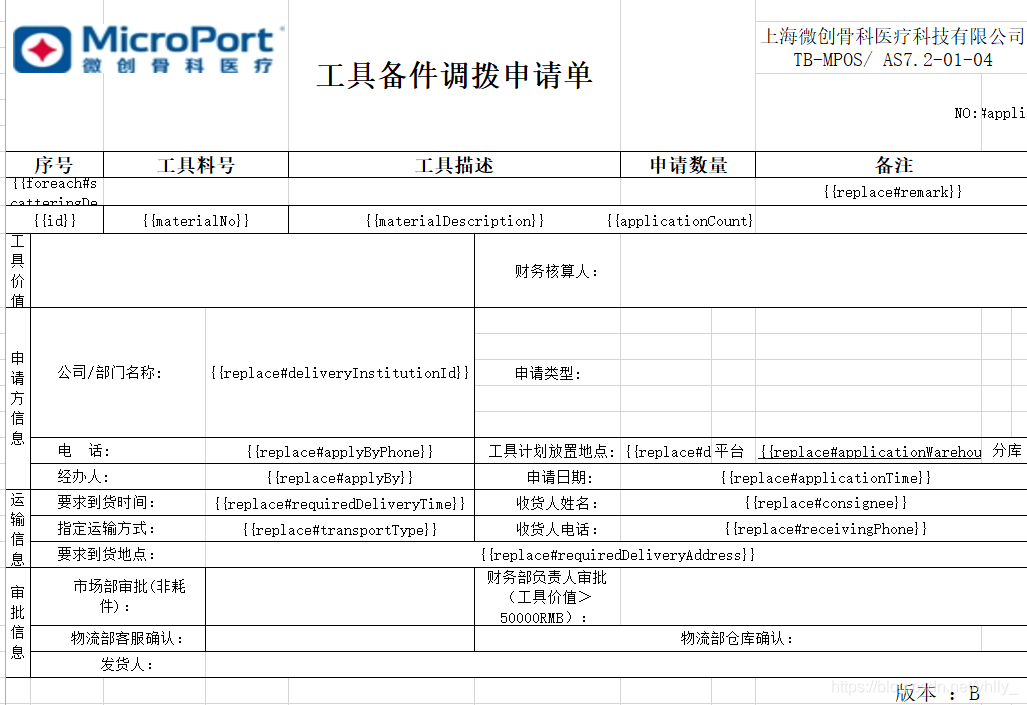
模板数据填充之后的效果

OK! 到了现在基本上已经完成了,但还存在一些小问题,比如明细表中的数据在使用foreach之后会对下面的表格形式进行打乱,查出问题可能是因为这个excel模板不支持上下合并,这就很头痛了。但木得办法,只能用最笨的方法,一行一行了;另外一个问题就是,因为是要根据不同的数据进行导入,然后不同的数据需要勾选不同的复选框,这个功能暂时还未能实现出来555555,等之后实现出来在更新了。仅以此文,记录少年的自己!
本文来自互联网用户投稿,文章观点仅代表作者本人,不代表本站立场,不承担相关法律责任。如若转载,请注明出处。 如若内容造成侵权/违法违规/事实不符,请点击【内容举报】进行投诉反馈!