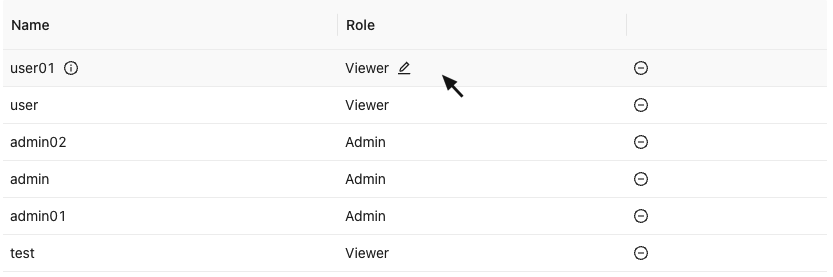
Antd表格鼠标悬浮某一行显示操作按钮
框架:React
UI:antd
import { useEffect, useState } from "react"
import type { ColumnsType } from 'antd/es/table'
import { EditOutlined, MinusCircleOutlined, InfoCircleOutlined } from '@ant-design/icons'interface DataType {user_name: stringuser_role: number
}export default function Table() {const [showIcon, setShowIcon] = useState(false)const [iconIndex, setIconIndex] = useState(-1)const columns: ColumnsType = [{title: 'Name',dataIndex: 'user_name',render: (user_name, record, index) => ({user_name}{ visibility: showIcon && index == iconIndex ? 'visible' : 'hidden' }} onClick={() => toDetailModal(user_name)} /> )},{title: 'Role',dataIndex: 'user_role',render: (user_role, record, index) => ({user_role === 0 ? 'Admin' : 'Viewer'}{ visibility: showIcon && index == iconIndex ? 'visible' : 'hidden' }} onClick={() => handleRoleUpdate(record)} /> )},{title: '',key: 'action',width: 200,render: (_, record) => ( handleDelete(record)} />),},]const hoverRow = (record: any, index: any) => {setShowIcon(true)setIconIndex(index)
}return ( {return {onMouseEnter: () => { hoverRow(record, index) },onMouseLeave: () => setShowIcon(false),}}}columns={columns}dataSource={yourDataSource} />)
} 
本文来自互联网用户投稿,文章观点仅代表作者本人,不代表本站立场,不承担相关法律责任。如若转载,请注明出处。 如若内容造成侵权/违法违规/事实不符,请点击【内容举报】进行投诉反馈!