shiro学习笔记:springboot整合shiro,并使用redis缓存
在B站上看了shiro的教学视频,觉得讲的挺不错的,根据自己的理解,记录一下学习笔记
应用场景是springboot的单体应用
目录
一、整合思路
二、搭建简单的web应用
1、创建应用
2、添加jsp依赖
3、配置properties
4、访问页面
5、如果访问jsp页面报错,进行如下配置
三、整合shiro
1、添加整合依赖
2、先创建一个自定义的Realm
3、创建shiro的过滤器,用来拦截请求
4、创建login页面
5、测试
四、整合mybatis-plus
1、整合步骤
2、创建测试的数据库表
3、整合之后的项目结构
五、实现注册功能
1、创建注册页面:register.jsp
2、配置视图
3、创建获取随机盐的工具类
4、UserController添加注册方法
5、测试
六、登录认证和退出
一、登录认证
1、修改Realm
2、创建登录方法
3、编辑login页面
4、添加工具类,ApplicationContextUtil
5、修改Realm
6、测试
二、退出
1、编辑index页面,添加退出连接
2、添加退出方法
3、测试
七、权限认证
1、数据库
2、index页面添加shiro标签
3、修改role和user对象,添加关联的集合属性
4、添加查询接口
5、修改自定义Realm中的授权方法
6、登录不同账号,进行验证
八、缓存的基本使用
前提:
一、缓存管理器介绍
二、添加缓存管理器
1、添加依赖
2、修改ShiroConfig
3、测试
九、使用redis缓存
1、添加依赖
2、配置文件
3、自定义缓存管理器,实现CacheManager
4、自定义缓存实现类,实现Cache
5、修改ShiroConfig
6、但是此时去login页面登录会报错
7、自定义salt的实现
8、修改认证的实现方法
十、添加验证码
1、先创建一个验证码生成工具VerifyCodeUtils
2、创建页面请求验证码接口
3、放行获取验证码的请求
4、调整login页面
5、调整登录接口
附录:
一、整合思路
直接从教学视频中,截取的图片:
主要就是在之前认证的基础上,在中间加入了shiro框架,加上shiro过滤器

二、搭建简单的web应用
1、创建应用
创建一个简单的springboot项目,勾选lombok、热部署、和spring web等必要的组件
在main目录下添加webapp目录,并新建jsp文件

2、添加jsp依赖
org.apache.tomcat.embed tomcat-embed-jasper
3、配置properties
server.port=8888
server.servlet.context-path=/
4、访问页面
启动项目,访问http://localhost:8888/index.jsp

5、如果访问jsp页面报错,进行如下配置
修改一些idea的配置,选择带有module的即可,重启再去访问

三、整合shiro
1、添加整合依赖
org.apache.shiro shiro-spring-boot-starter 1.4.0
2、先创建一个自定义的Realm
里面实现的方法,暂时都返回为null,表示认证是授权失败
public class MyRealm extends AuthorizingRealm {@Overrideprotected AuthorizationInfo doGetAuthorizationInfo(PrincipalCollection principalCollection) {return null;}@Overrideprotected AuthenticationInfo doGetAuthenticationInfo(AuthenticationToken authenticationToken) throws AuthenticationException {return null;}
}
3、创建shiro的过滤器,用来拦截请求
先拦截一个index.jsp页面资源,用来测试整合是否成功
@Configuration
public class ShiroConfig {//创建过滤器,拦截所有请求@Beanpublic ShiroFilterFactoryBean getShiroFilterFactoryBean(DefaultWebSecurityManager defaultWebSecurityManager){ShiroFilterFactoryBean shiroFilterFactoryBean = new ShiroFilterFactoryBean();shiroFilterFactoryBean.setSecurityManager(defaultWebSecurityManager);//设置角色和资源等权限Map map = new HashMap<>();map.put("/index.jsp","authc");shiroFilterFactoryBean.setLoginUrl("login.jsp");//默认就是login.jspshiroFilterFactoryBean.setFilterChainDefinitionMap(map);return shiroFilterFactoryBean;}//创建安全管理器@Beanpublic DefaultWebSecurityManager getSecurityManager(Realm myRealm){//要用WebDefaultWebSecurityManager securityManager = new DefaultWebSecurityManager();securityManager.setRealm(myRealm);return securityManager;}//创建自定义的Realm@Bean("myRealm")public Realm getRealm(){return new MyRealm();}
}
4、创建login页面
5、测试
访问http://localhost:8888/index.jsp,会重定向到login页面
因为在realm中,授权的时候,返回的是null,没有完成认证
四、整合mybatis-plus
1、整合步骤
参考:https://blog.csdn.net/zifengye520/article/details/121989659
2、创建测试的数据库表
sql如下:
SET NAMES utf8mb4;
SET FOREIGN_KEY_CHECKS = 0;-- ----------------------------
-- Table structure for perms
-- ----------------------------
DROP TABLE IF EXISTS `perms`;
CREATE TABLE `perms`  (`id` varchar(64) CHARACTER SET utf8 COLLATE utf8_general_ci NOT NULL,`name` varchar(255) CHARACTER SET utf8 COLLATE utf8_general_ci DEFAULT NULL,`url` varchar(255) CHARACTER SET utf8 COLLATE utf8_general_ci DEFAULT NULL,PRIMARY KEY (`id`) USING BTREE
) ENGINE = InnoDB CHARACTER SET = utf8 COLLATE = utf8_general_ci ROW_FORMAT = Dynamic;-- ----------------------------
-- Table structure for role
-- ----------------------------
DROP TABLE IF EXISTS `role`;
CREATE TABLE `role`  (`id` varchar(64) CHARACTER SET utf8 COLLATE utf8_general_ci NOT NULL,`rolename` varchar(255) CHARACTER SET utf8 COLLATE utf8_general_ci DEFAULT NULL,PRIMARY KEY (`id`) USING BTREE
) ENGINE = InnoDB CHARACTER SET = utf8 COLLATE = utf8_general_ci ROW_FORMAT = Dynamic;-- ----------------------------
-- Table structure for role_perm
-- ----------------------------
DROP TABLE IF EXISTS `role_perm`;
CREATE TABLE `role_perm`  (`id` varchar(64) CHARACTER SET utf8 COLLATE utf8_general_ci NOT NULL,`roleid` varchar(64) CHARACTER SET utf8 COLLATE utf8_general_ci DEFAULT NULL,`permid` varchar(64) CHARACTER SET utf8 COLLATE utf8_general_ci DEFAULT NULL,PRIMARY KEY (`id`) USING BTREE
) ENGINE = InnoDB CHARACTER SET = utf8 COLLATE = utf8_general_ci ROW_FORMAT = Dynamic;-- ----------------------------
-- Table structure for user
-- ----------------------------
DROP TABLE IF EXISTS `user`;
CREATE TABLE `user`  (`id` varchar(64) CHARACTER SET utf8 COLLATE utf8_general_ci NOT NULL,`username` varchar(255) CHARACTER SET utf8 COLLATE utf8_general_ci DEFAULT NULL,`password` varchar(255) CHARACTER SET utf8 COLLATE utf8_general_ci DEFAULT NULL,`salt` varchar(255) CHARACTER SET utf8 COLLATE utf8_general_ci DEFAULT NULL,PRIMARY KEY (`id`) USING BTREE
) ENGINE = InnoDB CHARACTER SET = utf8 COLLATE = utf8_general_ci ROW_FORMAT = Dynamic;-- ----------------------------
-- Table structure for user_role
-- ----------------------------
DROP TABLE IF EXISTS `user_role`;
CREATE TABLE `user_role`  (`id` varchar(64) CHARACTER SET utf8 COLLATE utf8_general_ci NOT NULL,`userid` varchar(64) CHARACTER SET utf8 COLLATE utf8_general_ci DEFAULT NULL,`roleid` varchar(64) CHARACTER SET utf8 COLLATE utf8_general_ci DEFAULT NULL,PRIMARY KEY (`id`) USING BTREE
) ENGINE = InnoDB CHARACTER SET = utf8 COLLATE = utf8_general_ci ROW_FORMAT = Dynamic;SET FOREIGN_KEY_CHECKS = 1;
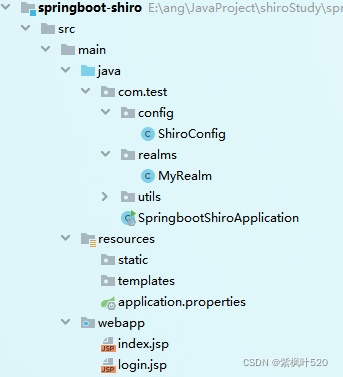
3、整合之后的项目结构

五、实现注册功能
1、创建注册页面:register.jsp
<%@ page contentType="text/html;charset=UTF-8" language="java" %>
register
2、配置视图
spring.mvc.view.prefix=/
spring.mvc.view.suffix=.jsp
3、创建获取随机盐的工具类
public class SaltUtil {private static final String str = "ABCDEFGHIJKLMNOPQRSTUVWXYZ0123456789";public static String getRandomSalt(int num){StringBuffer salt = new StringBuffer();IntStream.range(0,num).forEach(i->{Random random = new Random();//获取随机下标int index = random.nextInt(str.length()+1);//获取字符char result = str.charAt(index);salt.append(result);});return salt.toString();}
}
4、UserController添加注册方法
@PostMapping("/register")
public String register(User user){if(StringUtils.isNullOrEmpty(user.getUsername()) || StringUtils.isNullOrEmpty(user.getPassword())){return "register";
//            return "redirect:/register.jsp";//跳转页面,注意路径,用绝对路径,否则会加上class的前缀
//            return "redirect:toRegister";//跳转接口}String salt = SaltUtil.getRandomSalt(5);String password = user.getPassword();String newPassword = new Md5Hash(password,salt,1024).toHex();user.setPassword(newPassword);user.setSalt(salt);userService.save(user);return "login";
}
5、测试
访问页面:http://localhost:8888/user/register.jsp
输入:zhangsan | 1234,并点击按钮
查看数据库,发现注册成功

六、登录认证和退出
一、登录认证
1、修改Realm
首先要修改ShiroConfig中的Realm,因为要登录要用到盐值加密,所以需要修改Realm中的凭证匹配器
//创建自定义的Realm
@Bean("myRealm")
public Realm getRealm(){MyRealm myRealm = new MyRealm();//设置hashed凭证匹配器HashedCredentialsMatcher credentialsMatcher = new HashedCredentialsMatcher();credentialsMatcher.setHashAlgorithmName("md5");//加密方式md5credentialsMatcher.setHashIterations(1024);//散列次数,1024myRealm.setCredentialsMatcher(credentialsMatcher);return myRealm;
}
2、创建登录方法
可以直接使用SecurityUtils来获取主体
在ShiroConfig中配置了DefaultWebSecurityManager,会自动注入到SecurityUtils中
@Controller
public class LoginController {@RequestMapping("/login")public String login(User user){UsernamePasswordToken token = new UsernamePasswordToken(user.getUsername(),user.getPassword());Subject subject = SecurityUtils.getSubject();try{subject.login(token);}catch (UnknownAccountException e){//账号不存在System.out.println("账号不存在");return "register";}catch (IncorrectCredentialsException e){//密码不正确System.out.println("密码不正确");return "login";}return "index";}
}
3、编辑login页面
<%@ page contentType="text/html;charset=UTF-8" language="java" %>
Login
4、添加工具类,ApplicationContextUtil
添加一个工具类ApplicationContextUtil,用来获取spring容器中的bean,后面的realm中会用到
@Component
public class ApplicationContextUtil implements ApplicationContextAware {private static ApplicationContext context;@Overridepublic void setApplicationContext(ApplicationContext applicationContext) throws BeansException {this.context = applicationContext;}//获取上下文路径public static ApplicationContext getContext(){return context;}//获取beanpublic static Object getBean(String beanName){return context.getBean(beanName);}
}
5、修改Realm
修改自定义的Realm,从数据源获取用户信息,修改doGetAuthenticationInfo方法
@Override
protected AuthenticationInfo doGetAuthenticationInfo(AuthenticationToken authenticationToken) throws AuthenticationException {String principal = (String) authenticationToken.getPrincipal();if(!StringUtils.isNullOrEmpty(principal)){UserService userServiceImpl = (UserService) ApplicationContextUtil.getBean("userServiceImpl");QueryWrapper wrapper = new QueryWrapper();wrapper.eq("username",principal);User user = userServiceImpl.getOne(wrapper);if(user!=null){SimpleAuthenticationInfo info = new SimpleAuthenticationInfo(user.getUsername(),user.getPassword(),ByteSource.Util.bytes(user.getSalt()),this.getName());return info;}}return null;
}
6、测试
1)使用test登录,跳转到register页面,后台打印:账号不存在
2)使用zhangsan登录,随便输入密码,跳转到login页面,后台打印:密码不正确
3)使用zhangsan | 1234登录,进入到index页面
二、退出
1、编辑index页面,添加退出连接
退出登录2、添加退出方法
@RequestMapping("/logout")
public String logout(){Subject subject = SecurityUtils.getSubject();subject.logout();return "login";
}
3、测试
使用zhangsan | 1234登录,进入index页面
点击退出按钮,会进入login页面,测试在URL地址栏输入index.jsp,会发现自动跳转到login页面,因为已经退出成功
七、权限认证
1、数据库
插入测试数据,sql:
-- ----------------------------
-- Records of perms
-- ----------------------------
INSERT INTO `perms` VALUES ('1', 'admin:*:*', NULL);
INSERT INTO `perms` VALUES ('2', 'user:*:*', NULL);
INSERT INTO `perms` VALUES ('3', 'user:find:*', NULL);
INSERT INTO `perms` VALUES ('4', 'product:*:*', NULL);
-- ----------------------------
-- Records of role
-- ----------------------------
INSERT INTO `role` VALUES ('1', 'admin');
INSERT INTO `role` VALUES ('2', 'user');
INSERT INTO `role` VALUES ('3', 'product');
-- ----------------------------
-- Records of role_perm
-- ----------------------------
INSERT INTO `role_perm` VALUES ('1', '1', '1');
INSERT INTO `role_perm` VALUES ('2', '1', '3');
INSERT INTO `role_perm` VALUES ('3', '2', '2');
INSERT INTO `role_perm` VALUES ('4', '3', '3');
-- ----------------------------
-- Records of user
-- ----------------------------
INSERT INTO `user` VALUES ('1', 'admin', '7508cf15e102d437b3d2fd9238d4505e', 'PDTOK');
INSERT INTO `user` VALUES ('2', 'user', '3611dbe2193e0ffd93c2befabfc1d3f9', 'BAMAM');
INSERT INTO `user` VALUES ('3', 'guest', '9697df20425e3d5ac9d0f923f3dcb7f0', 'P6AP8');
-- ----------------------------
-- Records of user_role
-- ----------------------------
INSERT INTO `user_role` VALUES ('1', '1', '1');
INSERT INTO `user_role` VALUES ('2', '2', '2');
INSERT INTO `user_role` VALUES ('3', '3', '3');
2、index页面添加shiro标签
注意:shiro标签的引入
<%@ page contentType="text/html;charset=UTF-8" language="java" %>
<%@ taglib prefix="shiro" uri="http://shiro.apache.org/tags" %>
index
退出登录所有角色都能看
admin角色才能看
user角色才能看
admin或者user角色才能看
user:*:*资源才能看
user:find:*资源才能看
admin:*:*资源才能看
product:*:*资源才能看
3、修改role和user对象,添加关联的集合属性
User:
@Data
@NoArgsConstructor
@AllArgsConstructor
public class User extends Model {private static final long serialVersionUID = 1L;private String id;private String username;private String password;private String salt;@TableField(exist = false)private List roleList;
}
Role:
@Data
public class Role extends Model {private static final long serialVersionUID = 1L;@TableId(value = "id", type = IdType.AUTO)private String id;private String rolename;@TableField(exist = false)private List permsList;
}
4、添加查询接口
添加2个查询接口和sql:根据名称查询用户,根据角色查询权限
查询sql:
mapper接口:
public interface UserMapper extends BaseMapper {List getUserList(String username);List getPermByRole(String roleId);
}
service层省略
5、修改自定义Realm中的授权方法
@Override
protected AuthorizationInfo doGetAuthorizationInfo(PrincipalCollection principalCollection) {String primaryPrincipal = (String) principalCollection.getPrimaryPrincipal();UserService userServiceImpl = (UserService) ApplicationContextUtil.getBean("userServiceImpl");//获取用户List userList = userServiceImpl.getUserList(primaryPrincipal);if(userList==null || userList.size()==0){return null;}SimpleAuthorizationInfo simpleAuthorizationInfo = new SimpleAuthorizationInfo();User user = userList.get(0);//遍历用户角色user.getRoleList().forEach(role -> {//获取角色对应的资源权限List permsList = userServiceImpl.getPermByRole(role.getId());permsList.forEach(perms -> {//添加资源权限simpleAuthorizationInfo.addStringPermission(perms.getName());});//添加角色权限simpleAuthorizationInfo.addRole(role.getRolename());});return simpleAuthorizationInfo;
}
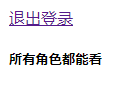
6、登录不同账号,进行验证
-----------------------------------------
user登录:角色:user,资源:user:*:*(包含user:find:*)

-----------------------------------------
guest登录:没有角色和资源
-----------------------------------------
admin登录:角色:admin,资源:admin:*:*、user:find:*

八、缓存的基本使用
前提:
在index页面,每次刷新页面,因为shiro标签,每次都会进行权限认证操作,调用doGetAuthorizationInfo方法会去数据库查询数据
加入页面有N个shiro标签,就会去调用doGetAuthorizationInfo方法N次
加入缓存之后的对比:

一、缓存管理器介绍
1、可以在Realm中定义缓存管理器(见1)
2、可以在SecurityManager中定义缓存管理器(见2)
3、一般在Realm中设置,因为在manager中设置,最终还是给realm使用(见3)
1、查看自定义realm的类图,或者通过点击extends,可以看到MyRealm继承了CachingRealm

查看CachingRealm的源码,可以看到CacheManager的变量和开关

2、使用的安全管理器DefaultWebSecurityManager,查看其类关系图

查看CachingSecurityManager源码:

3、看一下org.apache.shiro.mgt.RealmSecurityManage的源码实现:

二、添加缓存管理器
1、添加依赖
org.apache.shiro shiro-ehcache 1.5.3
2、修改ShiroConfig
在shiro配置类中,定义Realm的时候,给自定义的Realm设置缓存管理器
@Bean("myRealm")
public Realm getRealm(){MyRealm myRealm = new MyRealm();//设置hashed凭证匹配器HashedCredentialsMatcher credentialsMatcher = new HashedCredentialsMatcher();credentialsMatcher.setHashAlgorithmName("md5");//加密方式md5credentialsMatcher.setHashIterations(1024);//散列次数,1024myRealm.setCredentialsMatcher(credentialsMatcher);//开启缓存,设置缓存管理器myRealm.setCachingEnabled(true);myRealm.setAuthenticationCachingEnabled(true);myRealm.setAuthorizationCachingEnabled(true);myRealm.setCacheManager(new EhCacheManager());return myRealm;
}
3、测试
此时登录login,访问index,第一次会访问数据库,再次刷新页面的时候,不会再去访问数据库,也不会进去doGetAuthorizationInfo方法
九、使用redis缓存
1、添加依赖
org.springframework.boot spring-boot-starter-data-redis
2、配置文件
#redis
spring.redis.port=6379
spring.redis.host=localhost
spring.redis.database=0
3、自定义缓存管理器,实现CacheManager
public class RedisCacheManager implements CacheManager {@Overridepublic  Cache getCache(String s) throws CacheException {//返回自定义的缓存实现return new RedisCache(s);}
}
4、自定义缓存实现类,实现Cache
public class RedisCache implements Cache {private String name ;public RedisCache(){}public RedisCache(String name){System.out.println("name="+name);this.name = name;}private RedisTemplate getRedisTemplate(){RedisTemplate redisTemplate = (RedisTemplate) ApplicationContextUtil.getBean("redisTemplate");redisTemplate.setKeySerializer(new StringRedisSerializer());redisTemplate.setHashKeySerializer(new StringRedisSerializer());return redisTemplate;}@Overridepublic V get(K k) throws CacheException {System.out.println("------------------get from "+k.toString());return (V) getRedisTemplate().opsForHash().get(name,k.toString());}@Overridepublic V put(K k, V v) throws CacheException {System.out.println("------------------put "+ v +" with "+k.toString());getRedisTemplate().opsForHash().put(name,k.toString(),v);return null;}@Overridepublic V remove(K k) throws CacheException {System.out.println("------------------delete "+k.toString());getRedisTemplate().opsForHash().delete(name,k.toString());return null;}@Overridepublic void clear() throws CacheException {System.out.println("------------------clear");getRedisTemplate().opsForHash().delete(name);}@Overridepublic int size() {return 0;}@Overridepublic Set keys() {return getRedisTemplate().opsForHash().keys(this.name);}@Overridepublic Collection values() {return getRedisTemplate().opsForHash().values(this.name);}
}
5、修改ShiroConfig
在配置类中修改realm的缓存管理器
@Bean("myRealm")public Realm getRealm(){MyRealm myRealm = new MyRealm();//设置hashed凭证匹配器HashedCredentialsMatcher credentialsMatcher = new HashedCredentialsMatcher();credentialsMatcher.setHashAlgorithmName("md5");//加密方式md5credentialsMatcher.setHashIterations(1024);//散列次数,1024myRealm.setCredentialsMatcher(credentialsMatcher);//开启缓存,设置缓存管理器myRealm.setCachingEnabled(true);myRealm.setAuthenticationCachingEnabled(true);myRealm.setAuthorizationCachingEnabled(true);
//        myRealm.setCacheManager(new EhCacheManager());myRealm.setCacheManager(new RedisCacheManager());return myRealm;}
6、但是此时去login页面登录会报错

出错原因:由于shiro中提供的simpleByteSource实现,没有实现序列化,所以在认证时出现错误信息
解决方法:自定义salt实现,实现序列化接口
7、自定义salt的实现
有2种方式:
1)实现ByteSource接口和Serializable接口,要实现ByteSource的所有方法,比较麻烦,如下:
public class CustomSimpleByteSource implements ByteSource, Serializable {private static final long serialVersionUID = 1L;private  byte[] bytes;private String cachedHex;private String cachedBase64;public CustomSimpleByteSource(){}public CustomSimpleByteSource(byte[] bytes) {this.bytes = bytes;}public CustomSimpleByteSource(char[] chars) {this.bytes = CodecSupport.toBytes(chars);}public CustomSimpleByteSource(String string) {this.bytes = CodecSupport.toBytes(string);}public CustomSimpleByteSource(ByteSource source) {this.bytes = source.getBytes();}public CustomSimpleByteSource(File file) {this.bytes = (new com.test.redis.CustomSimpleByteSource.BytesHelper()).getBytes(file);}public CustomSimpleByteSource(InputStream stream) {this.bytes = (new com.test.redis.CustomSimpleByteSource.BytesHelper()).getBytes(stream);}public static boolean isCompatible(Object o) {return o instanceof byte[] || o instanceof char[] || o instanceof String || o instanceof ByteSource || o instanceof File || o instanceof InputStream;}public byte[] getBytes() {return this.bytes;}public boolean isEmpty() {return this.bytes == null || this.bytes.length == 0;}public String toHex() {if (this.cachedHex == null) {this.cachedHex = Hex.encodeToString(this.getBytes());}return this.cachedHex;}public String toBase64() {if (this.cachedBase64 == null) {this.cachedBase64 = Base64.encodeToString(this.getBytes());}return this.cachedBase64;}public String toString() {return this.toBase64();}public int hashCode() {return this.bytes != null && this.bytes.length != 0 ? Arrays.hashCode(this.bytes) : 0;}public boolean equals(Object o) {if (o == this) {return true;} else if (o instanceof ByteSource) {ByteSource bs = (ByteSource)o;return Arrays.equals(this.getBytes(), bs.getBytes());} else {return false;}}private static final class BytesHelper extends CodecSupport {private BytesHelper() {}public byte[] getBytes(File file) {return this.toBytes(file);}public byte[] getBytes(InputStream stream) {return this.toBytes(stream);}}
}
2)自定义一个类,继承SimpleByteSource 和 实现Serializable接口
public class MyByteSource extends SimpleByteSource implements Serializable {private static final long serialVersionUID = 1L;public MyByteSource(String string) {super(string);}
}
8、修改认证的实现方法
在自定义Realm中,修改认证的实现方法
@Override
protected AuthenticationInfo doGetAuthenticationInfo(AuthenticationToken authenticationToken) throws AuthenticationException {System.out.println("--------------------开始认证--------------------");String principal = (String) authenticationToken.getPrincipal();if(!StringUtils.isNullOrEmpty(principal)){UserService userServiceImpl = (UserService) ApplicationContextUtil.getBean("userServiceImpl");QueryWrapper wrapper = new QueryWrapper();wrapper.eq("username",principal);//查询用户User user = userServiceImpl.getOne(wrapper);//如果存在,返回if(user!=null){
//                SimpleAuthenticationInfo info = new SimpleAuthenticationInfo(user.getUsername(),user.getPassword(),
//                        ByteSource.Util.bytes(user.getSalt()),this.getName());
//                SimpleAuthenticationInfo info = new SimpleAuthenticationInfo(user.getUsername(),user.getPassword(),
//                        new CustomSimpleByteSource(user.getSalt()),this.getName());SimpleAuthenticationInfo info = new SimpleAuthenticationInfo(user.getUsername(),user.getPassword(),new MyByteSource(user.getSalt()),this.getName());return info;}}return null;
}
此时,再去登录,可以正常登录,也可以正常保存redis缓存

十、添加验证码
1、先创建一个验证码生成工具VerifyCodeUtils
public class VerifyCodeUtils {//使用到Algerian字体,系统里没有的话需要安装字体,字体只显示大写,去掉了1,0,i,o几个容易混淆的字符public static final String VERIFY_CODES = "23456789ABCDEFGHJKLMNPQRSTUVWXYZ";private static Random random = new Random();/*** 使用系统默认字符源生成验证码* @param verifySize    验证码长度* @return*/public static String generateVerifyCode(int verifySize){return generateVerifyCode(verifySize, VERIFY_CODES);}/*** 使用指定源生成验证码* @param verifySize    验证码长度* @param sources   验证码字符源* @return*/public static String generateVerifyCode(int verifySize, String sources){if(sources == null || sources.length() == 0){sources = VERIFY_CODES;}int codesLen = sources.length();Random rand = new Random(System.currentTimeMillis());StringBuilder verifyCode = new StringBuilder(verifySize);for(int i = 0; i < verifySize; i++){verifyCode.append(sources.charAt(rand.nextInt(codesLen-1)));}return verifyCode.toString();}/*** 生成随机验证码文件,并返回验证码值* @param w* @param h* @param outputFile* @param verifySize* @return* @throws IOException*/public static String outputVerifyImage(int w, int h, File outputFile, int verifySize) throws IOException {String verifyCode = generateVerifyCode(verifySize);outputImage(w, h, outputFile, verifyCode);return verifyCode;}/*** 输出随机验证码图片流,并返回验证码值* @param w* @param h* @param os* @param verifySize* @return* @throws IOException*/public static String outputVerifyImage(int w, int h, OutputStream os, int verifySize) throws IOException{String verifyCode = generateVerifyCode(verifySize);outputImage(w, h, os, verifyCode);return verifyCode;}/*** 生成指定验证码图像文件* @param w* @param h* @param outputFile* @param code* @throws IOException*/public static void outputImage(int w, int h, File outputFile, String code) throws IOException{if(outputFile == null){return;}File dir = outputFile.getParentFile();if(!dir.exists()){dir.mkdirs();}try{outputFile.createNewFile();FileOutputStream fos = new FileOutputStream(outputFile);outputImage(w, h, fos, code);fos.close();} catch(IOException e){throw e;}}/*** 输出指定验证码图片流* @param w* @param h* @param os* @param code* @throws IOException*/public static void outputImage(int w, int h, OutputStream os, String code) throws IOException{int verifySize = code.length();BufferedImage image = new BufferedImage(w, h, BufferedImage.TYPE_INT_RGB);Random rand = new Random();Graphics2D g2 = image.createGraphics();g2.setRenderingHint(RenderingHints.KEY_ANTIALIASING,RenderingHints.VALUE_ANTIALIAS_ON);Color[] colors = new Color[5];Color[] colorSpaces = new Color[] { Color.WHITE, Color.CYAN,Color.GRAY, Color.LIGHT_GRAY, Color.MAGENTA, Color.ORANGE,Color.PINK, Color.YELLOW };float[] fractions = new float[colors.length];for(int i = 0; i < colors.length; i++){colors[i] = colorSpaces[rand.nextInt(colorSpaces.length)];fractions[i] = rand.nextFloat();}Arrays.sort(fractions);g2.setColor(Color.GRAY);// 设置边框色g2.fillRect(0, 0, w, h);Color c = getRandColor(200, 250);g2.setColor(c);// 设置背景色g2.fillRect(0, 2, w, h-4);//绘制干扰线Random random = new Random();g2.setColor(getRandColor(160, 200));// 设置线条的颜色for (int i = 0; i < 20; i++) {int x = random.nextInt(w - 1);int y = random.nextInt(h - 1);int xl = random.nextInt(6) + 1;int yl = random.nextInt(12) + 1;g2.drawLine(x, y, x + xl + 40, y + yl + 20);}// 添加噪点float yawpRate = 0.05f;// 噪声率int area = (int) (yawpRate * w * h);for (int i = 0; i < area; i++) {int x = random.nextInt(w);int y = random.nextInt(h);int rgb = getRandomIntColor();image.setRGB(x, y, rgb);}shear(g2, w, h, c);// 使图片扭曲g2.setColor(getRandColor(100, 160));int fontSize = h-4;Font font = new Font("Algerian", Font.ITALIC, fontSize);g2.setFont(font);char[] chars = code.toCharArray();for(int i = 0; i < verifySize; i++){AffineTransform affine = new AffineTransform();affine.setToRotation(Math.PI / 4 * rand.nextDouble() * (rand.nextBoolean() ? 1 : -1), (w / verifySize) * i + fontSize/2, h/2);g2.setTransform(affine);g2.drawChars(chars, i, 1, ((w-10) / verifySize) * i + 5, h/2 + fontSize/2 - 10);}g2.dispose();ImageIO.write(image, "jpg", os);}private static Color getRandColor(int fc, int bc) {if (fc > 255)fc = 255;if (bc > 255)bc = 255;int r = fc + random.nextInt(bc - fc);int g = fc + random.nextInt(bc - fc);int b = fc + random.nextInt(bc - fc);return new Color(r, g, b);}private static int getRandomIntColor() {int[] rgb = getRandomRgb();int color = 0;for (int c : rgb) {color = color << 8;color = color | c;}return color;}private static int[] getRandomRgb() {int[] rgb = new int[3];for (int i = 0; i < 3; i++) {rgb[i] = random.nextInt(255);}return rgb;}private static void shear(Graphics g, int w1, int h1, Color color) {shearX(g, w1, h1, color);shearY(g, w1, h1, color);}private static void shearX(Graphics g, int w1, int h1, Color color) {int period = random.nextInt(2);boolean borderGap = true;int frames = 1;int phase = random.nextInt(2);for (int i = 0; i < h1; i++) {double d = (double) (period >> 1)* Math.sin((double) i / (double) period+ (6.2831853071795862D * (double) phase)/ (double) frames);g.copyArea(0, i, w1, 1, (int) d, 0);if (borderGap) {g.setColor(color);g.drawLine((int) d, i, 0, i);g.drawLine((int) d + w1, i, w1, i);}}}private static void shearY(Graphics g, int w1, int h1, Color color) {int period = random.nextInt(40) + 10; // 50;boolean borderGap = true;int frames = 20;int phase = 7;for (int i = 0; i < w1; i++) {double d = (double) (period >> 1)* Math.sin((double) i / (double) period+ (6.2831853071795862D * (double) phase)/ (double) frames);g.copyArea(i, 0, 1, h1, 0, (int) d);if (borderGap) {g.setColor(color);g.drawLine(i, (int) d, i, 0);g.drawLine(i, (int) d + h1, i, h1);}}}public static void main(String[] args) throws IOException {//获取验证码String s = generateVerifyCode(4);//将验证码放入图片中outputImage(260,60,new File("/Users/chenyannan/Desktop/安工资料/aa.jpg"),s);System.out.println(s);}
}
2、创建页面请求验证码接口
@RequestMapping("getImage")
public void getImage(HttpSession session, HttpServletResponse response) throws IOException {//生成验证码String code = VerifyCodeUtils.generateVerifyCode(4);//验证码放入sessionsession.setAttribute("code",code);//验证码存入图片ServletOutputStream os = response.getOutputStream();response.setContentType("image/png");VerifyCodeUtils.outputImage(220,60,os,code);
}
3、放行获取验证码的请求
map.put("/user/getImage","anon");//验证码4、调整login页面
5、调整登录接口
@RequestMapping("/login")
public String login(User user, String code, HttpSession session){UsernamePasswordToken token = new UsernamePasswordToken(user.getUsername(),user.getPassword());try{//比较验证码String codes = (String) session.getAttribute("code");if (codes.equalsIgnoreCase(code)){Subject subject = SecurityUtils.getSubject();subject.login(token);}}catch (UnknownAccountException e){//账号不存在System.out.println("账号不存在");return "register";}catch (IncorrectCredentialsException e){//密码不正确System.out.println("密码不正确");return "login";}
//        return "index";return "redirect:index.jsp";
}
附录:
jsp常用标签
游客访问
user 标签:用户已经通过认证\记住我 登录后显示响应的内容
欢迎[ authenticated标签:用户身份验证通过,即 Subjec.login 登录成功 不是记住我登录的
用户[ notAuthenticated标签:用户未进行身份验证,即没有调用Subject.login进行登录,包括"记住我"也属于未进行身份验证
未身份验证(包括"记住我")
principal 标签:显示用户身份信息,默认调用
Subjec.getPrincipal()获取,即Primary Principal
用户[ hasAnyRoles标签:如果Subject有任意一个角色(或的关系)将显示body体里的内容
用户[ lacksRole:如果当前 Subjec没有角色将显示body体内的内容
用户[ hashPermission:如果当前Subject有权限将显示body体内容
用户[ lacksPermission:如果当前Subject没有权限将显示body体内容
用户[ 本文来自互联网用户投稿,文章观点仅代表作者本人,不代表本站立场,不承担相关法律责任。如若转载,请注明出处。 如若内容造成侵权/违法违规/事实不符,请点击【内容举报】进行投诉反馈!