使用prettier 格式化(美化)代码字符串,上传提交操作
Prettier格式化代码
1.简述
想必prettier大家都熟悉,前端的小伙伴们如果用vs code那就可能用过这个美化代码插件
prettier不仅是美化代码插件,它还能在代码中将字符串格式化
2.格式化代码
-
安装
- npm i prettier
-
格式化html或vue
// 引入prettier import prettier from "prettier/standalone"; // 引入格式化插件 Html import parserHtml from "prettier/parser-html"; // 格式化代码 export function prettierCode(code) {try {// 参数1:代码字符串,参数2:格式化配置return prettier.format(code, {// 使用html格式parser: "html",// 使用引入的插件parserHtml格式化plugins: [parserHtml],// 允许vue脚本vueIndentScriptAndStyle: true,});} catch (error) {// 如果格式化失败,返回源码return code;} } -
效果
-
未格式化
-
格式化后的文本
-
-
来来来,再喝一杯
-
官网与格式化相关链接:https://prettier.io/docs/en/plugins.html#parsers
-
默认引入prettier时引入的插件
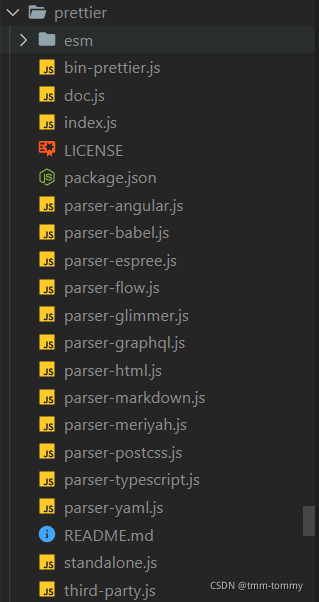
-
这是源码里
参数2的一些配置export interface RequiredOptions extends doc.printer.Options {/*** Print semicolons at the ends of statements.* @default true*/semi: boolean;/*** Use single quotes instead of double quotes.* @default false*/singleQuote: boolean;/*** Use single quotes in JSX.* @default false*/jsxSingleQuote: boolean;/*** Print trailing commas wherever possible.* @default 'es5'*/trailingComma: 'none' | 'es5' | 'all';/*** Print spaces between brackets in object literals.* @default true*/bracketSpacing: boolean;/*** Put the `>` of a multi-line HTML (HTML, JSX, Vue, Angular) element at the end of the last line instead of being* alone on the next line (does not apply to self closing elements).* @default false*/bracketSameLine: boolean;/*** Put the `>` of a multi-line JSX element at the end of the last line instead of being alone on the next line.* @default false* @deprecated use bracketSameLine instead*/jsxBracketSameLine: boolean;/*** Format only a segment of a file.* @default 0*/rangeStart: number;/*** Format only a segment of a file.* @default Infinity*/rangeEnd: number;/*** Specify which parser to use.*/parser: LiteralUnion| CustomParser;/*** Specify the input filepath. This will be used to do parser inference.*/filepath: string;/*** Prettier can restrict itself to only format files that contain a special comment, called a pragma, at the top of the file.* This is very useful when gradually transitioning large, unformatted codebases to prettier.* @default false*/requirePragma: boolean;/*** Prettier can insert a special @format marker at the top of files specifying that* the file has been formatted with prettier. This works well when used in tandem with* the --require-pragma option. If there is already a docblock at the top of* the file then this option will add a newline to it with the @format marker.* @default false*/insertPragma: boolean;/*** By default, Prettier will wrap markdown text as-is since some services use a linebreak-sensitive renderer.* In some cases you may want to rely on editor/viewer soft wrapping instead, so this option allows you to opt out.* @default 'preserve'*/proseWrap: 'always' | 'never' | 'preserve';/*** Include parentheses around a sole arrow function parameter.* @default 'always'*/arrowParens: 'avoid' | 'always';/*** Provide ability to support new languages to prettier.*/plugins: Array ;/*** Specify plugin directory paths to search for plugins if not installed in the same `node_modules` where prettier is located.*/pluginSearchDirs: string[];/*** How to handle whitespaces in HTML.* @default 'css'*/htmlWhitespaceSensitivity: 'css' | 'strict' | 'ignore';/*** Which end of line characters to apply.* @default 'lf'*/endOfLine: 'auto' | 'lf' | 'crlf' | 'cr';/*** Change when properties in objects are quoted.* @default 'as-needed'*/quoteProps: 'as-needed' | 'consistent' | 'preserve';/*** Whether or not to indent the code inside
-
