react---todoList案例
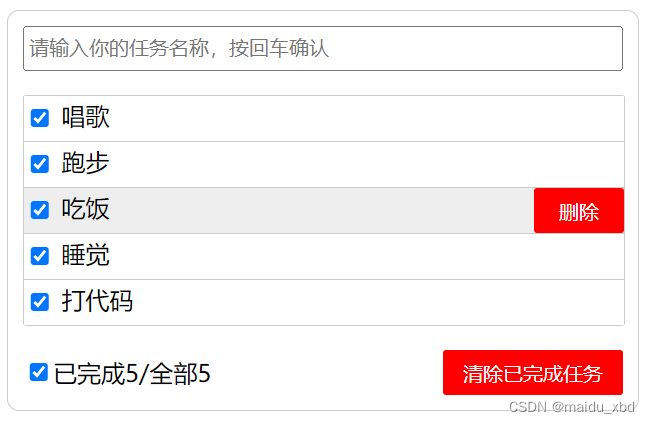
todoList案例效果图
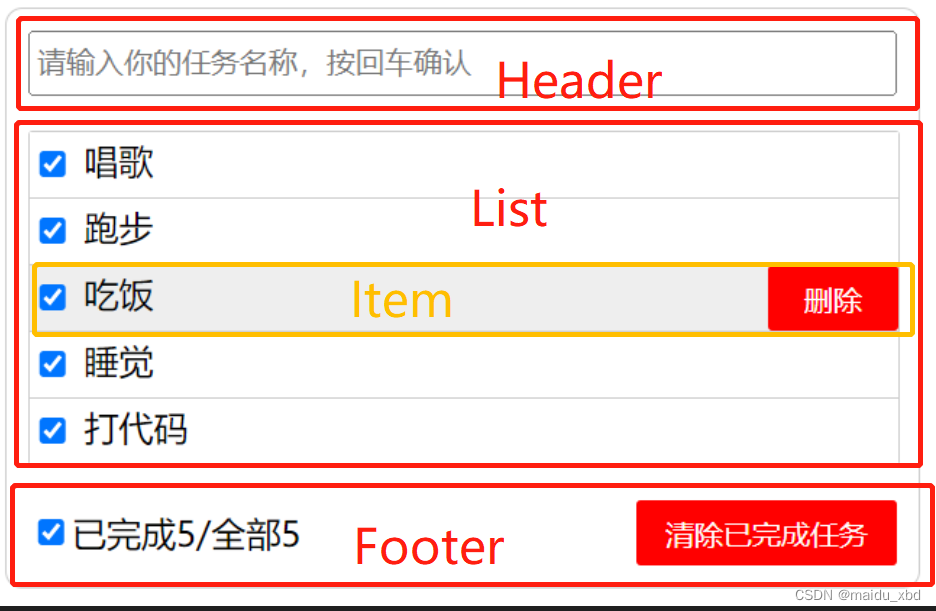
1.组件拆分
2.操作state数据
state 放在哪个组件:
- 如果某个组件组件使用: 放在其自身的state中。
- 如果某些组件使用:放在他们共同的父组件state中(官方称此操作为状态提升)
状态(state)在哪,操作状态的方法就在哪里。
App.jsx维护状态(数据),因此操作状态的新增,删除,选择等方法 要放在App.jsx中
addTodo = (todoObj) => {console.log("App接收的子组件Header传来的参数", todoObj);const { todoList } = this.state;const newList = [todoObj, ...todoList];this.setState({ todoList: newList });};
3.父子通信
父子通信:父->子通过props传递;子->父通过props传递,要求父提前给子传递一个函数
//App.jsx
allCheck = (done) => {const { todoList } = this.state;console.log("接受子组件footer的值", done);const newList = todoList.map((item) => {return { ...item, done: done };});this.setState({ todoList: newList });};deleteCheck = () => {const { todoList } = this.state;const newList = todoList.filter((item) => !item.done);this.setState({ todoList: newList });};render() {const { todoList } = this.state;return ();
}
父到子传递数据:App向Footer传递列表数据通过props传递,在Footer标签中通过【todoList={todoList}】传递todoList的数据,在Footer中通过【 const {todoList}=this.props】接收数据。
子到父传递数据:以全选为例,Footer要向App传递全选按钮的checked状态值为false还是true,需要事先在App定义好一个方法,并传递给Footer【allCheck={this.allCheck}】,在Footer中通过【 this.props.allCheck(event.target.checked)】传递数据
export default class Footer extends Component {handleAllCheck=(event)=>{this.props.allCheck(event.target.checked)}handleDeleteCheck=()=>{this.props.deleteCheck()}render() {const {todoList}=this.propsconst count=todoList.length;// reduce用来累加// const doneCount=todoList.reduce((prev,current)=>{return prev+(current.done?1:0)},0)// 精简以上写法const doneCount=todoList.reduce((prev,current)=>prev+(current.done?1:0),0)return (已完成{doneCount}/全部{count})}
}
4.defaultChecked和checked区别
defaultChecked:仅在第一次初次渲染时生效,更新时不受控制;
checked:始终受到控制,必须通过绑定 onChange 事件来控制选中情况。
类似的还有:defaultValue和value
5.关于案例中一些js用法
reduce---用来实现计算已完成的个数
// reduce用来累加
// const doneCount=todoList.reduce((prev,current)=>{return prev+(current.done?1:0)},0)
// 精简以上写法
const doneCount=todoList.reduce((prev,current)=>prev+(current.done?1:0),0)
JavaScript中Reduce() 的6个用例
nanoid---生成唯一的id
import {nanoid} from "nanoid"
const obj={id:nanoid(),name:target.value,done:false}
通过{...item}批量传值
{todoList.map(item=>{return - })}
传统的 HTML通过【οnclick="demo()"】绑定事件,
在react中【onClick={this.demo}】
或者【onClick={this.demo()}】,加了()必须在demo还有一个回调函数
handleMouse = (flag) => {// 注意这里要return一个回调,因为标签中调用时加了()return () => {this.setState({ mouse: flag });};};
本文来自互联网用户投稿,文章观点仅代表作者本人,不代表本站立场,不承担相关法律责任。如若转载,请注明出处。 如若内容造成侵权/违法违规/事实不符,请点击【内容举报】进行投诉反馈!