umy-ui树形结构表格懒加载用法详解
效果图
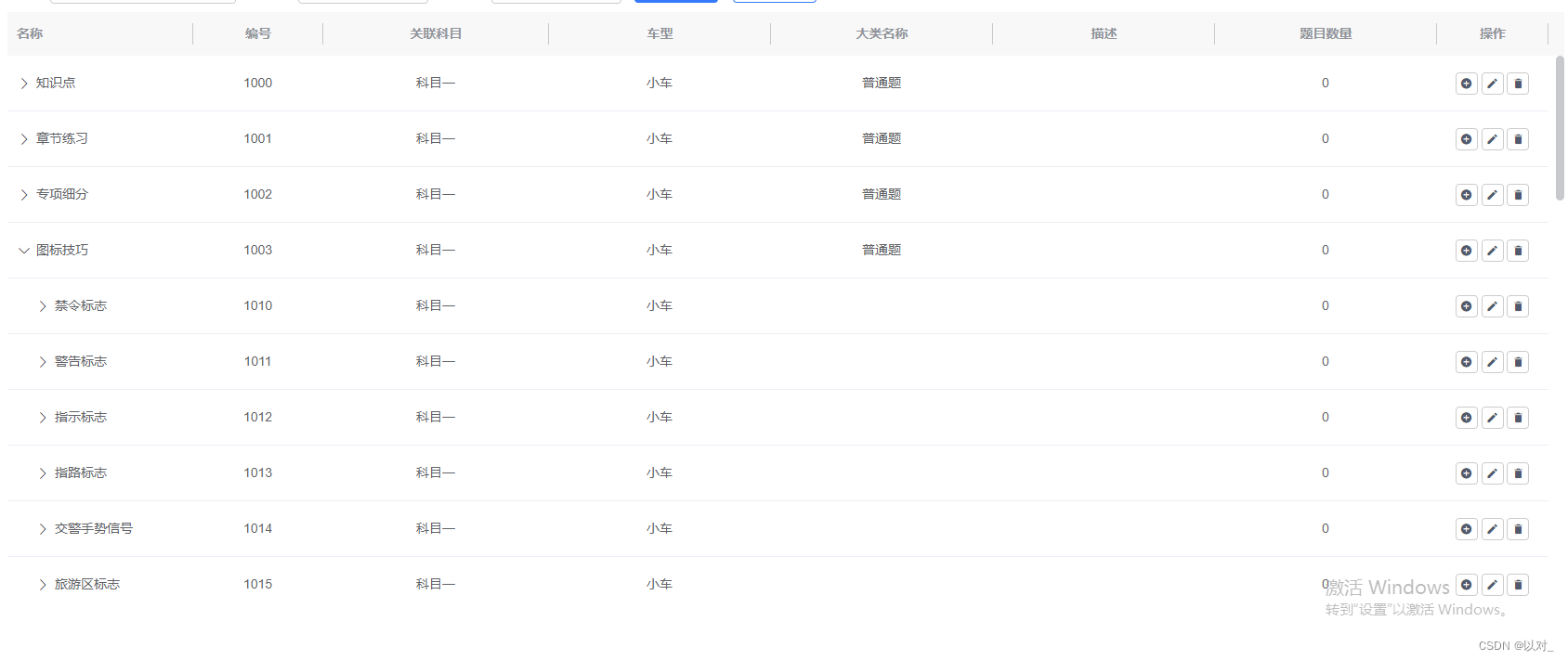
在做后台时,使用的iview组件库中的树形表格,但数据量过大时会导致页面卡死,借助umy-ui的虚拟表格完美解决了数据量大卡顿的问题。
先放文档:http://www.umyui.com/umycomponent/u-table-column-api
安装
npm install umy-ui
引入
全局引入:在main.js中放入以下代码
import Vue from 'vue';import UmyUi from 'umy-ui'import 'umy-ui/lib/theme-chalk/index.css';// 引入样式import App from './App.vue';Vue.use(UmyUi);new Vue({el: '#app',render: h => h(App)});
按需引入:
先安装 babel-plugin-component
npm install babel-plugin-component -D在 .babelrc 中plugins添加:
{"plugins": [["component",{"libraryName": "umy-ui","styleLibraryName": "theme-chalk"}]]
}在main.js中按需引入:(这里我只需要用到表格,所以只引入了表格,完整组件列表和引入方式可以查看官网)
import  UTable  from 'umy-ui'
Vue.use(UTable)
使用
<u-tablestyle="margin-top: 10px;"ref="plTreeTable"fixed-columns-rollbeautify-tableheader-drag-style:height="tableHeight":treeConfig="{children: 'children',expandAll: false,lazy: true,load: load,hasChildren: 'hasChildren'}"@toggle-tree-expand="toggleTreeExpand"use-virtualrow-id="id"row-key="id"border><u-table-column:tree-node="true"prop="name"label="名称":width="200"/><u-table-columnv-for="item in columns16":key="item.key":prop="item.key":label="item.title":width="item.width"align="center"/><u-table-column :resizable="false":width="120"align="center"label="操作"><template slot-scope="scope"><Button size="small" title="下级" icon="md-add-circle" @click="showModal(null, 4, '下级', scope.row.id)">Button><Button size="small" title="修改" icon="md-create" @click="showModal(scope.row.id, 2, '修改')">Button><Button size="small" title="删除" icon="md-trash" @click="removeTableHandle(scope.row)">Button>template>u-table-column>u-table><script>export default {data () {return {columns: [ // 表头数据{title: '编号',key: 'id',width: 140,},{title: '关联科目',key: 'glkmmc',align: 'center',},{title: '车型',key: 'jzlx',align: 'center',},{title: '大类名称',key: 'ctype',align: 'center',},{title: '描述',key: 'des',align: 'center',},{title: '题目数量',key: 'questcount',align: 'center',},],data5: [], // 完整表格数据data13: [], // }},mounted() {},methods:{async getTreeData(){ // 请求数据let paramData = {type: 'list',service: 'xxx',src: 'xxx',};const res = await this.$http(paramData);if (res.code == 200 && res.success) {this.data5 = JSON.parse(JSON.stringify(res.data)); // 存储完整数据用作展开子集懒加载时使用this.data13 = res.data; // 这个是实际渲染出来的数据,先将子集置空,保证页面运行速度this.data13.map(v=>{if(v.children.length>0){v.children = [];v.hasChildren = true; // 在children 为空的情况下,添加 hasChildren 为true才会显示展开按钮}})// 设置表格数据this.$refs.plTreeTable.reloadData([ ...this.data13])}},// 子集收起展开时触发toggleTreeExpand (row, treeExpanded, event) {// console.log(row, treeExpanded, event,'toggleTreeExpand')},load (row, resolve) { // row是当前点击的内容,拿到id再去找完整数据中对应的子集var res = this.data5.filter(v=>{return v.id == row.id;})[0];setTimeout(() => {if ( row.id ) {resolve(res .children)} }, 1000)},}}script>
可选择的树形表格
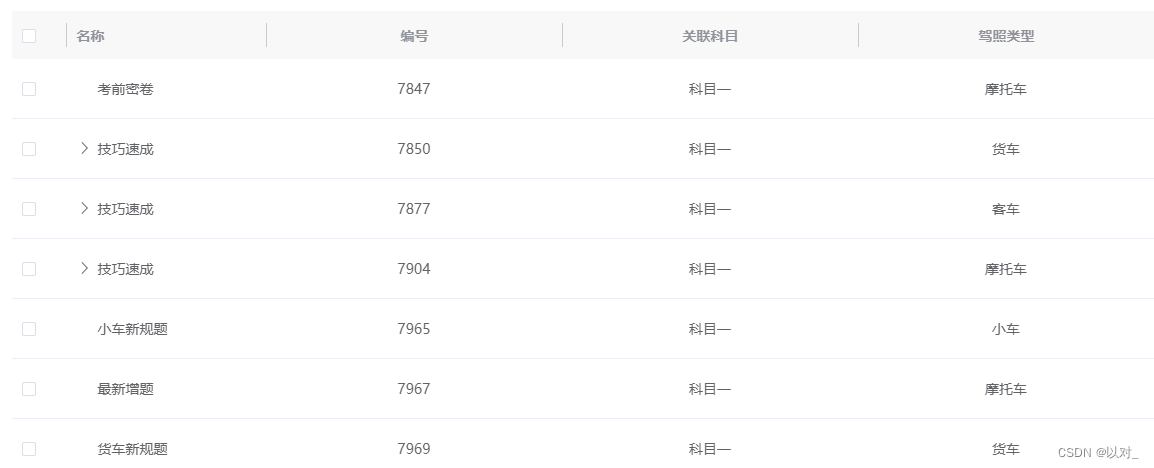
使用
<u-tablestyle="margin-top: 10px;"ref="plTreeTable"fixed-columns-rollbeautify-table:height="tableHeight"header-drag-style:treeConfig="{children: 'children',expandAll: false,lazy: true,load: load,hasChildren: 'hasChildren'}"@selection-change="handleSelectionChange"use-virtualrow-id="id"row-key="id"border><u-table-column border-line type="selection" width="55" :selectable="selectable"/><u-table-column:tree-node="true"prop="name"label="名称":width="200"/><u-table-columnv-for="item in columns":key="item.key":prop="item.key":label="item.title":width="item.width"align="center"/>u-table><script>export default {data () {return {columns: [ // 表头数据{title: '编号',key: 'id',width: 140,},{title: '关联科目',key: 'glkmmc',align: 'center',},{title: '车型',key: 'jzlx',align: 'center',},{title: '大类名称',key: 'ctype',align: 'center',},{title: '描述',key: 'des',align: 'center',},{title: '题目数量',key: 'questcount',align: 'center',},],data5: [], // 完整表格数据data13: [], // }},mounted() {},methods:{async getTreeData(){ // 请求数据let paramData = {type: 'list',service: 'xxx',src: 'xxx',};const res = await this.$http(paramData);if (res.code == 200 && res.success) {this.data5 = JSON.parse(JSON.stringify(res.data)); // 存储完整数据用作展开子集懒加载时使用this.data13 = res.data; // 这个是实际渲染出来的数据,先将子集置空,保证页面运行速度this.data13.map(v=>{if(v.children.length>0){v.children = [];v.hasChildren = true; // 在children 为空的情况下,添加 hasChildren 为true才会显示展开按钮}})// 设置表格数据this.$refs.plTreeTable.reloadData([ ...this.data13])}},load (row, resolve) { // row是当前点击的内容,拿到id再去找完整数据中对应的子集var res = this.data5.filter(v=>{return v.id == row.id;})[0];setTimeout(() => {if ( row.id ) {resolve(res .children)} }, 1000)},// index对应的行是否可选selectable (row, index) {// if (index==1) {return true// }},// 点击复选框按钮handleSelectionChange(val){this.chooseList = val; // 获取到点击的值}}}script>
本文来自互联网用户投稿,文章观点仅代表作者本人,不代表本站立场,不承担相关法律责任。如若转载,请注明出处。 如若内容造成侵权/违法违规/事实不符,请点击【内容举报】进行投诉反馈!