Antd中Select组件搜索高亮
Antd中Select组件搜索高亮
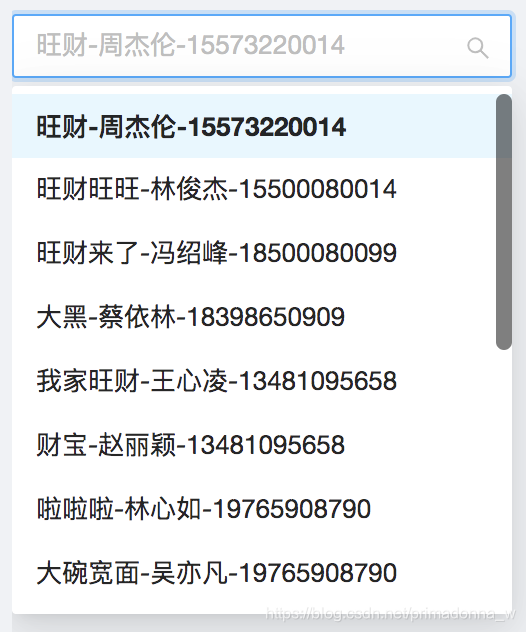
需求:默认时的状态:

点击时出现搜索框可以搜索:
搜索时关键字高亮:
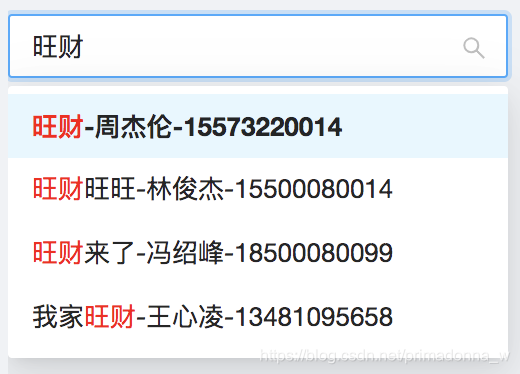
- 实现方法一:
import React from 'react'
import { Select } from 'antd'
import {
import React, {useEffect, useState, useRef,
} from 'react'
import {Select} from 'antd'const SelectSearch = (props) => {const { optionArr, currentValue='' } = propsconst { Option } = Select
export interface IProps {optionArr: Array<{customerName: string,animalName: string,customerPhone: string,id: number | string}>;currentValue?: string
}const SelectSearch = (props: IProps) => {const {optionArr, currentValue = ''} = propsconst {Option} = Selectconst [initialData, updateData] = useState(optionArr)const [searchValue, setSearchValue] = useState(currentValue)const onChange = (value) => {}const onSearch = (value) => {setSearchValue(value)}const SelectSearch = (props) => {return (<SelectshowSearchstyle={{ width: 200 }}style={{width: 200}}onChange={onChange}onSearch={onSearch}defaultValue={0}filterOption={(input, option) =>option.children.toLowerCase().indexOf(input.toLowerCase()) >= 0}filterOption={(input, option) => {const label = option?.children.map((span) => span.props.children).join('')console.log(label)if (label.toLowerCase().indexOf(input.toLowerCase()) > -1) {return true}return false}}>{optionArr.map((option, index) => (<Option key={`${option.customerName}-${index}`} value={option.id}>{`${option.animalName}-${option.customerName}-${option.customerPhone}`}</Option>))initialData.map((option, index) => {const {animalName, customerName, customerPhone} = optionconst c = `${animalName}-${customerName}-${customerPhone}`.split('').map((txt, index) => (<spankey={`${txt}-${index}`}style={{ color: searchValue.indexOf(txt) > -1 ? 'red' : 'initial'}}>{txt}</span>))return (<Option key={`${option.customerName}-${index}`} value={option.id} children={c}/>)})}</Select>)
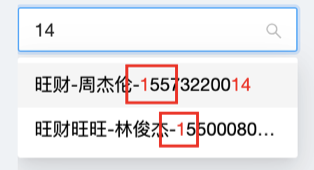
这个方法有个缺点:每次输入了之后,再次输入时,都会高亮,如下:
- 实现方法二:
<SelectshowSearchstyle={{width: 250}}onChange={onChange}onSearch={onSearch}defaultValue={0}filterOption={(input, option) => {const label = `${option?.children.props?.children[0]}${option.children.props?.children[1].props.children}${option.children.props?.children[2]}`if (label.toLowerCase().indexOf(input.toLowerCase()) > -1) {return true}return false}}>{initialData.map((option, index) => {const {animalName, customerName, customerPhone} = optionconst heightLightTxt = (txt, heightTxt) => {if (heightTxt === '') {return txt}const i = txt.indexOf(searchValue)const beforeStr = txt.substr(0, i)const afterStr = txt.substr(i + searchValue?.length)return i > -1 ? (<span>{beforeStr}<span style={{color: 'red'}}>{searchValue}</span>{afterStr}</span>) : txt}return (<Optionkey={`${option.customerName}-${index}`}value={option.id}>{heightLightTxt(`${animalName}-${customerName}-${customerPhone}`, searchValue)}</Option>)})))}</Select>
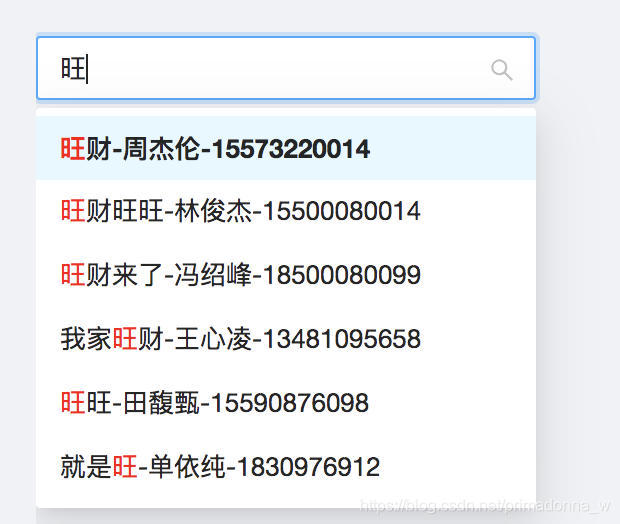
这个方法有个缺点:只能检索到第一个匹配的,例如输入“旺”,只能匹配一个option中的第一个旺,option中剩下的其它“旺”没有高亮,如下:
- 实现方法三(究极写法):
index.tsx中:
<SelectshowSearchstyle={{width: 250}}onChange={onChange}onSearch={onSearch}defaultValue={0}filterOption={(input, option) => (option.children && option.children.props && option.children.props.text && option.children.props.text.toLowerCase().indexOf(input.toLowerCase())) >= 0 }>{initialData.map((option, index) => (<Option key={`${option.customerName}-${index}`} value={option.id}><LightHeightOption text={`${option.animalName}-${option.customerName}-${option.customerPhone}`} filterTxt={searchValue}></LightHeightOption></Option>))}</Select>
子组件LightHeightOption中:
const LightHeightOption = (props) => {const {filterTxt, text,} = propsconst heightLightTxt = (txt, heightTxt) => {if (heightTxt === '') {return txt}// 前面filterOption 不区分大小写,这里用iconst regexp = new RegExp(heightTxt, 'gi')return txt.replace(regexp, `${heightTxt}`)}return (<div ref={(nodeElement) => {if (nodeElement) {nodeElement.innerHTML = heightLightTxt(text, filterTxt)}}}/>)
}
export default LightHeightOption
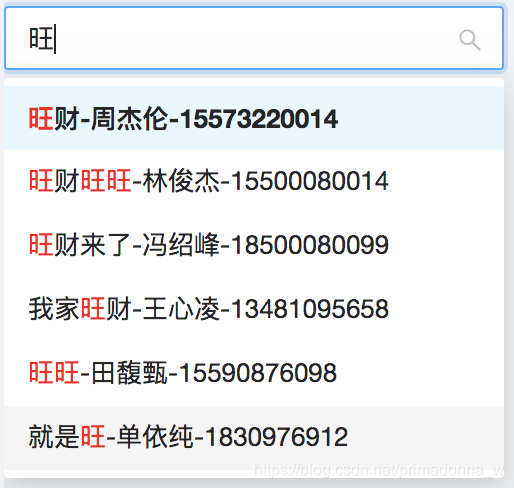
完美!!
以上就是实现方法啦
本文来自互联网用户投稿,文章观点仅代表作者本人,不代表本站立场,不承担相关法律责任。如若转载,请注明出处。 如若内容造成侵权/违法违规/事实不符,请点击【内容举报】进行投诉反馈!