Rollup Tree Shaking原理
Table of Contents generated with DocToc
- 揭秘 Rollup Tree Shaking
- 前言
- 对比webpack
- 如何使用rollup
- 使用tree shaking 功能
- rollup源码解析
- magic-string
- acorn
- AST工作流
- AST解析过程
- Scope
- 实现rollup
- 实现 tree shaking
- 依赖的变量有做修改操作
- 支持块级作用域
- 处理入口处 tree shaking
- 实现变量重命名
- 总结
- 引用
揭秘 Rollup Tree Shaking
文章首发于 @careteen/rollup,转载请注明来源即可。
前言
rollup随着ES2015发布Scripts and Modules横空出世。
Next-generation ES module bundler官网定义此为下一代ES模块捆绑器。
可以发现目前前端最火的几个框架Angular/React/Vue都在使用rollup作为打包工具。
rollup依赖于ES6的module,提供Tree-shaking功能。对其直译为树木摇晃,即将树木上面枯死的树叶摇晃下来。对应到编程中则是去除掉无用代码。这对于大型项目能起到一定优化作用。
比如在做一些中后台时会使用到ant-design部分组件,但是如果直接import Ant from 'antd'会将所有组件代码进行打包,而官方也提供了babel-plugin-import插件支持按需加载。从一定程度减小项目体积,使页面更快呈现给用户。
对比webpack
webpack可以进行代码分隔,静态资源处理,热模块替换rollup支持ES6 module,tree-shaking功能强大;但webpack不支持导出ES6 module。webpack打包体积臃肿,rollup打包后简洁,更接近源代码。
对比两者各自特性,可以发现webpack更适合于应用,而rollup更适用于类库。
项目中都在使用 webpack进行开发,抱着知其然并知其所以然的态度也学习并实现了一个简版 webpack,并且研究其 热更新原理。感兴趣的同学可以前往阅读。
如何使用rollup
下面示例代码存放在 rollup基础使用,可前往进行调试。
项目根目录新建文件rollup.config.dev.js做如下配置
// rollup.config.dev.js
import babel from 'rollup-plugin-babel'
import resolve from '@rollup/plugin-node-resolve'
import commonjs from '@rollup/plugin-commonjs'
import typescript from '@rollup/plugin-typescript'
import { terser } from 'rollup-plugin-terser'
import postcss from 'rollup-plugin-postcss'
import serve from 'rollup-plugin-serve'export default {input: './src/index.ts',output: {file: 'dist/index.js',format: 'es',},plugins: [babel({exclude: 'node_modules/**',}),resolve(),commonjs(),typescript(),terser(),postcss(),serve({open: true,port: 2333,contentBase: './dist',}),],
}
- rollup-plugin-babel支持使用新语法,用babel进行编译输出。
- @rollup/plugin-node-resolve支持解析第三方模块,即
node_modules目录下。 - @rollup/plugin-commonjs支持
commonjs规范。(因为默认只支持ES6 module) - @rollup/plugin-typescript支持解析
typescript - rollup-plugin-terser支持压缩
js - rollup-plugin-postcss支持编译
css - rollup-plugin-serve支持启动本地服务器
再新建src/index.ts文件
// src/index.ts
console.log('hello rollup')
在package.json文件中配置
// package.json
"scripts": {"dev": "rollup --config rollup.config.dev.js -w",
},运行脚本npm run dev
使用tree shaking 功能
新建文件src/userinfo.ts
// src/userinfo.ts
export const name = 'careteen'
export const age = 25
改动src/index.ts
// src/index.ts
import { name, age } from './userinfo'
console.log(name)
运行脚本npm run dev后查看dist/index.js
const name = 'careteen'
console.log(name)
可发现,rollup将两个文件合并成一个文件输出,去除了无用代码export const age = 25,而且也去除了import/export语句。
rollup源码解析
当下最新rollup功能丰富,架构复杂。而此文主要是想研究tree-shaking功能,故翻看rollup提交记录,找到rollup@0.2.0最初可用版本。 文件数量和代码行数都比较少,也方便我们能读懂。
.
├── Bundle
│   └── index.js # 负责打包
├── Module
│   └── index.js # 负责解析模块
├── ast
│   ├── Scope.js # 作用域链
│   ├── analyse.js # 解析ast语法树
│   └── walk.js # 遍历ast语法树
├── finalisers # 输出类型
│   ├── amd.js
│   ├── cjs.js
│   ├── es6.js
│   ├── index.js
│   └── umd.js
├── rollup.js # 入口
└── utils # 工具函数├── map-helpers.js├── object.js├── promise.js└── replaceIdentifiers.jsrollup.js打包入口文件Bundle/index.js打包工具,打包时生成一个Bundle实例,收集依赖的所有模块,最后将代码打包在一起输出Module/index.js每个文件就是一个模块ast/Scope.js构建作用域和作用域链ast/analyse.js分析Ast作用域和依赖项ast/walk.js遍历Ast
简单浏览代码依赖的第三方库,可以看到magic-string和acorn,我们先做个简单了解。
magic-string
作用是可以对源代码进行轻微的修改和替换。
const MagicString = require('magic-string')const s = new MagicString(`export var name = 'careteen'`)
// 返回剪切后的字符
console.log(s.snip(0, 6).toString(), s.toString()) // export, export var name = 'careteen'
// 移除指定位置区间字符
console.log(s.remove(0, 7).toString(), s.toString()) // var name = 'careteen', var name = 'careteen'// 用指定分隔符拼接源代码
const b = new MagicString.Bundle()
b.addSource({content: `var name = 'careteen'`,separator: '\n',
})
b.addSource({content: `var age = 25`,separator: '\n',
})
console.log(b.toString()) // var name = 'careteen' \n var age = 25
acorn
下面涉及代码存放在 @careteen/rollup - prepos,感兴趣可前往调试。
JavaScript解析器,将源代码解析成抽象语法树AST。
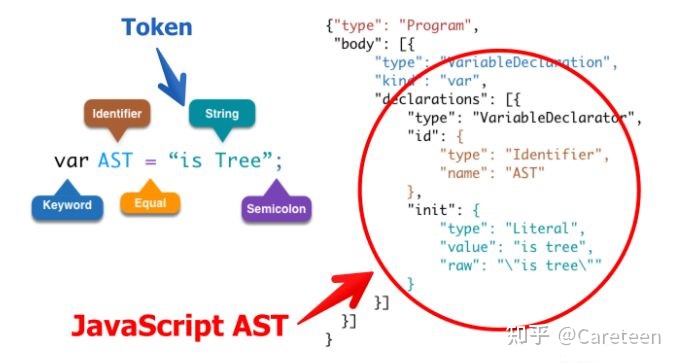
树上定义了代码的结构,通过操作这棵树,可以精准的定位到声明语句、赋值语句、运算语句等等。实现对代码的分析、优化、变更等操作。
AST工作流
- Parse(解析) 将源代码转换成抽象语法树,树上有很多的estree节点
- Transform(转换) 对抽象语法树进行转换
- Generate(代码生成) 将上一步经过转换过的抽象语法树生成新的代码
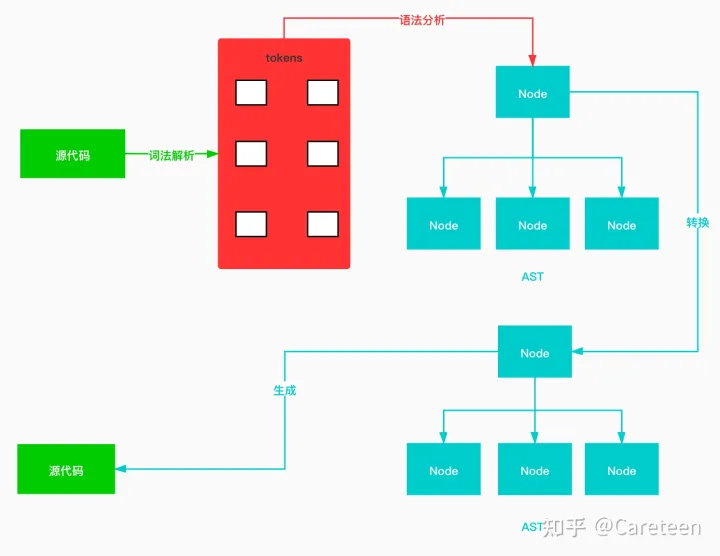
AST解析过程
借助astexplorer可以实时预览源代码的解析结果。并且设置Parser Settings为acorn。
下面代码解析结果如图
import $ from 'jquery';
那如何去遍历抽象语法树,并在合适的时机操作它呢?
采用深度优先遍历。
还不了解的同学前往 图解深度优先遍历算法
// walk.js
// DFS
function walk (node, { enter, leave }) {visit(node, null, enter, leave)
}function visit (node, parent, enter, leave) {if (enter) {enter.call(null, node, parent)}const keys = Object.keys(node).filter(key => typeof node[key] === 'object')keys.forEach(key => {const value = node[key]if (Array.isArray(value)) {value.forEach(val => {visit(val, node, enter, leave)})} else if (value && value.type) {visit(value, node, enter, leave)}})if (leave) {leave.call(null, node, parent)}
}module.exports = walk
此逻辑在源码 rollup/ast/walk.js处
输出抽象语法树
// ast.js
const walk = require('./walk')
const acorn = require('acorn')const ast = acorn.parse(`import $ from 'jquery';`,{locations: true,ranges: true,sourceType: 'module',ecmaVersion: 8,}
)let ident = 0
const padding = () => ' '.repeat(ident)// Test
ast.body.forEach(statement => {walk(statement, {enter(node) {if (node.type) {console.log(padding() + node.type)ident += 2}},leave(node) {if (node.type) {ident -= 2console.log(padding() + node.type)}}})
})// 输出结果
/**
ImportDeclarationImportDefaultSpecifierIdentifierIdentifierImportDefaultSpecifierLiteralLiteral
ImportDeclaration*/
期望的输出结果和上图结构一样。
Scope
源码处还有此文件 rollup/ast/Scope.js相对独立,其实为创建作用域的简易实现。
// scope.js
class Scope {constructor(options = {}) {this.name = options.namethis.parent = options.parentthis.names = options.params || []}add(name) {this.names.push(name)}findDefiningScope(name) {if (this.names.includes(name)) {return this}if (this.parent) {return this.parent.findDefiningScope(name)}return null}
}module.exports = Scope
此逻辑在源码 rollup/ast/scope.js处
看看如何使用
// useScope.js
const Scope = require('./scope')var a = 1
function one() {var b = 2function two() {var c = 3console.log(a, b, c)}two()
}
one()// 构建scope chain
const globalScope = new Scope({name: 'global',parent: null,
})
const oneScope = new Scope({name: 'one',parent: globalScope,
})
const twoScope = new Scope({name: 'two',parent: oneScope,
})globalScope.add('a')
oneScope.add('b')
twoScope.add('c')console.log(twoScope.findDefiningScope('a'))
console.log(oneScope.findDefiningScope('c'))
console.log(globalScope.findDefiningScope('d'))// 输出结果
// 1 2 3
// Scope { name: 'global', parent: null, names: [ 'a' ] }
// null
// null
此文件主要作用是创建作用域和作用域链,并且将声明的变量挂载到对应的作用域,而且也提供方法findDefiningScope查找具体变量所在的作用域。
其意义重大,rollup可以借助他判断变量是否为当前文件定义,否则为import导入,进而递归直到找到变量定义所在作用域,然后将依赖写入。
ES module特性是export的是值的引用,在import后如果对其修改会改变源,即只是个浅拷贝。
找到变量所在作用域后,可直接将其源代码剪切过来输出。(后面有详细实现)
实现rollup
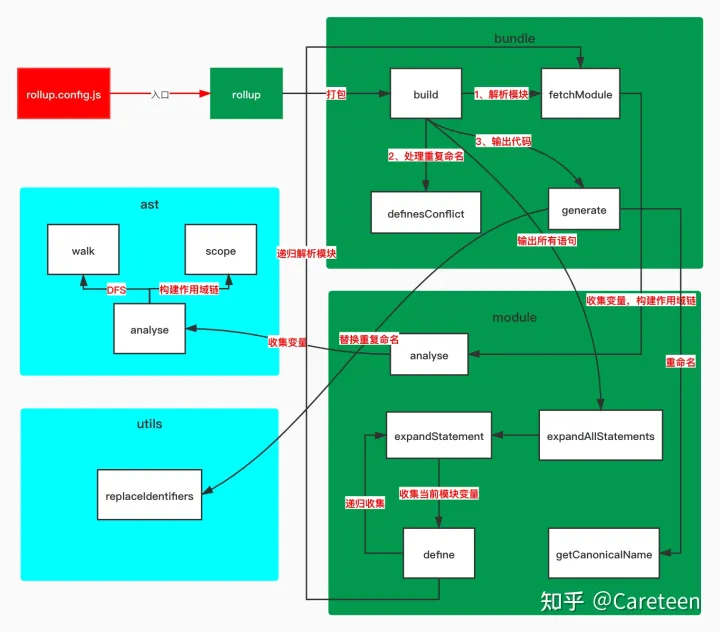
新建可调式的配置文件,将src/index.js作为入口文件,打包后输出到dest/bundle.js
// ./example/myRollup/rollup.config.js
const path = require('path')
const rollup = require('../../src/rollup')const entry = path.resolve(__dirname, 'src/index.js')
rollup(entry, 'dest/bundle.js')
入口文件则依赖于bundle对其真正编译打包。
// .src/rollup.js
const Bundle = require('./bundle')function rollup(entry, filename) {const bundle = new Bundle({entry,})bundle.build(filename)
}module.exports = rollup
初步思路则是解析入口文件entryPath内容,对源代码做解析处理,并输出到目标文件下。
// .src/bundle.js
const path = require('path')class Bundle {constructor(options) {this.entryPath = path.resolve(options.entry.replace(/\.js$/, '') + '.js')this.modules = {}}build(filename) {console.log(this.entryPath, filename)}
}module.exports = Bundle
大致流程为
- 获取入口文件的内容,包装成
module,生成抽象语法树 - 对入口文件抽象语法树进行依赖解析
- 生成最终代码
- 写入目标文件
// .src/bundle.js
const { readFileSync, writeFileSync } = require('fs')
const { resolve } = require('path')
const Module = require('./module')
const MagicString = require('magic-string')class Bundle {constructor(options) {this.entryPath = resolve(options.entry.replace(/\.js$/, '') + '.js')this.modules = {}this.statements = []}build(filename) {// 1. 获取入口文件的内容,包装成`module`,生成抽象语法树const entryModule = this.fetchModule(this.entryPath)// 2. 对入口文件抽象语法树进行依赖解析this.statements = entryModule.expandAllStatements()// 3. 生成最终代码const { code } = this.generate()// 4. 写入目标文件writeFileSync(filename, code)}fetchModule(importee) {let route = importeeif (route) {const code = readFileSync(route, 'utf-8')const module = new Module({code,path: importee,bundle: this,})return module}}generate() {const ms = new MagicString.Bundle()this.statements.forEach(statement => {const source = statement._source.clone()ms.addSource({content: source,separator: '\n',})})return {code: ms.toString()}}
}module.exports = Bundle
每一个文件即是一个module,会将源代码解析成抽象语法树,然后将源代码挂载到树的节点上,并提供展开修改方法。
// ./src/module.js
const { parse } = require('acorn')
const MagicString = require('magic-string')
const analyse = require('./ast/analyse')class Module {constructor({code,path,bundle,}) {this.code = new MagicString(code, {filename: path,})this.path = paththis.bundle = bundlethis.ast = parse(code, {ecmaVersion: 7,sourceType: 'module',})this.analyse()}analyse() {analyse(this.ast, this.code, this)}expandAllStatements() {const allStatements = []this.ast.body.forEach(statement => {const statements = this.expandStatement(statement)allStatements.push(...statements)})return allStatements}expandStatement(statement) {statement._included = trueconst result = []result.push(statement)return result}
}module.exports = Module
将源代码挂载到树的节点上。
// ./src/ast/analyse.js
function analyse(ast, ms) {ast.body.forEach(statement => {Object.defineProperties(statement, {_source: {value: ms.snip(statement.start, statement.end)}})})
}module.exports = analyse
实现 tree shaking
将调试文件内容做如下修改,测试tree-shaking功能
// ./example/myRollup/src/index.js
import { name, age } from './userinfo'function say() {console.log('hi ', name)
}say()
依赖的userinfo文件
// ./example/myRollup/src/userinfo.js
export var name = 'careteen'
export var age = 25
期望打包结果为
var name = 'careteen'
function say() {console.log('hi ', name)
}say()
需要做如下// +处新增和修改
// ./src/bundle.js
const { readFileSync, writeFileSync } = require('fs')
const { resolve, isAbsolute, dirname } = require('path') // +
const Module = require('./module')
const MagicString = require('magic-string')class Bundle {constructor(options) {this.entryPath = resolve(options.entry.replace(/\.js$/, '') + '.js')this.modules = {}this.statements = []}build(filename) {const entryModule = this.fetchModule(this.entryPath)this.statements = entryModule.expandAllStatements()const { code } = this.generate()writeFileSync(filename, code)}fetchModule(importee, importer) { // +let route // +if (!importer) { // +route = importee // +} else { // +if (isAbsolute(importee)) { // +route = importee // +} else if (importee[0] === '.') { // +route = resolve(dirname(importer), importee.replace(/\.js$/, '') + '.js') // +} // +} // +if (route) {const code = readFileSync(route, 'utf-8')const module = new Module({code,path: importee,bundle: this,})return module}}generate() {const ms = new MagicString.Bundle()this.statements.forEach(statement => {const source = statement._source.clone()if (/^Export/.test(statement.type)) { // +if (statement.type === 'ExportNamedDeclaration') { // +source.remove(statement.start, statement.declaration.start) // +} // +} // +ms.addSource({content: source,separator: '\n',})})return {code: ms.toString()}}
}module.exports = Bundle
主要是修改fetchModule方法,处理类似于import { name } from './userinfo'的情况时,userinfo中若有定义变量或者依赖其他文件变量时,做递归处理。
生成代码时generate方法中过滤掉ExportNamedDeclaration语句,而将变量定义直接输出。
- export var name = 'careteen'
+ var name = 'careteen'
对module模块做处理
// ./src/module.js
const { parse } = require('acorn')
const MagicString = require('magic-string')
const analyse = require('./ast/analyse')function hasOwn(obj, prop) { // +return Object.prototype.hasOwnProperty.call(obj, prop) // +
} // +class Module {constructor({code,path,bundle,}) {this.code = new MagicString(code, {filename: path,})this.path = paththis.bundle = bundlethis.ast = parse(code, {ecmaVersion: 7,sourceType: 'module',})// +++ start +++this.imports = {} // 导入的变量this.exports = {} // 导出的变量this.definitions = {} // 变量定义的语句// +++ end +++this.analyse()}analyse() {// +++ start +++// 收集导入和导出变量this.ast.body.forEach(node => {if (node.type === 'ImportDeclaration') {const source = node.source.valuenode.specifiers.forEach(specifier => {const { name: localName} = specifier.localconst { name } = specifier.importedthis.imports[localName] = {source,name,localName,}})} else if (node.type === 'ExportNamedDeclaration') {const { declaration } = nodeif (declaration.type === 'VariableDeclaration') {const { name } = declaration.declarations[0].idthis.exports[name] = {node,localName: name,expression: declaration,}}}})// +++ end +++analyse(this.ast, this.code, this)// +++ start +++// 收集所有语句定义的变量,建立变量和声明语句之间的对应关系this.ast.body.forEach(statement => {Object.keys(statement._defines).forEach(name => {this.definitions[name] = statement})})// +++ end +++}expandAllStatements() {const allStatements = []this.ast.body.forEach(statement => {// +++ start +++// 过滤`import`语句if (statement.type === 'ImportDeclaration') {return}// +++ end +++const statements = this.expandStatement(statement)allStatements.push(...statements)})return allStatements}expandStatement(statement) {statement._included = trueconst result = []// +++ start +++const dependencies = Object.keys(statement._dependsOn)dependencies.forEach(name => {const definition = this.define(name)result.push(...definition)})// +++ end +++result.push(statement)return result}// +++ start +++define(name) {if (hasOwn(this.imports, name)) {const importDeclaration = this.imports[name]const mod = this.bundle.fetchModule(importDeclaration.source, this.path)const exportDeclaration = mod.exports[importDeclaration.name]if (!exportDeclaration) {throw new Error(`Module ${mod.path} does not export ${importDeclaration.name} (imported by ${this.path})`)}return mod.define(exportDeclaration.localName)} else {let statement = this.definitions[name]if (statement && !statement._included) {return this.expandStatement(statement)} else {return []}}}// +++ end +++
}module.exports = Module
需要做几件事
- 收集导入和导出变量
- 建立映射关系,方便后续使用
- 收集所有语句定义的变量
- 建立变量和声明语句之间的对应关系,方便后续使用
- 过滤
import语句 - 删除关键词
- 输出语句时,判断变量是否为
import - 如是需要递归再次收集依赖文件的变量
- 否则直接输出
- 构建依赖关系,创建作用域链,交由
./src/ast/analyse.js文件处理 - 在抽象语法树的每一条语句上挂载
_source(源代码)、_defines(当前模块定义的变量)、_dependsOn(外部依赖的变量)、_included(是否已经包含在输出语句中) - 收集每个语句上定义的变量,创建作用域链
- 收集外部依赖的变量
// ./src/ast/analyse.js
// +++ start +++
const Scope = require('./scope')
const walk = require('./walk')function analyse(ast, ms) {let scope = new Scope()// 创建作用域链、ast.body.forEach(statement => {function addToScope(declarator) {const { name } = declarator.idscope.add(name)if (!scope.parent) { // 如果没有上层作用域,说明是模块内的定级作用域statement._defines[name] = true}}Object.defineProperties(statement, {_source: { // 源代码value: ms.snip(statement.start, statement.end),},_defines: { // 当前模块定义的变量value: {},},_dependsOn: { // 当前模块没有定义的变量,即外部依赖的变量value: {},},_included: { // 是否已经包含在输出语句中value: false,writable: true,},})// 收集每个语句上定义的变量,创建作用域链walk(statement, {enter(node) {let newScopeswitch (node.type) {case 'FunctionDeclaration':const params = node.params.map(p => p.name)addToScope(node)newScope = new Scope({parent: scope,params,})break;case 'VariableDeclaration':node.declarations.forEach(addToScope)break;}if (newScope) {Object.defineProperty(node, '_scope', {value: newScope,})scope = newScope}},leave(node) {if (node._scope) {scope = scope.parent}},})})ast._scope = scope// 收集外部依赖的变量ast.body.forEach(statement => {walk(statement, {enter(node) {if (node.type === 'Identifier') {const { name } = nodeconst definingScope = scope.findDefiningScope(name)// 作用域链中找不到 则说明为外部依赖if (!definingScope) {statement._dependsOn[name] = true}}},})})
}module.exports = analyse
// +++ end +++
依赖的遍历和作用域可直接使用上文提到的walk和Scope的实现。
依赖的变量有做修改操作
经过上述处理,已经基本实现简易tree-shaking功能,但是对于如下依赖文件中导出变量有做过修改还需处理
// ./example/myRollup/src/userinfo.js
export var name = 'careteen'
name += 'lan'
name ++
export var age = 25
需要在./src/module.js文件下做如下// +的新增修改
// ./src/module.js
class Module {constructor() {// ...this.definitions = {} // 变量定义的语句this.modifications = {} // 修改的变量 // +this.analyse()    }analyse() {// ...// 收集所有语句定义的变量,建立变量和声明语句之间的对应关系this.ast.body.forEach(statement => {Object.keys(statement._defines).forEach(name => {this.definitions[name] = statement})// +++ start +++Object.keys(statement._modifies).forEach(name => {if (!hasOwn(this.modifications, name)) {this.modifications[name] = []}// 可能有多处修改this.modifications[name].push(statement)})// +++ end +++})    }expandStatement(statement) {statement._included = trueconst result = []const dependencies = Object.keys(statement._dependsOn)dependencies.forEach(name => {const definition = this.define(name)result.push(...definition)})result.push(statement)// +++ start +++// 当前模块下所定义的变量 若有修改 则加入resultconst defines = Object.keys(statement._defines)defines.forEach(name => {const modifications = hasOwn(this.modifications, name) && this.modifications[name]if (modifications) {modifications.forEach(modif => {if (!modif._included) {const statements = this.expandStatement(modif)result.push(...statements)}})}})// +++ end +++return result}
}
需要做几件事
- 在抽象语法树每条语句中定义修改的变量
_modifies(交由src/ast/analyse.js处理) - 收集外部依赖的变量(上面已经实现过)
- 收集变量修改的语句
- 将所有修改语句的变量存放到
modifications - 输出语句时,判断定义的变量
_defines中是否含有修改语句变量,若有则需要输出
// ./src/ast/analyse.js
function analyse(ast, ms) {ast.body.forEach(statement => {// ...Object.defineProperties(statement, {// ..._modifies: { // 修改的变量value: {}, // +},})    })ast.body.forEach(statement => {// +++ start +++// 收集外部依赖的变量function checkForReads(node) {if (node.type === 'Identifier') {const { name } = nodeconst definingScope = scope.findDefiningScope(name)// 作用域链中找不到 则说明为外部依赖if (!definingScope) {statement._dependsOn[name] = true}}}// 收集变量修改的语句function checkForWrites(node) {function addNode(n) {while (n.type === 'MemberExpression') { // var a = 1; var obj = { c: 3 }; a += obj.c;n = n.object}if (n.type !== 'Identifier') {return}statement._modifies[n.name] = true}if (node.type === 'AssignmentExpression') {addNode(node.left)} else if (node.type === 'UpdateExpression') { // var a = 1; a++addNode(node.argument)} else if (node.type === 'CallExpression') {node.arguments.forEach(addNode)}}// // +++ end +++walk(statement, {enter(node) {// +++ start +++if (node._scope) {scope = node._scope}checkForReads(node)checkForWrites(node)},leave(node) {if (node._scope) {scope = scope.parent}}// +++ end +++})})
}
经过上述处理后,可得到期望的输出结果
// ./example/myRollup/dest/bundle.js
var name = 'careteen'
name += 'lan'
name ++
function say() {console.log('hi ', name)
}
say()
支持块级作用域
对于如下语句,还需提供支持
if(true) {var blockVariable = 25
}
console.log(blockVariable)
需要做如下处理
// ./src/ast/scope.js
class Scope {constructor(options = {}) {// ...this.isBlockScope = !!options.block // 是否为块作用域}// +++ start +++add(name, isBlockDeclaration) {if (this.isBlockScope && !isBlockDeclaration) { // 当前作用域是块级作用域 && 此语句为var或申明函数this.parent.add(name, isBlockDeclaration)} else {this.names.push(name)}}// +++ end +++
}
- 创建作用域时,区分块级作用域和普通变量定义
// ./src/ast/analyse.js
function analyse(ast, ms) {ast.body.forEach(statement => {function addToScope(declarator, isBlockDeclaration = false) { // +const { name } = declarator.idscope.add(name, isBlockDeclaration) // +// ...}// ...// 收集每个语句上定义的变量,创建作用域链walk(statement, {enter(node) {let newScopeswitch (node.type) {// +++ start +++case 'FunctionExpression':case 'FunctionDeclaration':const params = node.params.map(p => p.name)if (node.type === 'FunctionDeclaration') {addToScope(node)} else if (node.type === 'FunctionExpression' && node.id) {params.push(node.id.name)}newScope = new Scope({parent: scope,params,block: true,})break;case 'BlockStatement':newScope = new Scope({parent: scope,block: true,})break;case 'VariableDeclaration':node.declarations.forEach(variableDeclarator => {if (node.kind === 'let' || node.kind === 'const') {addToScope(variableDeclarator, true)} else {addToScope(variableDeclarator, false)}})break;// +++ end +++}}} }
}
输出语句时将系统变量console.log做处理,避免输出两次。
// ./src/module.js
const SYSTEM_VARIABLE = ['console', 'log']
class Module {// ...define(name) {if (hasOwn(this.imports, name)) {// ...} else {let statement = this.definitions[name]// +++ start +++if (statement && !statement._included) {return this.expandStatement(statement)} else if (SYSTEM_VARIABLE.includes(name)) {return []} else {throw new Error(`variable '${name}' is not exist`)}// +++ end +++}}
}
处理入口处 tree shaking
上述tree-shaking是针对于有import语句时的处理,对于入口文件有定义但未使用变量时,还需处理
var company = 'sohu focus'
var companyAge = 23
console.log(company)
- 过滤定义但未使用的变量
- 收集定义变量时,如果变量已经输出则不再输出
// ./src/module.js
class Module {// ...expandAllStatements() {if (statement.type === 'ImportDeclaration') {return}// +++ start +++// 过滤定义但未使用的变量if (statement.type === 'VariableDeclaration') {return}// +++ end +++}define(name) {if (hasOwn(this.imports, name)) {// ...} else {let statement = this.definitions[name]// +++ start +++if (statement) {if (statement._included) {return []} else {return this.expandStatement(statement)}// +++ end +++} else if (SYSTEM_VARIABLE.includes(name)) {return []} else {throw new Error(`variable '${name}' is not exist`)}}}
}
实现变量重命名
存在如下情况,多个模块都有某个变量相同命名company
// ./example/myRollup/src/compay1.ts
const company = 'qunar'
export const company1 = company + '1'// ./example/myRollup/src/compay2.ts
const company = 'sohu'
export const company2 = company + '2'
// ./example/myRollup/src/index.ts
import { company1 } from './compay1'
import { company2 } from './compay2'
console.log(company1, company2)
此时需要在打包时对重名变量适当重命名再输出
先抽离和准备工具函数
// ./src/utils.js
const walk = require('./ast/walk')function hasOwn(obj, prop) {return Object.prototype.hasOwnProperty.call(obj, prop)
}function replaceIdentifiers(statement, source, replacements) {walk(statement, {enter(node) {if (node.type === 'Identifier') {if (node.name && replacements[node.name]) {source.overwrite(node.start, node.end, replacements[node.name])}}}})
}module.exports = {hasOwn,replaceIdentifiers,
}
在抽象语法树每条语句上挂载当前模块的实例
// ./src/ast/analyse.js
function analyse(ast, ms, module) { // +ast.body.forEach(statement => {Object.defineProperties(statement, {_module: { // module实例value: module, // +},// ...}}
}
在module上提供重命名的方法
// ./src/module.js
class Module {constructor() {// ...this.canonicalNames = {} // 不重名的变量this.analyse()}// +++ start ++rename(name, replacement) {this.canonicalNames[name] = replacement}getCanonicalName(localName) {if (!hasOwn(this.canonicalNames, localName)) {this.canonicalNames[localName] = localName}return this.canonicalNames[localName]}// +++ end ++
}
- 收集重复命名的变量
- 重命名重复命名的变量
// ./src/bundle.js
const { hasOwn, replaceIdentifiers } = require('./utils')class Bundle {constructor(options) {build(filename) {const entryModule = this.fetchModule(this.entryPath)this.statements = entryModule.expandAllStatements()this.definesConflict() // +const { code } = this.generate()writeFileSync(filename, code)}// +++ start +++definesConflict() {const defines = {}const conflicts = {}this.statements.forEach(statement => {Object.keys(statement._defines).forEach(name => {if (hasOwn(defines, name)) {conflicts[name] = true} else {defines[name] = []}defines[name].push(statement._module)})})Object.keys(conflicts).forEach(name => {const modules = defines[name]modules.pop() // 最后一个重名的不处理modules.forEach(module => {const replacement = getSafeName(name)module.rename(name,replacement)})})function getSafeName(name) {while (hasOwn(conflicts, name)) {name = `_${name}`}conflicts[name] = truereturn name}}// +++ end +++generate() {const ms = new MagicString.Bundle()this.statements.forEach(statement => {// +++ start +++let replacements = {}Object.keys(statement._dependsOn).concat(Object.keys(statement._defines)).forEach(name => {const canonicalName = statement._module.getCanonicalName(name)if (name !== canonicalName) {replacements[name] = canonicalName}})// +++ end +++const source = statement._source.clone()if (/^Export/.test(statement.type)) {if (statement.type === 'ExportNamedDeclaration') {source.remove(statement.start, statement.declaration.start)}}replaceIdentifiers(statement, source, replacements) // +}}
}
进过上述处理,可得到如下输出结果
// ./example/myRollup/dest/bundle.js
const _company = 'qunar'
const company1 = _company + '1'
const company = 'sohu'
const company2 = company + '2'
console.log(company1, company2)
✌ ✌
总结
本文从rollup使用再到源码揭秘,实现了Tree-shaking简易功能,所有代码存放在@careteen/rollup中。感兴趣的同学可以前往调试。
引用
- Rollup 官网
- ECMA Module
- ES module 工作原理
- webpack简易实现
- commonjs规范原理
- 在线解析AST
本文来自互联网用户投稿,文章观点仅代表作者本人,不代表本站立场,不承担相关法律责任。如若转载,请注明出处。 如若内容造成侵权/违法违规/事实不符,请点击【内容举报】进行投诉反馈!