Angular动态表单生成(五)
动态表单生成之布局
到上面的篇章为止,我们已经把表单比较完整的生成出来了,也实现了一些验证功能,可以说,我们截止这里,就已经可以满足我们的大部分表单生成需求了~
但是:
目前来说,我们对于表单的布局只能是用一些公用的CSS统一控制一下,但是如果说我们的表单有需要将一些控件需要单独来点样式呢?我们接下来一起看看吧~
理论部分
其实,我们在
转到源码,我们可以看到layout的定义如下:
@Input("layout") formLayout: DynamicFormLayout; 从这里我们就可以看出,我们需要传递一个DynamicFormLayout类型的数据过去,DynamicFormLayout的定义如下:
import { DynamicFormControlLayout } from "../model/misc/dynamic-form-control-layout.model";
export declare type DynamicFormLayout = {[id: string]: DynamicFormControlLayout;
};
export declare class DynamicFormLayoutService {findById(id: string, formLayout: DynamicFormLayout | null): DynamicFormControlLayout | null;getClass(layout: DynamicFormControlLayout | null, context: string, place: string): string;
}
他是一个数组,里面可以包含多个 Key为string类型,Value为DynamicFormControlLayout的字典,其中,Key是控件的Id,然后DynamicFormControlLayout的定义又如下:
export interface DynamicFormControlLayoutConfig {container?: string;control?: string;errors?: string;group?: string;hint?: string;host?: string;label?: string;option?: string;[key: string]: string | undefined;
}
export interface DynamicFormControlLayout {element?: DynamicFormControlLayoutConfig;grid?: DynamicFormControlLayoutConfig;[key: string]: DynamicFormControlLayoutConfig | undefined;
}
其中,DynamicFormControlLayoutConfig 定义了你可以为组件的哪些部分添加样式,其中:
container:外层包裹容器
control:控件本身
errors:错误消息
group:DynamicFromGroup
hint:就是hint,貌似是Lable后面可以添加的一个说明性文字,DynamicFormControl中有这个属性
host:不清楚~
label:不解释
option:有option的这类组件,比如select之类的
到这里,我们应该就知道该如何定义layout属性的值了吧~
开始实战
好,接下来我们开始开搞~
首先,在kendo-ui.component.ts中定义一个layout对象:
formLayout: DynamicFormLayout = {'firstName': {element: {control: 'jax-control',host: 'jax-host',container: 'jax-container',label: 'jax-label',errors: 'jax-error',hint: 'jax-hint'}}};
然后在kendo-ui.component.html中为dynamic-kendo-form绑定layout属性:
[model]="formModel"[layout]="formLayout">
然后保存后就可以看到效果如下:
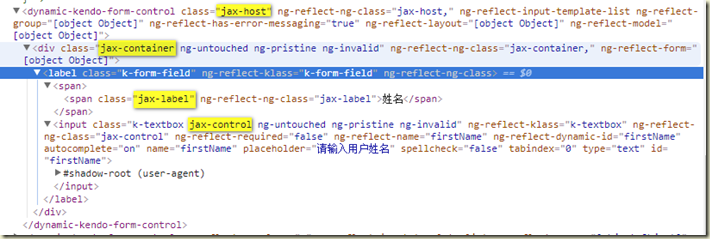
不知道您看到这里是不是已经恍然大悟,知道该怎么设置控件的样式了呢?
如果不明白,可以参考下官方的文档:
https://github.com/udos86/ng-dynamic-forms#form-layouts
转载于:https://www.cnblogs.com/baiyunchen/p/8496089.html
本文来自互联网用户投稿,文章观点仅代表作者本人,不代表本站立场,不承担相关法律责任。如若转载,请注明出处。 如若内容造成侵权/违法违规/事实不符,请点击【内容举报】进行投诉反馈!