小程序canvas 缩放/拖动/还原/封装和实例--开箱即用
小程序canvas 缩放/拖动/还原/封装和实例
- 一、预览
- 二、使用
- 2.1 创建和配置
- 方法
- 三、源码
- 3.1 实例组件
- 3.2 核心类
- 3.2 工具类
一、预览
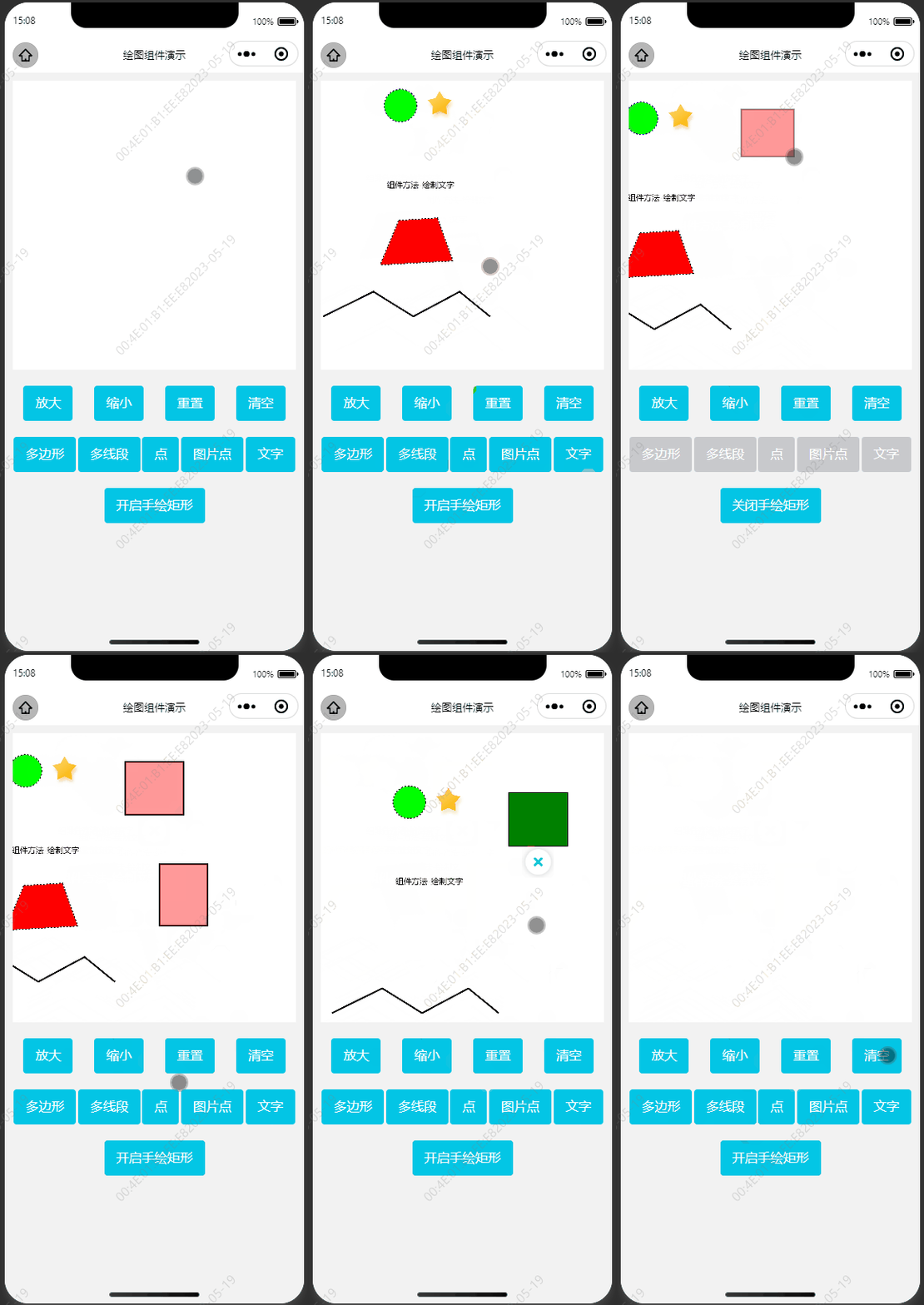
之前写过web端的canvas 缩放/拖动/还原/封装和实例。最近小程序也需要用到,但凡是涉及小程序canvas还是比较多坑的,而且难用多了,于是在web的基础上重新写了小程序的相关功能(参考了Fabric.js)。实现功能有:
- 支持双指、按钮缩放
- 支持单指/双指触摸拖动
- 支持高清显示
- 支持节流绘图
- 支持重置、清除画布
- 支持元素选中/删除
- 内置绘图方法
效果如下:
二、使用
案例涉及到3个文件:
- 图实例组件canvas.vue
- 核心CanvasDraw类canvasDraw.js
- 工具方法utils.js
2.1 创建和配置
小程序获取#canvas对象后就可以创建CanvasDraw实例了,创建实例时可以根据需要设置各种配置,其中drawCallBack是绘图回调,程序会在this.canvasDraw.draw()后再回调drawCallBack()来实现用户的绘图,用户可以使用this.canvasDraw.ctx来使用原生的canvas绘图。
/** 初始化canvas */initCanvas() {const query = wx.createSelectorQuery().in(this)query.select('#canvas').fields({ node: true, size: true, rect: true }).exec((res) => {const ele = res[0]this.canvasEle = ele// 配置项const option = {ele: this.canvasEle, // canvas元素drawCallBack: this.draw, // 用户自定义绘图方法scale: 1, // 当前缩放倍数scaleStep: 0.1, // 缩放步长(按钮)touchScaleStep: 0.005, // 缩放步长(手势)maxScale: 2, // 缩放最大倍数(缩放比率倍数)minScale: 0.5, // 缩放最小倍数(缩放比率倍数)translate: { x: 0, y: 0 }, // 默认画布偏移isThrottleDraw: true, // 是否开启节流绘图(建议开启,否则安卓调用频繁导致卡顿)throttleInterval: 20, // 节流绘图间隔,单位mspixelRatio: wx.getSystemInfoSync().pixelRatio, // 像素比(高像素比可以解决高清屏幕模糊问题)}this.canvasDraw = new CanvasDraw(option) // 创建CanvasDraw实例后就可以使用实例的所有方法了this.canvasDraw.draw() // 可以按实际需要调用绘图方法})},
方法
canvasDraw.clear() // 清除画布
canvasDraw.clearSelect() // 清除选中
canvasDraw.destory() // 销毁
canvasDraw.draw() // 绘图
canvasDraw.drawLines(opt) // 内置简化绘制多线段方法
canvasDraw.drawPoint(opt) // 内置简化绘制点/图形点
canvasDraw.drawShape(opt) // 内置简化绘制多边形方法
canvasDraw.drawText(opt) // 内置简化绘制文字方法
canvasDraw.getChild(id) // 获取子元素
canvasDraw.getPoint(e) // 获取触摸对象的canvas坐标
canvasDraw.getSelect() // 获取选中元素
canvasDraw.on(type,callBack) // 绑定事件
canvasDraw.off(type,callBack) // 解绑事件
canvasDraw.removeChild(id) // 移除子元素
canvasDraw.reset() // 重置画布(恢复到第一次绘制的状态)
canvasDraw.zoomIn() // 中心放大
canvasDraw.zoomOut() // 中心缩小
canvasDraw.zoomTo(scale, zoomCenter) // 缩放到指定倍数(可指定缩放中心点)
三、源码
3.1 实例组件
canvas.vue
<template><view class="container"><view class="canvas-wrap"><canvastype="2d"id="canvas"class="canvas"disable-scroll="true"@touchstart="touchstart"@touchmove="touchmove"@touchend="touchend">canvas>view><view class="buttons"><button @click="zoomIn">放大button><button @click="zoomOut">缩小button><button @click="reset">重置button><button @click="clear">清空button>view><view class="buttons"><button @click="addShape" :disabled="isDrawing">多边形button><button @click="addLines" :disabled="isDrawing">多线段button><button @click="addPoint" :disabled="isDrawing">点button><button @click="addImagePoint" :disabled="isDrawing">图片点button><button @click="addText" :disabled="isDrawing">文字button>view><view class="buttons"><button @click="handDraw">{{ isDrawing ? '关闭' : '开启' }}手绘矩形button>view>view>
template>
<script>
import { CanvasDraw } from '../../../components/custom-floor-map/canvasDraw'export default {data() {this.canvasDraw = null // 绘图对象this.canvasEle = null // canvas元素对象this.imgs = {star: '../../../static/images/starActive.png',delete: '../../../static/images/cancel.png',}this.startPoint = null // 手绘起点this.createId = null // 手绘idthis.fingers = 1 // 手指数量return {isDrawing: false, // 是否正在绘图}},created() {},beforeDestroy() {/** 销毁对象 */if (this.canvasDraw) {this.canvasDraw.destroy()this.canvasDraw = null}},mounted() {/** 初始化 */this.initCanvas()},methods: {/** 初始化canvas */initCanvas() {const query = wx.createSelectorQuery().in(this)query.select('#canvas').fields({ node: true, size: true, rect: true }).exec((res) => {const ele = res[0]this.canvasEle = ele// 配置项const option = {ele: this.canvasEle, // canvas元素drawCallBack: this.draw, // 必须:用户自定义绘图方法scale: 1, // 当前缩放倍数scaleStep: 0.1, // 缩放步长(按钮)touchScaleStep: 0.005, // 缩放步长(手势)maxScale: 2, // 缩放最大倍数(缩放比率倍数)minScale: 0.5, // 缩放最小倍数(缩放比率倍数)translate: { x: 0, y: 0 }, // 默认画布偏移isThrottleDraw: true, // 是否开启节流绘图(建议开启,否则安卓调用频繁导致卡顿)throttleInterval: 20, // 节流绘图间隔,单位mspixelRatio: wx.getSystemInfoSync().pixelRatio, // 像素比(高像素比可以解决高清屏幕模糊问题)controls: {delete: {radius: 20,fill: '#f00',customDraw: this.drawDeleteControl,},},}this.canvasDraw = new CanvasDraw(option) // 创建CanvasDraw实例后就可以使用实例的所有方法了this.addEvents() // 添加事件监听this.canvasDraw.draw() // 可以按实际需要调用绘图方法console.log('this.canvasDraw', this.canvasDraw)})},/** 绑定组件内置事件 */addEvents() {this.canvasDraw.on('selection:updated', this.onSelectionUpdated)this.canvasDraw.on('selection:cleared', this.onSelectionCleared)this.canvasDraw.on('touchstart', this.onTouchstart)this.canvasDraw.on('touchmove', this.onTouchmove)this.canvasDraw.on('touchend', this.onTouchend)this.canvasDraw.on('tap', this.onTap)this.canvasDraw.on('deleteControl:tap', this.onDeleteControl)},/** 用户自定义绘图内容 */draw() {// 1.默认绘图方式-圆形// const { ctx } = this.canvasDraw// ctx.beginPath()// ctx.strokeStyle = '#000'// ctx.arc(50, 50, 50, 0, 2 * Math.PI)// ctx.stroke()// ctx.closePath()},/** 中心放大 */zoomIn() {this.canvasDraw.zoomIn()},/** 中心缩小 */zoomOut() {this.canvasDraw.zoomOut()},/** 重置画布(回复初始效果) */reset() {this.canvasDraw.reset()},/** 清空画布 */clear() {this.canvasDraw.clear()},/** 组件方法-绘制多边形 */addShape() {const opt = {points: [{ x: 148, y: 194 },{ x: 196, y: 191 },{ x: 215, y: 244 },{ x: 125, y: 249 },],style: { strokeWidth: 2, stroke: '#000', lineDash: [2, 2], fill: 'red' },}this.canvasDraw.drawShape(opt)},/** 组件方法-绘制多线段 */addLines() {const opt = {points: [{ x: 53, y: 314 },{ x: 116, y: 283 },{ x: 166, y: 314 },{ x: 224, y: 283 },{ x: 262, y: 314 },],style: { strokeWidth: 2, stroke: '#000', lineDash: [2, 2] },angle: 45,}this.canvasDraw.drawLines(opt)},/** 组件方法-绘制文字 */addText() {const opt = {text: '组件方法-绘制文字',points: [{ x: 175, y: 150 }],style: {fill: '#000',textAlign: 'center',textBaseline: 'middle',},}this.canvasDraw.drawText(opt)},/** 组件方法-绘制点 */addPoint() {const opt = {points: [{ x: 150, y: 50 }],style: { radius: 20, strokeWidth: 2, stroke: '#00f', lineDash: [2, 2], fill: '#0f0' },}this.canvasDraw.drawPoint(opt)},/** 组件方法-绘制图片点 */addImagePoint() {const opt = {points: [{ x: 300, y: 50 }],style: { radius: 40, img: this.imgs.star },angle: 45,}this.canvasDraw.drawPoint(opt)},/** 用户手绘矩形 */handDraw() {// 如果是手绘则禁止拖拽画布,否则启动拖拽画布this.isDrawing = !this.isDrawingthis.canvasDraw.canDragCanvas = !this.isDrawing},/** 组件内置事件 */onSelectionUpdated(item) {if (this.isDrawing) returnconsole.log('选中元素:', item)item.style.fill = 'green'item.controlsVis = { delete: true }item.zIndex = 1this.canvasDraw.draw()},onSelectionCleared(item) {if (this.isDrawing) returnconsole.log('取消选中:', item)if (!item) returnitem.style.fill = 'red'item.controlsVis = { delete: false }item.zIndex = 0this.canvasDraw.draw()},onTouchstart(e) {console.log('触摸开始:', e)this.startPoint = e.pointthis.createId = `user_${new Date().getTime()}`this.fingers = e.event.touches.length},onTouchmove(e) {// console.log('触摸移动:', e)// 如果是绘制状态,触摸移动则进行矩形绘制if (this.fingers !== 1 || !this.isDrawing) returnconst tsPoint = this.startPointconst tmPoint = e.point// 两点距离小于5,不进行绘制if (Math.abs(tmPoint.x - tsPoint.x) <= 5 || Math.abs(tmPoint.y - tsPoint.y) <= 5) return// 先移除,再绘制this.canvasDraw.removeChild(this.createId)this.canvasDraw.draw()const opt = {id: this.createId,points: [tsPoint, { x: tmPoint.x, y: tsPoint.y }, tmPoint, { x: tsPoint.x, y: tmPoint.y }],style: { strokeWidth: 2, stroke: 'rgba(0,0,0,.4)', fill: 'rgba(255,0,0,.4)' },}this.canvasDraw.drawShape(opt)},onTouchend(e) {console.log('触摸结束:', e)// 如果是绘制状态,设置最后一个绘制的为选中状态,及显示删除控制点if (!this.isDrawing) returnthis.canvasDraw.children.forEach((item) => {if (item.id === this.createId) {item.style.stroke = 'blue'item.isSelect = trueitem.controlsVis = { delete: true }} else {item.style.stroke = 'black'item.isSelect = falseitem.controlsVis = { delete: false }}})this.canvasDraw.draw()},onTap(e) {console.log('点击坐标:', e.point)console.log('所有canvas子对象:', this.canvasDraw.children)},onDeleteControl(e) {console.log('点击删除控制点', e)this.canvasDraw.removeChild(e.id)this.canvasDraw.draw()},// 自定义绘制删除控制点drawDeleteControl(opt) {this.canvasDraw.drawPoint({id: 'delete',points: opt.points,style: {img: this.imgs.delete,radius: 20,},},false)},/** canvas事件绑定 */touchstart(e) {this.canvasDraw.touchstart(e)},touchmove(e) {this.canvasDraw.touchmove(e)},touchend(e) {this.canvasDraw.touchend(e)},},
}
script>
<style>
page {background: #f2f2f2;height: 100vh;overflow: hidden;display: flex;
}
.container {display: flex;flex: 1;flex-direction: column;height: 100%;
}
.canvas-wrap {display: flex;margin: 10px;height: 50%;
}
.canvas {flex: 1;width: 100%;height: 100%;background: #fff;
}
.buttons {display: flex;justify-content: space-around;margin: 10px;
}
style>
3.2 核心类
canvasDraw.js
import { isInPolygon, isInCircle, getBoundingBox, get2PointsDistance, getOCoords, isSameDirection, getPolygonCenterPoint } from './utils'/*** 绘图类* @param {object} option*/
export function CanvasDraw(option) {if (!option.ele) {console.error('canvas对象不存在')return}const { ele } = option/** 外部可访问属性 */this.canvasNode = ele.node // wx的canvas节点this.canvasNode.width = ele.width // 设置canvas节点宽度this.canvasNode.height = ele.height // 设置canvas节点高度this.ctx = this.canvasNode.getContext('2d')this.zoomCenter = { x: ele.width / 2, y: ele.height / 2 } // 缩放中心点this.children = [] // 子对象this.canDragCanvas = true // 能拖动画布/** 内部使用变量 */let startDistance = 0 // 拖动开始时距离(二指缩放)let preScale = 1 // 上次缩放let touchMoveTimer = null // 触摸移动计时器,用于节流let touchEndTimer = null // 触摸结束计时器,用于节流let fingers = 1 // 手指触摸个数const events = { 'selection:updated': [], 'selection:cleared': [], touchstart: [], touchmove: [], touchend: [], tap: [], 'deleteControl:tap': [] } // 事件集合let curControlKey = null // 当前选中控件keylet preTouches = [] // 上次触摸点let imgCache = {} // 图片缓存,防止拖动的时候反复加载图片造成闪烁/** 初始化 */const init = () => {const optionCopy = JSON.parse(JSON.stringify(option))this.scale = optionCopy.scale ?? 1 // 当前缩放倍数this.scaleStep = optionCopy.scaleStep ?? 0.1 // 缩放步长(按钮)this.touchScaleStep = optionCopy.touchScaleStep ?? 0.005 // 缩放步长(手势)this.maxScale = optionCopy.maxScale ?? 2 // 缩放最大倍数(缩放比率倍数)this.minScale = optionCopy.minScale ?? 0.5 // 缩放最小倍数(缩放比率倍数)this.translate = optionCopy.translate ?? { x: 0, y: 0 } // 默认画布偏移this.isThrottleDraw = optionCopy.isThrottleDraw ?? true // 是否开启节流绘图(建议开启,否则安卓调用频繁导致卡顿)this.throttleInterval = optionCopy.throttleInterval ?? 20 // 节流绘图间隔,单位msthis.pixelRatio = optionCopy.pixelRatio ?? 1 // 像素比(高像素比解决高清屏幕模糊问题)// 全局控制器设置,目前只有delete,属性为radius: 半径, fill: 默认绘制颜色,customDraw: 自定义绘制函数,若存在则覆盖默认绘制// 由于optionCopy不能复制customDraw函数,所以这里只能用optionthis.controls = option.controls ?? {delete: { radius: 10, fill: '#f00', customDraw: null },}// this.controls.delete.customDraw = option.controls.delete.customDraw// 全局控制器可见性,目前只做了delete;元素本身也可以单独设置this.controlsVis = optionCopy.controlsVis ?? {delete: false,}startDistance = 0 // 拖动开始时距离(二指缩放)preScale = this.scale // 上次缩放touchMoveTimer = nulltouchEndTimer = nullfingers = 1 // 手指触摸个数}init()/** 绘图(会进行缩放和位移) */this.draw = () => {clear()drawChildren()option.drawCallBack()}/** 私有清除画布(重设canvas尺寸会清空地图并重置canvas内置的scale/translate等) */const clear = () => {this.canvasNode.width = ele.width * this.pixelRatiothis.canvasNode.height = ele.height * this.pixelRatiothis.ctx.translate(this.translate.x * this.pixelRatio, this.translate.y * this.pixelRatio)this.ctx.scale(this.scale * this.pixelRatio, this.scale * this.pixelRatio)// console.log('当前位移', this.translate.x, this.translate.y, '当前缩放倍率', this.scale)}/** 清除画布,并清空子对象 */this.clear = () => {clear()this.children.length = 0}/*** 绘制多边形* @param {boolean} isAddChild 是否添加到canvas子对象* @param {object} opt 参数{ points:array, style:{strokeWidth:number, stroke:string, fill:string, lineDash:array} }*/this.drawShape = (opt, isAddChild = true) => {if (opt.points.length < 3) returnconst tempObj = { type: 'Shape', angle: opt.angle, points: opt.points }this.rotateDraw(tempObj, () => {this.ctx.beginPath()this.ctx.lineWidth = opt.style.strokeWidth ?? 1this.ctx.fillStyle = opt.style.fillthis.ctx.strokeStyle = opt.style.stroke ?? '#000'// 设置虚线if (opt.style.stroke && opt.style.lineDash && opt.style.lineDash.length > 0) {this.ctx.setLineDash(opt.style.lineDash)}for (let i = 0; i < opt.points.length; i++) {const p = opt.points[i]if (i === 0) {this.ctx.moveTo(p.x, p.y)} else {this.ctx.lineTo(p.x, p.y)}}this.ctx.closePath()if (opt.style.stroke) {this.ctx.stroke()this.ctx.setLineDash([])}if (opt.style.fill) {this.ctx.fill()}})if (isAddChild) {return this.addChild('Shape', opt)}}/** 绘制多条线段 */this.drawLines = (opt, isAddChild = true) => {if (opt.points.length < 2) returnconst tempObj = { type: 'Lines', angle: opt.angle, points: opt.points }this.rotateDraw(tempObj, () => {this.ctx.beginPath()this.ctx.lineWidth = opt.style.strokeWidth ?? 1this.ctx.strokeStyle = opt.style.stroke ?? '#000'// 设置虚线if (opt.style.stroke && opt.style.lineDash && opt.style.lineDash.length > 0) {this.ctx.setLineDash(opt.style.lineDash)}for (let i = 0; i < opt.points.length; i++) {const p = opt.points[i]if (i === 0) {this.ctx.moveTo(p.x, p.y)} else {this.ctx.lineTo(p.x, p.y)}}if (opt.style.stroke) {this.ctx.stroke()this.ctx.setLineDash([])}})if (isAddChild) {return this.addChild('Lines', opt)}}/** 绘制文字 */this.drawText = (opt, isAddChild = true) => {const p = opt.points[0]if (!p) returnconst tempObj = { type: 'Text', angle: opt.angle, points: opt.points }this.rotateDraw(tempObj, () => {this.ctx.fillStyle = opt.style.fillthis.ctx.textAlign = opt.style.textAlign ?? 'center'this.ctx.textBaseline = opt.style.textBaseline ?? 'middle'this.ctx.fillText(opt.text, p.x, p.y)})if (isAddChild) {return this.addChild('Text', opt)}}/** 绘制点图片 */const drawPointImg = (img, p, opt) => {this.ctx.drawImage(img, p.x - opt.style.radius, p.y - opt.style.radius, opt.style.radius * 2, opt.style.radius * 2)}/** 绘制点填充 */const drawPointFill = (p, opt) => {this.ctx.beginPath()this.ctx.lineWidth = opt.style.strokeWidth ?? 1this.ctx.fillStyle = opt.style.fillthis.ctx.strokeStyle = opt.style.stroke ?? '#000'// 设置虚线if (opt.style.stroke && opt.style.lineDash && opt.style.lineDash.length > 0) {this.ctx.setLineDash(opt.style.lineDash)}this.ctx.arc(p.x, p.y, opt.style.radius, 0, 2 * Math.PI)this.ctx.closePath()if (opt.style.stroke) {this.ctx.stroke()this.ctx.setLineDash([])}if (opt.style.fill) {this.ctx.fill()}}/** 绘制点 */this.drawPoint = (opt, isAddChild = true) => {const p = opt.points[0]if (!p) returnconst tempObj = { type: 'Point', angle: opt.angle, points: opt.points }// 图片点if (opt.style.img) {let img = imgCache[opt.style.img]if (!img) {img = this.canvasNode.createImage()img.src = opt.style.imgimg.onload = () => {imgCache[opt.style.img] = imgthis.rotateDraw(tempObj, drawPointImg.bind(this, img, p, opt))}} else {this.rotateDraw(tempObj, drawPointImg.bind(this, img, p, opt))}}// 绘画点else {this.rotateDraw(tempObj, drawPointFill.bind(this, p, opt))}if (isAddChild) {return this.addChild('Point', opt)}}/** 旋转绘制对象  */this.rotateDraw = (object, callBack) => {const angle = object.angle ?? 0const centerPoint = this.getObjectCenterPoint(object)this.ctx.save()this.ctx.translate(centerPoint.x, centerPoint.y)this.ctx.rotate((angle * Math.PI) / -180)this.ctx.translate(-centerPoint.x, -centerPoint.y)callBack()this.ctx.restore()}/** 获取子对象中心点 */this.getObjectCenterPoint = (object) => {switch (object.type) {case 'Point':return object.points[0]default:return getPolygonCenterPoint(object.points)}}/** 获取点击事件的画布坐标 */this.getPoint = (e) => {const t = getTouchPont(e, 0)return {x: (t.x - this.translate.x) / this.scale,y: (t.y - this.translate.y) / this.scale,}}/** 获取点击事件的屏幕坐标 */this.getScreenPoint = (e) => {const t = getTouchPont(e, 0)return {x: t.x,y: t.y,}}/** 获取当前选中的元素 */this.getSelect = () => {return this.children.find((item) => item.isSelect)}/** 清除选中 */this.clearSelect = () => {this.children.forEach((item) => {item.isSelect = false})}/** 添加子对象 */this.addChild = (type, opt) => {const aCoords = getBoundingBox(opt.points)const cv = opt.controlsVis ?? this.controlsVisconst obj = {id: opt.id ?? `c_${new Date().getTime()}`,zIndex: opt.zIndex ?? 0,angle: opt.angle ?? 0,isSelect: opt.isSelect ?? false,points: JSON.parse(JSON.stringify(opt.points)),style: opt.style ?? {},text: opt.text,type,controlsVis: cv,aCoords, // 多边形的包围盒oCoords: getOCoords(aCoords, cv, this.controls), // 控制器}// 如果已存在,则更新,否则添加const oldOjb = this.getChild(obj.id)if (oldOjb) {oldOjb.zIndex = obj.zIndexoldOjb.angle = obj.angleoldOjb.isSelect = obj.isSelectoldOjb.points = obj.pointsoldOjb.style = obj.styleoldOjb.text = obj.textoldOjb.type = obj.typeoldOjb.controlsVis = obj.controlsVisoldOjb.aCoords = obj.aCoordsoldOjb.oCoords = obj.oCoords} else {this.children.push(obj)}addControls(obj)return obj}/** 移除子对象 */this.removeChild = (id) => {const index = this.children.findIndex((item) => item.id === id)if (index !== -1) {this.children.splice(index, 1)}}/** 获取子对象 */this.getChild = (id) => {return this.children.find((item) => item.id === id)}/** 重置画布(恢复到第一次绘制的状态) */this.reset = () => {init()this.draw()}/** 中心放大 */this.zoomIn = () => {this.zoomTo(this.scale + this.scaleStep)}/** 中心缩小 */this.zoomOut = () => {this.zoomTo(this.scale - this.scaleStep)}/*** 缩放到指定倍数* @param {number} scale 缩放大小* @param {object} zoomCenter 缩放中心点(可选*/this.zoomTo = (scale, zoomCenter0) => {this.scale = scalethis.scale = this.scale > this.maxScale ? this.maxScale : this.scalethis.scale = this.scale < this.minScale ? this.minScale : this.scaleconst zoomCenter = zoomCenter0 || this.zoomCenterthis.translate.x = zoomCenter.x - ((zoomCenter.x - this.translate.x) * this.scale) / preScalethis.translate.y = zoomCenter.y - ((zoomCenter.y - this.translate.y) * this.scale) / preScalethis.draw()preScale = this.scale}/** tap事件 */this.tap = (e) => {if (fingers !== 1) returnconst ep = e.changedTouches[0]const sp = preTouches[0]if (!isSaveTouchPoint(sp, ep)) returnif (curControlKey) {triggerControl(curControlKey)return}const p = this.getPoint(e)triggerEvent('tap', { point: p, event: e })for (let i = this.children.length - 1; i >= 0; i--) {const item = this.children[i]// 这里只做了点击时否在多边形或圆形的判断,后期可以扩展if (isInPolygon(p, item.points, item.angle) || isInCircle(p, item.points[0], item.style.radius)) {item.isSelect = truetriggerEvent('selection:updated', item)return item}}}/** 触摸开始 */this.touchstart = (e) => {// console.log('touchstart', e)fingers = e.touches.lengthif (fingers > 2) returnpreTouches = JSON.parse(JSON.stringify(e.touches))// 单指if (fingers === 1) {// 如果是触摸了控制器curControlKey = getControlByPoint(this.getPoint(e))if (curControlKey) {return}triggerEvent('selection:cleared', this.getSelect())this.clearSelect()triggerEvent('touchstart', { point: this.getPoint(e), event: e })} else if (fingers === 2) {startDistance = get2PointsDistance(e)}}/** 触摸移动 */this.touchmove = (e) => {// console.log('touchmove', e)if (fingers > 2 || isSaveTouchPoint(preTouches[0], e.changedTouches[0])) returnif (this.isThrottleDraw) {if (touchMoveTimer) return// this.touchMoveEvent = etouchMoveTimer = setTimeout(this.touchmoveSelf.bind(this, e), this.throttleInterval)} else {// this.touchMoveEvent = ethis.touchmoveSelf(e)}}/** 触摸移动实际执行 */this.touchmoveSelf = (e) => {// const e = this.touchMoveEvent// 单指移动if (fingers === 1) {if (!curControlKey) {triggerEvent('touchmove', { point: this.getPoint(e), event: e })drag(e)}} else if (fingers === 2 && e.touches.length === 2 && preTouches.length === 2) {// 如果移动方向一致则拖动画布否则缩放if (isSameDirection(preTouches[0], getTouchPont(e, 0), preTouches[1], getTouchPont(e, 1))) {drag(e)} else {// 双指缩放const endDistance = get2PointsDistance(e)const distanceDiff = endDistance - startDistancestartDistance = endDistanceconst zoomCenter = {x: (getTouchPont(e, 0).x + getTouchPont(e, 1).x) / 2,y: (getTouchPont(e, 0).y + getTouchPont(e, 1).y) / 2,}this.zoomTo(preScale + this.touchScaleStep * distanceDiff, zoomCenter)}}preTouches = e.touches// preTouches = JSON.parse(JSON.stringify(e.touches))touchMoveTimer = null}/** 触摸结束 */this.touchend = (e) => {// console.log('touchend', e)if (this.isThrottleDraw) {touchEndTimer = setTimeout(this.touchendSelf.bind(this, e), this.throttleInterval)} else {this.touchendSelf(e)}}/** 触摸结束实际执行 */this.touchendSelf = (e) => {// console.log('touchend', e)this.tap(e)curControlKey = nulltriggerEvent('touchend', { point: this.getPoint(e), event: e })touchEndTimer = null}/** 绑定事件 */this.on = (type, callBack) => {if (!events[type]) returnevents[type].push(callBack)}/** 解绑事件 */this.off = (type, callBack) => {if (!events[type]) returnconst index = events[type].indexOf(callBack)if (index !== -1) {events[type].splice(index, 1)}}/** 销毁 */this.destroy = () => {resetEvents()clearTimeout(touchMoveTimer)clearTimeout(touchEndTimer)touchMoveTimer = nulltouchEndTimer = nullimgCache = nullthis.canvasNode = nullthis.children = nullthis.ctx = null// this.touchMoveEvent = nulloption.drawCallBack = null}/** 绘制所有子对象 */const drawChildren = () => {this.children.sort((a, b) => a.zIndex - b.zIndex)this.children.forEach((item) => {const opt = {id: item.id,zIndex: item.zIndex,angle: item.angle,isSelect: item.isSelect,points: item.points,style: item.style,text: item.text,type: item.type,controlsVis: item.controlsVis,}this[`draw${item.type}`](opt)})}/*** 拖动画布* @param {event} e 鼠标事件*/const drag = (e) => {if (!this.canDragCanvas) returnthis.translate.x += getTouchPont(e, 0).x - preTouches[0].xthis.translate.y += getTouchPont(e, 0).y - preTouches[0].ythis.draw()}/*** 获取点击的控制器* @param {Point} p 点坐标* @param {object} obj 画布元素* @return {string} 控制器名称*/const getControlByPoint = (p) => {const obj = this.getSelect()if (!obj) returnconst controls = obj.oCoordsconst keys = Object.keys(controls)for (let i = 0; i < keys.length; i++) {const key = keys[i]if (controls[key].vis) {const control = controls[key]if (isInCircle(p, control.point, control.radius)) {return key}}}}/** 添加控制器 */const addControls = (obj) => {Object.keys(obj.oCoords).forEach((key) => {const item = obj.oCoords[key]if (!item.vis) returnif (item.customDraw) {item.customDraw({ points: [obj.oCoords[key].point] })return}this.drawPoint({id: key,points: [obj.oCoords[key].point],style: {fill: this.controls[key].fill,radius: this.controls[key].radius,},},false)})}/** 触发控制器 */const triggerControl = (key) => {switch (key) {case 'delete':triggerEvent('deleteControl:tap', this.getSelect())breakdefault:break}}/** 触发某类事件 */const triggerEvent = (type, param) => {events[type].forEach((callBack) => {callBack(param)})}/** 重置事件 */const resetEvents = () => {Object.keys(events).forEach((key) => {events[key] = []})}/** 是否相同点击坐标 */const isSaveTouchPoint = (sp, ep) => {return Math.round(ep.x) === Math.round(sp.x) && Math.round(ep.y) === Math.round(sp.y)}/** 获取触摸点 */const getTouchPont = (e, index) => {if (e.touches && e.touches[index]) return e.touches[index]return e.changedTouches && e.changedTouches[index]}
}export default CanvasDraw
3.2 工具类
utils.js
/*** 判断点是否在多边形内部* @param {object} point 点坐标* @param {object} points 多边形坐标组* @param {number} angle 多边形中心点旋转角度* @returns*/
export function isInPolygon(point, points, angle = 0) {const center = getPolygonCenterPoint(points)const newPoints = points.map((p) => rotatePoint(p, center, angle))const n = newPoints.lengthlet nCross = 0for (let i = 0; i < n; i++) {const p1 = newPoints[i]const p2 = newPoints[(i + 1) % n]if (p1.y === p2.y) continueif (point.y < Math.min(p1.y, p2.y)) continueif (point.y >= Math.max(p1.y, p2.y)) continueconst x = ((point.y - p1.y) * (p2.x - p1.x)) / (p2.y - p1.y) + p1.xif (x > point.x) nCross++}return nCross % 2 === 1
}/** 点p1围绕点p2逆时针旋转angle度数后的坐标 */
function rotatePoint(p1, p2, angle) {const radians = (angle * Math.PI) / 180const dx = p1.x - p2.xconst dy = p1.y - p2.yconst cosRadians = Math.cos(radians)const sinRadians = Math.sin(radians)const x3 = cosRadians * dx - sinRadians * dy + p2.xconst y3 = sinRadians * dx + cosRadians * dy + p2.yreturn { x: x3, y: y3 }
}/*** 判断点是否在圆形半径内* @param {Point} point 点* @param {Point} center 圆心* @param {number} radius 圆半径*/
export function isInCircle(point, center, radius) {const dx = point.x - center.xconst dy = point.y - center.yreturn dx * dx + dy * dy <= radius * radius
}/*** 获取多边形中心点坐标* @param {array} points 多边形点坐标* @returns 2触摸点距离*/
export function getPolygonCenterPoint(points) {const result = { x: 0, y: 0 }points.forEach((p) => {result.x += p.xresult.y += p.y})result.x /= points.lengthresult.y /= points.lengthreturn result
}/*** 获取2触摸点距离* @param {object} e 触摸对象* @returns 2触摸点距离*/
export function get2PointsDistance(e) {if (e.touches.length < 2) return 0const xMove = e.touches[1].x - e.touches[0].xconst yMove = e.touches[1].y - e.touches[0].yreturn Math.sqrt(xMove * xMove + yMove * yMove)
}/** 获取多边形的包围盒 */
export function getBoundingBox(points) {const boundingBox = {}// 计算最左、最右、最上和最下的坐标let left = points[0].xlet right = points[0].xlet top = points[0].ylet bottom = points[0].yfor (let i = 1; i < points.length; i++) {if (points[i].x < left) {left = points[i].x} else if (points[i].x > right) {right = points[i].x}if (points[i].y < top) {top = points[i].y} else if (points[i].y > bottom) {bottom = points[i].y}}boundingBox.bl = { x: left, y: bottom }boundingBox.br = { x: right, y: bottom }boundingBox.tl = { x: left, y: top }boundingBox.tr = { x: right, y: top }return boundingBox
}/** 获取控制点坐标 */
export function getOCoords(aCoords, controlsVis, controls) {function getOCoord(type, p) {return {point: p,vis: controlsVis[type],radius: controls[type].radius,fill: controls[type].fill,customDraw: controls[type].customDraw,}}function getPoint(key) {switch (key) {case 'ml':return { x: aCoords.tl.x, y: aCoords.tl.y + (aCoords.bl.y - aCoords.tl.y) / 2 }case 'mt':return { x: aCoords.tl.x + (aCoords.tr.x - aCoords.tl.x) / 2, y: aCoords.tl.y }case 'mr':return { x: aCoords.tr.x, y: aCoords.tr.y + (aCoords.br.y - aCoords.tr.y) / 2 }case 'mb':return { x: aCoords.bl.x + (aCoords.br.x - aCoords.bl.x) / 2, y: aCoords.bl.y }case 'mtr':return { x: aCoords.tl.x + (aCoords.tr.x - aCoords.tl.x) / 2, y: aCoords.tl.y - 20 }case 'delete':return { x: aCoords.bl.x + (aCoords.br.x - aCoords.bl.x) / 2, y: aCoords.bl.y + 20 }default:return aCoords[key]}}const result = {}Object.keys(controls).forEach((key) => {result[key] = getOCoord(key, getPoint(key))})return result
}/** 使用向量的方式来判断两个坐标是否处于相同方向 */
export function isSameDirection(p1, p2, p3, p4) {// 获取 p1 到 p2 的向量const vector1 = {x: p2.x - p1.x,y: p2.y - p1.y,}// 获取 p3 到 p4 的向量const vector2 = {x: p4.x - p3.x,y: p4.y - p3.y,}if (vector1.x === 0 && vector1.y === 0 && vector2.x === 0 && vector2.y === 0) return trueif ((vector1.x === 0 && vector1.y === 0) || (vector2.x === 0 && vector2.y === 0)) return falseconst result = !((vector1.x < 0 && vector2.x > 0) ||(vector1.y < 0 && vector2.y > 0) ||(vector1.x > 0 && vector2.x < 0) ||(vector1.y > 0 && vector2.y < 0))return result
}
兄弟,如果帮到你,点个赞再走
本文来自互联网用户投稿,文章观点仅代表作者本人,不代表本站立场,不承担相关法律责任。如若转载,请注明出处。 如若内容造成侵权/违法违规/事实不符,请点击【内容举报】进行投诉反馈!