vscode 所有的默认配置项
文档
官网 setting.json
快速打开
使用快捷键 Ctrl+Shift+P ,然后搜索setting
- 首选项:打开默认设置(json),这个打开的是defaultSettings.json文件
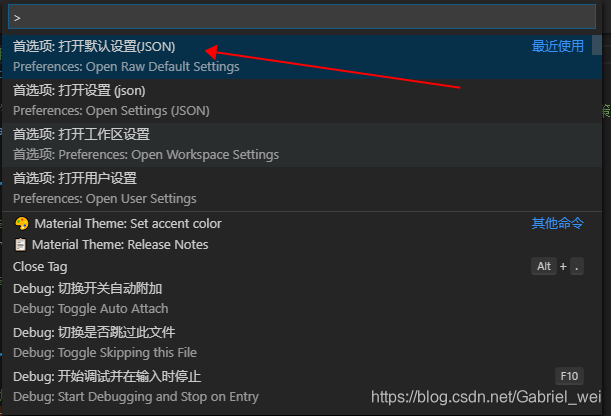
可以在你的默认配置中看到这些,然后自己配置的时候,不懂的地方,可以参考这里
{// 控制在差异编辑器中是否把前导空格或尾随空格的改动显示为差异。"diffEditor.ignoreTrimWhitespace": true,// 控制差异编辑器是否为添加/删除的更改显示 +/- 指示符号。"diffEditor.renderIndicators": true,// 控制差异编辑器的显示方式是并排还是内联。"diffEditor.renderSideBySide": true,// 控制是否应在遇到提交字符时接受建议。例如,在 JavaScript 中,半角分号 (`;`) 可以为提交字符,能够在接受建议的同时键入该字符。"editor.acceptSuggestionOnCommitCharacter": true,// 控制除了 `Tab` 键以外, `Enter` 键是否同样可以接受建议。这能减少“插入新行”和“接受建议”命令之间的歧义。// - on// - smart: 仅当建议包含文本改动时才可使用 `Enter` 键进行接受。// - off"editor.acceptSuggestionOnEnter": "on",// 控制编辑器是否应运行在对屏幕阅读器进行优化的模式。// - auto: 编辑器将使用平台 API 以检测是否附加了屏幕阅读器。// - on: 编辑器将对屏幕阅读器的使用进行永久优化。// - off: 编辑器将不再对屏幕阅读器的使用进行优化。"editor.accessibilitySupport": "auto",// 控制编辑器是否在左括号后自动插入右括号。// - always// - languageDefined: 使用语言配置确定何时自动闭合括号。// - beforeWhitespace: 仅当光标位于空白字符左侧时,才自动闭合括号。// - never"editor.autoClosingBrackets": "languageDefined",// 控制编辑器是否在左引号后自动插入右引号。// - always// - languageDefined: 使用语言配置确定何时自动闭合引号。// - beforeWhitespace: 仅当光标位于空白字符左侧时,才自动闭合引号。// - never"editor.autoClosingQuotes": "languageDefined",// 控制编辑器是否在用户键入、粘贴或移动行时自动调整缩进。必须安装包含此语言缩进规则的扩展。"editor.autoIndent": true,// 控制编辑器是否应自动包住所选内容。// - languageDefined: 使用语言配置确定何时自动包住所选内容。// - brackets: 使用括号而非引号来包住所选内容。// - quotes: 使用引号而非括号来包住所选内容。// - never"editor.autoSurround": "languageDefined",// 在保存时运行的代码操作类型。"editor.codeActionsOnSave": {},// 控制在保存文件时进行的代码操作的超时时间 (毫秒)。"editor.codeActionsOnSaveTimeout": 750,// 控制是否在编辑器中显示 CodeLens。"editor.codeLens": true,// 控制编辑器是否显示内联颜色修饰器和颜色选取器。"editor.colorDecorators": true,// 控制在复制时是否同时复制语法高亮。"editor.copyWithSyntaxHighlighting": true,// 控制光标的动画样式。"editor.cursorBlinking": "blink",// 控制是否启用平滑插入动画。"editor.cursorSmoothCaretAnimation": false,// 控制光标样式。"editor.cursorStyle": "line",// 当 `editor.cursorStyle` 设置为 `line` 时,控制光标的宽度。"editor.cursorWidth": 0,// 定义一个默认格式化程序, 该格式化程序优先于所有其他格式化程序设置。必须是提供格式化程序的扩展的标识符。// - null: 没有// - vscode.configuration-editing: 在配置文件 (如设置、启动和扩展推荐文件) 中提供高级 IntelliSense、自动修复等功能// - vscode.css-language-features: 为 CSS、LESS 和 SCSS 文件提供丰富的语言支持。// - vscode.debug-auto-launch: 当 node-debug 扩展未启用时提供自动附加的辅助程序。// - vscode.debug-server-ready: 如果正在调试的服务器已准备就绪,在浏览器中打开 URI。// - vscode.emmet: 适用于 VS Code 的 Emmet 支持// - vscode.extension-editing: 在创建扩展时提供 linting 功能。// - vscode.git: Git 源代码管理集成// - vscode.grunt: Extension to add Grunt capabilities to VS Code.// - vscode.gulp: 向 VSCode 提供 Gulp 功能的扩展。// - vscode.html-language-features: 为 HTML 和 Handlebar 文件提供丰富的语言支持// - vscode.jake: 向 VS Code 提供 Jake 功能的扩展。// - vscode.json-language-features: 为 JSON 文件提供丰富的语言支持// - vscode.markdown-language-features: 为 Markdown 提供丰富的语言支持。// - vscode.merge-conflict: 为内联合并冲突提供高亮和命令。// - ms-vscode.node-debug: Node.js 调试支持(低于 8.0 版本)// - ms-vscode.node-debug2: Node.js 调试支持// - ms-vscode.references-view: Reference Search results as separate, stable view in the sidebar// - vscode.npm: 为 npm 脚本提供任务支持的扩展。// - vscode.php-language-features: 为 PHP 文件提供丰富的语言支持。// - vscode.python: 在 Python 文件中提供语法高亮、括号匹配和折叠功能。// - vscode.typescript-language-features: 为 JavaScript 和 TypeScript 提供丰富的语言支持。// - christian-kohler.path-intellisense: Visual Studio Code plugin that autocompletes filenames// - CoenraadS.bracket-pair-colorizer: A customizable extension for colorizing matching brackets// - dbaeumer.vscode-eslint: Integrates ESLint JavaScript into VS Code.// - eamodio.gitlens: Supercharge the Git capabilities built into Visual Studio Code — Visualize code authorship at a glance via Git blame annotations and code lens, seamlessly navigate and explore Git repositories, gain valuable insights via powerful comparison commands, and so much more// - Equinusocio.vsc-material-theme: The most epic theme now for Visual Studio Code// - esbenp.prettier-vscode: VS Code plugin for prettier/prettier// - formulahendry.auto-close-tag: Automatically add HTML/XML close tag, same as Visual Studio IDE or Sublime Text// - formulahendry.auto-rename-tag: Auto rename paired HTML/XML tag// - formulahendry.code-runner: Run C, C++, Java, JS, PHP, Python, Perl, Ruby, Go, Lua, Groovy, PowerShell, CMD, BASH, F#, C#, VBScript, TypeScript, CoffeeScript, Scala, Swift, Julia, Crystal, OCaml, R, AppleScript, Elixir, VB.NET, Clojure, Haxe, Obj-C, Rust, Racket, AutoHotkey, AutoIt, Kotlin, Dart, Pascal, Haskell, Nim, D, Lisp, Kit// - octref.vetur: Vue tooling for VS Code// - PKief.material-icon-theme: Material Design Icons for Visual Studio Code// - ritwickdey.LiveServer: Launch a development local Server with live reload feature for static & dynamic pages// - Shan.code-settings-sync: Synchronize Settings, Snippets, Themes, File Icons, Launch, Keybindings, Workspaces and Extensions Across Multiple Machines Using GitHub Gist.// - shd101wyy.markdown-preview-enhanced: Markdown Preview Enhanced ported to vscode// - WallabyJs.quokka-vscode: Live Scratchpad for JavaScript."editor.defaultFormatter": null,// 控制是否在打开文件时,基于文件内容自动检测 `editor.tabSize#` 和 `#editor.insertSpaces`。"editor.detectIndentation": true,// 控制在编辑器中是否允许通过拖放来移动选中内容。"editor.dragAndDrop": true,// 控制在没有选择内容时进行复制是否复制当前行。"editor.emptySelectionClipboard": true,// 按下 "Alt" 时滚动速度加倍。"editor.fastScrollSensitivity": 5,// 控制 "查找小部件" 是否应在编辑器顶部添加额外的行。如果为 true, 则可以在 "查找小工具" 可见时滚动到第一行之外。"editor.find.addExtraSpaceOnTop": true,// 在执行查找操作时,在编辑器中的选中文本中还是整个文件中进行查找。"editor.find.autoFindInSelection": false,// 控制是否将编辑器选中内容作为搜索词填入到查找小组件中。"editor.find.seedSearchStringFromSelection": true,// 控制编辑器是否启用了代码折叠。"editor.folding": true,// 控制计算折叠范围的策略。`auto` 将使用语言特定的折叠策略 (若可用)。`indentation` 将使用基于缩进的折叠策略。"editor.foldingStrategy": "auto",// 控制字体系列。"editor.fontFamily": "Consolas, 'Courier New', monospace",// 启用或禁用字体连字。"editor.fontLigatures": false,// 以像素为单位控制字体大小。"editor.fontSize": 14,// 控制字体粗细。"editor.fontWeight": "normal",// 控制编辑器是否自动格式化粘贴的内容。格式化程序必须可用,并且能针对文档中的某一范围进行格式化。"editor.formatOnPaste": false,// 在保存时格式化文件。格式化程序必须可用,延迟后文件不能保存,并且编辑器不能关闭。"editor.formatOnSave": false,// 控制在保存文件时进行格式化的超时时间 (毫秒)。"editor.formatOnSaveTimeout": 750,// 控制编辑器在键入一行后是否自动格式化该行。"editor.formatOnType": false,// 控制编辑器是否应呈现垂直字形边距。字形边距最常用于调试。"editor.glyphMargin": true,// 当存在多个目标位置时, 控制 "Go To" 命令 (如 "Go To Definition") 的行为。// - peek: 显示结果的预览视图 (默认值)// - gotoAndPeek: 转到主结果并显示预览视图// - goto: 转到主要结果并忽略其他结果"editor.gotoLocation.multiple": "peek",// 控制是否在概览标尺中隐藏光标。"editor.hideCursorInOverviewRuler": false,// 控制是否突出显示编辑器中活动的缩进参考线。"editor.highlightActiveIndentGuide": true,// 控制显示悬停提示前的等待时间 (毫秒)。"editor.hover.delay": 300,// 控制是否显示悬停提示。"editor.hover.enabled": true,// 控制当鼠标移动到悬停提示上时,其是否保持可见。"editor.hover.sticky": true,// 按 `Tab` 键时插入空格。该设置在 `editor.detectIndentation` 启用时根据文件内容可能会被覆盖。"editor.insertSpaces": true,// 对大型文件进行特殊处理,禁用某些内存密集型功能。"editor.largeFileOptimizations": true,// 控制以像素为单位的字母间距。"editor.letterSpacing": 0,// 在编辑器中启用代码操作小灯泡提示。"editor.lightbulb.enabled": true,// 控制行高。为 0 时则通过字体大小自动计算。"editor.lineHeight": 0,// 控制行号的显示。// - off: 不显示行号。// - on: 将行号显示为绝对行数。// - relative: 将行号显示为与光标相隔的行数。// - interval: 每 10 行显示一次行号。"editor.lineNumbers": "on",// 控制是否在编辑器中检测链接并使其可被点击。"editor.links": true,// 当选择其中一项时,将突出显示匹配的括号。"editor.matchBrackets": true,// 由于性能原因,超过这个长度的行将不会被标记"editor.maxTokenizationLineLength": 20000,// 控制是否显示缩略图。"editor.minimap.enabled": true,// 限制缩略图的宽度,控制其最多显示的列数。"editor.minimap.maxColumn": 120,// 渲染每行的实际字符,而不是色块。"editor.minimap.renderCharacters": true,// 控制是否自动隐藏缩略图滑块。"editor.minimap.showSlider": "mouseover",// 控制在哪一侧显示缩略图。"editor.minimap.side": "right",// 对鼠标滚轮滚动事件的 `deltaX` 和 `deltaY` 乘上的系数。"editor.mouseWheelScrollSensitivity": 1,// 按住 `Ctrl` 键并滚动鼠标滚轮时对编辑器字体大小进行缩放。"editor.mouseWheelZoom": false,// 当多个光标重叠时进行合并。"editor.multiCursorMergeOverlapping": true,// 在通过鼠标添加多个光标时使用的修改键。“转到定义”和“打开链接”功能所需的鼠标动作将会相应调整,不与多光标修改键冲突。[阅读详细信息](https://code.visualstudio.com/docs/editor/codebasics#_multicursor-modifier)。// - ctrlCmd: 映射为 `Ctrl` (Windows 和 Linux) 或 `Command` (macOS)。// - alt: 映射为 `Alt` (Windows 和 Linux) 或 `Option` (macOS)。"editor.multiCursorModifier": "alt",// 控制编辑器是否突出显示语义符号的匹配项。"editor.occurrencesHighlight": true,// 控制是否在概览标尺周围绘制边框。"editor.overviewRulerBorder": true,// 控制概览标尺中同一位置可显示的提示数量。"editor.overviewRulerLanes": 3,// 控制参数提示菜单在到达列表末尾时进行循环还是关闭。"editor.parameterHints.cycle": false,// 在输入时显示含有参数文档和类型信息的小面板。"editor.parameterHints.enabled": true,// 控制是否在键入时自动显示建议。"editor.quickSuggestions": {"other": true,"comments": false,"strings": false},// 控制显示快速建议前的等待时间 (毫秒)。"editor.quickSuggestionsDelay": 10,// 控制编辑器是否显示控制字符。"editor.renderControlCharacters": false,// 当文件以换行符结束时, 呈现最后一行的行号。"editor.renderFinalNewline": true,// 控制编辑器是否显示缩进参考线。"editor.renderIndentGuides": true,// 控制编辑器的当前行进行高亮显示的方式。// - none// - gutter// - line// - all: 同时突出显示导航线和当前行。"editor.renderLineHighlight": "line",// 控制编辑器在空白字符上显示符号的方式。// - none// - boundary: 除了单个空格,在空白字符上显示符号。// - all"editor.renderWhitespace": "none",// 控制选区是否有圆角。"editor.roundedSelection": true,// 在一定数量的等宽字符后显示垂直标尺。输入多个值,显示多个标尺。若数组为空,则不绘制标尺。"editor.rulers": [],// 控制编辑器水平滚动时可以超过范围的字符数。"editor.scrollBeyondLastColumn": 5,// 控制编辑器是否可以滚动到最后一行之后。"editor.scrollBeyondLastLine": true,// 控制编辑器是否应突出显示与所选内容类似的匹配项。"editor.selectionHighlight": true,// 控制是否自动隐藏导航线上的折叠控件。"editor.showFoldingControls": "mouseover",// 控制是否淡化未使用的代码。"editor.showUnused": true,// 控制编辑器是否在滚动时使用动画。"editor.smoothScrolling": false,// 控制代码片段是否与其他建议一起显示及其排列的位置。// - top: 在其他建议上方显示代码片段建议。// - bottom: 在其他建议下方显示代码片段建议。// - inline: 在其他建议中穿插显示代码片段建议。// - none: 不显示代码片段建议。"editor.snippetSuggestions": "inline",// 在速览编辑器中,即使双击其中的内容或者按 `Esc` 键,也保持其打开状态。"editor.stablePeek": false,// 控制是否应从智能感知中筛选某些建议类型。建议类型的列表可以在这里找到: https://code.visualstudio.com/docs/editor/intellisense#_types-of-completions。"editor.suggest.filteredTypes": {"keyword": true},// 控制对建议的筛选和排序是否考虑小的拼写错误。"editor.suggest.filterGraceful": true,// 控制排序时是否提高靠近光标的词语的优先级。"editor.suggest.localityBonus": false,// 控制在显示滚动条之前智能感知将显示的建议数 (最多 15个)。"editor.suggest.maxVisibleSuggestions": 12,// 控制是否在多个工作区和窗口间共享记忆的建议选项(需要 `editor.suggestSelection`)。"editor.suggest.shareSuggestSelections": false,// 控制是否在建议中显示或隐藏图标。"editor.suggest.showIcons": true,// 控制在活动代码片段内是否禁用快速建议。"editor.suggest.snippetsPreventQuickSuggestions": true,// 建议小部件的字号。如果设置为 `0`,则使用 `editor.fontSize` 的值。"editor.suggestFontSize": 0,// 建议小部件的行高。如果设置为 `0`,则使用 `editor.lineHeight` 的值。"editor.suggestLineHeight": 0,// 控制在键入触发字符后是否自动显示建议。"editor.suggestOnTriggerCharacters": true,// 控制在建议列表中如何预先选择建议。// - first: 始终选择第一个建议。// - recentlyUsed: 选择最近的建议,除非进一步键入选择其他项。例如 `console. -> console.log`,因为最近补全过 `log`。// - recentlyUsedByPrefix: 根据之前补全过的建议的前缀来进行选择。例如,`co -> console`、`con -> const`。"editor.suggestSelection": "recentlyUsed",// 启用 Tab 补全。// - on: 在按下 Tab 键时进行 Tab 补全,将插入最佳匹配建议。// - off: 禁用 Tab 补全。// - onlySnippets: 在前缀匹配时进行 Tab 补全。在 "quickSuggestions" 未启用时体验最好。"editor.tabCompletion": "off",// 一个制表符等于的空格数。在 `editor.detectIndentation` 启用时,根据文件内容,该设置可能会被覆盖。"editor.tabSize": 4,// 覆盖当前所选颜色主题中的编辑器颜色和字体样式。"editor.tokenColorCustomizations": {},// 删除自动插入的尾随空白符号。"editor.trimAutoWhitespace": true,// 根据制表位插入和删除空格。"editor.useTabStops": true,// 控制是否根据文档中的文字计算自动完成列表。"editor.wordBasedSuggestions": true,// 执行单词相关的导航或操作时作为单词分隔符的字符。"editor.wordSeparators": "`~!@#$%^&*()-=+[{]}\\|;:'\",.<>/?",// 控制折行的方式。// - off: 永不换行。// - on: 将在视区宽度处换行。// - wordWrapColumn: 在 `editor.wordWrapColumn` 处折行。// - bounded: 在视区宽度和 `editor.wordWrapColumn` 中的较小值处折行。"editor.wordWrap": "off",// 在 `editor.wordWrap` 为 `wordWrapColumn` 或 `bounded` 时,控制编辑器的折行列。"editor.wordWrapColumn": 80,// 控制折行的缩进。// - none: 没有缩进。折行从第 1 列开始。// - same: 折行的缩进量与其父级相同。// - indent: 折行的缩进量比其父级多 1。// - deepIndent: 折行的缩进量比其父级多 2。"editor.wrappingIndent": "same",// 控制是否在“源代码管理”视图中始终显示内联操作。"scm.alwaysShowActions": false,// 控制是否始终显示“源代码管理提供程序”部分。"scm.alwaysShowProviders": false,// 控制编辑器中差异的显示效果。"scm.diffDecorations": "all",// 控制水槽中不同装饰的宽度(px)(添加&修改)。"scm.diffDecorationsGutterWidth": 3,// 控制在 "源代码管理提供程序" 部分中可见的提供程序数。设置为 "0", 以便能够手动调整视图的大小。"scm.providers.visible": 10,// 控制工作台中活动栏的可见性。"workbench.activityBar.visible": true,// 覆盖当前所选颜色主题的颜色。"workbench.colorCustomizations": {},// 指定用在工作台中的颜色主题。"workbench.colorTheme": "Default Dark+",// 控制命令面板中保留最近使用命令的数量。设置为 0 时禁用命令历史功能。"workbench.commandPalette.history": 50,// 当再次打开命令面板时,控制是否恢复上一次输入的内容。"workbench.commandPalette.preserveInput": false,// 如果在居中布局中打开了超过一组编辑器,控制是否自动将宽度调整为最大宽度值。当回到只打开了一组编辑器的状态,将自动将宽度调整为原始的居中宽度值。"workbench.editor.centeredLayoutAutoResize": true,// 控制编辑器组中最后一个选项卡关闭时这个空组的行为。若启用,将自动关闭空组。若禁用,空组仍将保留在网格布局中。"workbench.editor.closeEmptyGroups": true,// 当文件被其他进程删除或重命名时,控制是否自动关闭在这个期间内打开了此文件的编辑器。若禁用此项,在这种情况下将保留编辑器。请注意,若从应用内部进行删除,将始终关闭编辑器,并且为了保护您的数据,已更新文件始终不会关闭。"workbench.editor.closeOnFileDelete": false,// 控制打开的编辑器是否为预览编辑器。预览编辑器在被固定 (例如,通过双击或编辑) 前可重用,其字体样式为斜体。"workbench.editor.enablePreview": true,// 控制从 Quick Open 打开的编辑器是否为预览编辑器。预览编辑器在被固定 (例如,通过双击或编辑) 前可重用。"workbench.editor.enablePreviewFromQuickOpen": true,// 控制是否按最常使用的顺序或从左到右的顺序关闭选项卡。"workbench.editor.focusRecentEditorAfterClose": true,// 控制是否绘制已修改 (存在更新) 的编辑器选项卡的顶部边框。"workbench.editor.highlightModifiedTabs": false,// 控制编辑器标签的格式。// - default: 显示文件名。当启用选项卡且在同一组内有两个相同名称的文件时,将添加每个文件路径中可以用于区分的部分。在选项卡被禁用且编辑器活动时,将显示相对于工作区文件夹的路径。// - short: 在文件的目录名之后显示文件名。// - medium: 在文件相对当前工作区文件夹的路径之后显示文件名。// - long: 在文件的绝对路径之后显示文件名。"workbench.editor.labelFormat": "default",// 控制编辑器打开的位置。选择 `left` 或 `right` 可分别在当前活动编辑器的左侧或右侧打开。选择 `first` (最前) 或 `last` (最后) 打开的位置与当前活动编辑器无关。"workbench.editor.openPositioning": "right",// 控制编辑器在并排打开时 (比如从资源管理器) 出现的默认位置。默认在当前活动编辑器右侧打开。若更改为 `down`,则在当前活动编辑器下方打开。"workbench.editor.openSideBySideDirection": "right",// 在重新打开已关闭文件时,还原最后一个视图的状态 (如滚动位置)。"workbench.editor.restoreViewState": true,// 控制是否在打开的任何可见组中显示编辑器。如果禁用,编辑器将优先在当前活动的编辑器组中打开。如果启用,将会显示在已打开的编辑器,而不是在当前活动的编辑器组中再次打开。请注意,有些情况下会忽略此设置,例如,强制编辑器在特定组中打开或当前活动组的一侧时。"workbench.editor.revealIfOpen": false,// 控制是否在编辑器选项卡中显示图标。要求同时启用图标主题。"workbench.editor.showIcons": true,// 控制打开的编辑器是否显示在选项卡中。"workbench.editor.showTabs": true,// 控制编辑器选项卡中关闭按钮的位置,或是设置为 `off` 禁用。"workbench.editor.tabCloseButton": "right",// 控制编辑器选项卡的大小。// - fit: 始终将标签页保持足够大,能够完全显示编辑器标签。// - shrink: 在不能同时显示所有选项卡时,允许选项卡缩小。"workbench.editor.tabSizing": "fit",// 从 Microsoft 联机服务中获取要进行的实验。"workbench.enableExperiments": true,// 指定在工作台中使用的图标主题,或指定 "null" 以不显示任何文件图标。// - null: 无文件图标// - vs-minimal// - vs-seti// - material-icon-theme"workbench.iconTheme": "vs-seti",// 控制列表和树中的键盘导航是否仅通过键入自动触发。如果设置为“false”,键盘导航只在执行“list.toggleKeyboardNavigation ”命令时触发,您可以为该命令指定键盘快捷方式。"workbench.list.automaticKeyboardNavigation": true,// 控制列表和树是否支持在工作台中进行水平滚动。"workbench.list.horizontalScrolling": false,// 控制工作台中的列表和树的键盘导航样式。它可为“简单”、“突出显示”或“筛选”。// - simple: 简单键盘导航聚焦与键盘输入相匹配的元素。仅对前缀进行匹配。// - highlight: 高亮键盘导航会突出显示与键盘输入相匹配的元素。进一步向上和向下导航将仅遍历突出显示的元素。// - filter: 筛选器键盘导航将筛选出并隐藏与键盘输入不匹配的所有元素。"workbench.list.keyboardNavigation": "highlight",// 在通过鼠标多选树和列表条目时使用的修改键 (例如“资源管理器”、“打开的编辑器”和“源代码管理”视图)。“在侧边打开”功能所需的鼠标动作 (若可用) 将会相应调整,不与多选修改键冲突。// - ctrlCmd: 映射为 `Ctrl` (Windows 和 Linux) 或 `Command` (macOS)。// - alt: 映射为 `Alt` (Windows 和 Linux) 或 `Option` (macOS)。"workbench.list.multiSelectModifier": "ctrlCmd",// 控制在树和列表中怎样使用鼠标来展开子项(若支持)。对于树中的父节点,此设置将控制是使用单击还是双击来展开。注意,某些不适用于此设置的树或列表可能会忽略此项。"workbench.list.openMode": "singleClick",// 控制面板 (终端、调试控制台、输出、问题) 的默认位置。可显示在工作台的底部或右侧。"workbench.panel.defaultLocation": "bottom",// 控制 Quick Open 是否在其失去焦点时自动关闭。"workbench.quickOpen.closeOnFocusLost": true,// 在打开 Quick Open 视图时,控制是否自动恢复上一次输入的值。"workbench.quickOpen.preserveInput": false,// 配置默认使用的设置编辑器。// - ui: 使用设置 ui 编辑器。// - json: 使用 json 文件编辑器。"workbench.settings.editor": "ui",// 控制是否在设置中启用自然语言搜索。自然语言搜索由 Microsoft 联机服务提供。"workbench.settings.enableNaturalLanguageSearch": true,// 控制在打开按键绑定设置时是否同时打开显示所有默认按键绑定的编辑器。"workbench.settings.openDefaultKeybindings": false,// 控制在打开设置时是否同时打开显示所有默认设置的编辑器。"workbench.settings.openDefaultSettings": false,// 控制设置编辑器的目录在搜索时的行为。// - hide: 在搜索时隐藏目录。// - filter: 筛选目录为仅显示含有匹配设置的类别。单击一个类别将仅显示该类别的结果。"workbench.settings.settingsSearchTocBehavior": "filter",// 控制在将设置编辑为 json 时是否使用拆分 json 编辑器。"workbench.settings.useSplitJSON": false,// 控制边栏的位置。它可显示在工作台的左侧或右侧。"workbench.sideBar.location": "left",// 在没有从上一会话中恢复出信息的情况下,控制启动时显示的编辑器。// - none: 在启动时不打开编辑器。// - welcomePage: 打开欢迎页面 (默认)。// - readme: 打开包含一个自述文件的文件夹时, 打开自述文件, 否则回退到 "欢迎页面"。// - newUntitledFile: 打开新的无标题文件 (仅在打开空工作区时适用)。// - welcomePageInEmptyWorkbench: 在打开空工作区时打开欢迎页面。"workbench.startupEditor": "welcomePage",// 控制是否显示工作台底部状态栏中的 Twitter 反馈 (笑脸图标)。"workbench.statusBar.feedback.visible": true,// 控制工作台底部状态栏的可见性。"workbench.statusBar.visible": true,// 启用后,当没有打开编辑器时将显示水印提示。"workbench.tips.enabled": true,// 此设置已弃用, 请改用 "workbench.list.horizontalScrolling"。// 控制工作台中的树控件是否支持水平滚动。"workbench.tree.horizontalScrolling": false,// 控制树缩进(以像素为单位)。"workbench.tree.indent": 8,// 启用工作台的网格布局。此设置可能会为工作台组件启用其他布局选项。"workbench.useExperimentalGridLayout": false,// 控制是否显示视图头部的操作项。视图头部操作项可以一直,或是仅当聚焦到和悬停在视图上时显示。"workbench.view.alwaysShowHeaderActions": false,// 如果已启用,将自动更改为高对比度主题;如果 Windows 正在使用高对比度主题,则当离开 Windows 高对比度主题时会更改为深色主题。"window.autoDetectHighContrast": true,// 控制在关闭最后一个编辑器时是否关闭整个窗口。此设置仅适用于没有显示文件夹的窗口。"window.closeWhenEmpty": false,// 如果启用, 双击标题栏中的应用程序图标将关闭窗口, 并且该窗口无法通过图标拖动。此设置仅在 "#window.titleBarStyle#" 设置为 "custom" 时生效。"window.doubleClickIconToClose": false,// 启用后,即可使用 Alt 快捷键打开主菜单。若禁用助记键,这些 Alt 快捷键将能绑定到编辑器命令。"window.enableMenuBarMnemonics": true,// 控制菜单栏的可见性。“切换”设置表示隐藏菜单栏,按一次 Alt 键则将显示此菜单栏。默认情况下,除非窗口为全屏,否则菜单栏可见。// - default: 菜单仅在全屏模式下隐藏。// - visible: 菜单始终可见,即使处于全屏模式下。// - toggle: 菜单隐藏,但可以通过 Alt 键显示。// - hidden: 菜单始终隐藏。"window.menuBarVisibility": "default",// 控制在已有窗口时新开窗口的尺寸。请注意,此设置对第一个打开的窗口无效。第一个窗口将始终恢复关闭前的大小和位置。// - default: 在屏幕中心打开新窗口。// - inherit: 以与上一个活动窗口相同的尺寸打开新窗口。// - maximized: 打开最大化的新窗口。// - fullscreen: 在全屏模式下打开新窗口。"window.newWindowDimensions": "default",// 控制是否在新窗口中打开文件。// 注意,此设置可能会被忽略 (例如,在使用 `--new-window` 或 `--reuse-window` 命令行选项时)。// - on: 在新窗口中打开文件。// - off: 在文件所在文件夹的已有窗口中或在上一个活动窗口中打开文件。// - default: 在新窗口中打开文件,除非文件从应用程序内进行选取 (例如,通过“文件”菜单)。"window.openFilesInNewWindow": "off",// 控制打开文件夹时是在新窗口打开还是替换上一个活动窗口。// 注意,此设置可能会被忽略 (例如,在使用 `--new-window` 或 `--reuse-window` 命令行选项时)。// - on: 在新窗口中打开文件夹。// - off: 文件夹将替换上一个活动窗口。// - default: 在新窗口中打开文件夹,除非文件夹从应用程序内进行选取 (例如,通过“文件”菜单)。"window.openFoldersInNewWindow": "default",// 在另一实例无参启动时,控制是打开新的空窗口或是聚焦到最后运行的实例。// 注意,此设置可能会被忽略 (例如,在使用 `--new-window` 或 `--reuse-window` 命令行选项时)。// - on: 打开一个新的空窗口。// - off: 聚焦到上一活动的运行实例。"window.openWithoutArgumentsInNewWindow": "on",// 若窗口在处于全屏模式时退出,控制其在恢复时是否还原到全屏模式。"window.restoreFullscreen": false,// 控制窗口在重启后再次打开的方式。// - all: 重新打开所有窗口。// - folders: 重新打开所有文件夹。空工作区将不会被恢复。// - one: 重新打开上一个活动窗口。// - none: 永远不重新打开窗口。总是以一个空窗口启动。"window.restoreWindows": "one",// 根据活动编辑器控制窗口标题。变量是根据上下文替换的:"${activeEditorShort}": 文件名 (例如 myFile.txt)。// - "${activeEditorMedium}": 相对于工作区文件夹的文件路径 (例如, myFolder/myFileFolder/myFile.txt)。// - "${activeEditorLong}": 文件的完整路径 (例如 /Users/Development/myFolder/myFileFolder/myFile.txt)。// - "${activeFolderShort}": 文件所在的文件夹名称 (例如, myFileFolder)。// - "${activeFolderMedium}": 相对于工作区文件夹的、包含文件的文件夹的路径, (例如 myFolder/myFileFolder)。// - "${activeFolderLong}": 文件所在文件夹的完整路径 (例如 /Users/Development/myFolder/myFileFolder)。// - "${folderName}": 文件所在工作区文件夹的名称 (例如 myFolder)。// - "${folderpath}": 文件所在工作区文件夹的路径 (例如 /Users/Development/myFolder)。// - "${rootName}": 工作区的名称 (例如, myFolder 或 myWorkspace)。// - "${rootPath}": 工作区的文件路径 (例如 /Users/Development/myWorkspace)。// - "${appName}": 例如 VS Code。// - "${dirty}": 表示活动编辑器为脏的脏指示器。// - "${separator}": 一种条件分隔符 ("-"), 仅在被包含值或静态文本的变量包围时显示。"window.title": "${dirty}${activeEditorShort}${separator}${rootName}${separator}${appName}",// 调整窗口标题栏的外观。在 Linux 和 Windows 上,此设置也会影响应用程序和上下文菜单的外观。更改需要完全重新启动才能应用。"window.titleBarStyle": "custom",// 调整窗口的缩放级别。原始大小是 0,每次递增(例如 1)或递减(例如 -1)表示放大或缩小 20%。也可以输入小数以便以更精细的粒度调整缩放级别。"window.zoomLevel": 0,// 配置语言的文件关联 (如: `"*.extension": "html"`)。这些关联的优先级高于已安装语言的默认关联。"files.associations": {},// 启用后,将在文件打开时尝试猜测字符集编码。可以按语言对此项进行配置。"files.autoGuessEncoding": false,// 控制已更新文件的自动保存。可在[此处](https://code.visualstudio.com/docs/editor/codebasics#_save-auto-save)阅读有关自动保存的详细信息。// - off: 永不自动保存更新后的文件。// - afterDelay: 当文件修改后的时间超过 `files.autoSaveDelay` 中配置的值时自动进行保存。// - onFocusChange: 编辑器失去焦点时自动保存更新后的文件。// - onWindowChange: 窗口失去焦点时自动保存更新后的文件。"files.autoSave": "off",// 控制自动保存已更新文件的延迟时间 (毫秒)。仅在 `files.autoSave` 设置为 `afterDelay` 时生效。"files.autoSaveDelay": 1000,// 分配给新文件的默认语言模式。"files.defaultLanguage": "",// 在删除文件或文件夹时,将它们移动到操作系统的“废纸篓”中 (Windows 为“回收站”)。禁用此设置将永久删除文件或文件夹。"files.enableTrash": true,// 在读取和写入文件时使用的默认字符集编码。可以按语言对此项进行配置。// - utf8: UTF-8// - utf8bom: UTF-8 with BOM// - utf16le: UTF-16 LE// - utf16be: UTF-16 BE// - windows1252: Western (Windows 1252)// - iso88591: Western (ISO 8859-1)// - iso88593: Western (ISO 8859-3)// - iso885915: Western (ISO 8859-15)// - macroman: Western (Mac Roman)// - cp437: DOS (CP 437)// - windows1256: Arabic (Windows 1256)// - iso88596: Arabic (ISO 8859-6)// - windows1257: Baltic (Windows 1257)// - iso88594: Baltic (ISO 8859-4)// - iso885914: Celtic (ISO 8859-14)// - windows1250: Central European (Windows 1250)// - iso88592: Central European (ISO 8859-2)// - cp852: Central European (CP 852)// - windows1251: Cyrillic (Windows 1251)// - cp866: Cyrillic (CP 866)// - iso88595: Cyrillic (ISO 8859-5)// - koi8r: Cyrillic (KOI8-R)// - koi8u: Cyrillic (KOI8-U)// - iso885913: Estonian (ISO 8859-13)// - windows1253: Greek (Windows 1253)// - iso88597: Greek (ISO 8859-7)// - windows1255: Hebrew (Windows 1255)// - iso88598: Hebrew (ISO 8859-8)// - iso885910: Nordic (ISO 8859-10)// - iso885916: Romanian (ISO 8859-16)// - windows1254: Turkish (Windows 1254)// - iso88599: Turkish (ISO 8859-9)// - windows1258: Vietnamese (Windows 1258)// - gbk: Simplified Chinese (GBK)// - gb18030: Simplified Chinese (GB18030)// - cp950: Traditional Chinese (Big5)// - big5hkscs: Traditional Chinese (Big5-HKSCS)// - shiftjis: Japanese (Shift JIS)// - eucjp: Japanese (EUC-JP)// - euckr: Korean (EUC-KR)// - windows874: Thai (Windows 874)// - iso885911: Latin/Thai (ISO 8859-11)// - koi8ru: Cyrillic (KOI8-RU)// - koi8t: Tajik (KOI8-T)// - gb2312: Simplified Chinese (GB 2312)// - cp865: Nordic DOS (CP 865)// - cp850: Western European DOS (CP 850)"files.encoding": "utf8",// 默认行尾字符。// - \n: LF// - \r\n: CRLF// - auto: 使用具体操作系统规定的行末字符。"files.eol": "auto",// 配置排除的文件和文件夹的 glob 模式。例如,文件资源管理器将根据此设置决定要显示或隐藏的文件和文件夹。可在[此处](https://code.visualstudio.com/docs/editor/codebasics#_advanced-search-options)阅读有关 glob 模式的详细信息。"files.exclude": {"**/.git": true,"**/.svn": true,"**/.hg": true,"**/CVS": true,"**/.DS_Store": true},// 控制是否在会话间记住未保存的文件,以允许在退出编辑器时跳过保存提示。// - off: 禁用热退出。// - onExit: 在 Windows/Linux 平台关闭最后一个窗口,或者在全平台触发 `workbench.action.quit` 命令 (命令托盘、键绑定、菜单) 时进行热退出。下次启动时将还原所有已备份的窗口。// - onExitAndWindowClose: 在 Windows/Linux 平台关闭最后一个窗口、触发 `workbench.action.quit` 命令 (命令托盘、键绑定、菜单) 会引起应用程序关闭。对于任何有文件夹打开的窗口,则不论该窗口是否是最后一个窗口进行热退出。下次启动时将还原所有未打开文件夹的窗口。若要还原打开有文件夹的窗口,请将 `window.restoreWindows` 设置为 `all`。"files.hotExit": "onExit",// 启用后,保存文件时在文件末尾插入一个最终新行。"files.insertFinalNewline": false,// 在打开大型文件时,控制 VS Code 可在重启后使用的内存。在命令行中指定 `--max-memory=新的大小` 参数可达到相同效果。"files.maxMemoryForLargeFilesMB": 4096,// 启用后,保存文件时将删除在最终新行后的所有新行。"files.trimFinalNewlines": false,// 启用后,将在保存文件时剪裁尾随空格。"files.trimTrailingWhitespace": false,// 配置文件路径的 glob 模式以从文件监视排除。模式必须在绝对路径上匹配(例如 ** 前缀或完整路径需正确匹配)。更改此设置需要重启。如果在启动时遇到 Code 消耗大量 CPU 时间,则可以排除大型文件夹以减少初始加载。"files.watcherExclude": {"**/.git/objects/**": true,"**/.git/subtree-cache/**": true,"**/node_modules/*/**": true},// 控制在打开禅模式时是否启用居中布局。"zenMode.centerLayout": true,// 控制在打开禅模式时是否将工作台切换到全屏。"zenMode.fullScreen": true,// 控制在打开禅模式时是否隐藏工作台左侧的活动栏。"zenMode.hideActivityBar": true,// 控制在打开禅模式时是否隐藏编辑器行号。"zenMode.hideLineNumbers": true,// 控制在打开禅模式时是否隐藏工作台底部的状态栏。"zenMode.hideStatusBar": true,// 控制在打开禅模式时是否隐藏工作台选项卡。"zenMode.hideTabs": true,// 若窗口在处于禅模式时退出,控制其在恢复时是否还原到禅模式。"zenMode.restore": false,// 控制资源管理器是否在打开文件时自动显示并选择。"explorer.autoReveal": true,// 控制资源管理器是否在把文件删除到废纸篓时进行确认。"explorer.confirmDelete": true,// 控制在资源管理器内拖放移动文件或文件夹时是否进行确认。"explorer.confirmDragAndDrop": true,// 控制文件修饰是否应使用徽章。"explorer.decorations.badges": true,// 控制文件修饰是否应使用颜色。"explorer.decorations.colors": true,// 控制资源管理器是否允许通过拖放移动文件和文件夹。"explorer.enableDragAndDrop": true,// 在“打开的编辑器”窗格中显示的编辑器数量。"explorer.openEditors.visible": 9,// 控制文件和文件夹在资源管理器中的排列顺序。// - default: 按名称的字母顺序排列文件和文件夹。文件夹显示在文件前。// - mixed: 按名称的字母顺序排列文件和文件夹。两者穿插显示。// - filesFirst: 按名称的字母顺序排列文件和文件夹。文件显示在文件夹前。// - type: 按扩展名的字母顺序排列文件和文件夹。文件夹显示在文件前。// - modified: 按最后修改日期降序排列文件和文件夹。文件夹显示在文件前。"explorer.sortOrder": "default",// 在搜索视图中控制操作栏的位置。// - auto: 当搜索视图较窄时将操作栏置于右侧,当搜索视图较宽时,将它紧接在内容之后。// - right: 始终将操作栏放置在右侧。"search.actionsPosition": "auto",// 控制是折叠还是展开搜索结果。// - auto: Files with less than 10 results are expanded. Others are collapsed.// - alwaysCollapse// - alwaysExpand"search.collapseResults": "auto",// 配置在搜索中排除的文件和文件夹的 glob 模式。已经继承 `files.exclude` 设置的所有 glob 模式。可在[此处](https://code.visualstudio.com/docs/editor/codebasics#_advanced-search-options)阅读有关 glob 模式的详细信息。"search.exclude": {"**/node_modules": true,"**/bower_components": true},// 控制是否在搜索中跟踪符号链接。"search.followSymlinks": true,// 控制搜索功能是显示在侧边栏,还是显示在水平空间更大的面板区域。"search.location": "sidebar",// 启用后,搜索服务进程将保持活动状态,而不是在一个小时不活动后关闭。这将使文件搜索缓存保留在内存中。"search.maintainFileSearchCache": false,// 是否在 Quick Open 的文件结果中包含最近打开的文件。"search.quickOpen.includeHistory": true,// 控制 Quick Open 文件结果中是否包括全局符号搜索的结果。"search.quickOpen.includeSymbols": false,// 控制是否在扩展宿主中运行搜索。重启后才能生效。"search.runInExtensionHost": false,// 控制是否显示搜索结果所在的行号。"search.showLineNumbers": false,// 若搜索词全为小写,则不区分大小写进行搜索,否则区分大小写进行搜索。"search.smartCase": false,// 控制在搜索文件时是否使用全局 `.gitignore` 和 `.ignore` 文件。"search.useGlobalIgnoreFiles": false,// 控制在搜索文件时是否使用 `.gitignore` 和 `.ignore` 文件。"search.useIgnoreFiles": true,// 是否在文本搜索中使用 pcre2 正则表达式引擎。这允许使用一些高级正则表达式功能, 如前瞻和反向引用。但是, 并非所有 pcre2 功能都受支持-仅支持 javascript 也支持的功能。"search.usePCRE2": false,// 控制在选择或替换匹配项时是否打开“替换预览”视图。"search.useReplacePreview": true,// 已弃用。请考虑使用 "search.usePCRE2" 获取对高级正则表达式功能的支持。// 此设置已被弃用,将回退到 "search.usePCRE2"。"search.useRipgrep": true,// 已弃用。请改用 "search.runInExtensionHost"// 控制是否在扩展宿主中运行搜索"searchRipgrep.enable": false,// 使用的代理设置。如果没有设置,将从 http_proxy 和 https_proxy 环境变量中获取。"http.proxy": "",// 要作为每个网络请求的 "Proxy-Authorization" 标头发送的值。"http.proxyAuthorization": null,// 控制是否根据提供的 CA 列表验证代理服务器证书。"http.proxyStrictSSL": true,// 对扩展使用代理支持。// - off: 禁用对扩展的代理支持。// - on: 为扩展启用代理支持。// - override: 为扩展启用代理支持,覆盖请求选项。"http.proxySupport": "override",// 控制是否应从操作系统加载 CA 证书。(在 Windows 和 macOS 上, 关闭此窗口后需要重新加载窗口。"http.systemCertificates": true,// 此设置已弃用,请改用“update.mode”。// 配置是否接收自动更新。更改后需要重新启动。更新是从微软在线服务获取的。"update.channel": "default",// 启用 Windows 后台更新。更新将从 Microsoft 联机服务中获取。"update.enableWindowsBackgroundUpdates": true,// 配置是否接收自动更新。更改后需要重新启动。更新是从微软在线服务获取的。// - none: 禁用更新。// - manual: 禁用自动后台更新检查。如果手动检查更新,更新将可用。// - default: 启用自动更新检查。代码将定期自动检查更新。"update.mode": "default",// 在更新后显示发行说明。发行说明将从 Microsoft 联机服务中获取。"update.showReleaseNotes": true,// 启用/禁用 HTML 标记的自动关闭。"html.autoClosingTags": true,// A list of JSON file paths that define custom tags, properties and other HTML syntax constructs. Only workspace folder setting will be read."html.experimental.customData": [],// List of tags, comma separated, where the content shouldn't be reformatted. `null` defaults to the `pre` tag."html.format.contentUnformatted": "pre,code,textarea",// 启用或禁用默认 HTML 格式化程序。"html.format.enable": true,// 以新行结束。"html.format.endWithNewline": false,// 以逗号分隔的标记列表,其中的标记之前将有额外新行。若为 `null`,默认包含 `"head, body, /html"`。"html.format.extraLiners": "head, body, /html",// 对 `{{#foo}}` 和 `{{/foo}}` 进行格式化与缩进。"html.format.indentHandlebars": false,// 缩进 `<head>` 和 `<body>` 部分。"html.format.indentInnerHtml": false,// 保留在一个区块中的换行符的最大数量。若为 `null`,则没有限制。"html.format.maxPreserveNewLines": null,// 控制是否保留元素前已有的换行符。仅适用于元素前,不适用于标记内或文本。"html.format.preserveNewLines": true,// 以逗号分隔的标记列表,其中的内容不会被重新格式化。若为 `null`,默认包含所有列于 https://www.w3.org/TR/html5/dom.html#phrasing-content 的标记。"html.format.unformatted": "wbr",// 对属性进行换行。// - auto: 仅在超出行长度时才对属性进行换行。// - force: 对除第一个属性外的其他每个属性进行换行。// - force-aligned: 对除第一个属性外的其他每个属性进行换行,并保持对齐。// - force-expand-multiline: 对每个属性进行换行。// - aligned-multiple: 当超出折行长度时,将属性进行垂直对齐。// - preserve: 保留属性的包装// - preserve-aligned: 保留属性的包装,但对齐。"html.format.wrapAttributes": "auto",// 每行最大字符数(0 = 禁用)。"html.format.wrapLineLength": 120,// 配置内置 HTML 语言支持是否建议 HTML5 标记、属性和值。"html.suggest.html5": true,// 跟踪 VS Code 与 HTML 语言服务器之间的通信。"html.trace.server": "off",// 配置内置的 HTML 语言支持是否对嵌入的脚本进行验证。"html.validate.scripts": true,// 配置内置 HTML 语言支持是否对嵌入的样式进行验证。"html.validate.styles": true,// 已弃用设置 "json.colorDecorators.enable",请改用 "editor.colorDecorators"。// 启用或禁用颜色修饰器"json.colorDecorators.enable": true,// 启用或禁用默认 JSON 格式化程序。"json.format.enable": true,// 将当前项目中的 JSON 文件与架构关联起来"json.schemas": [],// 跟踪 VS Code 和 JSON 语言服务器之间的通信。"json.trace.server": "off",// 设置换行符如何在 markdown 预览中呈现。将其设置为 "true" 会为每一个新行创建一个
。"markdown.preview.breaks": false,// 在 Markdown 预览中双击切换到编辑器。"markdown.preview.doubleClickToSwitchToEditor": true,// 控制 Markdown 预览中使用的字体系列。"markdown.preview.fontFamily": "-apple-system, BlinkMacSystemFont, 'Segoe WPC', 'Segoe UI', 'Ubuntu', 'Droid Sans', sans-serif",// 控制 Markdown 预览中使用的字号(以像素为单位)。"markdown.preview.fontSize": 14,// 控制 Markdown 预览中使用的行高。此数值与字号相关。"markdown.preview.lineHeight": 1.6,// 在 Markdown 预览中启用或禁用将类似 URL 的文本转换为链接。"markdown.preview.linkify": true,// 在 Markdown 预览中标记当前的编辑器选定内容。"markdown.preview.markEditorSelection": true,// 在预览中,控制如何处理指向 Markdown 文件的链接。// - inPreview: 尝试在 Markdown 预览中打开链接// - inEditor: 尝试在编辑器中打开链接"markdown.preview.openMarkdownLinks": "inPreview",// 滚动 Markdown 预览时,更新其编辑器视图。"markdown.preview.scrollEditorWithPreview": true,// 滚动 Markdown 编辑器时,更新其预览视图。"markdown.preview.scrollPreviewWithEditor": true,// 此设置已被 "markdown.preview.scrollPreviewWithEditor" 替换且不再有任何效果。// [弃用] 滚动 Markdown 预览以显示编辑器当前所选行。"markdown.preview.scrollPreviewWithEditorSelection": true,// 要在 Markdown 预览中使用的 CSS 样式表的 URL 或本地路径列表。相对路径被解释为相对于资源管理器中打开的文件夹。如果没有任何打开的文件夹,则会被解释为相对于 Markdown 文件的位置。所有的 "\" 需写为 "\\"。"markdown.styles": [],// 对 Markdown 扩展启用调试日志记录。"markdown.trace": "off",// 控制是否启用内置 PHP 语言建议。支持对 PHP 全局变量和变量进行建议。"php.suggest.basic": true,// 启用/禁用内置的 PHP 验证。"php.validate.enable": true,// 指向 PHP 可执行文件。"php.validate.executablePath": null,// 不管 linter 是在 save 还是在 type 上运行。"php.validate.run": "onSave",// 启用或禁用自动关闭 JSX 标记。要求工作区使用高于 3.0 版本的 TypeScript。"javascript.autoClosingTags": true,// 启用/禁用 JavaScript 格式化程序。"javascript.format.enable": true,// 定义逗号分隔符后面的空格处理。"javascript.format.insertSpaceAfterCommaDelimiter": true,// 定义 constructor 关键字后的空格处理方式。要求工作区使用高于 2.3.0 版本的 TypeScript。"javascript.format.insertSpaceAfterConstructor": false,// 定义匿名函数的函数关键字后面的空格处理。"javascript.format.insertSpaceAfterFunctionKeywordForAnonymousFunctions": true,// 定义控制流语句中关键字后面的空格处理。"javascript.format.insertSpaceAfterKeywordsInControlFlowStatements": true,// 定义 JSX 表达式括号中左括号后和右括号前的空格处理方式。"javascript.format.insertSpaceAfterOpeningAndBeforeClosingJsxExpressionBraces": false,// 定义非空大括号中左括号后和右括号前的空格处理方式。要求工作区使用高于 2.3.0 版本的 TypeScript。"javascript.format.insertSpaceAfterOpeningAndBeforeClosingNonemptyBraces": true,// 定义非空中括号的左括号后和右括号前的空格处理方式。"javascript.format.insertSpaceAfterOpeningAndBeforeClosingNonemptyBrackets": false,// 定义非空小括号的左括号后和右括号前的空格处理方式。"javascript.format.insertSpaceAfterOpeningAndBeforeClosingNonemptyParenthesis": false,// 定义模板字符串括号中左括号后和右括号前的空格处理方式。"javascript.format.insertSpaceAfterOpeningAndBeforeClosingTemplateStringBraces": false,// 定义 for 语句中分号之后的空格处理方式。"javascript.format.insertSpaceAfterSemicolonInForStatements": true,// 定义二进制运算符后面的空格处理"javascript.format.insertSpaceBeforeAndAfterBinaryOperators": true,// 定义函数参数括号前的空格处理方式。"javascript.format.insertSpaceBeforeFunctionParenthesis": false,// 定义控制块的左括号是否放置在新的一行。"javascript.format.placeOpenBraceOnNewLineForControlBlocks": false,// 定义函数的左大括号是否放置在新的一行。"javascript.format.placeOpenBraceOnNewLineForFunctions": false,// 启用或禁用 JavaScript 文件的语义检查。若有 jsconfig.json 或 tsconfig.json 文件,将覆盖此设置。要求工作区使用高于 2.3.1 版本的 TypeScript。"javascript.implicitProjectConfig.checkJs": false,// 对不属于任何工程的 JavaScript 文件启用或禁用 `experimentalDecorators` 设置。若有 jsconfig.json 或 tsconfig.json 文件,将覆盖此设置。要求工作区使用高于 2.3.1 版本的 TypeScript。"javascript.implicitProjectConfig.experimentalDecorators": false,// 自动 import 语句中路径的首选样式。// - auto: 推断最短的路径类型。// - relative: 相对于文件位置。// - non-relative: 根据 `jsconfig.json` 或 `tsconfig.json` 中配置的 `baseUrl` 。"javascript.preferences.importModuleSpecifier": "auto",// 用于快速修复的首选引用样式: `single` (单引号)、`double` (双引号) 或 `auto` (从已有 import 语句中推测引号类型)。要求工作区使用高于 2.9 版本的 TypeScript。"javascript.preferences.quoteStyle": "auto",// 启用/禁用在重命名过程中引入对象速记属性的别名。需要在工作区中使用 TypeScript 3.4 或更高版本。"javascript.preferences.renameShorthandProperties": true,// 启用/禁用在 JavaScript 文件中引用 CodeLens。"javascript.referencesCodeLens.enabled": false,// 启用或禁用自动导入建议。要求工作区使用高于 2.6.1 版本的 TypeScript。"javascript.suggest.autoImports": true,// 完成函数的参数签名。"javascript.suggest.completeFunctionCalls": false,// 启用/禁用对完成 JSDoc 注释的建议。"javascript.suggest.completeJSDocs": true,// 启用或禁用自动完成建议。"javascript.suggest.enabled": true,// 启用或禁用在 JavaScript 建议列表中包含文件中的唯一名称。"javascript.suggest.names": true,// 在 import 语句和 require 调用中,启用或禁用路径建议。"javascript.suggest.paths": true,// 启用或禁用编辑器中 JavaScript 文件的建议诊断。要求工作区使用高于 2.8 版本的 TypeScript。"javascript.suggestionActions.enabled": true,// 当在 VS Code 中重命名或移动文件时,启用或禁用自动更新导入路径。要求工作区使用高于 2.9 版本的 TypeScript。// - prompt: 在每次重命名时进行提示。// - always: 始终自动更新路径。// - never: 一律不要重命名路径,也不要提示。"javascript.updateImportsOnFileMove.enabled": "prompt",// 启用/禁用 JavaScript 验证。"javascript.validate.enable": true,// 启用或禁用自动关闭 JSX 标记。要求工作区使用高于 3.0 版本的 TypeScript。"typescript.autoClosingTags": true,// 检查是否安装了 NPM 以自动获取类型。"typescript.check.npmIsInstalled": true,// 禁用自动类型获取。自动类型获取从 npm 提取 `@types` 包,提高对于外部库的 IntelliSense 能力。"typescript.disableAutomaticTypeAcquisition": false,// 启用/禁用默认 TypeScript 格式化程序。"typescript.format.enable": true,// 定义逗号分隔符后面的空格处理。"typescript.format.insertSpaceAfterCommaDelimiter": true,// 定义 constructor 关键字后的空格处理方式。要求工作区使用高于 2.3.0 版本的 TypeScript。"typescript.format.insertSpaceAfterConstructor": false,// 定义匿名函数的函数关键字后面的空格处理。"typescript.format.insertSpaceAfterFunctionKeywordForAnonymousFunctions": true,// 定义控制流语句中关键字后面的空格处理。"typescript.format.insertSpaceAfterKeywordsInControlFlowStatements": true,// 定义 JSX 表达式括号中左括号后和右括号前的空格处理方式。"typescript.format.insertSpaceAfterOpeningAndBeforeClosingJsxExpressionBraces": false,// 定义非空大括号中左括号后和右括号前的空格处理方式。要求工作区使用高于 2.3.0 版本的 TypeScript。"typescript.format.insertSpaceAfterOpeningAndBeforeClosingNonemptyBraces": true,// 定义非空中括号的左括号后和右括号前的空格处理方式。"typescript.format.insertSpaceAfterOpeningAndBeforeClosingNonemptyBrackets": false,// 定义非空小括号的左括号后和右括号前的空格处理方式。"typescript.format.insertSpaceAfterOpeningAndBeforeClosingNonemptyParenthesis": false,// 定义模板字符串括号中左括号后和右括号前的空格处理方式。"typescript.format.insertSpaceAfterOpeningAndBeforeClosingTemplateStringBraces": false,// 定义 for 语句中分号之后的空格处理方式。"typescript.format.insertSpaceAfterSemicolonInForStatements": true,// 定义 TypeScript 中类型断言后的空格处理方式。要求工作区使用高于 2.4 版本的 TypeScript。"typescript.format.insertSpaceAfterTypeAssertion": false,// 定义二进制运算符后面的空格处理"typescript.format.insertSpaceBeforeAndAfterBinaryOperators": true,// 定义函数参数括号前的空格处理方式。"typescript.format.insertSpaceBeforeFunctionParenthesis": false,// 定义控制块的左括号是否放置在新的一行。"typescript.format.placeOpenBraceOnNewLineForControlBlocks": false,// 定义函数的左大括号是否放置在新的一行。"typescript.format.placeOpenBraceOnNewLineForFunctions": false,// 启用或禁用实现 CodeLens。此 CodeLens 显示接口的实现。"typescript.implementationsCodeLens.enabled": false,// 设置在报告 JavaScript 和 TypeScript 的错误时使用的区域设置。要求工作区使用高于 2.6.0 版本的 TypeScript。默认 (`null`) 使用 VS Code 的区域设置。"typescript.locale": null,// 指定用于自动获取类型的 NPM 可执行文件的路径。要求工作区使用高于 2.3.4 版本的 TypeScript。"typescript.npm": null,// 自动 import 语句中路径的首选样式。// - auto: 推断最短的路径类型。// - relative: 相对于文件位置。// - non-relative: 根据 `jsconfig.json` 或 `tsconfig.json` 中配置的 `baseUrl` 。"typescript.preferences.importModuleSpecifier": "auto",// 用于快速修复的首选引用样式: `single` (单引号)、`double` (双引号) 或 `auto` (从已有 import 语句中推测引号类型)。要求工作区使用高于 2.9 版本的 TypeScript。"typescript.preferences.quoteStyle": "auto",// 启用/禁用在重命名过程中引入对象速记属性的别名。需要在工作区中使用 TypeScript 3.4 或更高版本。"typescript.preferences.renameShorthandProperties": true,// 在 TypeScript 文件中启用或禁用引用 CodeLens。"typescript.referencesCodeLens.enabled": false,// 将风格检查的问题报告为警告。"typescript.reportStyleChecksAsWarnings": true,// 启用或禁用自动导入建议。要求工作区使用高于 2.6.1 版本的 TypeScript。"typescript.suggest.autoImports": true,// 完成函数的参数签名。"typescript.suggest.completeFunctionCalls": false,// 启用/禁用对完成 JSDoc 注释的建议。"typescript.suggest.completeJSDocs": true,// 启用或禁用自动完成建议。"typescript.suggest.enabled": true,// 在 import 语句和 require 调用中,启用或禁用路径建议。"typescript.suggest.paths": true,// 启用或禁用编辑器中 TypeScript 文件的建议诊断。要求工作区使用高于 2.8 版本的 TypeScript。"typescript.suggestionActions.enabled": true,// 启用或禁用偶尔出现的有关 JavaScript 和 TypeScript 的调查,帮助我们改善 VS Code 对两者的支持。"typescript.surveys.enabled": true,// 控制对 tsc 任务的自动检测。// - on: 同时创建生成和监视任务。// - off: 禁用此功能。// - build: 仅创建单次运行编译任务。// - watch: 仅创建编译和监视任务。"typescript.tsc.autoDetect": "on",// 指定包含要使用的 tsserver 和 lib*.d.ts 文件的文件夹路径。"typescript.tsdk": null,// 将 TS 服务器的日志保存到一个文件。此日志可用于诊断 TS 服务器问题。日志可能包含你的项目中的文件路径、源代码和其他可能敏感的信息。"typescript.tsserver.log": "off",// 其他用于搜索 TypeScript 语言服务插件的路径。要求工作区使用高于 2.3.0 版本的 TypeScript。"typescript.tsserver.pluginPaths": [],// 对发送到 TS 服务器的消息启用跟踪。此跟踪信息可用于诊断 TS 服务器问题。 跟踪信息可能包含你的项目中的文件路径、源代码和其他可能敏感的信息。"typescript.tsserver.trace": "off",// 当在 VS Code 中重命名或移动文件时,启用或禁用自动更新导入路径。要求工作区使用高于 2.9 版本的 TypeScript。// - prompt: 在每次重命名时进行提示。// - always: 始终自动更新路径。// - never: 一律不要重命名路径,也不要提示。"typescript.updateImportsOnFileMove.enabled": "prompt",// 启用/禁用 TypeScript 验证。"typescript.validate.enable": true,// 控制评论面板应何时打开。"comments.openPanel": "openOnSessionStartWithComments",// 允许在任何文件中设置断点。"debug.allowBreakpointsEverywhere": false,// 控制调试控制台中的字体系列。"debug.console.fontFamily": "default",// 控制调试控制台中的字体大小(以像素为单位)。"debug.console.fontSize": 14,// 设置调试控制台中的行高(以像素为单位)。使用 0 来计算从字体大小开始的行高。"debug.console.lineHeight": 0,// 控制调试过程中是否启用非调试悬停提示。启用后,将调用悬停提供程序来提供悬停提示。即使启用此项设置,普通悬停提示也不会显示。"debug.enableAllHovers": false,// 当处于调试过程中时,在编辑器中内联显示变量值。"debug.inlineValues": false,// 控制何时打开内部调试控制台。"debug.internalConsoleOptions": "openOnFirstSessionStart",// 控制何时打开“调试”视图。"debug.openDebug": "openOnSessionStart",// 在调试会话结束时自动打开资源管理器视图。"debug.openExplorerOnEnd": false,// 控制何时显示调试状态栏。// - never: 在状态栏中不再显示调试// - always: 始终在状态栏中显示调试// - onFirstSessionStart: 仅于第一次启动调试后在状态栏中显示调试"debug.showInStatusBar": "onFirstSessionStart",// 控制调试子会话是否显示在调试工具栏中。当此设置为 false 时, 子会话上的 stop 命令也将停止父会话。"debug.showSubSessionsInToolBar": false,// 控制调试工具栏的位置。可在所有视图中“浮动”、在调试视图中“停靠”,也可“隐藏”。"debug.toolBarLocation": "floating",// 全局调试启动配置。应当作为跨工作区共享的 \"launch.json\" 的替代方法。"launch": {"configurations": [],"compounds": []},// 默认情况下,VS Code 在选择 CSS 属性后触发属性值完成。使用此设置可禁用此行为。"css.completion.triggerPropertyValueCompletion": true,// A list of JSON file paths that define custom CSS data that loads custom properties, at directives, pseudo classes / elements."css.experimental.customData": [],// 无效的参数数量。"css.lint.argumentsInColorFunction": "error",// 在使用 `padding` 或 `border` 时,不要使用 `width` 或 `height`。"css.lint.boxModel": "ignore",// 使用厂商特定的前缀时,同时添加所有其他厂商特定的属性。"css.lint.compatibleVendorPrefixes": "ignore",// 不要使用重复的样式定义。"css.lint.duplicateProperties": "ignore",// 不要使用空规则集。"css.lint.emptyRules": "warning",// 避免使用 `float`。浮动会使 CSS 变得脆弱。即使只更改了一部分布局,也很容易造成破坏。"css.lint.float": "ignore",// `@font-face` 规则必须定义 `src` 和 `font-family` 属性。"css.lint.fontFaceProperties": "warning",// 十六进制颜色必须由三个或六个十六进制数字组成。"css.lint.hexColorLength": "error",// 选择器不应包含 ID,因为这些规则与 HTML 的耦合过于紧密。"css.lint.idSelector": "ignore",// 仅在需要支持 IE7 及更低版本时,才需要 IE hack。"css.lint.ieHack": "ignore",// 避免使用 `!important`。它表明整个 CSS 的优先级已经失去控制且需要进行重构。"css.lint.important": "ignore",// import 语句没有并行加载。"css.lint.importStatement": "ignore",// 由于 `display` 属性值,属性被忽略。例如,使用 `display: inline` 时,`width`、`height`、`margin-top`、`margin-bottom` 和 `float` 属性将不起作用。"css.lint.propertyIgnoredDueToDisplay": "warning",// 通配选择符 (`*`) 的运行效率低。"css.lint.universalSelector": "ignore",// 未知的 @ 规则。"css.lint.unknownAtRules": "warning",// 未知的属性。"css.lint.unknownProperties": "warning",// 未知的供应商特定属性。"css.lint.unknownVendorSpecificProperties": "ignore",// 不根据 "unknownProperties" 规则进行验证的属性列表。"css.lint.validProperties": [],// 使用厂商特定的前缀时,同时添加标准属性。"css.lint.vendorPrefix": "warning",// 零不需要单位。"css.lint.zeroUnits": "ignore",// 跟踪 VS Code 与 CSS 语言服务器之间的通信。"css.trace.server": "off",// 启用或禁用所有验证。"css.validate": true,// 参数数目无效。"less.lint.argumentsInColorFunction": "error",// 在使用 `padding` 或 `border` 时,不要使用 `width` 或 `height`。"less.lint.boxModel": "ignore",// 使用厂商特定的前缀时,同时添加所有其他厂商特定的属性。"less.lint.compatibleVendorPrefixes": "ignore",// 不要使用重复的样式定义。"less.lint.duplicateProperties": "ignore",// 不要使用空规则集。"less.lint.emptyRules": "warning",// 避免使用 `float`。浮动会使 CSS 变得脆弱。即使只更改了一部分布局,也很容易造成破坏。"less.lint.float": "ignore",// `@font-face` 规则必须定义 `src` 和 `font-family` 属性。"less.lint.fontFaceProperties": "warning",// 十六进制颜色必须由三个或六个十六进制数字组成。"less.lint.hexColorLength": "error",// 选择器不应包含 ID,因为这些规则与 HTML 的耦合过于紧密。"less.lint.idSelector": "ignore",// 仅在需要支持 IE7 及更低版本时,才需要 IE hack。"less.lint.ieHack": "ignore",// 避免使用 `!important`。它表明整个 CSS 的优先级已经失去控制且需要进行重构。"less.lint.important": "ignore",// import 语句没有并行加载。"less.lint.importStatement": "ignore",// 由于 `display` 属性值,属性被忽略。例如,使用 `display: inline` 时,`width`、`height`、`margin-top`、`margin-bottom` 和 `float` 属性将不起作用。"less.lint.propertyIgnoredDueToDisplay": "warning",// 通配选择符 (`*`) 的运行效率低。"less.lint.universalSelector": "ignore",// 未知的属性。"less.lint.unknownProperties": "warning",// 未知的供应商特定属性。"less.lint.unknownVendorSpecificProperties": "ignore",// 不根据 "unknownProperties" 规则进行验证的属性列表。"less.lint.validProperties": [],// 使用厂商特定的前缀时,同时添加标准属性。"less.lint.vendorPrefix": "warning",// 零不需要单位。"less.lint.zeroUnits": "ignore",// 启用或禁用所有验证。"less.validate": true,// 参数数目无效。"scss.lint.argumentsInColorFunction": "error",// 在使用 `padding` 或 `border` 时,不要使用 `width` 或 `height`。"scss.lint.boxModel": "ignore",// 使用厂商特定的前缀时,同时添加所有其他厂商特定的属性。"scss.lint.compatibleVendorPrefixes": "ignore",// 不要使用重复的样式定义。"scss.lint.duplicateProperties": "ignore",// 不要使用空规则集。"scss.lint.emptyRules": "warning",// 避免使用 `float`。浮动会使 CSS 变得脆弱。即使只更改了一部分布局,也很容易造成破坏。"scss.lint.float": "ignore",// `@font-face` 规则必须定义 `src` 和 `font-family` 属性。"scss.lint.fontFaceProperties": "warning",// 十六进制颜色必须由三个或六个十六进制数字组成。"scss.lint.hexColorLength": "error",// 选择器不应包含 ID,因为这些规则与 HTML 的耦合过于紧密。"scss.lint.idSelector": "ignore",// 仅在需要支持 IE7 及更低版本时,才需要 IE hack。"scss.lint.ieHack": "ignore",// 避免使用 `!important`。它表明整个 CSS 的优先级已经失去控制且需要进行重构。"scss.lint.important": "ignore",// import 语句没有并行加载。"scss.lint.importStatement": "ignore",// 由于 `display` 属性值,属性被忽略。例如,使用 `display: inline` 时,`width`、`height`、`margin-top`、`margin-bottom` 和 `float` 属性将不起作用。"scss.lint.propertyIgnoredDueToDisplay": "warning",// 通配选择符 (`*`) 的运行效率低。"scss.lint.universalSelector": "ignore",// 未知的属性。"scss.lint.unknownProperties": "warning",// 未知的供应商特定属性。"scss.lint.unknownVendorSpecificProperties": "ignore",// 不根据 "unknownProperties" 规则进行验证的属性列表。"scss.lint.validProperties": [],// 使用厂商特定的前缀时,同时添加标准属性。"scss.lint.vendorPrefix": "warning",// 零不需要单位。"scss.lint.zeroUnits": "ignore",// 启用或禁用所有验证。"scss.validate": true,// 启用后,将自动检查扩展更新。若扩展存在更新,将在“扩展”视图中将其标记为过时扩展。更新将从 Microsoft 联机服务中获取。"extensions.autoCheckUpdates": true,// 启用后,将自动安装扩展更新。更新将从 Microsoft 联机服务中获取。"extensions.autoUpdate": true,// 启用后,将在离开“扩展”视图时,自动关闭扩展详细信息页面。"extensions.closeExtensionDetailsOnViewChange": false,// 启用后,将不会显示扩展建议的通知。"extensions.ignoreRecommendations": false,// 启用后,除非用户特别进行请求,将不会获取或显示推荐。某些推荐将从 Microsoft 联机服务中获取。"extensions.showRecommendationsOnlyOnDemand": false,// 自定义要启动的终端类型。// - integrated: 使用 VS Code 的集成终端。// - external: 使用设定的外部终端。"terminal.explorerKind": "integrated",// 自定义要在 Linux 上运行的终端。"terminal.external.linuxExec": "xterm",// 定义在 macOS 上运行的终端应用程序。"terminal.external.osxExec": "Terminal.app",// 自定义要在 Windows 上运行的终端。"terminal.external.windowsExec": "C:\\windows\\System32\\cmd.exe",// 一组命令 ID,其键绑定将不发送到 shell,而始终由 Code 进行处理。这样,使用键绑定(通常由 shell 使用)时的效果与终端未对焦时(例如,按 Ctrl+P 启动“快速打开”)时的效果一致。// 默认跳过的命令:// // - editor.action.toggleTabFocusMode// - workbench.action.debug.continue// - workbench.action.debug.pause// - workbench.action.debug.restart// - workbench.action.debug.run// - workbench.action.debug.start// - workbench.action.debug.stepInto// - workbench.action.debug.stepOut// - workbench.action.debug.stepOver// - workbench.action.debug.stop// - workbench.action.firstEditorInGroup// - workbench.action.focusActiveEditorGroup// - workbench.action.focusEighthEditorGroup// - workbench.action.focusFifthEditorGroup// - workbench.action.focusFirstEditorGroup// - workbench.action.focusFourthEditorGroup// - workbench.action.focusLastEditorGroup// - workbench.action.focusSecondEditorGroup// - workbench.action.focusSeventhEditorGroup// - workbench.action.focusSixthEditorGroup// - workbench.action.focusThirdEditorGroup// - workbench.action.lastEditorInGroup// - workbench.action.navigateDown// - workbench.action.navigateLeft// - workbench.action.navigateRight// - workbench.action.navigateUp// - workbench.action.nextPanelView// - workbench.action.nextSideBarView// - workbench.action.openNextRecentlyUsedEditorInGroup// - workbench.action.openPreviousRecentlyUsedEditorInGroup// - workbench.action.previousPanelView// - workbench.action.previousSideBarView// - workbench.action.quickOpen// - workbench.action.quickOpenPreviousEditor// - workbench.action.quickOpenView// - workbench.action.showCommands// - workbench.action.tasks.build// - workbench.action.tasks.reRunTask// - workbench.action.tasks.restartTask// - workbench.action.tasks.runTask// - workbench.action.tasks.showLog// - workbench.action.tasks.showTasks// - workbench.action.tasks.terminate// - workbench.action.tasks.test// - workbench.action.terminal.clear// - workbench.action.terminal.clearSelection// - workbench.action.terminal.copySelection// - workbench.action.terminal.deleteToLineStart// - workbench.action.terminal.deleteWordLeft// - workbench.action.terminal.deleteWordRight// - workbench.action.terminal.findNextTerminalFocus// - workbench.action.terminal.findPreviousTerminalFocus// - workbench.action.terminal.focus// - workbench.action.terminal.focusAtIndex1// - workbench.action.terminal.focusAtIndex2// - workbench.action.terminal.focusAtIndex3// - workbench.action.terminal.focusAtIndex4// - workbench.action.terminal.focusAtIndex5// - workbench.action.terminal.focusAtIndex6// - workbench.action.terminal.focusAtIndex7// - workbench.action.terminal.focusAtIndex8// - workbench.action.terminal.focusAtIndex9// - workbench.action.terminal.focusFindWidget// - workbench.action.terminal.focusNext// - workbench.action.terminal.focusNextPane// - workbench.action.terminal.focusPrevious// - workbench.action.terminal.focusPreviousPane// - workbench.action.terminal.hideFindWidget// - workbench.action.terminal.kill// - workbench.action.terminal.moveToLineEnd// - workbench.action.terminal.moveToLineStart// - workbench.action.terminal.new// - workbench.action.terminal.newInActiveWorkspace// - workbench.action.terminal.paste// - workbench.action.terminal.resizePaneDown// - workbench.action.terminal.resizePaneLeft// - workbench.action.terminal.resizePaneRight// - workbench.action.terminal.resizePaneUp// - workbench.action.terminal.runActiveFile// - workbench.action.terminal.runSelectedText// - workbench.action.terminal.scrollDown// - workbench.action.terminal.scrollDownPage// - workbench.action.terminal.scrollToBottom// - workbench.action.terminal.scrollToNextCommand// - workbench.action.terminal.scrollToPreviousCommand// - workbench.action.terminal.scrollToTop// - workbench.action.terminal.scrollUp// - workbench.action.terminal.scrollUpPage// - workbench.action.terminal.selectAll// - workbench.action.terminal.selectToNextCommand// - workbench.action.terminal.selectToNextLine// - workbench.action.terminal.selectToPreviousCommand// - workbench.action.terminal.selectToPreviousLine// - workbench.action.terminal.sendSequence// - workbench.action.terminal.split// - workbench.action.terminal.splitInActiveWorkspace// - workbench.action.terminal.toggleFindCaseSensitiveTerminalFocus// - workbench.action.terminal.toggleFindRegexTerminalFocus// - workbench.action.terminal.toggleFindWholeWordTerminalFocus// - workbench.action.terminal.toggleTerminal// - workbench.action.toggleFullScreen// - workbench.action.toggleMaximizedPanel// - workbench.action.togglePanel"terminal.integrated.commandsToSkipShell": [],// 在存在活动终端会话的情况下,是否在退出时进行确认。"terminal.integrated.confirmOnExit": false,// 控制是否将终端中选定的文本复制到剪贴板。"terminal.integrated.copyOnSelection": false,// 控制终端光标是否闪烁。"terminal.integrated.cursorBlinking": false,// 控制终端光标的样式。"terminal.integrated.cursorStyle": "block",// 将在其中启动终端的一个显式起始路径,它用作 shell 进程的当前工作目录(cwd)。当根目录为不方便的 cwd 时,此路径在工作区设置中可能十分有用。"terminal.integrated.cwd": "",// 控制终端中的粗体文本是否始终使用 ANSI 的“明亮”颜色样式。"terminal.integrated.drawBoldTextInBrightColors": true,// 控制终端铃声是否启用。"terminal.integrated.enableBell": false,// Whether to enable the latency mitigation feature for high-latency terminals."terminal.integrated.enableLatencyMitigation": false,// 要添加到 VS Code 进程中的带有环境变量的对象,其将被 Linux 终端使用。设置为 `null` 可删除环境变量。"terminal.integrated.env.linux": {},// 要添加到 VS Code 进程中的带有环境变量的对象,其将被 macOS 终端使用。设置为 `null` 可删除环境变量。"terminal.integrated.env.osx": {},// 要添加到 VS Code 进程中的带有环境变量的对象,其将被 Windows 终端使用。设置为 `null` 可删除环境变量。"terminal.integrated.env.windows": {},// An experimental setting that will refresh the terminal renderer when the system is resumed."terminal.integrated.experimentalRefreshOnResume": false,// 控制终端的字体系列,默认为 `editor.fontFamily` 的值。"terminal.integrated.fontFamily": "",// 控制终端的字号(以像素为单位)。"terminal.integrated.fontSize": 14,// 终端中非粗体字使用的字重。"terminal.integrated.fontWeight": "normal",// 终端中粗体字使用的字重。"terminal.integrated.fontWeightBold": "bold",// 控制终端字符的间距。此项的值为整数,表示在字符间添加的额外像素数。"terminal.integrated.letterSpacing": 0,// 控制终端的行高,此数字乘上终端字号得到实际行高(以像素为单位)。"terminal.integrated.lineHeight": 1,// 在 macOS 中,控制是否在按住 Option 键并单击时进行强制选择。这将强制进行常规 (行) 选择并禁用列选择模式; 同时允许使用常规终端选择来进行复制与粘贴,例如,可在 tmux 启用了鼠标模式时适用。"terminal.integrated.macOptionClickForcesSelection": false,// 控制是否在 macOS 终端中,使用 Option 键作为 Meta 键。"terminal.integrated.macOptionIsMeta": false,// 控制终端的渲染方式。// - auto: 让 VS Code 决定要使用的渲染器。// - canvas: 使用标准 GPU/基于 canvas 的渲染器// - dom: 使用基于 DOM 的备用渲染器。"terminal.integrated.rendererType": "auto",// 控制终端对右键单击的响应方式。// - default: 显示上下文菜单。// - copyPaste: 当有内容选中时进行复制,否则进行粘贴。// - selectWord: 选择光标下的单词并显示上下文菜单。"terminal.integrated.rightClickBehavior": "copyPaste",// 控制终端保持在缓冲区的最大行数。"terminal.integrated.scrollback": 1000,// 控制是否在终端启动时设置语言区域变量。"terminal.integrated.setLocaleVariables": true,// 终端在 Linux 上使用的 Shell 的路径。[阅读有关配置 Shell 的详细信息](https://code.visualstudio.com/docs/editor/integrated-terminal#_configuration)。"terminal.integrated.shell.linux": "/bin/bash",// 终端在 macOS 上使用的 Shell 的路径。[阅读有关配置 Shell 的详细信息](https://code.visualstudio.com/docs/editor/integrated-terminal#_configuration)。"terminal.integrated.shell.osx": "/bin/bash",// 终端在 Windows 上使用的 Shell 的路径。[阅读有关配置 Shell 的详细信息](https://code.visualstudio.com/docs/editor/integrated-terminal#_configuration)。"terminal.integrated.shell.windows": "C:\\windows\\System32\\WindowsPowerShell\\v1.0\\powershell.exe",// 在 Linux 终端上使用的命令行参数。[阅读有关配置 Shell 的详细信息](https://code.visualstudio.com/docs/editor/integrated-terminal#_configuration)。"terminal.integrated.shellArgs.linux": [],// 在 macOS 终端上使用的命令行参数。[阅读有关配置 Shell 的详细信息](https://code.visualstudio.com/docs/editor/integrated-terminal#_configuration)。"terminal.integrated.shellArgs.osx": ["-l"],// 在 Windows 终端上使用的命令行参数。[阅读有关配置 Shell 的详细信息](https://code.visualstudio.com/docs/editor/integrated-terminal#_configuration)。"terminal.integrated.shellArgs.windows": [],// 当退出代码非零时,控制是否显示“终端进程以某退出代码终止”的警告。"terminal.integrated.showExitAlert": true,// 控制拆分终端的初始工作目录。// - workspaceRoot: 新拆分终端将使用工作区根目录作为工作目录。在多根目录工作区中,可选择要使用的根目录。// - initial: 新拆分终端将使用父终端起始目录作为工作目录。// - inherited: 在macOS和Linux上,一个新的分割终端将使用父终端的工作目录。在Windows上,这与初始值相同。"terminal.integrated.splitCwd": "inherited",// Works in conjunction with the `terminal.integrated.windowsEnableConpty` setting. Both must be enabled for tasks to use conpty. Defaults to `false`."terminal.integrated.windowsAllowConptyTasks": false,// 是否要将 ConPTY 用于 Windows 终端进程通信(需要 Windows 10 内部版本号 18309+)。如果此为 false,则将使用 Winpty。"terminal.integrated.windowsEnableConpty": true,// 在打开文件时,控制是否在“问题”视图中对其进行定位。"problems.autoReveal": true,// 在文件和文件夹上显示错误和警告。"problems.decorations.enabled": true,// 启用/禁用导航路径。"breadcrumbs.enabled": false,// 控制是否及如何在“导航路径”视图中显示文件路径。// - on: 在导航路径视图中显示文件路径。// - off: 不在导航路径视图中显示文件路径。// - last: 在导航路径视图中仅显示文件路径的最后一个元素。"breadcrumbs.filePath": "on",// 控制是否及如何在“导航路径”视图中显示符号。// - on: 在“导航路径”视图中显示所有符号。// - off: 不在导航路径视图中显示符号。// - last: 在导航路径视图中仅显示当前符号。"breadcrumbs.symbolPath": "on",// 控制“导航路径”大纲视图中符号的排序方式。// - position: 以文件位置顺序显示符号大纲。// - name: 以字母顺序显示符号大纲。// - type: 以符号类型顺序显示符号大纲。"breadcrumbs.symbolSortOrder": "position",// 将崩溃报告发送到 Microsoft 联机服务。// 此选项在重新启动后才能生效。"telemetry.enableCrashReporter": true,// 将使用数据和错误发送到 Microsoft 联机服务。"telemetry.enableTelemetry": true,// 显示大纲元素的图标。"outline.icons": true,// 使用错误和警告的徽章。"outline.problems.badges": true,// 使用颜色表示错误和警告。"outline.problems.colors": true,// 显示大纲元素上的错误和警告。"outline.problems.enabled": true,// Colorize Quokka output"quokka.colorizeOutput": true,// Quokka gutter indicators colors (requires a restart after change)"quokka.colors": {"covered": "#62b455","errorPath": "#ffa0a0","errorSource": "#fe536a","notCovered": "#cccccc","partiallyCovered": "#d2a032"},// Minimize the number of new line characters between output console messages"quokka.compactMessageOutput": false,// Override Quokka Dark Theme Error"quokka.darkTheme.error.decorationAttachmentRenderOptions": {"border": null,"borderColor": null,"fontStyle": null,"fontWeight": null,"textDecoration": null,"color": "#fe536a","backgroundColor": null,"margin": "1.2em","width": null,"height": null},// Override Quokka Dark Theme Log"quokka.darkTheme.log.decorationAttachmentRenderOptions": {"border": null,"borderColor": null,"fontStyle": null,"fontWeight": null,"textDecoration": null,"color": "rgba(86, 156, 214, 1)","backgroundColor": null,"margin": "1.2em","width": null,"height": null},// Override Quokka Light Theme Error"quokka.lightTheme.error.decorationAttachmentRenderOptions": {"border": null,"borderColor": null,"fontStyle": null,"fontWeight": null,"textDecoration": null,"color": "#c80000","backgroundColor": null,"margin": "1.2em","width": null,"height": null},// Override Quokka Light Theme Log"quokka.lightTheme.log.decorationAttachmentRenderOptions": {"border": null,"borderColor": null,"fontStyle": null,"fontWeight": null,"textDecoration": null,"color": "#0000ff","backgroundColor": null,"margin": "1.2em","width": null,"height": null},// Show Quokka output window on start up"quokka.showOutputOnStart": true,// Stop Quokka expiring license update reminders"quokka.suppressExpirationNotifications": false,// Supress Quokka Glyph Margin Notifications"quokka.suppressGlyphMarginNotifications": true,// Always show the ESlint status bar item."eslint.alwaysShowStatus": false,// Turns auto fix on save on or off."eslint.autoFixOnSave": false,// "eslint.codeAction.disableRuleComment": {"enable": true,"location": "separateLine"},// "eslint.codeAction.showDocumentation": {"enable": true},// Controls whether eslint is enabled for JavaScript files or not."eslint.enable": true,// A path added to NODE_PATH when resolving the eslint module."eslint.nodePath": null,// The eslint options object to provide args normally passed to eslint when executed from a command line (see http://eslint.org/docs/developer-guide/nodejs-api#cliengine)."eslint.options": {},// The package manager you use to install node modules."eslint.packageManager": "npm",// Controls whether a task for linting the whole workspace will be available."eslint.provideLintTask": false,// Turns on quiet mode, which ignores warnings."eslint.quiet": false,// Run the linter on save (onSave) or on type (onType)"eslint.run": "onType",// The location of the node binary to run ESLint under."eslint.runtime": null,// Traces the communication between VSCode and the eslint linter service."eslint.trace.server": "off",// An array of language ids which should be validated by ESLint"eslint.validate": ["javascript","javascriptreact"],// "eslint.workingDirectories": [],// 针对 [git-commit] 语言,配置替代编辑器设置。"[git-commit]": {"editor.rulers": [72]},// 针对 [go] 语言,配置替代编辑器设置。"[go]": {"editor.insertSpaces": false},// 针对 [json] 语言,配置替代编辑器设置。"[json]": {"editor.quickSuggestions": {"strings": true}},// 针对 [makefile] 语言,配置替代编辑器设置。"[makefile]": {"editor.insertSpaces": false},// 针对 [markdown] 语言,配置替代编辑器设置。"[markdown]": {"editor.wordWrap": "on","editor.quickSuggestions": false},// 针对 [yaml] 语言,配置替代编辑器设置。"[yaml]": {"editor.insertSpaces": true,"editor.tabSize": 2,"editor.autoIndent": false},// Specifies the length of abbreviated commit ids (shas)"gitlens.advanced.abbreviatedShaLength": "7",// Specifies additional arguments to pass to the `git blame` command"gitlens.advanced.blame.customArguments": null,// Specifies the time (in milliseconds) to wait before re-blaming an unsaved document after an edit. Use 0 to specify an infinite wait"gitlens.advanced.blame.delayAfterEdit": 5000,// Specifies the maximum document size (in lines) allowed to be re-blamed after an edit while still unsaved. Use 0 to specify no maximum"gitlens.advanced.blame.sizeThresholdAfterEdit": 5000,// Specifies whether git output will be cached — changing the default is not recommended"gitlens.advanced.caching.enabled": true,// Specifies whether file histories will follow renames — will affect how merge commits are shown in histories"gitlens.advanced.fileHistoryFollowsRenames": true,// Specifies the maximum number of items to show in a list. Use 0 to specify no maximum"gitlens.advanced.maxListItems": 200,// Specifies the maximum number of items to show in a search. Use 0 to specify no maximum"gitlens.advanced.maxSearchItems": 200,// Specifies which messages should be suppressed"gitlens.advanced.messages": {"suppressCommitHasNoPreviousCommitWarning": false,"suppressCommitNotFoundWarning": false,"suppressFileNotUnderSourceControlWarning": false,"suppressGitDisabledWarning": false,"suppressGitVersionWarning": false,"suppressLineUncommittedWarning": false,"suppressNoRepositoryWarning": false,"suppressSupportGitLensNotification": false},// Specifies whether to close QuickPick menus when focus is lost"gitlens.advanced.quickPick.closeOnFocusOut": true,// Specifies how many folders deep to search for repositories"gitlens.advanced.repositorySearchDepth": 1,// Specifies the amount (percent) of similarity a deleted and added file pair must have to be considered a rename"gitlens.advanced.similarityThreshold": null,// Specifies whether to enable GitLens telemetry (even if enabled still abides by the overall `telemetry.enableTelemetry` setting"gitlens.advanced.telemetry.enabled": true,// Specifies whether to show avatar images in the gutter blame annotations"gitlens.blame.avatars": true,// Specifies whether to compact (deduplicate) matching adjacent gutter blame annotations"gitlens.blame.compact": true,// Specifies how to format absolute dates (e.g. using the `${date}` token) in gutter blame annotations. See the [Moment.js docs](https://momentjs.com/docs/#/displaying/format/) for valid formats"gitlens.blame.dateFormat": null,// Specifies the format of the gutter blame annotations. See [_Commit Tokens_](https://github.com/eamodio/vscode-gitlens/wiki/Custom-Formatting#commit-tokens) in the GitLens docs. Date formatting is controlled by the `gitlens.blame.dateFormat` setting"gitlens.blame.format": "${message|40?} ${agoOrDate|14-}",// Specifies whether to provide a heatmap indicator in the gutter blame annotations"gitlens.blame.heatmap.enabled": true,// Specifies where the heatmap indicators will be shown in the gutter blame annotations// - left: Adds a heatmap indicator on the left edge of the gutter blame annotations// - right: Adds a heatmap indicator on the right edge of the gutter blame annotations"gitlens.blame.heatmap.location": "right",// Specifies whether to highlight lines associated with the current line"gitlens.blame.highlight.enabled": true,// Specifies where the associated line highlights will be shown"gitlens.blame.highlight.locations": ["gutter","line","overview"],// Specifies whether to ignore whitespace when comparing revisions during blame operations"gitlens.blame.ignoreWhitespace": false,// Specifies whether gutter blame annotations will be separated by a small gap"gitlens.blame.separateLines": true,// Specifies how the gutter blame annotations will be toggled// - file: Toggles each file individually// - window: Toggles the window, i.e. all files at once"gitlens.blame.toggleMode": "file",// Specifies the command to be executed when an _authors_ code lens is clicked// - gitlens.toggleFileBlame: Toggles file blame annotations// - gitlens.diffWithPrevious: Compares the current committed file with the previous commit// - gitlens.showQuickCommitDetails: Shows a commit details quick pick// - gitlens.showQuickCommitFileDetails: Shows a commit file details quick pick// - gitlens.showQuickFileHistory: Shows a file history quick pick// - gitlens.showQuickRepoHistory: Shows a branch history quick pick"gitlens.codeLens.authors.command": "gitlens.toggleFileBlame",// Specifies whether to provide an _authors_ code lens, showing number of authors of the file or code block and the most prominent author (if there is more than one)"gitlens.codeLens.authors.enabled": true,// Specifies whether to provide any Git code lens, by default. Use the `Toggle Git Code Lens` command (`gitlens.toggleCodeLens`) to toggle the Git code lens on and off for the current window"gitlens.codeLens.enabled": true,// Specifies whether to provide any Git code lens on symbols that span only a single line"gitlens.codeLens.includeSingleLineSymbols": false,// Specifies the command to be executed when a _recent change_ code lens is clicked// - gitlens.toggleFileBlame: Toggles file blame annotations// - gitlens.diffWithPrevious: Compares the current committed file with the previous commit// - gitlens.showQuickCommitDetails: Shows a commit details quick pick// - gitlens.showQuickCommitFileDetails: Shows a commit file details quick pick// - gitlens.showQuickFileHistory: Shows a file history quick pick// - gitlens.showQuickRepoHistory: Shows a branch history quick pick"gitlens.codeLens.recentChange.command": "gitlens.showQuickCommitFileDetails",// Specifies whether to provide a _recent change_ code lens, showing the author and date of the most recent commit for the file or code block"gitlens.codeLens.recentChange.enabled": true,// Specifies where Git code lens will be shown in the document"gitlens.codeLens.scopes": ["document","containers"],// Specifies where Git code lens will be shown in the document for the specified languages"gitlens.codeLens.scopesByLanguage": [{"language": "azure-pipelines","scopes": ["document"]},{"language": "css","scopes": ["document"]},{"language": "html","scopes": ["document"]},{"language": "json","scopes": ["document"]},{"language": "jsonc","scopes": ["document"]},{"language": "less","scopes": ["document"]},{"language": "postcss","scopes": ["document"]},{"language": "python","symbolScopes": ["!Module"]},{"language": "scss","scopes": ["document"]},{"language": "stylus","scopes": ["document"]},{"language": "vue","scopes": ["document"]},{"language": "yaml","scopes": ["document"]}],// Specifies a set of document symbols where Git code lens will or will not be shown in the document. Prefix with `!` to avoid providing a Git code lens for the symbol. Must be a member of `SymbolKind`"gitlens.codeLens.symbolScopes": [],// Specifies how to format absolute dates (e.g. using the `${date}` token) for the current line blame annotation. See the [Moment.js docs](https://momentjs.com/docs/#/displaying/format/) for valid formats"gitlens.currentLine.dateFormat": null,// Specifies whether to provide a blame annotation for the current line, by default. Use the `Toggle Line Blame Annotations` command (`gitlens.toggleLineBlame`) to toggle the annotations on and off for the current window"gitlens.currentLine.enabled": true,// Specifies the format of the current line blame annotation. See [_Commit Tokens_](https://github.com/eamodio/vscode-gitlens/wiki/Custom-Formatting#commit-tokens) in the GitLens docs. Date formatting is controlled by the `gitlens.currentLine.dateFormat` setting"gitlens.currentLine.format": "${author}, ${agoOrDate} • ${message}",// Specifies whether the current line blame annotation can be scrolled into view when it is outside the viewport"gitlens.currentLine.scrollable": true,// Specifies debug mode"gitlens.debug": false,// Specifies how absolute dates will be formatted by default. See the [Moment.js docs](https://momentjs.com/docs/#/displaying/format/) for valid formats"gitlens.defaultDateFormat": null,// Specifies how short absolute dates will be formatted by default. See the [Moment.js docs](https://momentjs.com/docs/#/displaying/format/) for valid formats"gitlens.defaultDateShortFormat": null,// Specifies whether commit dates should use the authored or committed date// - authored: Uses the date when the changes were authored (i.e. originally written)// - committed: Uses the date when the changes were committed"gitlens.defaultDateSource": "authored",// Specifies how dates will be displayed by default// - relative: e.g. 1 day ago// - absolute: e.g. July 25th, 2018 7:18pm"gitlens.defaultDateStyle": "relative",// Specifies the style of the gravatar default (fallback) images// - identicon: A geometric pattern// - mp: A simple, cartoon-style silhouetted outline of a person (does not vary by email hash)// - monsterid: A monster with different colors, faces, etc// - retro: 8-bit arcade-style pixelated faces// - robohash: A robot with different colors, faces, etc// - wavatar: A face with differing features and backgrounds"gitlens.defaultGravatarsStyle": "robohash",// Specifies the age of the most recent change (in days) after which the gutter heatmap annotations will be cold rather than hot (i.e. will use `gitlens.heatmap.coldColor#` instead of `#gitlens.heatmap.hotColor`)"gitlens.heatmap.ageThreshold": "90",// Specifies the base color of the gutter heatmap annotations when the most recent change is older (cold) than the `gitlens.heatmap.ageThreshold` value"gitlens.heatmap.coldColor": "#0a60f6",// Specifies the base color of the gutter heatmap annotations when the most recent change is newer (hot) than the `gitlens.heatmap.ageThreshold` value"gitlens.heatmap.hotColor": "#f66a0a",// Specifies how the gutter heatmap annotations will be toggled// - file: Toggles each file individually// - window: Toggles the window, i.e. all files at once"gitlens.heatmap.toggleMode": "file",// Specifies whether to provide a _changes (diff)_ hover for all lines when showing blame annotations"gitlens.hovers.annotations.changes": true,// Specifies whether to provide a _commit details_ hover for all lines when showing blame annotations"gitlens.hovers.annotations.details": true,// Specifies whether to provide any hovers when showing blame annotations"gitlens.hovers.annotations.enabled": true,// Specifies when to trigger hovers when showing blame annotations// - annotation: Only shown when hovering over the line annotation// - line: Shown when hovering anywhere over the line"gitlens.hovers.annotations.over": "line",// Specifies whether to show avatar images in hovers"gitlens.hovers.avatars": true,// Specifies whether to show just the changes to the line or the set of related changes in the _changes (diff)_ hover// - line: Shows only the changes to the line// - hunk: Shows the set of related changes"gitlens.hovers.changesDiff": "line",// Specifies whether to provide a _changes (diff)_ hover for the current line"gitlens.hovers.currentLine.changes": true,// Specifies whether to provide a _commit details_ hover for the current line"gitlens.hovers.currentLine.details": true,// Specifies whether to provide any hovers for the current line"gitlens.hovers.currentLine.enabled": true,// Specifies when to trigger hovers for the current line// - annotation: Only shown when hovering over the line annotation// - line: Shown when hovering anywhere over the line"gitlens.hovers.currentLine.over": "annotation",// Specifies the format (in markdown) of the _commit details_ hover. See [_Commit Tokens_](https://github.com/eamodio/vscode-gitlens/wiki/Custom-Formatting#commit-tokens) in the GitLens docs"gitlens.hovers.detailsMarkdownFormat": "${avatar} __${author}__, ${ago} _(${date})_ \n\n${message}\n\n${commands}",// Specifies whether to provide any hovers"gitlens.hovers.enabled": true,// Specifies whether to enable experimental features"gitlens.insiders": false,// Specifies the keymap to use for GitLens shortcut keys// - alternate: Adds an alternate set of shortcut keys that start with `Alt` (⌥ on macOS)// - chorded: Adds a chorded set of shortcut keys that start with `Ctrl+Alt+G` (`⌥⌘G` on macOS)// - none: No shortcut keys will be added"gitlens.keymap": "chorded",// Specifies whether to allow guest access to GitLens features when using Visual Studio Live Share"gitlens.liveshare.allowGuestAccess": true,// Specifies which commands will be added to which menus"gitlens.menus": {"editor": {"blame": false,"clipboard": true,"compare": true,"details": false,"history": false,"remote": false},"editorGroup": {"blame": true,"compare": true},"editorTab": {"clipboard": true,"compare": true,"history": true,"remote": true},"explorer": {"clipboard": true,"compare": true,"history": true,"remote": true},"scmGroup": {"compare": true,"openClose": true,"stash": true,"stashInline": true},"scmItem": {"clipboard": true,"compare": true,"history": true,"remote": true,"stash": true}},// Specifies the active GitLens mode, if any"gitlens.mode.active": "",// Specifies the active GitLens mode alignment in the status bar// - left: Aligns to the left// - right: Aligns to the right"gitlens.mode.statusBar.alignment": "right",// Specifies whether to provide the active GitLens mode in the status bar"gitlens.mode.statusBar.enabled": true,// Specifies the user-defined GitLens modes"gitlens.modes": {"zen": {"name": "Zen","statusBarItemName": "Zen","description": "for a zen-like experience, disables many visual features","codeLens": false,"currentLine": false,"hovers": false,"statusBar": false},"review": {"name": "Review","statusBarItemName": "Reviewing","description": "for reviewing code, enables many visual features","codeLens": true,"currentLine": true,"hovers": true}},// Specifies how much (if any) output will be sent to the GitLens output channel// - silent: Logs nothing// - errors: Logs only errors// - verbose: Logs all errors, warnings, and messages// - debug: Logs all errors, warnings, and messages with extra context useful for debugging"gitlens.outputLevel": "errors",// Specifies where the highlights of the recently changed lines will be shown"gitlens.recentChanges.highlight.locations": ["gutter","line","overview"],// Specifies how the recently changed lines annotations will be toggled// - file: Toggles each file individually// - window: Toggles the window, i.e. all files at once"gitlens.recentChanges.toggleMode": "file",// Specifies user-defined remote (code-hosting) services or custom domains for built-in remote services"gitlens.remotes": null,// Specifies the display mode of the interactive settings editor// - simple: Only displays common settings// - advanced: Displays all settings"gitlens.settings.mode": "simple",// Specifies whether to show What's New after upgrading to new feature releases"gitlens.showWhatsNewAfterUpgrades": true,// Specifies the blame alignment in the status bar// - left: Aligns to the left// - right: Aligns to the right"gitlens.statusBar.alignment": "right",// Specifies the command to be executed when the blame status bar item is clicked// - gitlens.toggleFileBlame: Toggles file blame annotations// - gitlens.diffWithPrevious: Compares the current line commit with the previous// - gitlens.diffWithWorking: Compares the current line commit with the working tree// - gitlens.toggleCodeLens: Toggles Git code lens// - gitlens.showQuickCommitDetails: Shows a commit details quick pick// - gitlens.showQuickCommitFileDetails: Shows a commit file details quick pick// - gitlens.showQuickFileHistory: Shows a file history quick pick// - gitlens.showQuickRepoHistory: Shows a branch history quick pick"gitlens.statusBar.command": "gitlens.showQuickCommitDetails",// Specifies how to format absolute dates (e.g. using the `${date}` token) in the blame information in the status bar. See the [Moment.js docs](https://momentjs.com/docs/#/displaying/format/) for valid formats"gitlens.statusBar.dateFormat": null,// Specifies whether to provide blame information in the status bar"gitlens.statusBar.enabled": true,// Specifies the format of the blame information in the status bar. See [_Commit Tokens_](https://github.com/eamodio/vscode-gitlens/wiki/Custom-Formatting#commit-tokens) in the GitLens docs. Date formatting is controlled by the `gitlens.statusBar.dateFormat` setting"gitlens.statusBar.format": "${author}, ${agoOrDate}",// Specifies whether to avoid clearing the previous blame information when changing lines to reduce status bar "flashing""gitlens.statusBar.reduceFlicker": false,// Specifies the string to be shown in place of the _authors_ code lens when there are unsaved changes"gitlens.strings.codeLens.unsavedChanges.authorsOnly": "Unsaved changes (cannot determine authors)",// Specifies the string to be shown in place of both the _recent change_ and _authors_ code lens when there are unsaved changes"gitlens.strings.codeLens.unsavedChanges.recentChangeAndAuthors": "Unsaved changes (cannot determine recent change or authors)",// Specifies the string to be shown in place of the _recent change_ code lens when there are unsaved changes"gitlens.strings.codeLens.unsavedChanges.recentChangeOnly": "Unsaved changes (cannot determine recent change)",// Specifies the description format of committed changes in the views. See [_Commit Tokens_](https://github.com/eamodio/vscode-gitlens/wiki/Custom-Formatting#commit-tokens) in the GitLens docs"gitlens.views.commitDescriptionFormat": "${changes • }${author}, ${agoOrDate}",// Specifies the description format of a committed file in the views. See [_File Tokens_](https://github.com/eamodio/vscode-gitlens/wiki/Custom-Formatting#file-tokens) in the GitLens docs"gitlens.views.commitFileDescriptionFormat": "${directory}${ ← originalPath}",// Specifies the format of a committed file in the views. See [_File Tokens_](https://github.com/eamodio/vscode-gitlens/wiki/Custom-Formatting#file-tokens) in the GitLens docs"gitlens.views.commitFileFormat": "${file}",// Specifies the format of committed changes in the views. See [_Commit Tokens_](https://github.com/eamodio/vscode-gitlens/wiki/Custom-Formatting#commit-tokens) in the GitLens docs"gitlens.views.commitFormat": "${message}",// Specifies whether to show avatar images instead of commit (or status) icons in the _Compare_ view"gitlens.views.compare.avatars": true,// Specifies whether to show the _Compare_ view"gitlens.views.compare.enabled": true,// Specifies whether to compact (flatten) unnecessary file nesting in the _Compare_ view. Only applies when `gitlens.views.compare.files.layout` is set to `tree` or `auto`"gitlens.views.compare.files.compact": true,// Specifies how the _Compare_ view will display files// - auto: Automatically switches between displaying files as a `tree` or `list` based on the `gitlens.views.compare.files.threshold` value and the number of files at each nesting level// - list: Displays files as a list// - tree: Displays files as a tree"gitlens.views.compare.files.layout": "auto",// Specifies when to switch between displaying files as a `tree` or `list` based on the number of files in a nesting level in the _Compare_ view. Only applies when `gitlens.views.compare.files.layout` is set to `auto`"gitlens.views.compare.files.threshold": 5,// Specifies where to show the _Compare_ view// - gitlens: Adds to the GitLens side bar// - explorer: Adds to the Explorer side bar// - scm: Adds to the Source Control side bar"gitlens.views.compare.location": "gitlens",// Specifies the default number of items to show in a view list. Use 0 to specify no limit"gitlens.views.defaultItemLimit": 10,// Specifies whether to show avatar images instead of status icons in the _File History_ view"gitlens.views.fileHistory.avatars": true,// Specifies whether to show the _File History_ view"gitlens.views.fileHistory.enabled": true,// Specifies where to show the _File History_ view// - gitlens: Adds to the GitLens side bar// - explorer: Adds to the Explorer side bar// - scm: Adds to the Source Control side bar"gitlens.views.fileHistory.location": "gitlens",// Specifies whether to show avatar images instead of status icons in the _Line History_ view"gitlens.views.lineHistory.avatars": true,// Specifies whether to show the _Line History_ view"gitlens.views.lineHistory.enabled": true,// Specifies where to show the _Line History_ view// - gitlens: Adds to the GitLens side bar// - explorer: Adds to the Explorer side bar// - scm: Adds to the Source Control side bar"gitlens.views.lineHistory.location": "gitlens",// Specifies the number of items to show in a each page when paginating a view list. Use 0 to specify no limit"gitlens.views.pageItemLimit": 20,// Specifies whether to automatically refresh the _Repositories_ view when the repository or the file system changes"gitlens.views.repositories.autoRefresh": true,// Specifies whether to automatically reveal repositories in the _Repositories_ view when opening files"gitlens.views.repositories.autoReveal": true,// Specifies whether to show avatar images instead of commit (or status) icons in the _Repositories_ view"gitlens.views.repositories.avatars": true,// Specifies how the _Repositories_ view will display branches// - list: Displays branches as a list// - tree: Displays branches as a tree when branch names contain slashes `/`"gitlens.views.repositories.branches.layout": "tree",// Specifies whether to show the _Repositories_ view in a compact display density"gitlens.views.repositories.compact": false,// Specifies whether to show the _Repositories_ view"gitlens.views.repositories.enabled": true,// Specifies whether to compact (flatten) unnecessary file nesting in the _Repositories_ view. Only applies when `gitlens.views.repositories.files.layout` is set to `tree` or `auto`"gitlens.views.repositories.files.compact": true,// Specifies how the _Repositories_ view will display files// - auto: Automatically switches between displaying files as a `tree` or `list` based on the `gitlens.views.repositories.files.threshold` value and the number of files at each nesting level// - list: Displays files as a list// - tree: Displays files as a tree"gitlens.views.repositories.files.layout": "auto",// Specifies when to switch between displaying files as a `tree` or `list` based on the number of files in a nesting level in the _Repositories_ view. Only applies when `gitlens.views.repositories.files.layout` is set to `auto`"gitlens.views.repositories.files.threshold": 5,// Specifies whether to include working tree file status for each repository in the _Repositories_ view"gitlens.views.repositories.includeWorkingTree": true,// Specifies where to show the _Repositories_ view// - gitlens: Adds to the GitLens side bar// - explorer: Adds to the Explorer side bar// - scm: Adds to the Source Control side bar"gitlens.views.repositories.location": "gitlens",// Specifies whether to show the tracking branch when displaying local branches in the _Repositories_ view"gitlens.views.repositories.showTrackingBranch": true,// Specifies whether to show avatar images instead of commit (or status) icons in the _Search Commits_ view"gitlens.views.search.avatars": true,// Specifies whether to show the _Search Commits_ view"gitlens.views.search.enabled": true,// Specifies whether to compact (flatten) unnecessary file nesting in the _Search Commits_ view. Only applies when `gitlens.views.search.files.layout` is set to `tree` or `auto`"gitlens.views.search.files.compact": true,// Specifies how the _Search Commits_ view will display files// - auto: Automatically switches between displaying files as a `tree` or `list` based on the `gitlens.views.search.files.threshold` value and the number of files at each nesting level// - list: Displays files as a list// - tree: Displays files as a tree"gitlens.views.search.files.layout": "auto",// Specifies when to switch between displaying files as a `tree` or `list` based on the number of files in a nesting level in the _Search Commits_ view. Only applies when `gitlens.views.search.files.layout` is set to `auto`"gitlens.views.search.files.threshold": 5,// Specifies where to show the _Search Commits_ view// - gitlens: Adds to the GitLens side bar// - explorer: Adds to the Explorer side bar// - scm: Adds to the Source Control side bar"gitlens.views.search.location": "gitlens",// Specifies whether to show relative date markers (_Less than a week ago_, _Over a week ago_, _Over a month ago_, etc) on revision (commit) histories in the views"gitlens.views.showRelativeDateMarkers": true,// Specifies the description format of stashed changes in the views. See [_Commit Tokens_](https://github.com/eamodio/vscode-gitlens/wiki/Custom-Formatting#commit-tokens) in the GitLens docs"gitlens.views.stashDescriptionFormat": "${changes • }${agoOrDate}",// Specifies the description format of a stashed file in the views. See [_File Tokens_](https://github.com/eamodio/vscode-gitlens/wiki/Custom-Formatting#file-tokens) in the GitLens docs"gitlens.views.stashFileDescriptionFormat": "${directory}${ ← originalPath}",// Specifies the format of a stashed file in the views. See [_File Tokens_](https://github.com/eamodio/vscode-gitlens/wiki/Custom-Formatting#file-tokens) in the GitLens docs"gitlens.views.stashFileFormat": "${file}",// Specifies the format of stashed changes in the views. See [_Commit Tokens_](https://github.com/eamodio/vscode-gitlens/wiki/Custom-Formatting#commit-tokens) in the GitLens docs"gitlens.views.stashFormat": "${message}",// Specifies the description format of the status of a working or committed file in the views. See [_File Tokens_](https://github.com/eamodio/vscode-gitlens/wiki/Custom-Formatting#file-tokens) in the GitLens docs"gitlens.views.statusFileDescriptionFormat": "${directory}${ ← originalPath}",// Specifies the format of the status of a working or committed file in the views. See [_File Tokens_](https://github.com/eamodio/vscode-gitlens/wiki/Custom-Formatting#file-tokens) in the GitLens docs"gitlens.views.statusFileFormat": "${working }${file}",// 控制是否自动检测 Grunt 任务。默认开启。"grunt.autoDetect": "on",// Current accent color selected"materialTheme.accent": "Blue",// 控制是否启用强制推送 (不论 force 还是 force-with-lease)。"git.allowForcePush": false,// 始终显示“暂存的更改”资源组。"git.alwaysShowStagedChangesResourceGroup": false,// 控制所有提交的 signoff 标志。"git.alwaysSignOff": false,// 启用时,提交将自动从当前Git存储库的默认远程获取。"git.autofetch": false,// 在启用 "git.autofetch" 情况下每次自动 git fetch 之间的间隔时间(以秒为单位)。"git.autofetchPeriod": 180,// 是否启用自动刷新。"git.autorefresh": true,// 配置何时自动检测存储库。// - true: 扫描当前打开文件夹与当前打开文件所在文件夹的子文件夹。// - false: 禁止自动扫描存储库。// - subFolders: 扫描当前打开文件夹的子文件夹。// - openEditors: 扫描当前打开文件的父文件夹。"git.autoRepositoryDetection": true,// 在拉取前暂存所有更改,在成功拉取后还原这些更改。"git.autoStash": false,// 用于验证新分支名称的正则表达式。"git.branchValidationRegex": "",// 在新分支名称中替换空白字符的字符。"git.branchWhitespaceChar": "-",// 控制在运行“推送到...”功能时列出的分支类型。// - all: 显示全部参考文献。// - local: 只显示本地分支。// - tags: 仅显示标记。// - remote: 仅显示远程分支。"git.checkoutType": "all",// 在创建空提交时始终进行确认。"git.confirmEmptyCommits": true,// 控制在强制推送前是否进行确认。"git.confirmForcePush": true,// 同步 Git 存储库前请先进行确认。"git.confirmSync": true,// 控制 Git 徽章计数器。// - all: 对所有更改计数。// - tracked: 仅对跟踪的更改计数。// - off: 关闭计数器。"git.countBadge": "all",// 控制 Git 是否在资源管理器和“打开的编辑器”视图中添加颜色和小标。"git.decorations.enabled": true,// 克隆 Git 存储库的默认位置。"git.defaultCloneDirectory": null,// 控制是否自动检测 Git 子模块。"git.detectSubmodules": true,// 控制可检测到的 Git 子模块的限制。"git.detectSubmodulesLimit": 10,// 启用使用 GPG 签名的提交"git.enableCommitSigning": false,// 是否启用 Git。"git.enabled": true,// 在没有暂存的更改时提交所有更改。"git.enableSmartCommit": false,// 在拉取时是抓取所有分支还是仅当前分支。"git.fetchOnPull": false,// 要忽略的 Git 存储库列表。"git.ignoredRepositories": [],// 忽略“旧版 Git”警告。"git.ignoreLegacyWarning": false,// 忽略“存储库中存在大量更改”的警告。"git.ignoreLimitWarning": false,// 忽略“缺失 Git”的警告。"git.ignoreMissingGitWarning": false,// 控制何时显示提交消息输入验证。"git.inputValidation": "warn",// 控制显示提交消息长度警告的长度阈值。"git.inputValidationLength": 72,// 控制显示警告的提交消息主题长度阈值。请取消设置它以继承 "config.inputValidationLength" 的值。"git.inputValidationSubjectLength": 50,// 控制单击更改时是否应打开差异编辑器。否则将打开常规编辑器。"git.openDiffOnClick": true,// Git 可执行文件的路径和文件名。例如: `C:\Program Files\Git\bin\git.exe` (Windows)。"git.path": null,// 成功提交后运行 git 命令。// - none: 提交后不要运行任何命令。// - push: 成功提交后运行'Git Push'。// - sync: 成功提交后运行'Git Sync'。"git.postCommitCommand": "none",// 控制 Git 是否在提交之前检查未保存的文件。"git.promptToSaveFilesBeforeCommit": true,// 在运行“同步”命令时,强制 Git 使用“变基”。"git.rebaseWhenSync": false,// 在其中搜索 Git 存储库的路径的列表。"git.scanRepositories": [],// 控制是否在 Git 更改视图中显示内联“打开文件”操作。"git.showInlineOpenFileAction": true,// 控制 Git 操作是否显示进度提示。"git.showProgress": true,// 控制在推送成功时是否显示通知。"git.showPushSuccessNotification": false,// 控制是否使用更安全的 force-with-lease 进行强制推送。"git.useForcePushWithLease": true,// Include parentheses around a sole arrow function parameter"prettier.arrowParens": "avoid",// Controls the printing of spaces inside object literals"prettier.bracketSpacing": true,// A list of languages IDs to disable this extension on"prettier.disableLanguages": ["vue"],// Specify the end of line used by prettier"prettier.endOfLine": "auto",// Use 'prettier-eslint' instead of 'prettier'. Other settings will only be fallbacks in case they could not be inferred from eslint rules."prettier.eslintIntegration": false,// Specify the global whitespace sensitivity for HTML files.// Valid options: // 'css' - Respect the default value of CSS display property. // 'strict' - Whitespaces are considered sensitive. // 'ignore' - Whitespaces are considered insensitive."prettier.htmlWhitespaceSensitivity": "css",// Path to a .prettierignore or similar file"prettier.ignorePath": ".prettierignore",// If true, puts the `>` of a multi-line jsx element at the end of the last line instead of being alone on the next line"prettier.jsxBracketSameLine": false,// Use single quotes instead of double quotes in JSX"prettier.jsxSingleQuote": false,// Override the parser. You shouldn't have to change this setting."prettier.parser": "babylon",// Fit code within this line limit"prettier.printWidth": 80,// (Markdown) wrap prose over multiple lines"prettier.proseWrap": "preserve",// Change when properties in objects are quoted"prettier.quoteProps": "as-needed",// Require a 'prettierconfig' to format"prettier.requireConfig": false,// Whether to add a semicolon at the end of every line"prettier.semi": true,// If true, will use single instead of double quotes"prettier.singleQuote": false,// Use 'prettier-stylelint' instead of 'prettier'. Other settings will only be fallbacks in case they could not be inferred from stylelint rules."prettier.stylelintIntegration": false,// Number of spaces it should use per tab"prettier.tabWidth": 2,// Controls the printing of trailing commas wherever possible.// Valid options:// 'none' - No trailing commas// 'es5' - Trailing commas where valid in ES5 (objects, arrays, etc)// 'all' - Trailing commas wherever possible (function arguments)"prettier.trailingComma": "none",// Use 'prettier-tslint' instead of 'prettier'. Other settings will only be fallbacks in case they could not be inferred from tslint rules."prettier.tslintIntegration": false,// Indent lines with tabs"prettier.useTabs": false,// 不应展开 Emmet 缩写的语言数组。"emmet.excludeLanguages": ["markdown"],// 指向包含 Emmet 配置文件与代码片段的文件夹路径。"emmet.extensionsPath": null,// 在默认不支持 Emmet 的语言中启用 Emmet 缩写功能。在此添加该语言与受支持的语言间的映射。// 示例: `{"vue-html": "html", "javascript": "javascriptreact"}`"emmet.includeLanguages": {},// 当设置为 `false` 时,将分析整个文件并确定当前位置能否展开 Emmet 缩写。当设置为 `true` 时,将仅在 CSS/SCSS/LESS 文件中分析当前位置周围的内容。"emmet.optimizeStylesheetParsing": true,// 用于修改 Emmet 某些操作和解析程序的行为的首选项。"emmet.preferences": {},// 将可能的 Emmet 缩写作为建议进行显示。当在样式表中或 emmet.showExpandedAbbreviation 设置为 `"never"` 时不适用。"emmet.showAbbreviationSuggestions": true,// 将展开的 Emmet 缩写作为建议进行显示。// 若选择 `"inMarkupAndStylesheetFilesOnly"`,将在 html、haml、jade、slim、xml、xsl、css、scss、sass、less 和 stylus 文件中生效。// 若选择 `"always"`,将在所有适用文件 (不仅仅是标记或 CSS 文件) 的所有部分生效。"emmet.showExpandedAbbreviation": "always",// 若为 `true`,Emmet 建议将显示为代码片段。可以在 `editor.snippetSuggestions` 设置中排列其顺序。"emmet.showSuggestionsAsSnippets": false,// 为指定的语法定义配置文件或使用带有特定规则的配置文件。"emmet.syntaxProfiles": {},// 启用后,按下 TAB 键,将展开 Emmet 缩写。"emmet.triggerExpansionOnTab": false,// 用于 Emmet 代码片段的变量"emmet.variables": {},// Set the languages that the extension will be activated. e.g. ["html","xml","php"]. Use ["*"] to activate for all languages."auto-close-tag.activationOnLanguage": ["xml","php","blade","ejs","jinja","javascript","javascriptreact","typescript","typescriptreact","plaintext","markdown","vue","liquid","erb","lang-cfml","cfml","HTML (Eex)"],// Whether to close self-closing tag automatically"auto-close-tag.enableAutoCloseSelfClosingTag": true,// Whether to insert close tag automatically"auto-close-tag.enableAutoCloseTag": true,// Set the tag list that would not be auto closed."auto-close-tag.excludedTags": ["area","base","br","col","command","embed","hr","img","input","keygen","link","meta","param","source","track","wbr"],// Enable both Visual Studio and Sublime Text mode"auto-close-tag.fullMode": false,// Auto close tag when --silent` 选项运行 npm 命令。"npm.runSilent": false,// 在脚本资源管理器中点击时进行的默认操作: `open` (打开) 或 `run` (运行)。默认值为 `open`。"npm.scriptExplorerAction": "open",// Whether to clear previous output before each run."code-runner.clearPreviousOutput": false,// Set the custom command to run."code-runner.customCommand": "echo Hello",// Set the working directory."code-runner.cwd": "",// Set the default language to run."code-runner.defaultLanguage": "",// Whether to enable AppInsights to track user telemetry data."code-runner.enableAppInsights": true,// Set the executor of each language."code-runner.executorMap": {"javascript": "node","java": "cd $dir && javac $fileName && java $fileNameWithoutExt","c": "cd $dir && gcc $fileName -o $fileNameWithoutExt && $dir$fileNameWithoutExt","cpp": "cd $dir && g++ $fileName -o $fileNameWithoutExt && $dir$fileNameWithoutExt","objective-c": "cd $dir && gcc -framework Cocoa $fileName -o $fileNameWithoutExt && $dir$fileNameWithoutExt","php": "php","python": "python -u","perl": "perl","perl6": "perl6","ruby": "ruby","go": "go run","lua": "lua","groovy": "groovy","powershell": "powershell -ExecutionPolicy ByPass -File","bat": "cmd /c","shellscript": "bash","fsharp": "fsi","csharp": "scriptcs","vbscript": "cscript //Nologo","typescript": "ts-node","coffeescript": "coffee","scala": "scala","swift": "swift","julia": "julia","crystal": "crystal","ocaml": "ocaml","r": "Rscript","applescript": "osascript","clojure": "lein exec","haxe": "haxe --cwd $dirWithoutTrailingSlash --run $fileNameWithoutExt","rust": "cd $dir && rustc $fileName && $dir$fileNameWithoutExt","racket": "racket","ahk": "autohotkey","autoit": "autoit3","dart": "dart","pascal": "cd $dir && fpc $fileName && $dir$fileNameWithoutExt","d": "cd $dir && dmd $fileName && $dir$fileNameWithoutExt","haskell": "runhaskell","nim": "nim compile --verbosity:0 --hints:off --run","lisp": "sbcl --script","kit": "kitc --run"},// Set the executor of each file extension."code-runner.executorMapByFileExtension": {".vb": "cd $dir && vbc /nologo $fileName && $dir$fileNameWithoutExt",".vbs": "cscript //Nologo",".scala": "scala",".jl": "julia",".cr": "crystal",".ml": "ocaml",".exs": "elixir",".hx": "haxe --cwd $dirWithoutTrailingSlash --run $fileNameWithoutExt",".rkt": "racket",".ahk": "autohotkey",".au3": "autoit3",".kt": "cd $dir && kotlinc $fileName -include-runtime -d $fileNameWithoutExt.jar && java -jar $fileNameWithoutExt.jar",".kts": "kotlinc -script",".dart": "dart",".pas": "cd $dir && fpc $fileName && $dir$fileNameWithoutExt",".pp": "cd $dir && fpc $fileName && $dir$fileNameWithoutExt",".d": "cd $dir && dmd $fileName && $dir$fileNameWithoutExt",".hs": "runhaskell",".nim": "nim compile --verbosity:0 --hints:off --run",".csproj": "dotnet run --project",".fsproj": "dotnet run --project",".lisp": "sbcl --script",".kit": "kitc --run"},// Set the executor by glob."code-runner.executorMapByGlob": {"pom.xml": "cd $dir && mvn clean package"},// Whether to use the directory of the file to be executed as the working directory."code-runner.fileDirectoryAsCwd": false,// Whether to ignore selection to always run entire file."code-runner.ignoreSelection": false,// Set the mapping of languageId to file extension."code-runner.languageIdToFileExtensionMap": {"bat": ".bat","powershell": ".ps1","typescript": ".ts"},// Whether to preserve focus on code editor after code run is triggered."code-runner.preserveFocus": true,// Whether to respect Shebang to run code."code-runner.respectShebang": true,// Whether to run code in Integrated Terminal."code-runner.runInTerminal": false,// Whether to save all files before running."code-runner.saveAllFilesBeforeRun": false,// Whether to save the current file before running."code-runner.saveFileBeforeRun": false,// Whether to show extra execution message like [Running] ... and [Done] ..."code-runner.showExecutionMessage": true,// Whether to show 'Run Code' command in editor context menu."code-runner.showRunCommandInEditorContextMenu": true,// Whether to show 'Run Code' command in explorer context menu."code-runner.showRunCommandInExplorerContextMenu": true,// Whether to show 'Run Code' icon in editor title menu."code-runner.showRunIconInEditorTitleMenu": true,// Temporary file name used in running selected code snippet. When it is set as empty, the file name will be random."code-runner.temporaryFileName": "tempCodeRunnerFile",// For Windows system, replaces the Windows style drive letter in the command with a Unix style root when using a custom shell as the terminal, like Bash or Cgywin. Example: Setting this to '/mnt/' will replace 'C:\path' with '/mnt/c/path'"code-runner.terminalRoot": "",// Include completion for module export and auto import them"vetur.completion.autoImport": true,// Casing conversion for tag completion// - initial: use the key in `components: {...}` as is for tag completion and do not force any casing// - kebab: kebab-case completion for "vetur.completion.tagCasing": "kebab",// Enable/disable Vetur's built-in scaffolding snippets"vetur.completion.useScaffoldSnippets": true,// Log level for VLS// - INFO: Only log info messages. This is the default.// - DEBUG: Log info and debug messages."vetur.dev.logLevel": "INFO",// Path to VLS for Vetur developers. There are two ways of using it. // // 1. Clone vuejs/vetur from GitHub, build it and point it to the ABSOLUTE path of ` /server`.// 2. `yarn global add vue-language-server` and point Vetur to the installed location (`yarn global dir` + node_modules/vue-language-server)"vetur.dev.vlsPath": "",// The port that VLS listens to. Can be used for attaching to the VLS Node process for debugging / profiling."vetur.dev.vlsPort": -1,// Enable template interpolation service that offers diagnostics / hover / definition / references."vetur.experimental.templateInterpolationService": false,// Default formatter for