【todo】Angular6问题记录:ngDefaultControl
radio组件中使用input,但在使用组件时,报错,
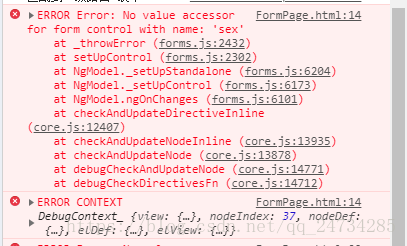
于是查到可以用ngDefaultControl解决:
https://stackoverflow.com/questions/38978166/no-value-accessor-for-form-control-with-name-recipient
但是有浏览器兼容问题,在谷歌的低版本和360浏览器上,点击radio毫无反应
组件代码:
radio.component.ts
import {Component, Input} from '@angular/core';
@Component({selector: 'radio',templateUrl: './radio.component.html',styleUrls: ['./radio.component.css']
})export class RadioComponent {@Input() name: string;@Input() value: any;@Input() model: any;
}
radio.component.html
<div class="radio-box" [ngClass]="{'radio-active':value==model}"><input type="radio" name="{{name}}" value="{{value}}"><div class="radio-checked" *ngIf="value==model">div>
div>
radio.component.css
.radio-box {width: 20px;height: 20px;background: #fff;border: 1px solid #dfe3eb;border-radius: 50%;position: relative;padding: 0;display: inline-block;
}.radio-box input {width: 20px;height: 20px;position: absolute;top: 0;left: 0;margin: 0;outline: none;opacity: 0;z-index: 1000;
}.radio-active {}.radio-checked {background: #ff893e;width: 10px;height: 10px;position: absolute;z-index: 999;top: 5px;left: 5px;border-radius: 50%;
}
本文来自互联网用户投稿,文章观点仅代表作者本人,不代表本站立场,不承担相关法律责任。如若转载,请注明出处。 如若内容造成侵权/违法违规/事实不符,请点击【内容举报】进行投诉反馈!