Angular 2 环境搭建
2019独角兽企业重金招聘Python工程师标准>>> 
1、下载安装 nodejs 和 npm
2、新建文件夹 ‘angular2-quickstart-master’
3、在 ‘angular2-quickstart-master’ 添加文件 目录结构如下:
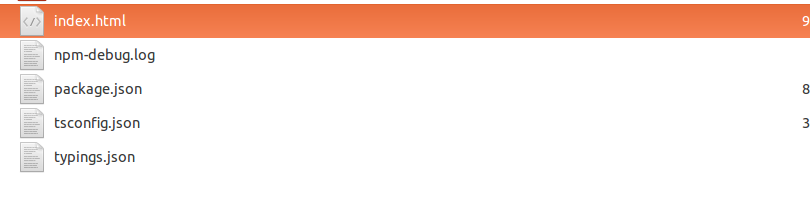
index.html:
Angular 2 QuickStart
package.json:
{"name": "angular2-quickstart","version": "1.0.0","scripts": {"postinstall": " ./node_modules/.bin/typings install","tsc": "tsc","tsc:w": "tsc -w","lite": "lite-server","start": "concurrent \"npm run tsc:w\" \"npm run lite\" "},"license": "ISC","dependencies": {"@angular/common": "^2.0.0-rc.1","@angular/compiler": "^2.0.0-rc.1","@angular/core": "^2.0.0-rc.1","@angular/platform-browser": "^2.0.0-rc.1","@angular/platform-browser-dynamic": "^2.0.0-rc.1","bootstrap": "^3.3.6","es6-shim": "0.35.0","ng-semantic": "^1.0.21","ng2-bootstrap": "1.0.16","reflect-metadata": "0.1.2","rxjs": "5.0.0-beta.6","systemjs": "0.19.28","typings": "0.8.1","zone.js": "0.6.12"},"devDependencies": {"concurrently": "2.0.0","lite-server": "2.2.0","typescript": "1.8.10"}
}
tsconfig.json:
{"compilerOptions": {"target": "ES5","module": "system","moduleResolution": "node","sourceMap": true,"emitDecoratorMetadata": true,"experimentalDecorators": true,"removeComments": false,"noImplicitAny": false,"listFiles": true},"exclude": ["node_modules","typings/browser.d.ts"]
}
typings.json:
{"ambientDependencies": {"es6-shim": "registry:dt/es6-shim#0.31.2+20160317120654"}
}
4、打开终端运行: npm install,可能需要等待一段时间下载,下载完成后项目目录下会多出’node_modules‘的文件夹。
5、再在项目根目录下新建app文件夹,添加文件 app.component.ts:
import {Component} from '@angular/core';
import {AlertComponent, DATEPICKER_DIRECTIVES,CAROUSEL_DIRECTIVES} from 'ng2-bootstrap/ng2-bootstrap';@Component({selector: 'my-app',directives: [AlertComponent, DATEPICKER_DIRECTIVES],template: `ng2-bootstrap hello world! Selected date is: {{ getDate() | date:'fullDate'}}Inline
;private tomorrow:Date;private afterTomorrow:Date;private formats:Array = ['DD-MM-YYYY', 'YYYY/MM/DD', 'DD.MM.YYYY', 'shortDate'];private format = this.formats[0];private dateOptions:any = {formatYear: 'YY',startingDay: 1};private opened:boolean = false;public getDate():number {return this.dt && this.dt.getTime() || new Date().getTime();}
} 和 boot.ts:
import {bootstrap} from '@angular/platform-browser-dynamic';
import {AppComponent} from './app.component'
import {enableProdMode} from '@angular/core';enableProdMode();bootstrap(AppComponent);
再打开终端,cd到你项目根目录下运行,npm start 这样你的项目就跑起来了
转载于:https://my.oschina.net/mercyyang/blog/682319
本文来自互联网用户投稿,文章观点仅代表作者本人,不代表本站立场,不承担相关法律责任。如若转载,请注明出处。 如若内容造成侵权/违法违规/事实不符,请点击【内容举报】进行投诉反馈!