自定义 FullCalendar v5 + Vue2
说明
FullCalendar 版本为 5.x,Vue 版本为 2.x
主要内容
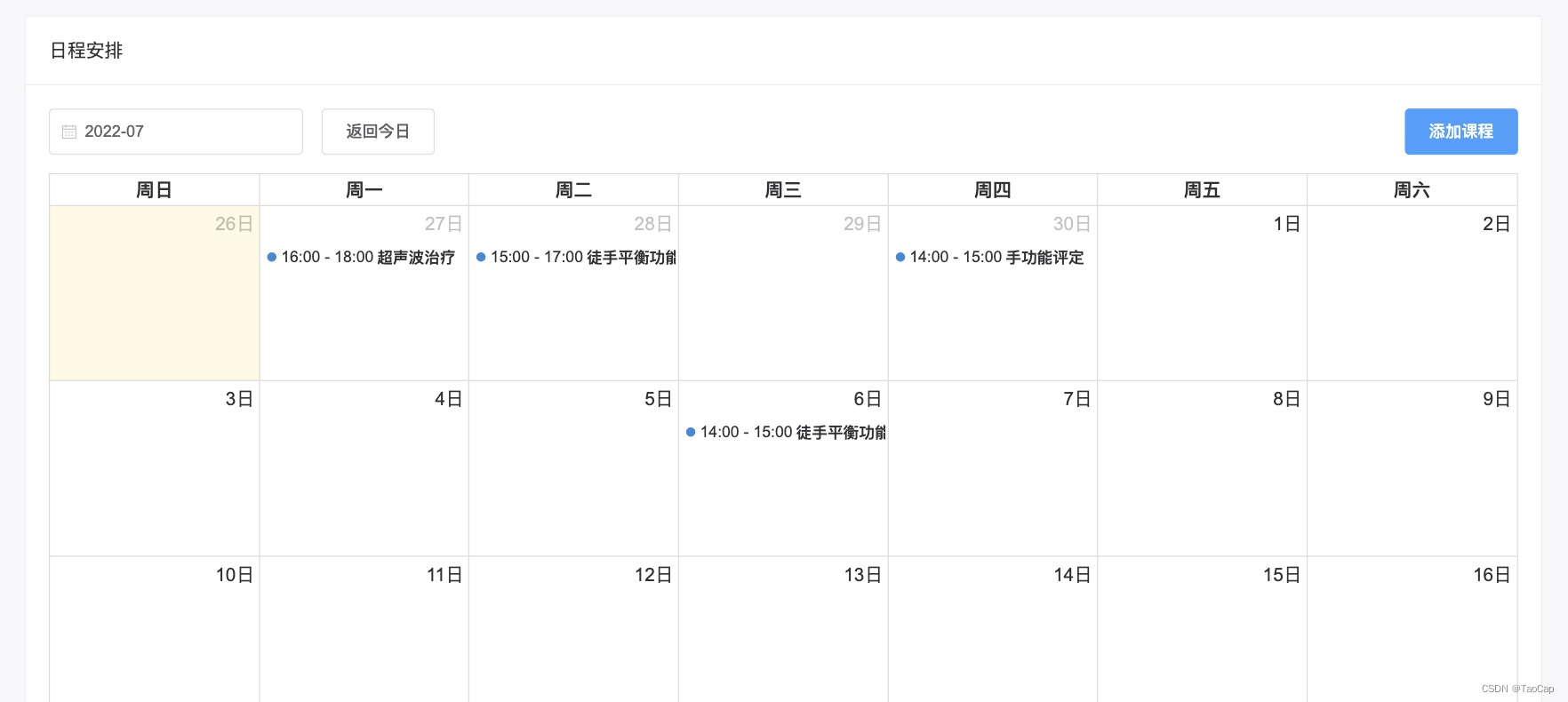
- 去除默认 headerToolbar,自定义工具栏;
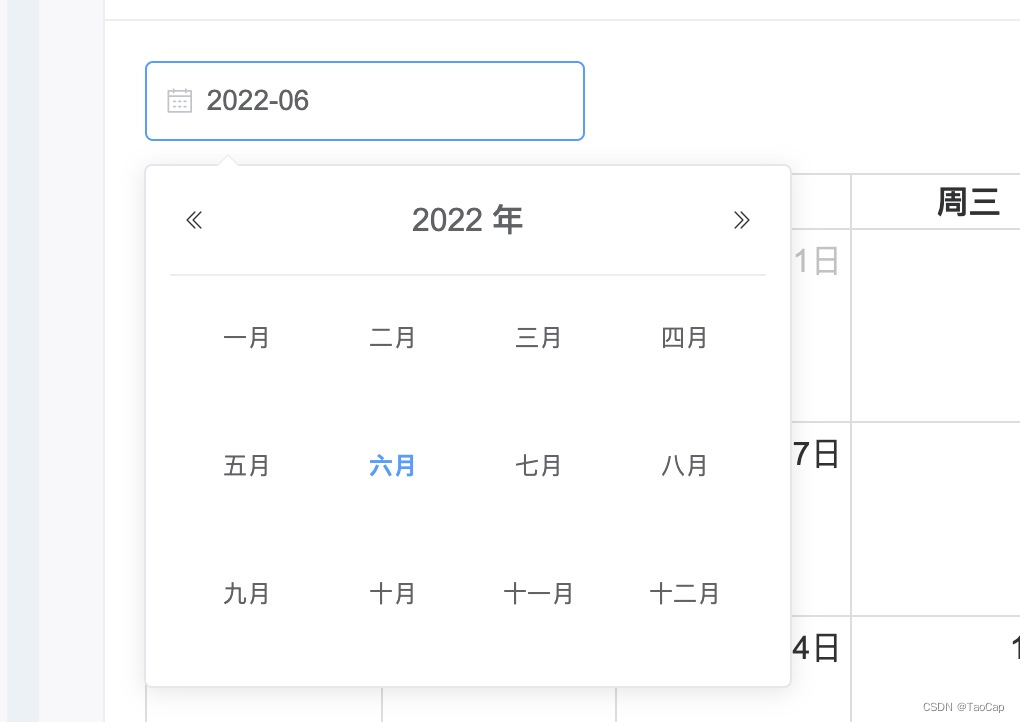
- 任意月份跳转,可返回当前月份;
- 添加事件;
- 查看事件详情(点击)
效果
代码
为了理解和使用,合并简化了代码。主功能流程简洁明了,可根据实际需求场景 DIY。
代码中时间格式化选用 day.js,可根据项目更改时间格式化方法
引入依赖
$ npm i @fullcalendar/core @fullcalendar/daygrid @fullcalendar/interaction @fullcalendar/vue
Calendar.vue
<template><div><div class="toolbar-boxer"><div><el-date-pickerv-model="selectMonth"type="month":clearable="false"placeholder="选择月"value-format="yyyy-MM"@change="handleDatePick"></el-date-picker><el-button class="margin-left" v-if="btnReturnCurrenMonthVisiable" @click="handleReturnCurrentMonth">返回今日</el-button></div><div class="toolbar-right"><el-button type="primary" @click="handleAddEvent">添加课程</el-button></div></div><full-calendarref="fullCalendar"class="calendar":options="calendarOptions" /></div>
</template>
<script>
import FullCalendar from '@fullcalendar/vue'
import dayGridPlugin from '@fullcalendar/daygrid'
import interactionPlugin from '@fullcalendar/interaction'
import dayjs from 'dayjs'export default {props: {events: {type: Array,default: () => []}},watch: {// 监听事件list的变动,更新界面events (newVal, oldVal) {this.calendarOptions.events = newVal}},data () {return {btnReturnCurrenMonthVisiable: false,currentDate: null,selectMonth: null, // 当前选择的月份calendarApi: null,calendarOptions: {plugins: [ dayGridPlugin, interactionPlugin ],initialView: 'dayGridMonth',locale: 'zh-cn',headerToolbar: false, // 不显示头部 toolbar// headerToolbar: {//   start: 'addEventBtn',//   center: 'title'// },events: this.events,eventTimeFormat: { // 事件时间的格式化hour: 'numeric',minute: '2-digit',hour12: false},displayEventEnd: true, // 事件显示结束时间eventClick: this.handleEventClick},}},mounted () {this.calendarApi = this.$refs.fullCalendar.getApi()this.currentDate = dayjs(this.calendarApi.getDate()).format('YYYY-MM')this.selectMonth = this.currentDate},methods: {/*** 点击事件*/handleEventClick (eventClickInfo) {this.$emit('onEventClick', eventClickInfo)},/*** 添加事件*/handleAddEvent () {this.$emit('onAddEvent')},/*** 下拉选择日期并跳转至相应月份*/handleDatePick (month) {// 选择了别的月份,则显示返回今日按钮this.btnReturnCurrenMonthVisiable = month !== this.currentDatethis.calendarApi.gotoDate(month)},/*** 返回当前月份*/handleReturnCurrentMonth () {this.calendarApi.gotoDate(this.currentDate)this.btnReturnCurrenMonthVisiable = falsethis.selectMonth = this.currentDate},},components: {FullCalendar},
}
</script><style scoped>
.toolbar-boxer {display: flex;flex-direction: row;justify-content: space-between;
}.toolbar-right {text-align: right;
}.calendar {margin-top: 1rem;
}.margin-left {margin-left: 1rem;
}
</style>
在页面中使用 Calendar.vue 组件
xxx.vue
<template><calendar:events="dataEventList"@onAddEvent="onAddEvent"@onEventClick="onEventClick" />
</template>
<script>
import Calendar from '@/components/Calendar'export default {data () {return {dataEventList [], // 事件 list}},methods: {/*** 添加事件 Demo*/onAddEvent () {// Event 数据基本结构,可添加自定义属性this.dataEventList.push({title: '事件名称',start: '0000-00-00 00:00:00', // 开始时间end: '0000-00-00 00:00:00', // 结束时间customAttribute: 'hello world', // 可添加自定义属性,便于在查看详情时获取使用})},/*** 点击事件,查看事件详情*/onEventClick (eventInfo) {// _event: { title, start, end }const _event = eventInfo.event// _props: { customAttribute, ... }const _props = _event._def.extendedProps// todo 根据使用场景展示事件详情或执行动作},},components: {Calendar},
}
</script>
本文来自互联网用户投稿,文章观点仅代表作者本人,不代表本站立场,不承担相关法律责任。如若转载,请注明出处。 如若内容造成侵权/违法违规/事实不符,请点击【内容举报】进行投诉反馈!