angular 动态组件 ComponentFactoryResolver
当组件数量不多的话可以利用ngif来判断component
组件目录结构

模板代码
<nz-radio-group [(ngModel)]="radioValue" (ngModelChange)="radioValueChange()"><label nz-radio nzValue="A">A</label><label nz-radio nzValue="B">B</label><label nz-radio nzValue="C">C</label>
</nz-radio-group><ng-container *ngIf="radioValue === 'A'"><app-component-a></app-component-a>
</ng-container>
<ng-container *ngIf="radioValue === 'B'"><app-component-b></app-component-b>
</ng-container>
<ng-container *ngIf="radioValue === 'C'"><app-component-c></app-component-c>
</ng-container>
效果

但是当选项很多的时候,或者选项通过后端决定等复杂情况下,再用ngif来实现会很麻烦,代码会很容易变得杂乱且不容易维护,这时候就需要动态组件,动态的方式来生成component
1.首先我们先建立一个directive,并注入ViewContainerRef,ViewContainerRef可以让我们知道目前所在的HTML元素包含的view内容,也可以通过它来改变view的结果(例如:动态的产生component,或者动态的移除component等等)。
执行命令: ng generate directive DynamicComponent
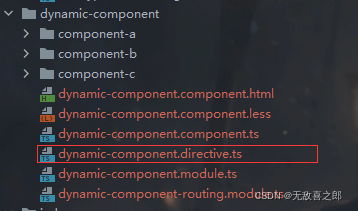
import {Directive, ViewContainerRef} from '@angular/core';@Directive({selector: '[appDynamicComponent]'
})
export class DynamicComponentDirective {constructor(public viewContainerRef: ViewContainerRef) { }
}
2.需要套用这个指令到需要动态产生component的容器上,可以使用ng-template,代码被修改为
注意此时给radio加了一个valueChange事件
<nz-radio-group [(ngModel)]="radioValue" (ngModelChange)="radioValueChange()"><label nz-radio nzValue="A">A</label><label nz-radio nzValue="B">B</label><label nz-radio nzValue="C">C</label>
</nz-radio-group><ng-template appDynamicComponent></ng-template>
3.注入ComponentFactoryResolver,动态产生component
/*利用viewChild获取模板元素*/@ViewChild(DynamicComponentDirective) componentHost: DynamicComponentDirective | undefined;radioValue: string = '';/*所有的组件列表*/componentList = {componentA: ComponentAComponent,componentB: ComponentBComponent,componentC: ComponentCComponent,}constructor(public componentFactoryResolver: ComponentFactoryResolver) {}ngOnInit(): void {}radioValueChange() {/** 利用组件工厂动态生成组件*/const componentFactory = this.componentFactoryResolver.resolveComponentFactory(this.getComponent(this.radioValue));/** 获取到模板元素,因为用viewChild获取dom时定义的undefined 所以需要手动as定义一下类型*/const viewContainerRef = (this.componentHost as DynamicComponentDirective).viewContainerRef;/*将模板上的元素清空*/viewContainerRef.clear();/*创建组件*/viewContainerRef.createComponent(componentFactory);}getComponent(radioValue: string): any {if (radioValue === 'componentA') {return this.componentList['componentA']} else if (radioValue === 'componentB') {return this.componentList['componentB']} else {return this.componentList['componentC']}}
写在最后,很多博客中写道最后要引入entryComponents,在新版本中已经被弃用了,不需要再引入了
ng最新版本动态组件写法
@Component({selector: 'a-component',template: `本文来自互联网用户投稿,文章观点仅代表作者本人,不代表本站立场,不承担相关法律责任。如若转载,请注明出处。 如若内容造成侵权/违法违规/事实不符,请点击【内容举报】进行投诉反馈!