Angular Router Lazy Loading
1. 概述
Angular Router 的懒加载是 Angular2 的一项核心特性。懒加载使我们的程序拥有更快的启动速度,因为它在初始加载的时候只需要加载主模块中的内容。当切换到不同路由中时,才去加载路由中定义的相关模块。
本文通过 Tab 之间切换这一个简单的例子来说明 Angular Router 的懒加载。一级 Tab 有 `Home` 和 `About`,在 `Home` 下又有二级 Tab, `Sub1` 和 `Sub2`。
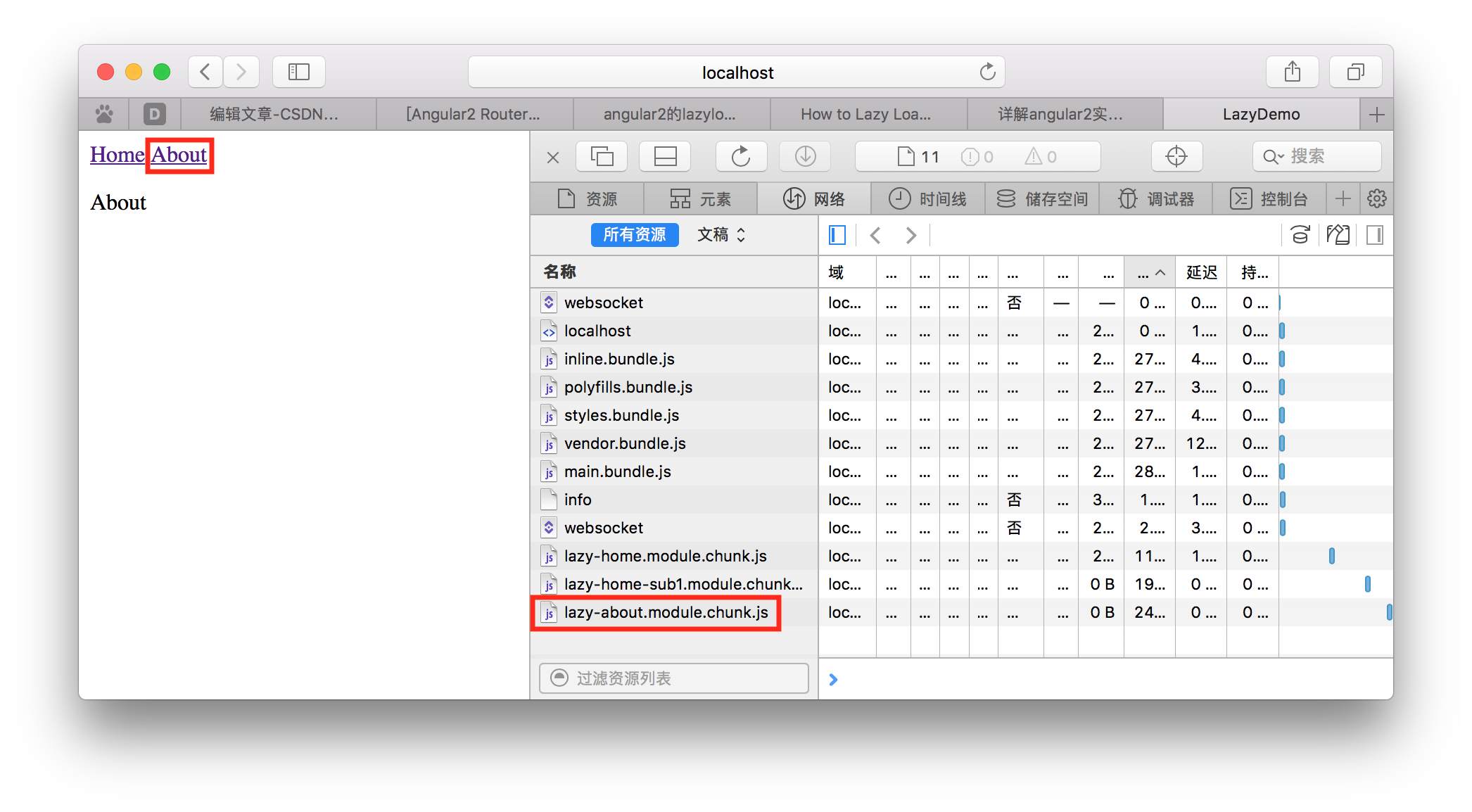
想要实现的效果:当点击 `Home` 的时候,去加载 `Home` Tab 所需要的文件;当点击 `Home` 下的子 Tab,`Sub1` 的时候,才去加载 `Sub1` Tab 所需文件;当点击 `About` 的时候,才去加载 `About` Tab 所需要的文件。即当进入某路由的时候,才去加载该路由所需要的文件,而不是一上来就加载全部,从而使程序拥有更快的启动速度。


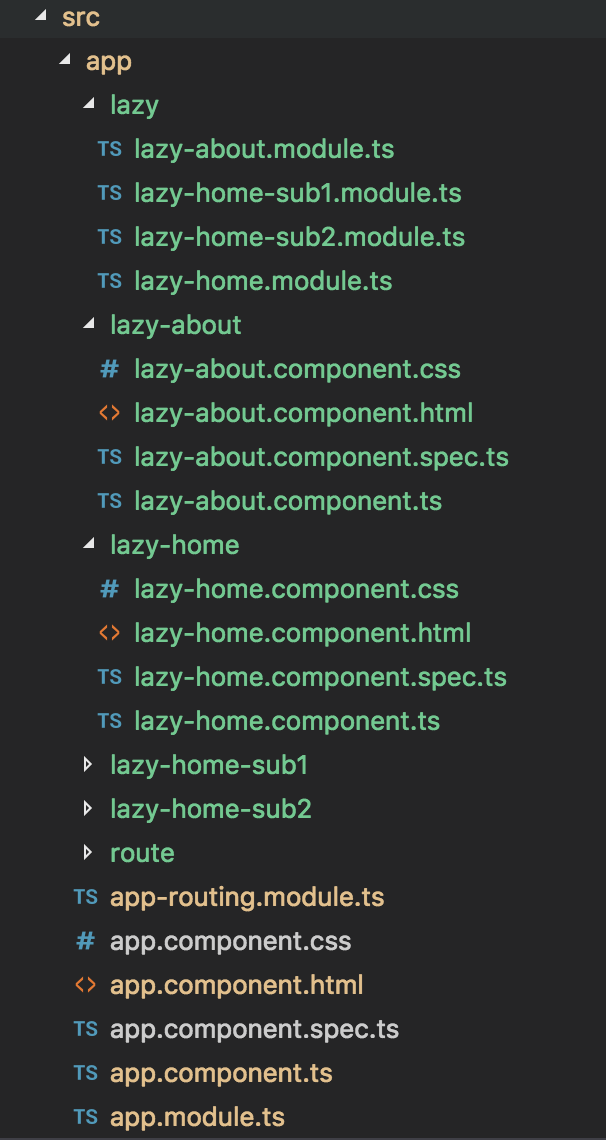
程序目录如下:
2. 代码
下面直接上代码
APP:
< a routerLinkActive= "active" routerLink= "/lazy-home" >Home a > < a routerLinkActive= "active" routerLink= "/lazy-about/about" >About a > < router-outlet > router-outlet > // app-routing.module.ts import { NgModule } from '@angular/core'; import { Routes, RouterModule } from '@angular/router'; import { Route } from '@angular/router/src/config';const routes: Routes = [ { path: '', children: [ { path: 'lazy-home', loadChildren: './lazy/lazy-home.module#LazyHomeModule' }, { path: 'lazy-about', loadChildren: './lazy/lazy-about.module#LazyAboutModule' }
// 这里用 `loadChildren` 来代替 `component`。
// `component` 会直接加载组件,如果想实现懒加载的话,就需要用 `loadChildren`,
// 然后在 `loadChildren` 里写明该组件的模块所在的路径。 ] } ];@NgModule({ imports: [RouterModule.forRoot(routes)], exports: [RouterModule] }) export class AppRoutingModule { }
@NgModule({ declarations: [ AppComponent ], imports: [ BrowserModule, AppRoutingModule ], bootstrap: [AppComponent] }) export class AppModule { }
Home:
// lazy-home.module.ts import { NgModule } from '@angular/core'; import { CommonModule } from '@angular/common'; import { LazyHomeComponent } from '../lazy-home/lazy-home.component';import { Routes, RouterModule } from '@angular/router'; import { Router } from '@angular/router/src/router';
const routes: Routes = [ { path: '', component: LazyHomeComponent, children:[ { path:'home-sub1', loadChildren:'./lazy-home-sub1.module#LazyHomeSub1Module' }, { path:'home-sub2', loadChildren:'./lazy-home-sub2.module#LazyHomeSub2Module' } ] } ];
@NgModule({ imports: [ CommonModule, RouterModule.forChild(routes) ], declarations: [LazyHomeComponent] }) export class LazyHomeModule { }
Home - Sub1:
// lazy-home-sub1.module.ts import { NgModule } from '@angular/core'; import { CommonModule } from '@angular/common'; import { Routes, RouterModule } from '@angular/router'; import { LazyHomeSub1Component } from '../lazy-home-sub1/lazy-home-sub1.component';const routes: Routes = [ { path: 'sub1', component: LazyHomeSub1Component } ]; @NgModule({ imports: [ CommonModule, RouterModule.forChild(routes) ], declarations: [LazyHomeSub1Component] }) export class LazyHomeSub1Module { }
Home - Sub2:
// lazy-home-sub2.module.ts import { NgModule } from '@angular/core'; import { CommonModule } from '@angular/common'; import { Routes, RouterModule } from '@angular/router'; import { LazyHomeSub2Component } from '../lazy-home-sub2/lazy-home-sub2.component';const routes: Routes = [ { path: 'sub2', component: LazyHomeSub2Component } ]; @NgModule({ imports: [ CommonModule, RouterModule.forChild(routes) ], declarations: [LazyHomeSub2Component] }) export class LazyHomeSub2Module { }
About:
// lazy-about.module.ts import { NgModule } from '@angular/core'; import { CommonModule } from '@angular/common'; import { LazyAboutComponent } from '../lazy-about/lazy-about.component';import { Routes, RouterModule } from '@angular/router';
const routes: Routes = [ { path: 'about', component: LazyAboutComponent } ]; @NgModule({ imports: [ CommonModule, RouterModule.forChild(routes) ], declarations: [LazyAboutComponent] }) export class LazyAboutModule { }
3. 参考网址:
http://www.cnblogs.com/Answer1215/p/5906995.html
http://blog.csdn.net/liangxw1/article/details/78468432?locationNum=5&fps=1
http://www.jb51.net/article/109406.htm
本文来自互联网用户投稿,文章观点仅代表作者本人,不代表本站立场,不承担相关法律责任。如若转载,请注明出处。 如若内容造成侵权/违法违规/事实不符,请点击【内容举报】进行投诉反馈!