Python小白逆袭大神:Day5-大作业(含具体实现代码、停用词表和做作业过程中遇到的问题)
文章目录
- 引言
- 第一步:评论数据的爬取。
- 第二步:词频统计并可视化展示
- 1. 数据预处理:
- 2. 中文分词
- 3. 去除停用词
- 4. 统计top10高频词
- 第四步:结合PaddleHub,对评论进行内容审核,找出一些带有色情含义的评论。
- 最终的run代码
- 结果展示:
- 遇到的问题:
引言
好了经过了前面4天对python基础语法、python网络爬虫、python数据分析和paddleHub的学习,今天呢发布了本次7天集训营的大作业。本次作业综合了前面几天所学,其实还加了一点NLP的内容。具体要求见下图。
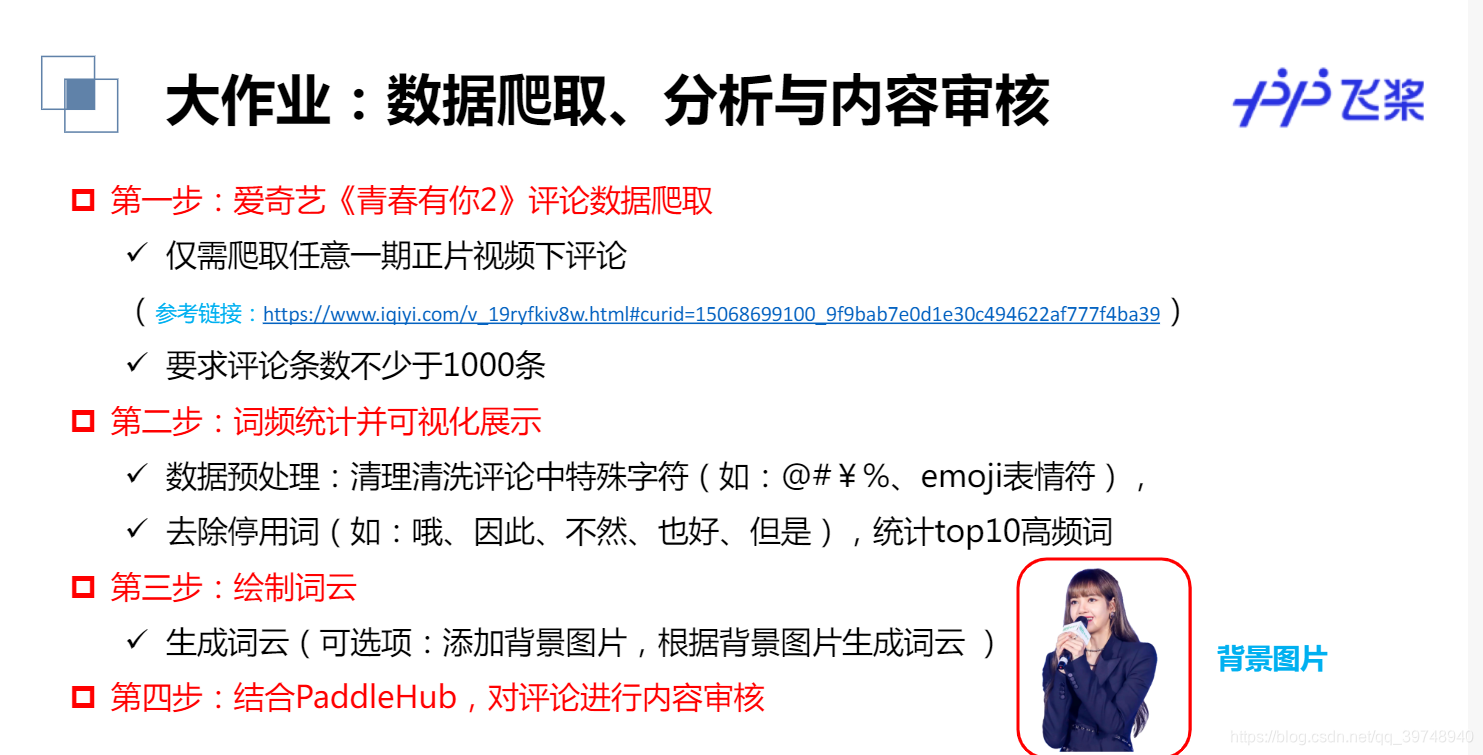
话不多说,赶紧开始做我们的作业吧.
第一步:评论数据的爬取。
这一步涉及到第一天爬虫相关内容,python爬虫其实就是和web开发者斗智斗勇的过程,要学会去F12里找到我们想要的资源,然后想办法爬下来。这里的评论数据大概用到了异步请求吧,页面默认只展示了10条评论,需要我们不断发出请求。经过观察发现,评论数据的链接存在规律,即通过改变lastId来获取新的评论数据,那么我们就好办了,代码如下。
#请求爱奇艺评论接口,返回response信息
def getMovieinfo(url):'''请求爱奇艺评论接口,返回response信息参数  url: 评论的url:return: response信息'''headers = { 'User-Agent': 'Mozilla/5.0 (Windows NT 10.0; WOW64) AppleWebKit/537.36 (KHTML, like Gecko) Chrome/67.0.3396.99 Safari/537.36'}session = requests.Session()response = session.get(url, headers=headers)if response.status_code == 200:return response.textreturn Falsereturn #解析json数据,获取评论
def saveMovieInfoToFile(lastId,arr):'''解析json数据,获取评论参数  lastId:最后一条评论ID  arr:存放文本的list:return: 新的lastId'''url = 'https://sns-comment.iqiyi.com/v3/comment/get_comments.action?agent_type=118&agent_version=9.11.5\&authcookie=41H2bDqLkn6dsGrn2m3VcI6m1Ibwa1l5y1OcyuwuCvhzm2k93j3HeMtEysjyPHKoe3opK58&business_type=17&content_id=15068699100&hot_size=0&last_id='url +=str(lastId)responseTxt = getMovieinfo(url)responseJson = json.loads(responseTxt)comments = responseJson['data']['comments']for val in comments:if 'content' in val.keys():# print(val['content'])arr.append(val['content'])lastId = str(val['id'])# print(lastId)return lastId
第二步:词频统计并可视化展示
这一步的工作量还是挺大的,主要涉及到的其实还是对文档的处理。主要包括以下5步
1. 数据预处理:
清理清洗评论中特殊字符(如:@#¥%、emoji表情符),清洗后结果存储为txt文档。这块是对正则表达式的使用,具体规则也不用太了解,网上找找就好了。
#去除文本中特殊字符
def clear_special_char(content):'''正则处理特殊字符参数 content:原文本return: 清除后的文本'''s = re.sub(r"| |\t|\r", '', content)s = re.sub(r"\n", ' ', s)s = re.sub(r'\*','\\*',s) s = re.sub('[^\u4e00-\u9fa5^a-z^A-Z^0-9]', '', s)s = re.sub('[a-zA-Z]', '', s)  return s
2. 中文分词
这里我们添加新增词(如:青你、奥利给、冲鸭)还有选手的名字。
def fenci(text):'''利用jieba进行分词参数 text:需要分词的句子或文本return:分词结果'''jieba.load_userdict('add_words.txt') #自定义分词词典seg = jieba.lcut(text, cut_all=False)return seg
3. 去除停用词
分完词后有一些完全没作用的词(如:哦、因此、不然、也好、但是) ,我们也给它去掉。我用到的停用词表会放在资源里,供大家下载。
def stopwordslist(file_path):'''创建停用词表参数 file_path:停用词文本路径return:停用词list'''stopwords = [line.strip() for line in open(file_path, encoding='UTF-8').readlines()]return stopwords
4. 统计top10高频词
def movestopwords(sentence, stopwords, counts):'''去除停用词,统计词频参数 file_path:停用词文本路径 stopwords:停用词list counts: 词频统计结果return:None'''out = []for word in sentence:if word not in stopwords:if len(word) != 1:counts[word] = counts.get(word,0) + 1return None
- 可视化展示高频词
def drawcounts(count, num):'''绘制词频统计表参数 counts: 词频统计结果 num:绘制topNreturn:none'''x = []y = []sorted_list = sorted(count.items(),key=lambda d:d[1],reverse=True) #降序排序for c in sorted_list[:num]:x.append(c[0])y.append(c[1])# 设置显示中文matplotlib.rcParams['font.family'] = ['SimHei'] # 指定默认字体matplotlib.rcParams['axes.unicode_minus'] = Falseplt.bar(x, y)plt.title('词频统计结果')plt.show()第三步:绘制词云
根据得到的词频统计来绘制词云图,并添加背景图。
def drawcloud(word_f):'''根据词频绘制词云图参数 word_f:统计出的词频结果return:none'''#加载背景图片cloud_mask = np.array(Image.open('cloud.png'))#忽略显示的词st = set(['东西','这是'])#生成worldcloud对象wc = WordCloud(background_color='white',mask = cloud_mask,max_words = 150,font_path='simhei.ttf',min_font_size = 10,max_font_size = 100,width = 400,relative_scaling = 0.3,stopwords=st)wc.fit_words(word_f)plt.imshow(wc)wc.to_file('pic.png')
# drawcloud(word_count)
第四步:结合PaddleHub,对评论进行内容审核,找出一些带有色情含义的评论。
def text_detection(test_text, file_path):'''使用hub对评论进行内容分析return:分析结果'''porn_detection_lstm = hub.Module(name='porn_detection_lstm')f = open(file_path, 'r', encoding='UTF-8')for line in f:if len(line.strip()) == 1:continueelse:test_text.append(line)f.close()input_dict = {"text": test_text}results = porn_detection_lstm.detection(data=input_dict, use_gpu=True, batch_size=1)# print(results)for index, item in enumerate(results):if item['porn_detection_key'] == 'porn':print(item['text'], ':', item['porn_probs'])# text_detection()
最终的run代码
#评论是多分页的,得多次请求爱奇艺的评论接口才能获取多页评论,有些评论含有表情、特殊字符之类的
#num 是页数,一页10条评论,假如爬取1000条评论,设置num=100
if __name__ == "__main__":num = 50lastId = 0arr = []with open ('aqy.txt', 'a', encoding="utf-8") as f:for i in range(num):lastId = saveMovieInfoToFile(lastId, arr)time.sleep(0.5)for item in arr:Item = clear_special_char(item)if Item.strip() != '':try:f.write(Item+'\n')except Exception as e:print('含有特殊字符')print('共获取评论数:', len(arr))f = open('aqy.txt', 'r', encoding='UTF-8')counts = {}for line in f:words = fenci(line)stopwords = stopwordslist('stopwords.txt')movestopwords(words, stopwords, counts)drawcounts(counts,20)drawcloud(counts)f.close()file_path = 'aqy.txt'test_text = []text_detection(test_text, file_path)
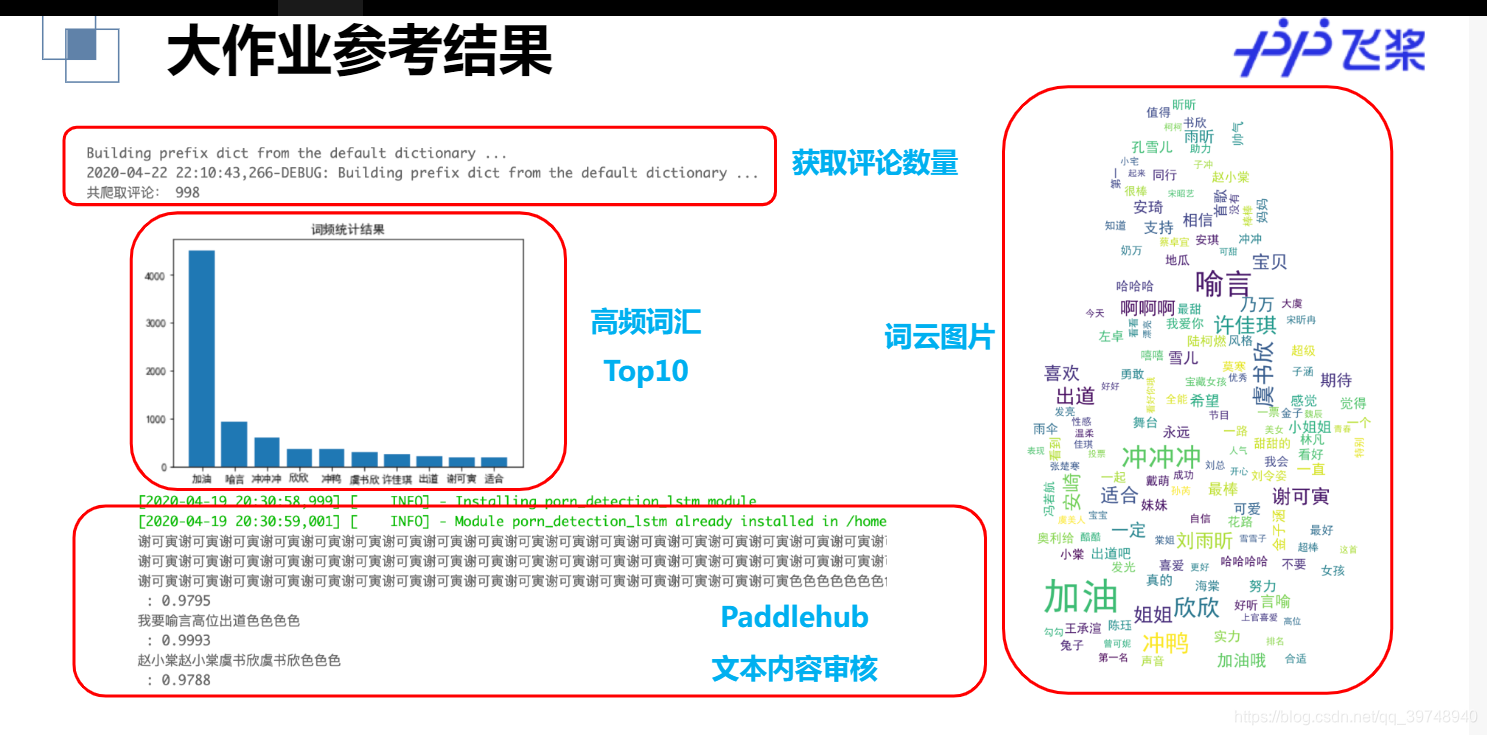
结果展示:
自己跑的和这个差不多,老师的ppt排版的更好看,就借用啦嘿嘿。
遇到的问题:
1.字体安装问题。好迷,昨天这行代码还下载不了字体,刚刚试了一下又可以了。 !wget https://mydueros.cdn.bcebos.com/font/simhei.ttf # 下载中文字体。
昨天的话呢,下载不了字体,我们首先从本地的C:\Windows\Fonts 目录下找到微软雅黑字体,上传到平台的根目录,然后在执行这三行代码就好啦。

如果不放心的话,当查看系统已安装的字体出现以下内容,就说明安装好了。

2.安装好啦字体,可是词频统计图还是乱码的问题。
首先可以尝试重启,主要每次重启都得安装字体。如果还不行的话可以看看话词频统计图的代码有没有设置中文字体环境。

3.话词云图的时候我们明明上传的图片背景,为啥没有显示。
词云图的绘制必须是白色背景的图片,这样应该就不会错。而且不加背景图的话还会出现就显示几个词的尴尬局面。这里给大家提供一张图片吧。

OK,以上就是本次大作业的全部内容了,如果你觉得写的还不错的话,求点赞求关注。
本文来自互联网用户投稿,文章观点仅代表作者本人,不代表本站立场,不承担相关法律责任。如若转载,请注明出处。 如若内容造成侵权/违法违规/事实不符,请点击【内容举报】进行投诉反馈!