Windows Practice_DllHook_IAT Hook
PE结构
PE结构时Windows中一个比较大的结构体,它的整个结构体图如下所示:
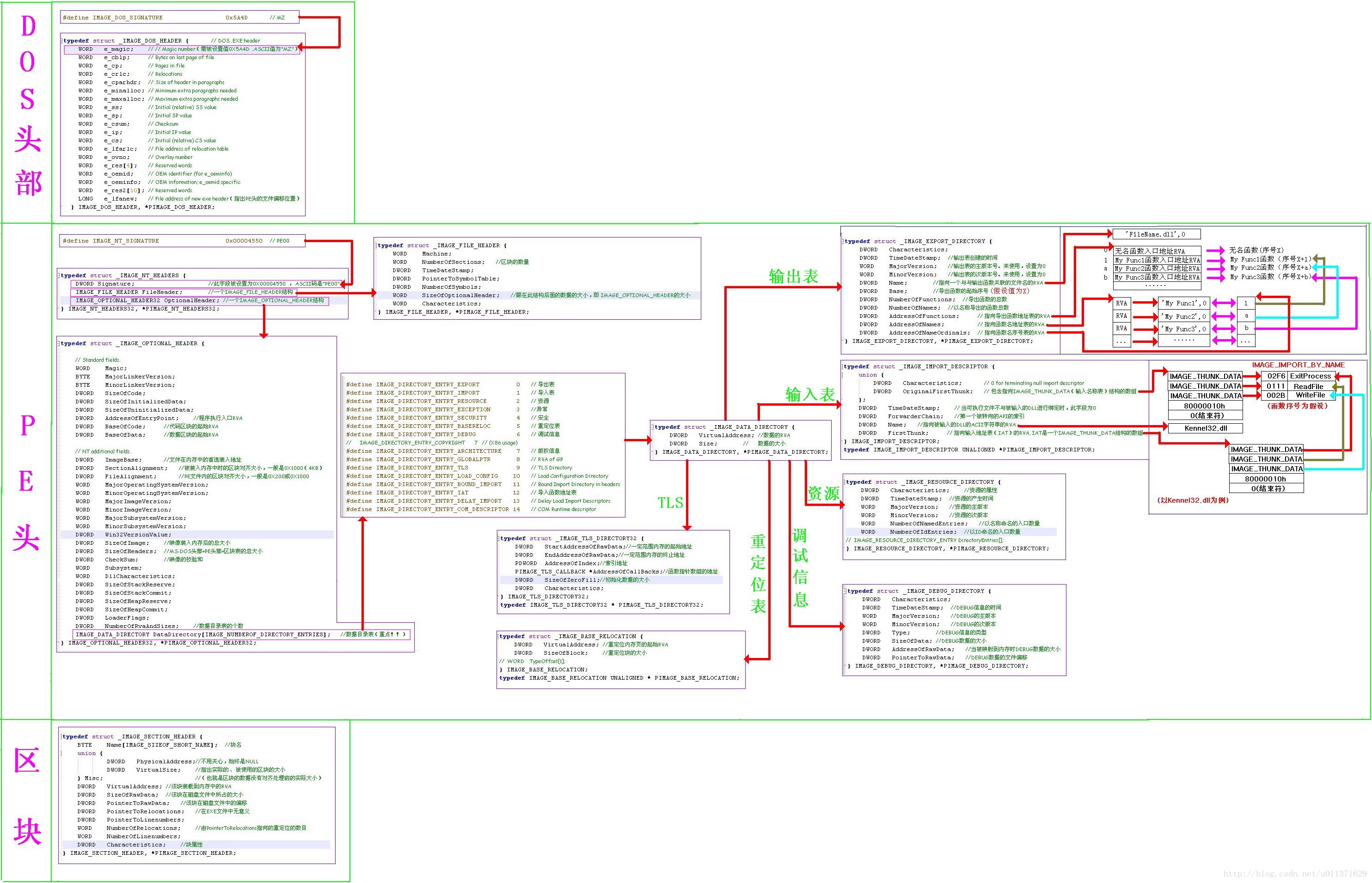
给MessageBoxW函数挂钩我们自己的函数
就是我们挂钩之后,调用MessageBoxW函数后,会进入到我们自己的函数中执行我们自己的代码。挂钩还原之后,还可以正常的调用MessageBoxW函数,这就是这个测试程序的功能。
// IATHookDemo.cpp : 定义控制台应用程序的入口点。
//
#include "stdafx.h"
#include (hMod);IMAGE_OPTIONAL_HEADER *pOptHeader = reinterpret_cast(reinterpret_cast(hMod) + pDosHeader->e_lfanew + sizeof(DWORD) + sizeof(IMAGE_FILE_HEADER));IMAGE_IMPORT_DESCRIPTOR *pImportDesc = reinterpret_cast(static_cast(hMod) + pOptHeader->DataDirectory[IMAGE_DIRECTORY_ENTRY_IMPORT].VirtualAddress);while (pImportDesc->FirstThunk){char *strDllName = reinterpret_cast<char *>(static_cast(hMod) + pImportDesc->Name);if (strcmp(strDllName, "USER32.dll") == 0){break;}++pImportDesc;}if (pImportDesc->FirstThunk){IMAGE_THUNK_DATA *pThunkData = reinterpret_cast(static_cast(hMod) + pImportDesc->FirstThunk);while (pThunkData->u1.Function){if (pThunkData->u1.Function == dwNewFunc){DWORD *lpAddr = &(pThunkData->u1.Function);DWORD dwOldProtect;MEMORY_BASIC_INFORMATION mbi;VirtualQuery(lpAddr, &mbi, sizeof(MEMORY_BASIC_INFORMATION));VirtualProtect(lpAddr, sizeof(DWORD), PAGE_READWRITE, &dwOldProtect);pThunkData->u1.Function = dwOldFunc;VirtualProtect(lpAddr, sizeof(DWORD), dwOldProtect, nullptr);bRet = TRUE;break;}}}return bRet;
}int WINAPI MyMessageBox(_In_opt_ HWND hWnd, _In_opt_ LPCTSTR lpText, _In_opt_ LPCTSTR lpCaption, _In_ UINT uType)
{MESSAGEBOXW_FUNC func = (MESSAGEBOXW_FUNC)g_dwOldFunc;return func(nullptr, L"成功修改MessageBowW函数", L"提示", MB_OK);
}BOOL MySetHook()
{// 使用普通的方式查找要替换的函数地址BOOL bRet = FALSE;HANDLE hMod = GetModuleHandle(nullptr);IMAGE_DOS_HEADER *pDosHeader = reinterpret_cast(hMod);IMAGE_OPTIONAL_HEADER *pOptHeader = reinterpret_cast(reinterpret_cast(hMod) + pDosHeader->e_lfanew + sizeof(DWORD) + sizeof(IMAGE_FILE_HEADER));IMAGE_IMPORT_DESCRIPTOR *pImportDesc = reinterpret_cast(static_cast(hMod) + pOptHeader->DataDirectory[IMAGE_DIRECTORY_ENTRY_IMPORT].VirtualAddress);while (pImportDesc->FirstThunk){char *strDllName = reinterpret_cast<char *>(static_cast(hMod) + pImportDesc->Name);if (strcmp(strDllName, "USER32.dll") == 0){break;}++pImportDesc;}if (pImportDesc->FirstThunk){DWORD dwFuncAddr = reinterpret_cast(MessageBoxW);IMAGE_THUNK_DATA *pThunkData = reinterpret_cast(static_cast(hMod) + pImportDesc->FirstThunk);while (pThunkData->u1.Function){if (pThunkData->u1.Function == dwFuncAddr){DWORD *lpAddr = &(pThunkData->u1.Function);DWORD dwOldProtect;MEMORY_BASIC_INFORMATION mbi;VirtualQuery(lpAddr, &mbi, sizeof(MEMORY_BASIC_INFORMATION));VirtualProtect(lpAddr, sizeof(DWORD), PAGE_READWRITE, &dwOldProtect);g_dwOldFunc = pThunkData->u1.Function;pThunkData->u1.Function = reinterpret_cast(MyMessageBox);g_dwNewFunc = pThunkData->u1.Function;VirtualProtect(lpAddr, sizeof(DWORD), dwOldProtect, nullptr);bRet = TRUE;break;}}}return bRet;
}int main()
{MessageBoxW(nullptr, L"Test", L"Tips", MB_OK);MySetHook();MessageBoxW(nullptr, L"Test", L"Tips", MB_OK);ResetHook(g_dwOldFunc, g_dwNewFunc);MessageBoxW(nullptr, L"Test", L"Tips", MB_OK);system("pause");return 0;
} 这个程序一般没有什么问题,但是有一点需要注意,那就是我们在修改程序地址的时候,会出现修改失败,这是因为我们没有写的权限。需要修改这一段内存空间的读写权限,把它改为可读可写的权限,这样才能修改IAT表中的函数地址。
本文来自互联网用户投稿,文章观点仅代表作者本人,不代表本站立场,不承担相关法律责任。如若转载,请注明出处。 如若内容造成侵权/违法违规/事实不符,请点击【内容举报】进行投诉反馈!