微信小程序开发- 缓存用户登录信息,连接websocket做小游戏(四)
缓存用户登录信息
登录前先做一下判断,看是否有缓存用户信息。每次打开页面时,有登录信息就直接进入,不需要再次去登录,如果没有缓存的登录信息再进行登录
wx.login({wx.setStorageSync({// 这里传的是字符串,需要将对象转化字符串"userInfo",JSON.stringify(userInfo)});
});// 生命周期函数--监听页面加载
onLoad: function (options) {// 每次打开页面时,先判断一下有无缓存 的登录的用户信息if (wx.getStorageSync("userInfo")) {let userInfo = JSON.parse(wx.getStorageSync("userInfo"));// console.log(userInfo);}
}
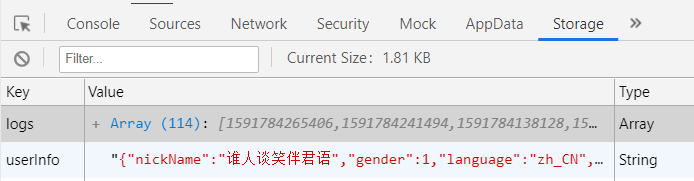
如图,从控制台【Storage】查看缓存信息,缓存第一次登录的用户信息,再次打开页面就不需要进行登录操作了。
连接服务端webSocket
后端index.js
const WS = require("ws").Server;
// console.log(WS);// 微信小程序提供的websocket
let wss = new WS({// 连接websocket用port: 8600
});let socketObj = {};
let userArr = []; //监听是否有连接
wss.on("connection", function (ws) {//websocket可以多端口连接,谁访问参数ws就是谁console.log("有连接");ws.on("message", res => {// console.log(res);let userInfo = JSON.parse(res);let openId = userInfo.openId;let result = userArr.filter(user=>user.openId);if (result.length===0) {// 如果没有连接过userArr.push(userInfo);}else{// 如果有连接过,更新分数ws.send(tapTime);}// 保存当前连接者(当前连接者有唯一id,避免了重复连接)socketObj[openId] = ws;// 对所有的socket连接者,发送广播for (let key in socketObj) {socketObj[key].send(userArr);   }})
});
小程序项目逻辑处理部分
pages/game/index.js
登录请求需要满足三个条件:
- AppID:每个小程序都有唯一的标识符id、
- secret:秘钥,登录微信公众平台账号-开发-开发设置-开发者id,秘钥。如果没有,单击生成即可
- code:临时凭证。通过wx.login(Object object)
调用接口获取登录凭证(code)。通过凭证进而换取用户登录态信息
Page({/*页面的初始数据 */data: {isLogin: false, //默认未登录userInfo: null, //默认登录用户信息为nulluserAllInfo: [], //数组存所有登录用户的信息message: "", //提示信息startTime: null, //开始时间tapTime: "" //点击按钮用时(分数)},// 处理点击事件的函数(获取用户信息-第一次登录时)getInfo() {wx.getUserInfo({success: (res) => {console.log(res);let userInfo = res.userInfo;// 登录 获取openIdwx.login({success: (result) => {console.log(result);let code = result.code;// 通过code换取openId(微信官方处于安全考虑,我们无法直接获取openId这个唯一标识符)wx.request({// 登录请求需要三个条件:AppID、secret、code// AppID:  wx9c1aad985564c704// 秘钥secret: a1dcdfe14b90175fb03b381791644b1c// 临时登录凭证code: ${code}// url后面的地址使用模板字符串// 前面的定义的code是个变量,使用模板字符串直接获取,如果不用模板字符串,使用字符串拼接到url中也是一样的url: `https://api.weixin.qq.com/sns/jscode2session?appid=wx9c1aad985564c704&secret=c423ff7181925e84cab031c1718a3705&js_code=${code}&grant_type=authorization_code`,success: res => {console.log(res);userInfo.openid = res.data.openid;// 登录成功,获取用户数据this.setData({// 登录用户的信息(属性名与属性值相同,写其一)userInfo,// 使用解构赋值,将每一条用户信息添加到用户数组中userAllInfo:[...this.data.userAllInfo,userInfo],// 登录成功状态为trueisLogin: true});console.log(this.data.userAllInfo);// 缓存用户信息(每次打开页面时,有登录信息就直接进入,不需要再登录一次,如果没有登录信息再进行登录)// wx.setStorage({ //没有获取到缓存的用户登录信息// "userInfo": JSON.stringify(userInfo)// });wx.setStorageSync("userInfo",JSON.stringify(userInfo));// 给服务发送用户信息wx.sendSocketMessage({// 将对象转为字符串data: JSON.stringify(userInfo),});// 监听服务器回应的信息wx.onSocketMessage((result) => {console.log(result);});}})},})},})},/*** 生命周期函数--监听页面加载*/onLoad: function (options) {// 建立连接webSocketwx.connectSocket({// 你自己的电脑所在的网络url: "ws://192.168.1.4:8600",// url: "ws://192.168.43.5:8600",});// 检测是否连接webSocket成功wx.onSocketOpen((result) => {console.log("连接成功");// 每次打开页面时,先判断是否有缓存的登录用户信息,如果有直接拿来用,直接进入,不需要再次登录操作if (wx.getStorageSync("userInfo")) {// 使用JSON.parse()将缓存的字符串信息转化为对象let userInfo = JSON.parse(wx.getStorageSync("userInfo"));console.log( userInfo);this.setData({userInfo,userAllInfo:[...this.data.userAllInfo,userInfo],isLogin:true});// 给服务发送用户信息wx.sendSocketMessage({// 将对象转为字符串data: JSON.stringify(userInfo),});// 监听服务器回应的信息wx.onSocketMessage((result) => {// console.log(result);console.log("??",JSON.parse(result.data));});}});// 触摸开始startTime(){// 开始触摸计时let startTime = new Date().getTime();this.setData({startTime});},// 触摸结束endTime() {// 触摸结束计时let endTime = new Date().getTime();// 计算 时差 = 结束时间-开始时间// 时差即是作为用户得到的分数(保留一位小数)let tapTime =( (endTime - this.data.startTime) / 1000).toFixed(1);console.log(tapTime);this.setData({tapTime});if (tapTime > 0 && tapTime <= 1.0) {this.setData({message: "还需要努力哟!"});} else if (tapTime > 1.0 && tapTime <= 2.5) {this.setData({message: "有进步啊!继续加油!"});} else if (tapTime > 2.5 && tapTime <= 3.0) {this.setData({message: "哎呦!不错哟!"});} else {this.setData({message: "超时了亲!"});}// 更新分数,发送给服务器wx.sendSocketMessage({data: tapTime});}
})
注意:连接webSocket时,url中的ip地址是你的电脑所在的网络上的地址。
使用真机测试时,服务器端与你要测试的手机在同一网络下。
作为微信小程序管理员去添加参与测试的成员,手机网络也要在同一网络下。
小程序项目下视图部分
pages/game/index.wxml
<view wx:if="{{!isLogin}}"><!-- 绑定点击事件,获取微信用户登录的信息 --><button type="primary" open-type="getUserInfo" bindgetuserinfo="getInfo">点击登录</button>
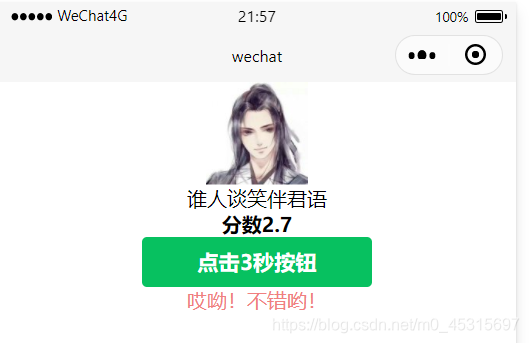
</view><view class="gameContainer" wx:if="{{isLogin}}"><view class="userContainer"><view class="userItem" wx:for="{{userAllInfo}}" wx:key="key"><!-- 用户头像 --><image src="{{item.avatarUrl}}"></image><!-- 用户昵称 --><text>{{item.nickName}}</text><!-- 得分 --><text class="score">分数{{tapTime}}</text></view><!-- 绑定手指触摸开始与结束事件 --><button type="primary" bind:touchstart="startTime" bind:touchend="endTime">点击3秒按钮</button><!--提示信息--><text class="info">{{message}}</text></view>
</view>
本文来自互联网用户投稿,文章观点仅代表作者本人,不代表本站立场,不承担相关法律责任。如若转载,请注明出处。 如若内容造成侵权/违法违规/事实不符,请点击【内容举报】进行投诉反馈!