最新版cesium集成threejs
最新版cesium集成three.js
- 简介
- 完整代码
- 使用版本
- html 代码
- JavaScript代码
- 实现效果
- 项目在线示例
2023年4月19日更新—搞了一个 Cesium 镜像,欢迎使用:沙盒示例 和 API
简介
之前三维加载模型都是加载 glb 或者 gltf,模型不好找,一般需要定制,因此领导想加载 threejs的模型。
按照官方示例(吐槽:2017年的示例 ,代码存在诸多问题,而且版本太老)。
官方地址: Integrating Cesium with Three.js
githup地址:cesium-threejs-experiment
尝试了很多遍,无法加载模型;githup项目无法运行。
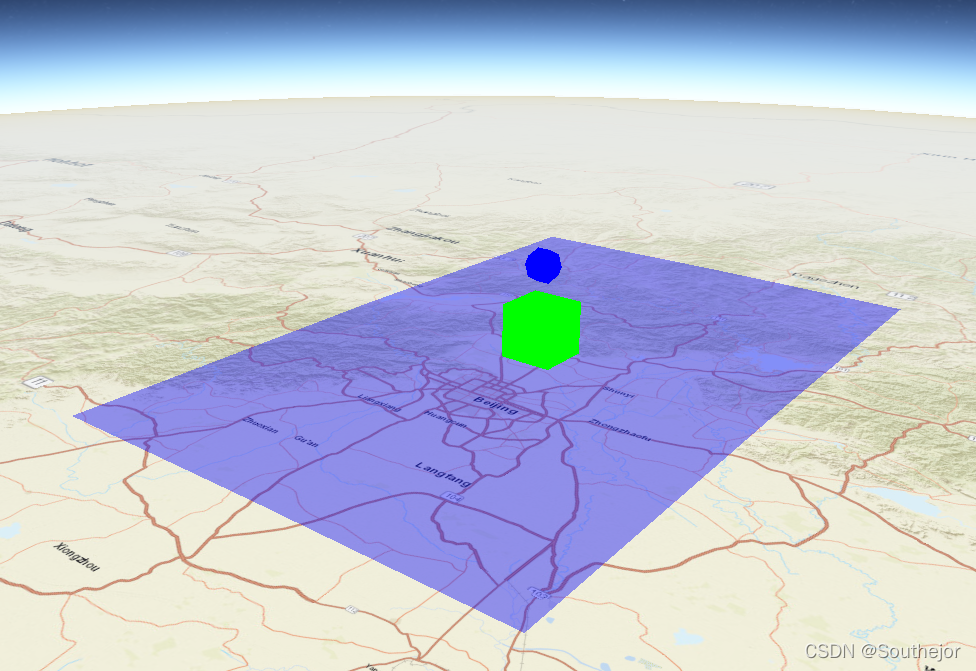
后来在搜索到一篇博客,修改之后可以显示模型,但是模型没有添加到cesium地球中,是分离的,经过修改,完成地球加载three模型,并且同步。
完整代码
基本上是参照官方示例,和大神博客来完成的。自己修改部分主要是:
cesium初始化增加底图、three初始化修改容器
同步cesium画布和three画布位置,画布叠加在一起
解决cesium初始化找不到容器的问题
增加立方体模型
使用版本
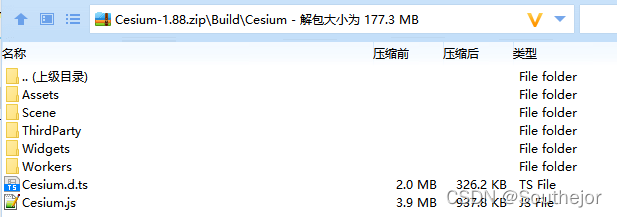
cesium 1.88 (目前最新版)
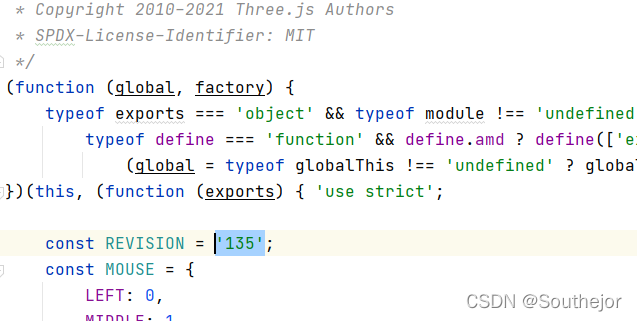
thee.js r135(目前最新版)
---------------------------------------------------------------------------------------------------------------------------
html 代码
DOCTYPE html>
<html lang="en">
<head><meta charset="utf-8"><meta http-equiv="X-UA-Compatible" content="IE=Edge,chrome=1"><meta name="viewport"content="width=device-width, initial-scale=1, maximum-scale=1, minimum-scale=1, user-scalable=no"><title>Cesium integrate Threejstitle><link rel="stylesheet" href="./Widgets/widgets.css"><script src="./Cesium.js">script><script src="./threejs/three.js">script><style>/*设置cesium和three的画布位置*/.container-integrate canvas {position: absolute;top: 0;}/*three画布禁止鼠标操作*/.container-integrate canvas:nth-child(3) {pointer-events: none;}style>
head><body onload="pageload()"><div class="container-integrate" style=""><div id="cesiumContainer" style="height: 800px;width: 100%;">div>
div>
JavaScript代码
// three对象
let three = {renderer: null,camera: null,scene: null
};//cesium对象
let cesium = {viewer: null
};function pageload() {// 模型定位范围let minWGS84 = [115.56936458615716, 39.284100766866445];let maxWGS84 = [117.10745052365716, 41.107831235616445];// cesium 容器let cesiumContainer = document.getElementById("cesiumContainer");let _3Dobjects = []; //Could be any Three.js object mesh// three对象function _3DObject() {//THREEJS 3DObject.meshthis.threeMesh = null;//location bounding boxthis.minWGS84 = null;this.maxWGS84 = null;}// 初始化地球function initCesium() {cesium.viewer = new Cesium.Viewer(cesiumContainer, {useDefaultRenderLoop: false,selectionIndicator: false,homeButton: false,sceneModePicker: false,infoBox: false,navigationHelpButton: false,navigationInstructionsInitiallyVisible: false,animation: false,timeline: false,fullscreenButton: false,allowTextureFilterAnisotropic: false,baseLayerPicker: false,contextOptions: {webgl: {alpha: false,antialias: true,preserveDrawingBuffer: true,failIfMajorPerformanceCaveat: false,depth: true,stencil: false,anialias: false},},targetFrameRate: 60,resolutionScale: 0.1,orderIndependentTranslucency: true,//加载底图imageryProvider: new Cesium.ArcGisMapServerImageryProvider({url: "https://services.arcgisonline.com/ArcGIS/rest/services/World_Street_Map/MapServer",}),geocoder: false,automaticallyTrackDataSourceClocks: false,// creditContainer : "hidecredit", //注意:这里需要注释掉,否则会报找不到容器的问题dataSources: null,clock: null,terrainShadows: Cesium.ShadowMode.DISABLED});let center = Cesium.Cartesian3.fromDegrees((minWGS84[0] + maxWGS84[0]) / 2,((minWGS84[1] + maxWGS84[1]) / 2) - 1,200000);cesium.viewer.camera.flyTo({destination: center,orientation: {heading: Cesium.Math.toRadians(0),pitch: Cesium.Math.toRadians(-60),roll: Cesium.Math.toRadians(0)},duration: 3});}//初始化threefunction initThree() {let fov = 45;let width = window.innerWidth;let height = window.innerHeight;let aspect = width / height;let near = 1;let far = 10 * 1000 * 1000;three.scene = new THREE.Scene();three.camera = new THREE.PerspectiveCamera(fov, aspect, near, far);three.renderer = new THREE.WebGLRenderer({alpha: true});let Amlight = new THREE.AmbientLight(0xffffff, 2);three.scene.add(Amlight);// 注意这里,直接把three容器(canvas 添加到 cesium中,在cesium的canvas之下),// 这样的话,两个canvas才会重叠起来。cesium.viewer.cesiumWidget.canvas.parentElement.appendChild(three.renderer.domElement);// ThreeContainer.appendChild(three.renderer.domElement);}//创建 cesium 图形,跟three无关function createPolygon() {let entity = {name: 'Polygon',polygon: {hierarchy: Cesium.Cartesian3.fromDegreesArray([minWGS84[0], minWGS84[1],maxWGS84[0], minWGS84[1],maxWGS84[0], maxWGS84[1],minWGS84[0], maxWGS84[1],]),material: Cesium.Color.BLUE.withAlpha(0.4)}};let Polygon = cesium.viewer.entities.add(entity);}// 加载three模型function getModel(geometry) {geometry = new THREE.DodecahedronGeometry();const material = new THREE.MeshBasicMaterial({color: 0x0000ff});let dodecahedronMesh = new THREE.Mesh(geometry, material);// let dodecahedronMesh = new THREE.Mesh(geometry, new THREE.MeshNormalMaterial());dodecahedronMesh.scale.set(5000, 5000, 5000); //scale object to be visible at planet scaledodecahedronMesh.position.z += 25000.0; // translate "up" in Three.js space so the "bottom" of the mesh is the handledodecahedronMesh.rotation.x = Math.PI / 2; // rotate mesh for Cesium's Y-up systemlet dodecahedronMeshYup = new THREE.Group();dodecahedronMeshYup.add(dodecahedronMesh)three.scene.add(dodecahedronMeshYup); // don’t forget to add it to the Three.js scene manually//Assign Three.js object mesh to our object arraylet _3DOB = new _3DObject();_3DOB.threeMesh = dodecahedronMeshYup;_3DOB.minWGS84 = minWGS84;_3DOB.maxWGS84 = maxWGS84;_3Dobjects.push(_3DOB);}// 加载three立方体模型function cube() {const geometry = new THREE.BoxGeometry();const material = new THREE.MeshBasicMaterial({color: 0x00ff00});const dodecahedronMesh = new THREE.Mesh(geometry, material);dodecahedronMesh.scale.set(15000, 15000, 15000); //scale object to be visible at planet scaledodecahedronMesh.position.z += 7000.0; // translate "up" in Three.js space so the "bottom" of the mesh is the handledodecahedronMesh.rotation.x = Math.PI / 2; // rotate mesh for Cesium's Y-up systemlet dodecahedronMeshYup = new THREE.Group();dodecahedronMeshYup.add(dodecahedronMesh)three.scene.add(dodecahedronMeshYup); // don’t forget to add it to the Three.js scene manually//Assign Three.js object mesh to our object arraylet _3DOB = new _3DObject();_3DOB.threeMesh = dodecahedronMeshYup;_3DOB.minWGS84 = minWGS84;_3DOB.maxWGS84 = maxWGS84;_3Dobjects.push(_3DOB);}// 创建three 对象function createThreeObject() {getModel();cube();}// 初始化模型function init3DObject() {//Cesium entitycreatePolygon()//Three.js ObjectscreateThreeObject()}// cesium 渲染function renderCesium() {cesium.viewer.render();}function renderThreeObj() {// register Three.js scene with Cesiumthree.camera.fov = Cesium.Math.toDegrees(cesium.viewer.camera.frustum.fovy) // ThreeJS FOV is vertical//three.camera.updateProjectionMatrix();let cartToVec = function (cart) {return new THREE.Vector3(cart.x, cart.y, cart.z);};// Configure Three.js meshes to stand against globe center position up directionfor (let id in _3Dobjects) {minWGS84 = _3Dobjects[id].minWGS84;maxWGS84 = _3Dobjects[id].maxWGS84;// convert lat/long center position to Cartesian3let center = Cesium.Cartesian3.fromDegrees((minWGS84[0] + maxWGS84[0]) / 2, (minWGS84[1] + maxWGS84[1]) / 2);// get forward direction for orienting modellet centerHigh = Cesium.Cartesian3.fromDegrees((minWGS84[0] + maxWGS84[0]) / 2, (minWGS84[1] + maxWGS84[1]) / 2, 1);// use direction from bottom left to top left as up-vectorlet bottomLeft = cartToVec(Cesium.Cartesian3.fromDegrees(minWGS84[0], minWGS84[1]));let topLeft = cartToVec(Cesium.Cartesian3.fromDegrees(minWGS84[0], maxWGS84[1]));let latDir = new THREE.Vector3().subVectors(bottomLeft, topLeft).normalize();// configure entity position and orientation_3Dobjects[id].threeMesh.position.copy(center);_3Dobjects[id].threeMesh.lookAt(centerHigh.x, centerHigh.y, centerHigh.z);_3Dobjects[id].threeMesh.up.copy(latDir);}// Clone Cesium Camera projection position so the// Three.js Object will appear to be at the same place as above the Cesium Globethree.camera.matrixAutoUpdate = false;let cvm = cesium.viewer.camera.viewMatrix;let civm = cesium.viewer.camera.inverseViewMatrix;// 注意这里,经大神博客得知,three高版本这行代码需要放在 three.camera.matrixWorld 之前three.camera.lookAt(0, 0, 0);three.camera.matrixWorld.set(civm[0], civm[4], civm[8], civm[12],civm[1], civm[5], civm[9], civm[13],civm[2], civm[6], civm[10], civm[14],civm[3], civm[7], civm[11], civm[15]);three.camera.matrixWorldInverse.set(cvm[0], cvm[4], cvm[8], cvm[12],cvm[1], cvm[5], cvm[9], cvm[13],cvm[2], cvm[6], cvm[10], cvm[14],cvm[3], cvm[7], cvm[11], cvm[15]);// 设置three宽高let width = cesiumContainer.clientWidth;let height = cesiumContainer.clientHeight;let aspect = width / height;three.camera.aspect = aspect;three.camera.updateProjectionMatrix();three.renderer.setSize(width, height);three.renderer.clear();three.renderer.render(three.scene, three.camera);}// 同步function loop() {requestAnimationFrame(loop);renderCesium();renderThreeObj();}initCesium(); // Initialize Cesium rendererinitThree(); // Initialize Three.js rendererinit3DObject(); // Initialize Three.js object mesh with Cesium Cartesian coordinate systemloop(); // Looping renderer
}
实现效果
项目在线示例
在线示例,可以直接扒代码在本地运行
嫌麻烦可以直接下载源码: 项目源码
参考博客:
cesium与three.js 结合的栗子,结合了一下网友们的栗子,解决了three.js 高版本模型出不来的问题
cesium+threejs结合实现GIS+BIM大场景-2
本文来自互联网用户投稿,文章观点仅代表作者本人,不代表本站立场,不承担相关法律责任。如若转载,请注明出处。 如若内容造成侵权/违法违规/事实不符,请点击【内容举报】进行投诉反馈!