图酷
图库
整体架构
核心就是一个 HTTP 服务器, 提供对图片的增删改查能力. 搭配简单的页面辅助完成图片上传/展示,在 MySQL 数据库中存储对应的图片信息。
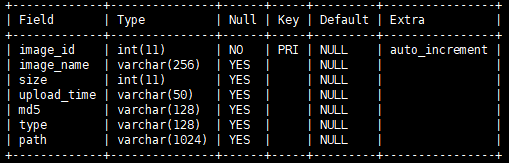
数据库设计
这个项目用到了一张表,存储图片的ID,name,id,name,size,upload_time,type,path,md5
接口设计(hpp)
namespace image_system { static MYSQL* MySQLInit() {} static void MySQLRelease(MYSQL* mysql) {} class ImageTable { ImageTable(MYSQL* mysql) { } bool Insert(const Json::Value& image);//插入图片bool SelectAll(Json::Value* images); //查看所有图片信息bool SelectOne(int32_t image_id, Json::Value* image); //获取某张图片属性bool Delete(int image_id); //删除某张图片};
}
接口的实现
1.初始化(static MYSQL* MySQLInit() {})
static MYSQL* MySQLInit() {// 1. 先创建一个 mysql 的句柄MYSQL* mysql = mysql_init(NULL);// 2. 拿着句柄和数据库建立链接if (mysql_real_connect(mysql, "127.0.0.1", "root", "", "image_system2", 3306, NULL, 0) == NULL) {printf("连接失败! %s\n", mysql_error(mysql)); // 数据库连接失败return NULL;}// 3. 设置编码格式mysql_set_character_set(mysql, "utf8");return mysql;}static void MySQLRelease(MYSQL* mysql) {mysql_close(mysql);}
2.释放(static void MySQLRelease(MYSQL* mysql) {})
static void MySQLRelease(MYSQL* mysql) {mysql_close(mysql);
}
3.类中接口的实现
3.1插入图片( bool Insert(const Json::Value& image) {})
bool Insert(const Json::Value& image) {char sql[4 * 1024] = {0};sprintf(sql, "insert into image_table values(null, '%s', %d, '%s', '%s', '%s', '%s')", image["image_name"].asCString(),image["size"].asInt(), image["upload_time"].asCString(),image["md5"].asCString(), image["type"].asCString(),image["path"].asCString());printf("[Insert sql] %s\n", sql);int ret = mysql_query(mysql_, sql);if (ret != 0) {printf("Insert 执行 SQL 失败! %s\n", mysql_error(mysql_));return false;}return true;}
3.2查看所有图片信息( bool SelectAll(Json::Value* images) {})
bool SelectAll(Json::Value* images) {char sql[1024 * 4] = {0};sprintf(sql, "select * from image_table");int ret = mysql_query(mysql_, sql);if (ret != 0) {printf("SelectAll 执行 SQL 失败! %s\n", mysql_error(mysql_));return false;}// 遍历结果集合, 并把结果集写到 images 参数之中MYSQL_RES* result = mysql_store_result(mysql_);int rows = mysql_num_rows(result);for (int i = 0; i < rows; ++i) {MYSQL_ROW row = mysql_fetch_row(result);// 数据库查出的每条记录都相当于是一个图片的信息,需要把这个信息转成 JSON 格式Json::Value image;image["image_id"] = atoi(row[0]);image["image_name"] = row[1];image["size"] = atoi(row[2]);image["upload_time"] = row[3];image["md5"] = row[4];image["type"] = row[5];image["path"] = row[6];images->append(image);}mysql_free_result(result);return true;}
3.3.获取某张图片信息(bool SelectOne(int image_id, Json::Value* image_ptr) {})
bool SelectOne(int image_id, Json::Value* image_ptr) {char sql[1024 * 4] = {0};sprintf(sql, "select * from image_table where image_id = %d",image_id);int ret = mysql_query(mysql_, sql);if (ret != 0) {printf("SelectOne 执行 SQL 失败! %s\n", mysql_error(mysql_));return false;}// 遍历结果集合MYSQL_RES* result = mysql_store_result(mysql_);int rows = mysql_num_rows(result);if (rows != 1) {printf("SelectOne 查询结果不是 1 条记录! 实际查到 %d 条!\n", rows);return false;}MYSQL_ROW row = mysql_fetch_row(result);Json::Value image;image["image_id"] = atoi(row[0]);image["image_name"] = row[1];image["size"] = atoi(row[2]);image["upload_time"] = row[3];image["md5"] = row[4];image["type"] = row[5];image["path"] = row[6];*image_ptr = image;// 释放结果集合mysql_free_result(result);return true;}
3.4.删除某张图片(bool Delete(int image_id);)
bool Delete(int image_id) {char sql[1024 * 4] = {0};sprintf(sql, "delete from image_table where image_id = %d",image_id);int ret = mysql_query(mysql_, sql);if (ret != 0) {printf("Delete 执行 SQL 失败! %s\n", mysql_error(mysql_));return false;}return true;}
代码如下
#pragma once
#include
#include
#include
#include
namespace image_system {
static MYSQL* MySQLInit() { // 1. 先创建一个 mysql 的句柄MYSQL* mysql = mysql_init(NULL);// 2. 拿着句柄和数据库建立链接if (mysql_real_connect(mysql, "127.0.0.1", "root", "", "image_system2", 3306, NULL, 0) == NULL) {// 数据库链接失败printf("连接失败! %s\n", mysql_error(mysql));return NULL;}// 3. 设置编码格式mysql_set_character_set(mysql, "utf8");return mysql;
}static void MySQLRelease(MYSQL* mysql) {mysql_close(mysql);
}
class ImageTable {
public:ImageTable(MYSQL* mysql) : mysql_(mysql) {}bool Insert(const Json::Value& image) {char sql[4 * 1024] = {0};sprintf(sql, "insert into image_table values(null, '%s', %d, '%s', '%s', '%s', '%s')", image["image_name"].asCString(),image["size"].asInt(), image["upload_time"].asCString(),image["md5"].asCString(), image["type"].asCString(),image["path"].asCString());printf("[Insert sql] %s\n", sql);int ret = mysql_query(mysql_, sql);if (ret != 0) {printf("Insert 执行 SQL 失败! %s\n", mysql_error(mysql_));return false;}return true;}bool SelectAll(Json::Value* images) {char sql[1024 * 4] = {0};sprintf(sql, "select * from image_table");int ret = mysql_query(mysql_, sql);if (ret != 0) {printf("SelectAll 执行 SQL 失败! %s\n", mysql_error(mysql_));return false;}// 遍历结果集合, 并把结果集写到 images 参数之中MYSQL_RES* result = mysql_store_result(mysql_);int rows = mysql_num_rows(result);for (int i = 0; i < rows; ++i) {MYSQL_ROW row = mysql_fetch_row(result);// 数据库查出的每条记录都相当于是一个图片的信息,需要把这个信息转成 JSON 格式Json::Value image;image["image_id"] = atoi(row[0]);image["image_name"] = row[1];image["size"] = atoi(row[2]);image["upload_time"] = row[3];image["md5"] = row[4];image["type"] = row[5];image["path"] = row[6];images->append(image);}mysql_free_result(result);return true;}bool SelectOne(int image_id, Json::Value* image_ptr) {char sql[1024 * 4] = {0};sprintf(sql, "select * from image_table where image_id = %d",image_id);int ret = mysql_query(mysql_, sql);if (ret != 0) {printf("SelectOne 执行 SQL 失败! %s\n", mysql_error(mysql_));return false;}// 遍历结果集合MYSQL_RES* result = mysql_store_result(mysql_);int rows = mysql_num_rows(result);if (rows != 1) {printf("SelectOne 查询结果不是 1 条记录! 实际查到 %d 条!\n", rows);return false;}MYSQL_ROW row = mysql_fetch_row(result);Json::Value image;image["image_id"] = atoi(row[0]);image["image_name"] = row[1];image["size"] = atoi(row[2]);image["upload_time"] = row[3];image["md5"] = row[4];image["type"] = row[5];image["path"] = row[6];*image_ptr = image;// 释放结果集合mysql_free_result(result);return true;}bool Delete(int image_id) {char sql[1024 * 4] = {0};sprintf(sql, "delete from image_table where image_id = %d",image_id);int ret = mysql_query(mysql_, sql);if (ret != 0) {printf("Delete 执行 SQL 失败! %s\n", mysql_error(mysql_));return false;}return true;}
private:MYSQL* mysql_;
};
}
服务器的基本框架
1.实现完整上传图片接口
server.Post("/image", [&image_table](const Request& req, Response& resp) {Json::FastWriter writer;Json::Value resp_json;printf("上传图片\n");// 1. 对参数进行校验auto ret = req.has_file("upload");if (!ret) {printf("文件上传出错!\n");resp.status = 404;// 可以使用 json 格式组织一个返回结果resp_json["ok"] = false;resp_json["reason"] = "上传文件出错, 没有需要的upload 字段";resp.set_content(writer.write(resp_json), "application/json");return;}// 2. 根据文件名获取到文件数据 file 对象const auto& file = req.get_file_value("upload");// 3. 把图片属性信息插入到数据库中Json::Value image;image["image_name"] = file.filename;image["size"] = (int)file.length;image["upload_time"] = "2018/08/29"; // TODOimage["md5"] = "aaaaaaa"; // TODOimage["type"] = file.content_type;image["path"] = "./data/" + file.filename;ret = image_table.Insert(image);if (!ret) {printf("image_table Insert failed!\n");resp_json["ok"] = false;resp_json["reason"] = "数据库插入失败!";resp.status = 500;resp.set_content(writer.write(resp_json), "application/json");return;} // 4. 把图片保存到指定的磁盘目录中auto body = req.body.substr(file.offset, file.length);FileUtil::Write(image["path"].asString(), body);// 5. 构造一个响应数据通知客户端上传成功resp_json["ok"] = true;resp.status = 200;resp.set_content(writer.write(resp_json), "application/json");return;});
2.实现查看所有图片信息接口
server.Get("/image", [&image_table](const Request& req, Response& resp) {(void) req; // 没有任何实际的效果printf("获取所有图片信息\n");Json::Value resp_json;Json::FastWriter writer;// 1. 调用数据库接口来获取数据bool ret = image_table.SelectAll(&resp_json);if (!ret) {printf("查询数据库失败!\n");resp_json["ok"] = false;resp_json["reason"] = "查询数据库失败!";resp.status = 500;resp.set_content(writer.write(resp_json), "application/json");return;}// 2. 构造响应结果返回给客户端resp.status = 200;resp.set_content(writer.write(resp_json), "application/json");});// 1. 正则表达式// 2. 原始字符串(raw string)server.Get(R"(/image/(\d+))", [&image_table](const Request& req, Response& resp) {Json::FastWriter writer;Json::Value resp_json;// 1. 先获取到图片 idint image_id = std::stoi(req.matches[1]);printf("获取 id 为 %d 的图片信息!\n", image_id);// 2. 再根据图片 id 查询数据库bool ret = image_table.SelectOne(image_id, &resp_json);if (!ret) {printf("数据库查询出错!\n");resp_json["ok"] = false;resp_json["reason"] = "数据库查询出错";resp.status = 404;resp.set_content(writer.write(resp_json), "application/json");return;}// 3. 把查询结果返回给客户端resp_json["ok"] = true;resp.set_content(writer.write(resp_json), "application/json");return;});
3.实现查看指定图片的接口
server.Get(R"(/show/(\d+))", [&image_table](const Request& req,Response& resp) {Json::FastWriter writer;Json::Value resp_json;// 1. 根据图片 id 去数据库中查到对应的目录int image_id = std::stoi(req.matches[1]);printf("获取 id 为 %d 的图片内容!\n", image_id);Json::Value image;bool ret = image_table.SelectOne(image_id, &image);if (!ret) {printf("读取数据库失败!\n");resp_json["ok"] = false;resp_json["reason"] = "数据库查询出错";resp.status = 404;resp.set_content(writer.write(resp_json), "application/json");return;}// 2. 根据目录找到文件内容, 读取文件内容std::string image_body;printf("%s\n", image["path"].asCString());ret = FileUtil::Read(image["path"].asString(), &image_body);if (!ret) {printf("读取图片文件失败!\n");resp_json["ok"] = false;resp_json["reason"] = "读取图片文件失败";resp.status = 500;resp.set_content(writer.write(resp_json), "application/json");return;}// 3. 把文件内容构造成一个响应resp.status = 200;// 不同的图片, 设置的 content type 是不一样的. // 如果是 png 应该设为 image/png// 如果是 jpg 应该设为 image/jpgresp.set_content(image_body, image["type"].asCString());});
4.实现删除图片接口
server.Delete(R"(/image/(\d+))", [&image_table](const Request& req, Response& resp) {Json::FastWriter writer;Json::Value resp_json;// 1. 根据图片 id 去数据库中查到对应的目录int image_id = std::stoi(req.matches[1]);printf("删除 id 为 %d 的图片!\n", image_id);// 2. 查找到对应文件的路径Json::Value image;bool ret = image_table.SelectOne(image_id, &image);if (!ret) {printf("删除图片文件失败!\n");resp_json["ok"] = false;resp_json["reason"] = "删除图片文件失败";resp.status = 404;resp.set_content(writer.write(resp_json), "application/json");return;}// 3. 调用数据库操作进行删除ret = image_table.Delete(image_id);if (!ret) {printf("删除图片文件失败!\n");resp_json["ok"] = false;resp_json["reason"] = "删除图片文件失败";resp.status = 404;resp.set_content(writer.write(resp_json), "application/json");return;}// 4. 删除磁盘上的文件unlink(image["path"].asCString());// 5. 构造响应resp_json["ok"] = true;resp.status = 200;resp.set_content(writer.write(resp_json), "application/json");});
构造一个类,用于实现读写操作
class FileUtil {
public:static bool Write(const std::string& file_name, const std::string& content) {std::ofstream file(file_name.c_str());if (!file.is_open()) {return false;}file.write(content.c_str(), content.length());file.close();return true;}static bool Read(const std::string& file_name, std::string* content) {std::ifstream file(file_name.c_str());if (!file.is_open()) {return false;}struct stat st;stat(file_name.c_str(), &st);content->resize(st.st_size);file.read((char*)content->c_str(), content->size());file.close();return true;}
};
服务端代码如下
#include
#include
#include
#include "httplib.h"
#include "db.hpp"class FileUtil {
public:static bool Write(const std::string& file_name, const std::string& content) {std::ofstream file(file_name.c_str());if (!file.is_open()) {return false;}file.write(content.c_str(), content.length());file.close();return true;}static bool Read(const std::string& file_name, std::string* content) {std::ifstream file(file_name.c_str());if (!file.is_open()) {return false;}struct stat st;stat(file_name.c_str(), &st);content->resize(st.st_size);file.read((char*)content->c_str(), content->size());file.close();return true;}
};MYSQL* mysql = NULL;int main() {using namespace httplib;mysql = image_system::MySQLInit();image_system::ImageTable image_table(mysql);signal(SIGINT, [](int) {image_system::MySQLRelease(mysql);exit(0);});Server server;server.Post("/image", [&image_table](const Request& req, Response& resp) {Json::FastWriter writer;Json::Value resp_json;printf("上传图片\n");// 1. 对参数进行校验auto ret = req.has_file("upload");if (!ret) {printf("文件上传出错!\n");resp.status = 404;// 可以使用 json 格式组织一个返回结果resp_json["ok"] = false;resp_json["reason"] = "上传文件出错, 没有需要的upload 字段";resp.set_content(writer.write(resp_json), "application/json");return;}// 2. 根据文件名获取到文件数据 file 对象const auto& file = req.get_file_value("upload");// 3. 把图片属性信息插入到数据库中Json::Value image;image["image_name"] = file.filename;image["size"] = (int)file.length;image["upload_time"] = "2018/08/29";  // TODOimage["md5"] = "aaaaaaa"; // TODOimage["type"] = file.content_type;image["path"] = "./data/" + file.filename;ret = image_table.Insert(image);if (!ret) {printf("image_table Insert failed!\n");resp_json["ok"] = false;resp_json["reason"] = "数据库插入失败!";resp.status = 500;resp.set_content(writer.write(resp_json), "application/json");return;}      // 4. 把图片保存到指定的磁盘目录中auto body = req.body.substr(file.offset, file.length);FileUtil::Write(image["path"].asString(), body);// 5. 构造一个响应数据通知客户端上传成功resp_json["ok"] = true;resp.status = 200;resp.set_content(writer.write(resp_json), "application/json");return;});server.Get("/image", [&image_table](const Request& req, Response& resp) {(void) req; // 没有任何实际的效果printf("获取所有图片信息\n");Json::Value resp_json;Json::FastWriter writer;// 1. 调用数据库接口来获取数据bool ret = image_table.SelectAll(&resp_json);if (!ret) {printf("查询数据库失败!\n");resp_json["ok"] = false;resp_json["reason"] = "查询数据库失败!";resp.status = 500;resp.set_content(writer.write(resp_json), "application/json");return;}// 2. 构造响应结果返回给客户端resp.status = 200;resp.set_content(writer.write(resp_json), "application/json");});server.Get(R"(/image/(\d+))", [&image_table](const Request& req, Response& resp) {Json::FastWriter writer;Json::Value resp_json;// 1. 先获取到图片 idint image_id = std::stoi(req.matches[1]);printf("获取 id 为 %d 的图片信息!\n", image_id);// 2. 再根据图片 id 查询数据库bool ret = image_table.SelectOne(image_id, &resp_json);if (!ret) {printf("数据库查询出错!\n");resp_json["ok"] = false;resp_json["reason"] = "数据库查询出错";resp.status = 404;resp.set_content(writer.write(resp_json), "application/json");return;}// 3. 把查询结果返回给客户端resp_json["ok"] = true;resp.set_content(writer.write(resp_json), "application/json");return;});server.Get(R"(/show/(\d+))", [&image_table](const Request& req, Response& resp) {Json::FastWriter writer;Json::Value resp_json;// 1. 根据图片 id 去数据库中查到对应的目录int image_id = std::stoi(req.matches[1]);printf("获取 id 为 %d 的图片内容!\n", image_id);Json::Value image;bool ret = image_table.SelectOne(image_id, &image);if (!ret) {printf("读取数据库失败!\n");resp_json["ok"] = false;resp_json["reason"] = "数据库查询出错";resp.status = 404;resp.set_content(writer.write(resp_json), "application/json");return;}// 2. 根据目录找到文件内容, 读取文件内容std::string image_body;printf("%s\n", image["path"].asCString());ret = FileUtil::Read(image["path"].asString(), &image_body);if (!ret) {printf("读取图片文件失败!\n");resp_json["ok"] = false;resp_json["reason"] = "读取图片文件失败";resp.status = 500;resp.set_content(writer.write(resp_json), "application/json");return;}// 3. 把文件内容构造成一个响应resp.status = 200;// 不同的图片, 设置的 content type 是不一样的. // 如果是 png 应该设为 image/png// 如果是 jpg 应该设为 image/jpgresp.set_content(image_body, image["type"].asCString());});server.Delete(R"(/image/(\d+))", [&image_table](const Request& req, Response& resp) {Json::FastWriter writer;Json::Value resp_json;// 1. 根据图片 id 去数据库中查到对应的目录int image_id = std::stoi(req.matches[1]);printf("删除 id 为 %d 的图片!\n", image_id);// 2. 查找到对应文件的路径Json::Value image;bool ret = image_table.SelectOne(image_id, &image);if (!ret) {printf("删除图片文件失败!\n");resp_json["ok"] = false;resp_json["reason"] = "删除图片文件失败";resp.status = 404;resp.set_content(writer.write(resp_json), "application/json");return;}// 3. 调用数据库操作进行删除ret = image_table.Delete(image_id);if (!ret) {printf("删除图片文件失败!\n");resp_json["ok"] = false;resp_json["reason"] = "删除图片文件失败";resp.status = 404;resp.set_content(writer.write(resp_json), "application/json");return;}// 4. 删除磁盘上的文件unlink(image["path"].asCString());  // 5. 构造响应resp_json["ok"] = true;resp.status = 200;resp.set_content(writer.write(resp_json), "application/json");});server.set_base_dir("./wwwroot");server.listen("0.0.0.0", 9094);return 0;
}
测试
测试相关功能是需要用到postman来构造请求
本文来自互联网用户投稿,文章观点仅代表作者本人,不代表本站立场,不承担相关法律责任。如若转载,请注明出处。 如若内容造成侵权/违法违规/事实不符,请点击【内容举报】进行投诉反馈!