MybatisPlus实现多表联查、分页查询
前言
MybatisPlus对于单表的操作很方便,但是多表查询等复杂的操作还是需要在xml中写sql语句来完成。
那么,在MybatisPlus中如何实现多表联查、分页查询呢?
一、数据库表设计
新建学生表 student 和课程表 course
学生表
列名
注释
id
唯一标识
student_name
学生姓名
课程表
列名
注释
id
唯一标识
course_name
课程名称
student_id
学生id
二、项目目录结构
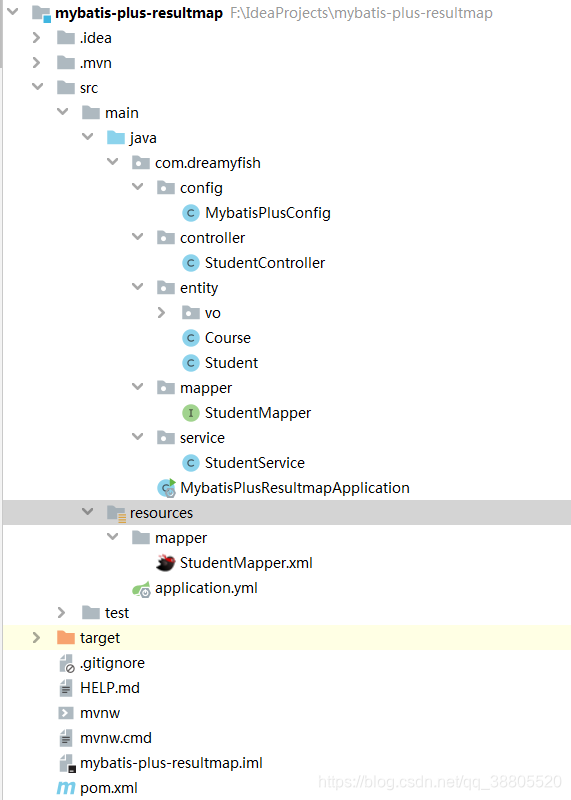
项目源码:https://github.com/dreamy-fish/mybatis-plus-resultmap
1、pom.xml
org.projectlombok lombok true
com.baomidou mybatis-plus-boot-starter 3.4.0
2、application.yml
mybatis-plus:mapper-locations: classpath:/mapper/*Mapper.xml
3、实体类
Course
import com.baomidou.mybatisplus.annotation.TableName;
import lombok.Data;@Data
@TableName(value = "course")
public class Course {private Integer cid;private String courseName;private Integer studentId;
}
Student
import com.baomidou.mybatisplus.annotation.TableField;
import com.baomidou.mybatisplus.annotation.TableName;
import lombok.Data;import java.util.List;@Data
@TableName(value = "student")
public class Student {private Integer id;private String studentName;//一对一//@TableField(exist = false)//private Course course;//一对多@TableField(exist = false)private List courses;
}
三、多表联查(VO对象)
1、StudentCourseVo
import lombok.Data;
import java.io.Serializable;@Data
public class StudentCourseVo implements Serializable {private Integer id;private String studentName;//学生姓名private Integer cid;private String courseName;//课程名称private Integer studentId;
}
2、StudentController
import com.baomidou.mybatisplus.extension.plugins.pagination.Page;
import com.dreamyfish.entity.vo.StudentCourseVo;
import com.dreamyfish.service.StudentService;
import org.springframework.web.bind.annotation.GetMapping;
import org.springframework.web.bind.annotation.PathVariable;
import org.springframework.web.bind.annotation.RequestMapping;
import org.springframework.web.bind.annotation.RestController;import javax.annotation.Resource;@RestController
@RequestMapping("student")
public class StudentController {@Resourceprivate StudentService studentService;/*** 多表联查,一对多,分页* @param page 当前页* @param size 每页条数* @return*/@GetMapping("pageTestB/{page}/{size}")public Page pageTestB(@PathVariable Integer page, @PathVariable Integer size){System.out.println("A");Page iPage = new Page(page, size);return studentService.getPageVo(iPage);}
}
3、StudentService
//import省略
@Service
public class StudentService {@Resourceprivate StudentMapper studentMapper;public Page getPageVo(Page iPage) {return studentMapper.getPageVo(iPage);}
}
4、StudentMapper
//import省略
public interface StudentMapper extends BaseMapper {@Select("SELECT * from student a LEFT JOIN course b on a.id=b.student_id")Page getPageVo(Page iPage);
}
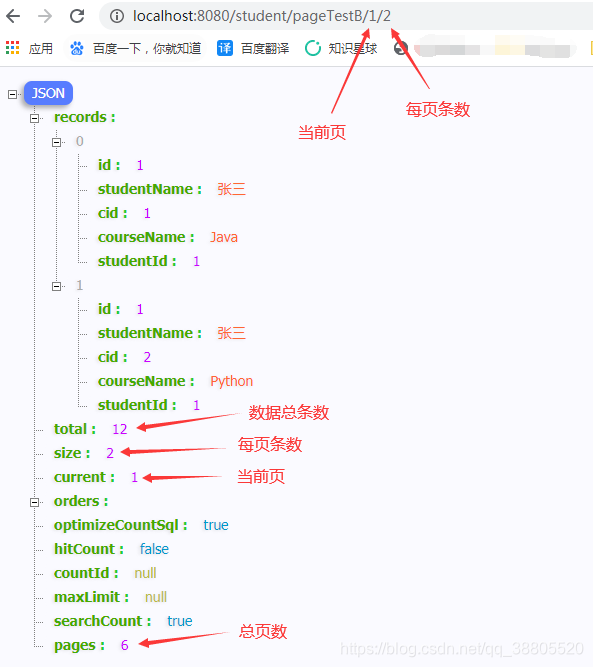
5、接口测试
http://localhost:8080/student/pageTestB/1/2
四、多表联查(xml、一对多)
1、StudentMapper
import com.baomidou.mybatisplus.core.mapper.BaseMapper;
import com.dreamyfish.entity.Student;import java.util.List;public interface StudentMapper extends BaseMapper {List getAll();
}
2、StudentService
import com.dreamyfish.entity.Student;
import com.dreamyfish.mapper.StudentMapper;
import org.springframework.stereotype.Service;import javax.annotation.Resource;
import java.util.List;@Service
public class StudentService {@Resourceprivate StudentMapper studentMapper;public List getAll() {return studentMapper.getAll();}
}
3、StudentController
import com.dreamyfish.entity.Student;
import com.dreamyfish.service.StudentService;
import org.springframework.web.bind.annotation.GetMapping;
import org.springframework.web.bind.annotation.RequestMapping;
import org.springframework.web.bind.annotation.RestController;import javax.annotation.Resource;
import java.util.List;@RestController
@RequestMapping("student")
public class StudentController {@Resourceprivate StudentService studentService;/*** 多表联查,一对多* @return*/@GetMapping("testA")public List testA(){return studentService.getAll();}
}
4、StudentMapper.xml
提示:如果是一对一,把collection改成assocication
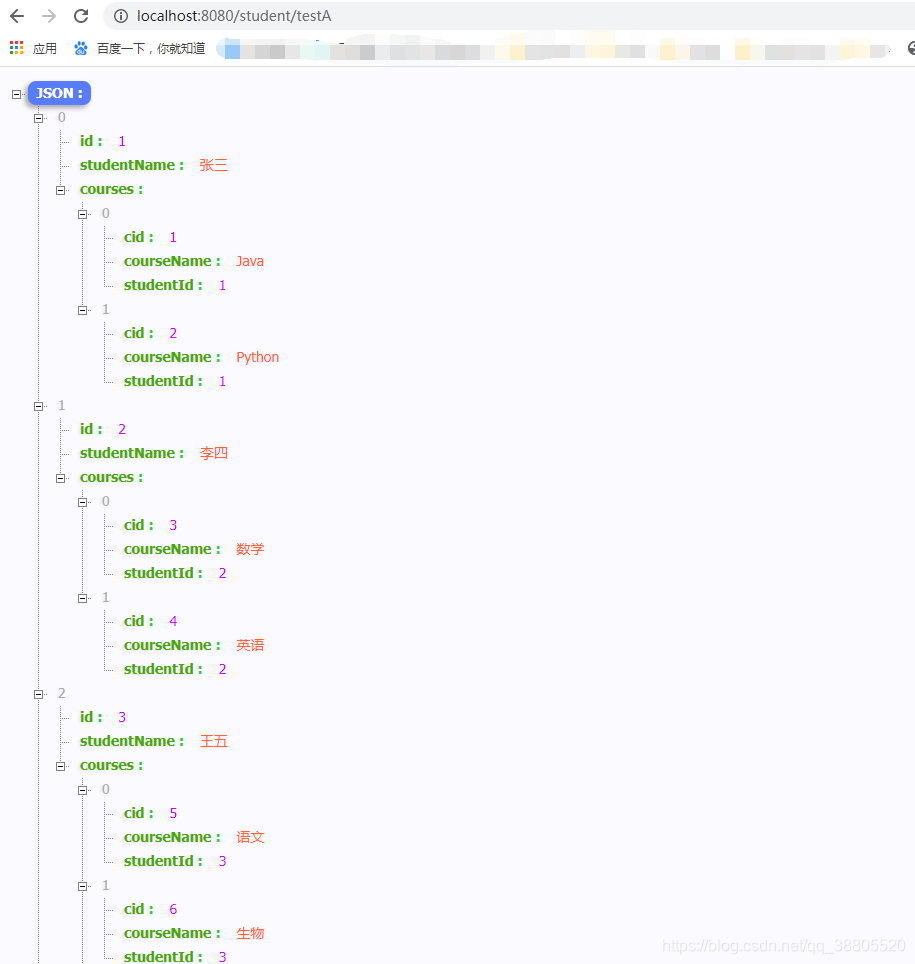
5、接口测试
http://localhost:8080/student/testA
五、多表联查(一对多、分页)
1、MybatisPlusConfig
MybatisPlus分页配置
import com.baomidou.mybatisplus.extension.plugins.PaginationInterceptor;
import org.mybatis.spring.annotation.MapperScan;
import org.springframework.context.annotation.Bean;
import org.springframework.context.annotation.Configuration;@Configuration
@MapperScan("com.dreamyfish.mapper.*")
public class MybatisPlusConfig {/*** 分页插件,自动识别数据库类型 多租户,请参考官网【插件扩展】*/@Beanpublic PaginationInterceptor paginationInterceptor(){return new PaginationInterceptor();}
}
2、StudentController
import com.baomidou.mybatisplus.extension.plugins.pagination.Page;
import com.dreamyfish.entity.Student;
import com.dreamyfish.service.StudentService;
import org.springframework.web.bind.annotation.GetMapping;
import org.springframework.web.bind.annotation.PathVariable;
import org.springframework.web.bind.annotation.RequestMapping;
import org.springframework.web.bind.annotation.RestController;import javax.annotation.Resource;@RestController
@RequestMapping("student")
public class StudentController {@Resourceprivate StudentService studentService;/*** 多表联查,一对多,分页* @param page 当前页* @param size 每页条数* @return*/@GetMapping("pageTestA/{page}/{size}")public Page pageTestA(@PathVariable Integer page, @PathVariable Integer size){Page iPage = new Page(page, size);return studentService.getAll(iPage);}
}
3、StudentService
//import省略
@Service
public class StudentService {@Resourceprivate StudentMapper studentMapper;public Page getAll(IPage iPage) {return studentMapper.getAll(iPage);}
}
4、StudentMapper
//import省略
public interface StudentMapper extends BaseMapper {Page getAll(IPage iPage);
}
5、CourseMapper
//import省略
public interface CourseMapper extends BaseMapper {@Select("select * from course where student_id=#{studentId}")List selectByStudentId(Integer studentId);
}
6、StudentMapper.xml
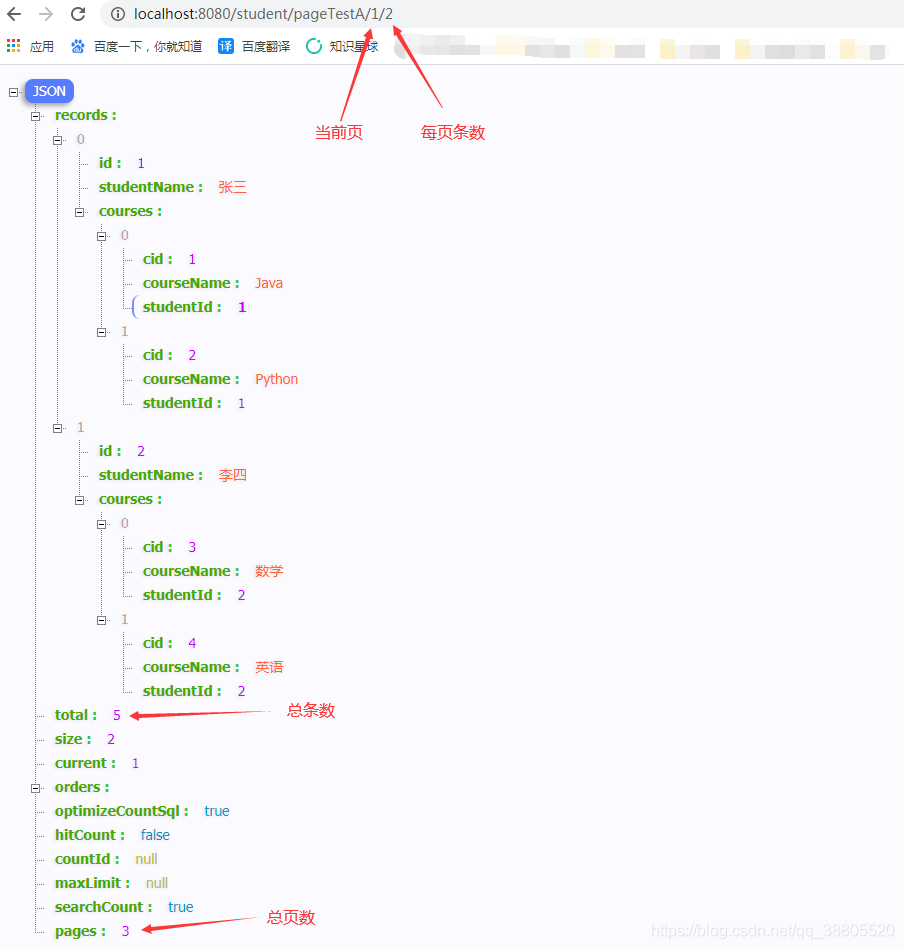
7、接口测试
http://localhost:8080/student/pageTestA/1/2
小结
项目源码:https://github.com/dreamy-fish/mybatis-plus-resultmap
参考:https://baomidou.com/guide/page.html
本文来自互联网用户投稿,文章观点仅代表作者本人,不代表本站立场,不承担相关法律责任。如若转载,请注明出处。 如若内容造成侵权/违法违规/事实不符,请点击【内容举报】进行投诉反馈!