四合一图片处理脚本
python-opencv:
img.shape输出结果为(高,宽,通道数)—(h,w,c);
获取图像像素的方法为:img[h1,w1,c1]
point,输入的分别是(宽,高)或者说是(x,y); 例如rectangle函数,point的输入就是(x,y);cv2.rectangle(img, (x1, y1,), (x2, y2), (255,0,0), 8, 2)
yolov5(U版)数据结构:label cx/Iw cy/Ih w/Iw h/Ih;
截取图像的roi:[y0:y1, x0:x1];其中y为h,x为w;、
C+±opencv:
img.at(i,j) 表示第i行第j列的像素;
rect(100, 50, 50, 100) 左上顶点的坐标 [100, 50],右下顶点的坐标 [150, 150];
rect(x, y, width, height);
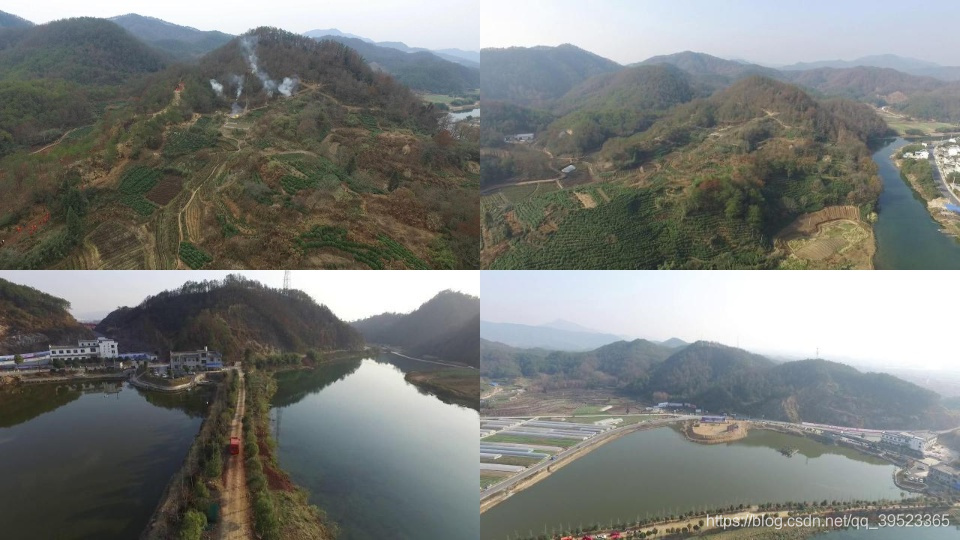
功能:将四张图按等比例缩放合成一张图,此方法可以增加小目标的检出率,提升背景的多样性。
import os
import io
import math
import sys
import cv2
import shutil
import random
import numpy as np
from collections import namedtuple, OrderedDict  label_names = ['person','car','bus','truck','motorcycle','chemical']def get_files(dir, suffix): res = []for root, directory, files in os.walk(dir): for filename in files:name, suf = os.path.splitext(filename) if suf == suffix:#res.append(filename)res.append(os.path.join(root, filename))return resdef convert_dataset(list_path, save_base_dir):while true:width_rate = random.random() if (width_rate > 0.3 and width_rate < 0.7):breakelse:continuewhile true:height_rate = random.random() if (height_rate > 0.3 and height_rate < 0.7):breakelse:continueimage_list = get_files(list_path, '.jpg')total_len = len(image_list)print('total_label_len', total_len)if not os.path.exists(save_base_dir):os.makedirs(save_base_dir)random.shuffle(image_list)
'''calss_file = save_base_dir + '/'+'classes.txt'fd_class = open(calss_file, 'w')# fd_class.write( [a+'\n' for a in label_names] )fd_class.write('person'+ '\n')fd_class.write('car'+ '\n')fd_class.write('bus'+ '\n')fd_class.write('truck'+ '\n')fd_class.write('motorcycle'+ '\n')fd_class.write('chemical'+ '\n')fd_class.close()
'''error_count =0image_count =0for i in range(0, total_len):image_file = image_list[i]j1 = random.randint(0, total_len-1)j2 = random.randint(0, total_len-1)j3 = random.randint(0, total_len-1)img = cv2.imread(image_file)img_h, img_w, img_c = img.shapeimg1 = cv2.imread(image_list[j1])img2 = cv2.imread(image_list[j2])img3 = cv2.imread(image_list[j3])print("img: ", img_w, img_h)resize_h= int(img_h/2)resize_w= int(img_w/2)img0 = cv2.resize(img, (resize_w,resize_h), interpolation=cv2.INTER_LINEAR)img1 = cv2.resize(img1, (resize_w,resize_h), interpolation=cv2.INTER_LINEAR)img2 = cv2.resize(img2, (resize_w,resize_h), interpolation=cv2.INTER_LINEAR)img3 = cv2.resize(img3, (resize_w,resize_h), interpolation=cv2.INTER_LINEAR)img_name , img_type = os.path.splitext(image_file)img_label_file = img_name + '.txt'if img_type != '.jpg' or not os.path.exists(img_label_file):error_count += 1#print("file_error: ",label_file.encode('UTF-8', 'ignore').decode('UTF-8'))continue_ , image_name = os.path.split(img_name)img1_name , img1_type = os.path.splitext(image_list[j1])img1_label_file = img1_name + '.txt'if img1_type != '.jpg' or not os.path.exists(img1_label_file):#print("file_error: ",img1_label_file.encode('UTF-8', 'ignore').decode('UTF-8'))continueimg2_name , img2_type = os.path.splitext(image_list[j2])img2_label_file = img2_name + '.txt'if img2_type != '.jpg' or not os.path.exists(img2_label_file):# print("file_error: ",img2_label_file.encode('UTF-8', 'ignore').decode('UTF-8'))continueimg3_name , img3_type = os.path.splitext(image_list[j3])img3_label_file = img3_name + '.txt'if img3_type != '.jpg' or not os.path.exists(img3_label_file):#print("file_error: ",img3_label_file.encode('UTF-8', 'ignore').decode('UTF-8'))continueimage_count +=1img4 = np.full((img_h, img_w, img.shape[2]), 114, dtype=np.uint8)img4[:resize_h, :resize_w] = img0[:, :]img4[:resize_h, resize_w:] = img1[:, :]img4[resize_h:, :resize_w] = img2[:, :]img4[resize_h:, resize_w:] = img3[:, :]save_img = save_base_dir  + '/'+  image_name + str(image_count) + '_mixup.jpg'cv2.imwrite(save_img, img4)fd = open(img_label_file, 'r')lines = [line.split() for line in fd]fd.close()fd1 = open(img1_label_file, 'r')lines1 = [line.split() for line in fd1]fd1.close()fd2 = open(img2_label_file, 'r')lines2 = [line.split() for line in fd2]fd2.close()fd3 = open(img3_label_file, 'r')lines3 = [line.split() for line in fd3]fd3.close()save_label= save_base_dir+ '/' + image_name +str(image_count)+'_mixup.txt'label_file = open(save_label, 'w')for line in lines:target_id, x1, y1, w, h = lineb = (float(x1)/2, float(y1)/2, float(w)/2, float(h)/2)label_file.write(str(target_id) + " "+ " ".join([str(round(a,8)) for a in b]) + '\n')for line in lines1:target_id, x1, y1, w, h = lineb = (0.5+float(x1)/2, float(y1)/2, float(w)/2, float(h)/2)label_file.write(str(target_id) + " "+ " ".join([str(round(a,8)) for a in b]) + '\n')for line in lines2:target_id, x1, y1, w, h = lineb = (float(x1)/2, 0.5+float(y1)/2, float(w)/2, float(h)/2)label_file.write(str(target_id) + " "+ " ".join([str(round(a,8)) for a in b]) + '\n')for line in lines3:target_id, x1, y1, w, h = lineb = (0.5+float(x1)/2, 0.5+float(y1)/2, float(w)/2, float(h)/2)label_file.write(str(target_id) + " "+ " ".join([str(round(a,8)) for a in b]) + '\n')label_file.close()def main():  list_path = r'E:\projection\forest'#base_dir = os.getcwd()save_base_dir= r'E:\projection\cat'#save_base_dir = os.path.join(save_base_dir, 'r554DergCvk4h00')convert_dataset(list_path, save_base_dir)if __name__ == '__main__':  main()
本文来自互联网用户投稿,文章观点仅代表作者本人,不代表本站立场,不承担相关法律责任。如若转载,请注明出处。 如若内容造成侵权/违法违规/事实不符,请点击【内容举报】进行投诉反馈!