android 酷欧天气完整项目
先要建议三张表:province、city、county,分别用于存放省市县的数据信息。
Province.java
package com.example.lenovo.coolweather.db;import org.litepal.crud.DataSupport;/*** 代表省的数据库表*/public class Province extends DataSupport {private int id;    //id号private String provinceName;  //省得名字private int provinceCode;    //省得代号public int getId() {return id;}public void setId(int id) {this.id = id;}public String getProvinceName() {return provinceName;}public void setProvinceName(String provinceName) {this.provinceName = provinceName;}public int getProvinceCode() {return provinceCode;}public void setProvinceCode(int provinceCode) {this.provinceCode = provinceCode;}
}City.javapackage com.example.lenovo.coolweather.db;import org.litepal.crud.DataSupport;/*** 代表市的数据库表*/public class City extends DataSupport {private int id;private String cityName; //城市名字private int cityCode; //城市代号private int provinceId; //当前城市所属省得idpublic int getId() {return id;}public void setId(int id) {this.id = id;}public String getCityName() {return cityName;}public void setCityName(String cityName) {this.cityName = cityName;}public int getCityCode() {return cityCode;}public void setCityCode(int cityCode) {this.cityCode = cityCode;}public int getProvinceId() {return provinceId;}public void setProvinceId(int provinceId) {this.provinceId = provinceId;}
}
package com.example.lenovo.coolweather.db;import org.litepal.crud.DataSupport;/*** 代表县的数据库表*/public class County extends DataSupport {private int id;private String countName;  //县的名字private String weatherId;   //天气idprivate int cityId;    //当前县所属城市的idpublic int getId() {return id;}public void setId(int id) {this.id = id;}public String getCountName() {return countName;}public void setCountName(String countName) {this.countName = countName;}public String getWeatherId() {return weatherId;}public void setWeatherId(String weatherId) {this.weatherId = weatherId;}public int getCityId() {return cityId;}public void setCityId(int cityId) {this.cityId = cityId;}
}
遍历省市县数据的碎片
ChooseAreaFragment.java
package com.example.lenovo.coolweather;import android.app.ProgressDialog;
import android.content.Intent;
import android.os.Bundle;
import android.support.annotation.Nullable;
import android.support.v4.app.Fragment;
import android.view.LayoutInflater;
import android.view.View;
import android.view.ViewGroup;
import android.widget.AdapterView;
import android.widget.ArrayAdapter;
import android.widget.Button;
import android.widget.ListView;
import android.widget.TextView;
import android.widget.Toast;import com.example.lenovo.coolweather.db.City;
import com.example.lenovo.coolweather.db.County;
import com.example.lenovo.coolweather.db.Province;
import com.example.lenovo.coolweather.util.HttpUtil;
import com.example.lenovo.coolweather.util.Utility;import org.litepal.crud.DataSupport;import java.io.IOException;
import java.util.ArrayList;
import java.util.List;import okhttp3.Call;
import okhttp3.Callback;
import okhttp3.Response;/*** 遍历省市县数据的碎片*/public class ChooseAreaFragment extends Fragment {public static final int LEVEL_PROVINCE = 0;   //省标记public static final int LEVEL_CITY = 1;    //市标记public static final int LEVEL_COUNTY = 2;   //县标记private ProgressDialog progressDialog;   //进度条private TextView titleText;       //标题private Button backButton;       //返回按钮private ListView listView;private ArrayAdapter adapter;private List dataList = new ArrayList<>();private List provinceList;   //省列表private List cityList;  //市列表private List countyList;  //县列表private Province selectProvince;  //选中的省份private City selectCity;  //选中的城市private int currentLevel;  //当前选中的级别@Nullable@Overridepublic View onCreateView(LayoutInflater inflater, @Nullable ViewGroup container, @Nullable Bundle savedInstanceState) {View view = inflater.inflate(R.layout.choose_area, container, false);//找到控件titleText = (TextView) view.findViewById(R.id.title_text);backButton = (Button) view.findViewById(R.id.back_button);listView = (ListView) view.findViewById(R.id.list_view);//创建适配器adapter = new ArrayAdapter(getContext(),android.R.layout.simple_list_item_1, dataList);//设置适配器listView.setAdapter(adapter);return view;}@Overridepublic void onActivityCreated(@Nullable Bundle savedInstanceState) {super.onActivityCreated(savedInstanceState);//设置监听listView.setOnItemClickListener(new AdapterView.OnItemClickListener() {@Overridepublic void onItemClick(AdapterView parent, View view, int position, long id) {if (currentLevel == LEVEL_PROVINCE) {selectProvince = provinceList.get(position);queryCities();} else if (currentLevel == LEVEL_CITY) {selectCity = cityList.get(position);queryCounties();}else if(currentLevel == LEVEL_COUNTY){//跳转到天气界面String weatherId = countyList.get(position).getWeatherId();if(getActivity() instanceof MainActivity){Intent intent = new Intent(getActivity(),WeatherActivity.class);intent.putExtra("weather_id",weatherId);startActivity(intent);getActivity().finish();}else if(getActivity() instanceof WeatherActivity){WeatherActivity activity = (WeatherActivity) getActivity();activity.drawerLayout.closeDrawers();activity.swipeRefresh.setRefreshing(true);activity.requestWeather(weatherId);}}}});//设置按钮监听事件backButton.setOnClickListener(new View.OnClickListener() {@Overridepublic void onClick(View v) {if (currentLevel == LEVEL_COUNTY) {queryCities();} else if (currentLevel == LEVEL_CITY) {queryProvince();}}});queryProvince();}/*** 查询所有的省,优先从数据库查询,如果没有查询到再去服务器上查询*/private void queryProvince() {titleText.setText("中国");//隐藏返回按钮backButton.setVisibility(View.GONE);//先从数据库中查找数据provinceList = DataSupport.findAll(Province.class);//大于0,说明数据库中有数据if (provinceList.size() > 0) {//重新设置适配器,更新数据dataList.clear();for (Province province : provinceList) {dataList.add(province.getProvinceName());}adapter.notifyDataSetChanged();listView.setSelection(0);currentLevel = LEVEL_PROVINCE;} else {//数据库中没有数据,从网络中获取String address = "http://guolin.tech/api/china";queryFromServer(address, "province");}}/*** 查询选中省中的所有的市,优先从数据库查询,如果没有查询到再去服务器上查询*/private void queryCities() {titleText.setText(selectProvince.getProvinceName());backButton.setVisibility(View.VISIBLE);cityList = DataSupport.where("provinceid = ?", String.valueOf(selectProvince.getId())).find(City.class);if (cityList.size() > 0) {dataList.clear();for (City city : cityList) {dataList.add(city.getCityName());}adapter.notifyDataSetChanged();listView.setSelection(0);currentLevel = LEVEL_CITY;} else {int provinceCode = selectProvince.getProvinceCode();String address = "http://guolin.tech/api/china/" + provinceCode;queryFromServer(address, "city");}}/*** 查询选中市中的所有的县,优先从数据库查询,如果没有查询到再去服务器上查询*/private void queryCounties() {titleText.setText(selectCity.getCityName());backButton.setVisibility(View.VISIBLE);countyList = DataSupport.where("cityid=?", String.valueOf(selectCity.getId())).find(County.class);if (countyList.size() > 0) {dataList.clear();for (County county : countyList) {dataList.add(county.getCountName());}adapter.notifyDataSetChanged();listView.setSelection(0);currentLevel = LEVEL_COUNTY;} else {int provinceCode = selectProvince.getProvinceCode();int cityCode = selectCity.getCityCode();String address = "http://guolin.tech/api/china/" + provinceCode + "/" + cityCode;queryFromServer(address, "county");}}/*** 根据传入的地址和类型从服务器上查询省市县数据** @param address* @param type*/private void queryFromServer(String address, final String type) {showProgressDialog();HttpUtil.sendOkHttpRequest(address, new Callback() {@Overridepublic void onFailure(Call call, IOException e) {getActivity().runOnUiThread(new Runnable() {@Overridepublic void run() {closeProgressDialog();Toast.makeText(getContext(), "加载失败", Toast.LENGTH_SHORT).show();}});}@Overridepublic void onResponse(Call call, Response response) throws IOException {String responseText = response.body().string();boolean result = false;if ("province".equals(type)) {result = Utility.handleProvinceResponse(responseText);} else if ("city".equals(type)) {result = Utility.handleCityResponse(responseText,selectProvince.getId());} else if ("county".equals(type)) {result = Utility.handleCountyResponse(responseText,selectCity.getId());}if (result) {getActivity().runOnUiThread(new Runnable() {@Overridepublic void run() {closeProgressDialog();if ("porvince".equals(type)) {queryProvince();} else if ("city".equals(type)) {queryCities();} else if ("county".equals(type)) {queryCounties();}}});}}});}/*** 显示进度条*/private void showProgressDialog() {if (progressDialog == null) {progressDialog = new ProgressDialog(getActivity());progressDialog.setMessage("加载中...");progressDialog.setCanceledOnTouchOutside(false);}progressDialog.show();}/*** 关闭进度条*/private void closeProgressDialog() {if (progressDialog != null) {progressDialog.dismiss();}}}
WeatherActicity.java
package com.example.lenovo.coolweather;import android.content.Intent;
import android.content.SharedPreferences;
import android.graphics.Color;
import android.os.Build;
import android.preference.PreferenceManager;
import android.support.v4.content.SharedPreferencesCompat;
import android.support.v4.view.GravityCompat;
import android.support.v4.widget.DrawerLayout;
import android.support.v4.widget.SwipeRefreshLayout;
import android.support.v7.app.AlertDialog;
import android.support.v7.app.AppCompatActivity;
import android.os.Bundle;
import android.util.Log;
import android.view.LayoutInflater;
import android.view.View;
import android.widget.Button;
import android.widget.ImageView;
import android.widget.LinearLayout;
import android.widget.ScrollView;
import android.widget.TextView;
import android.widget.Toast;import com.bumptech.glide.Glide;
import com.example.lenovo.coolweather.gson.Forcast;
import com.example.lenovo.coolweather.gson.Weather;
import com.example.lenovo.coolweather.service.AutoUpdateService;
import com.example.lenovo.coolweather.util.HttpUtil;
import com.example.lenovo.coolweather.util.Utility;import java.io.IOException;import okhttp3.Call;
import okhttp3.Callback;
import okhttp3.Response;public class WeatherActivity extends AppCompatActivity {public SwipeRefreshLayout swipeRefresh;public DrawerLayout drawerLayout;private Button navButton;private String mWeatherId;private ScrollView weatherLayout;private TextView titleCity;private TextView titleUpdateTime;private TextView degreeText;private TextView weatherInfoText;private LinearLayout forecastLayout;private TextView aqiText;private TextView pm25Text;private TextView comfortText;private TextView carWashText;private TextView sportText;private ImageView bingPicImg;@Overrideprotected void onCreate(Bundle savedInstanceState) {super.onCreate(savedInstanceState);if(Build.VERSION.SDK_INT >= 21){//拿到当前活动的DecorViewView decorView = getWindow().getDecorView();//活动的布局显示在状态栏上面decorView.setSystemUiVisibility(View.SYSTEM_UI_FLAG_FULLSCREEN | View.SYSTEM_UI_FLAG_LAYOUT_STABLE);getWindow().setStatusBarColor(Color.TRANSPARENT);}setContentView(R.layout.activity_weather);//初始化各控件initView();swipeRefresh.setColorSchemeResources(R.color.colorPrimary);SharedPreferences prefs = PreferenceManager.getDefaultSharedPreferences(this);String weatherString = prefs.getString("weather",null);if(weatherString != null){//有缓存时直接解析天气数据Weather weather = Utility.handleWeatherResponse(weatherString);mWeatherId = weather.basic.weatherId;showWeatherInfo(weather);}else{//没有缓存时去服务器查询天气//String weatherId = getIntent().getStringExtra("weather_id");mWeatherId = getIntent().getStringExtra("weather_id");;weatherLayout.setVisibility(View.INVISIBLE);requestWeather(mWeatherId);}swipeRefresh.setOnRefreshListener(new SwipeRefreshLayout.OnRefreshListener() {@Overridepublic void onRefresh() {requestWeather(mWeatherId);}});String bingPic = prefs.getString("bing_pic",null);if(bingPic != null){Glide.with(this).load(bingPic).into(bingPicImg);}else{loadBingPic();}navButton.setOnClickListener(new View.OnClickListener() {@Overridepublic void onClick(View v) {drawerLayout.openDrawer(GravityCompat.START);}});}/*** 找到所有控件*/private void initView() {drawerLayout = (DrawerLayout) findViewById(R.id.drawer_layout);navButton = (Button) findViewById(R.id.nav_button);swipeRefresh = (SwipeRefreshLayout) findViewById(R.id.swipe_regresh);bingPicImg = (ImageView) findViewById(R.id.bing_pic_img);weatherLayout = (ScrollView) findViewById(R.id.weather_layout);titleCity = (TextView) findViewById(R.id.title_city);titleUpdateTime = (TextView) findViewById(R.id.title_update_time);degreeText = (TextView) findViewById(R.id.degree_text);weatherInfoText = (TextView) findViewById(R.id.weather_info_text);forecastLayout = (LinearLayout) findViewById(R.id.forecast_layout);aqiText = (TextView) findViewById(R.id.aqi_text);pm25Text = (TextView) findViewById(R.id.pm25_text);comfortText  = (TextView) findViewById(R.id.comfort_text);carWashText = (TextView) findViewById(R.id.car_wash_text);sportText = (TextView) findViewById(R.id.sport_text);}/*** 加载必应每日一图*/private void loadBingPic() {String requestBingPic = "http://guolin.tech/api/bing_pic";HttpUtil.sendOkHttpRequest(requestBingPic, new Callback() {@Overridepublic void onFailure(Call call, IOException e) {e.printStackTrace();}@Overridepublic void onResponse(Call call, Response response) throws IOException {final String bingPic = response.body().string();SharedPreferences.Editor editor = PreferenceManager.getDefaultSharedPreferences(WeatherActivity.this).edit();editor.putString("bing_pic",bingPic);editor.apply();runOnUiThread(new Runnable() {@Overridepublic void run() {Glide.with(WeatherActivity.this).load(bingPic).into(bingPicImg);}});}});}/*** 根据天气id请求城市天气信息* @param weatherId*/public void requestWeather(String weatherId) {String weatherUrl = "http://guolin.tech/api/weather?cityid=" +weatherId+"&key=bc0418b57b2d4918819d3974ac1285d9";HttpUtil.sendOkHttpRequest(weatherUrl, new Callback() {@Overridepublic void onFailure(Call call, IOException e) {e.printStackTrace();runOnUiThread(new Runnable() {@Overridepublic void run() {Toast.makeText(WeatherActivity.this,"获取天气信息失败",Toast.LENGTH_SHORT).show();swipeRefresh.setRefreshing(false);}});}@Overridepublic void onResponse(Call call, Response response) throws IOException {final String responseText = response.body().string();final Weather weather = Utility.handleWeatherResponse(responseText);runOnUiThread(new Runnable() {@Overridepublic void run() {if(weather != null && "ok".equals(weather.status)){SharedPreferences.Editor editor = PreferenceManager.getDefaultSharedPreferences(WeatherActivity.this).edit();editor.putString("weather",responseText);editor.apply();Intent intent = new Intent(WeatherActivity.this, AutoUpdateService.class);startService(intent);showWeatherInfo(weather);}else{Toast.makeText(WeatherActivity.this,"获取天气信息失败",Toast.LENGTH_SHORT).show();}swipeRefresh.setRefreshing(false);}});}});loadBingPic();}/*** 处理并展示Weather实体类的数据* @param weather*/private void showWeatherInfo(Weather weather) {String cityName = weather.basic.cityName;String updateTime = weather.basic.update.updateTime.split(" ")[1];String degree = weather.now.temperature+"℃";String weatherInfo = weather.now.more.info;titleCity.setText(cityName);titleUpdateTime.setText(updateTime);degreeText.setText(degree);weatherInfoText.setText(weatherInfo);forecastLayout.removeAllViews();for(Forcast forcast : weather.forcastList){View view = LayoutInflater.from(this).inflate(R.layout.forecast_item,forecastLayout,false);TextView dateText = (TextView) view.findViewById(R.id.date_text);TextView infoText = (TextView) view.findViewById(R.id.info_text);TextView maxText = (TextView) view.findViewById(R.id.max_text);TextView minText = (TextView) view.findViewById(R.id.min_text);dateText.setText(forcast.date);infoText.setText(forcast.more.info);maxText.setText(forcast.temperature.max);minText.setText(forcast.temperature.min);forecastLayout.addView(view);}if(weather.aqi != null){aqiText.setText(weather.aqi.city.aqi);pm25Text.setText(weather.aqi.city.pm25);}String comfort = "舒适度:"+weather.suggestion.comfort.info;String carWash = "洗车指数:"+weather.suggestion.carWash.info;String sport = "运动建议:"+weather.suggestion.sport.info;comfortText.setText(comfort);carWashText.setText(carWash);sportText.setText(sport);weatherLayout.setVisibility(View.VISIBLE);}
}
package com.example.lenovo.coolweather;import android.content.Intent;
import android.content.SharedPreferences;
import android.preference.PreferenceManager;
import android.support.v7.app.AppCompatActivity;
import android.os.Bundle;public class MainActivity extends AppCompatActivity {@Overrideprotected void onCreate(Bundle savedInstanceState) {super.onCreate(savedInstanceState);setContentView(R.layout.activity_main);SharedPreferences prefs = PreferenceManager.getDefaultSharedPreferences(this);if(prefs.getString("weather",null) != null){Intent intent = new Intent(this,WeatherActivity.class);startActivity(intent);finish();}}
}
运行结果:
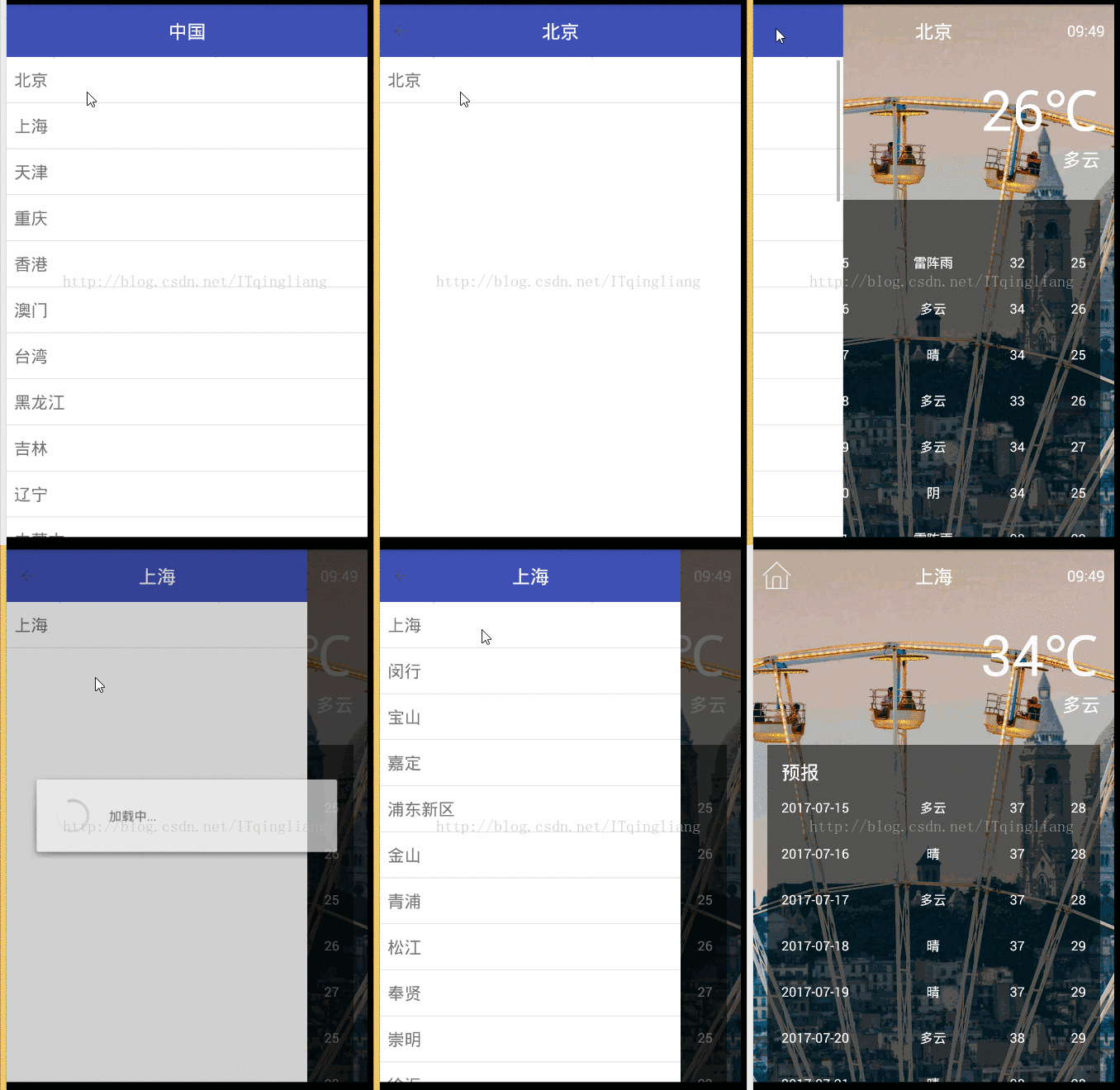
完整项目在:https://github.com/zhaoqingliang/MyCoolWeather.git点击打开链接
本文来自互联网用户投稿,文章观点仅代表作者本人,不代表本站立场,不承担相关法律责任。如若转载,请注明出处。 如若内容造成侵权/违法违规/事实不符,请点击【内容举报】进行投诉反馈!