前端简洁登录页面
关注重工黑大帅,学习不迷路
先看效果图: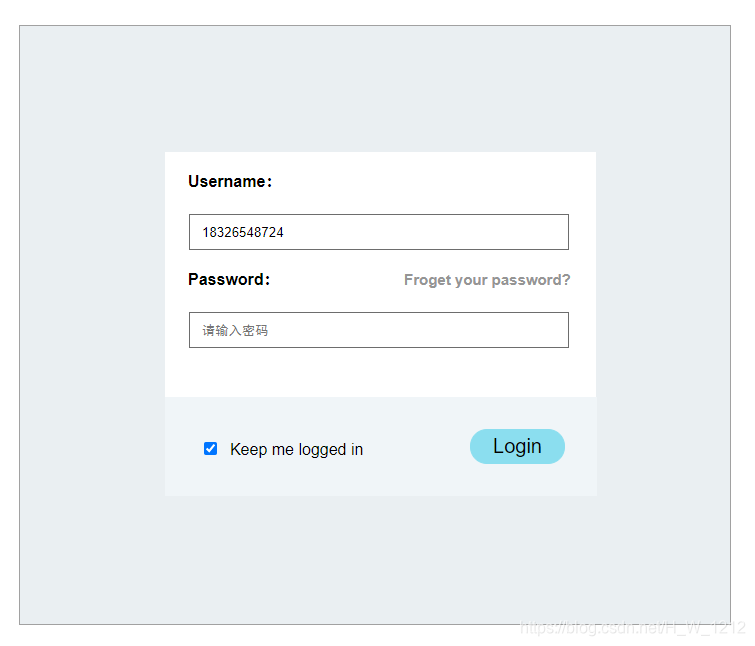
上代码:
index.html
<html>
<head>
<meta http-equiv="Refresh" content="30">
<meta charset="utf-8">
<title>登录界面title>
<meta name="Keywords" content="用户登录界面" >
<meta name="Description" content="只需登录的时候输入正确,你就可以放心上网,玩得更嗨。">
<link rel="stylesheet" href="css/style.css" type="text/css">
head><body><div  class="reg"><div class="bg"><form action="result.html"  name="register" id="register"><table><tr><td><h4 class="u">Username:h4>td><td><input type="text"  class="inputs" name="uname" id="uname" value="" list="book_list" placeholder="请输入账号/手机号" autofocus="autofocus" required><datalist id="book_list"><option label="php" value="PHP程序设计">option><option  label="java" value="JAVA 编程">option><option  label="ui" value="UI界面设计">option><option  label="html" value="网页制作基础">option> datalist>td>tr><tr><td><h4 class="u" >Password: <a href="https://aq.qq.com/v2/uv_aq/html/reset_pwd/pc_reset_pwd_input_account.html?v=3.0&old_ver_account=" target="_blank" class="a_f">Froget your password? a>h4>td><td><input type="password" class="inputs"  name="pwd" id="pwd" value="" placeholder="请输入密码" autofocus="autofocus" required>td>tr><tr><td><div class="box"><input type="checkbox" name="check" class="message" value="">   Keep me logged in<input type="submit" value="Login" class="reg_btn" id="reg_btn" name="reg_btn"><div class="clears">div>div>div>td>tr>table>form>div>div>
<script  src="javascript/web.js">script>
body>
html>
result.html:
<html>
<head>
<meta charset="utf-8">
<title>登录成功页面title>
<style type="text/css">.word{text-align: center;line-height: 600px;}
style>
head><body><h1 class="word">登录成功,欢迎你的到来!h1>
body>
html>
style.css:
*{margin: 0;padding: 0;
}
body{font-family: Arial,Verdana,"Microsoft YaHei","SimSun";
}
.clears{clear: both;height: 0;line-height: 0;font-size: 0;overflow: hidden;
}
.reg{border: 1px solid #A1A1A1;background: #eaeff2;width:712px;height: 600px;margin-left: auto;margin-right: auto;margin-top: 60px;box-sizing: border-box;
}
.bg{width: 431px;height: 340px;background: white;margin-top: 126px;margin-left: 145px;
}
.u{margin-top: -30px;margin-left: 21px;margin-right: 1px;padding-top: 0px;line-height: 20px;background-color: white;margin-bottom: 5px;overflow: hidden;
}
.inputs{padding-left: 12px;padding-right: 16px;height:36px;width: 380px;margin-top: 60px;margin-left: -410px;border:1px #6D6D6D solid;box-shadow: 10px 10px 10px blue outset;box-sizing: border-box;
}
.content{border: 2px #f0f5f8 solid;width: 428px;height: 95px;background-color: #f0f5f8;margin-top: 47px;margin-left: -2px;display: inline-block;
}
.box{text-align: center;line-height: 102px;margin-left: -70px;
}
.reg_btn{background-color:#8bdeef;border: 1px solid #8bdeef;width: 95px;height: 35px;font-size: 20px;color: white;border-radius: 30px;cursor:pointer;  float: right;text-align: center;margin-top: 30px;margin-right: 30px;
}
.reg_btn:hover{text-decoration: none;color: black;
}
a{font-family: "Arial","MicroSoft YaHei";font-size: 15px;color: gray;
}
a:link{text-decoration: none;color: #959595;
}
a:hover{text-decoration: none;color: black;
}
.a_f{margin-left: 120px;
}
web.js:
var  reg_form = document.forms["register"];
var  uname = reg_form.elements["uname"];
var  pwd = reg_form.elements["pwd"];
var  btn = reg_form.elements["reg_btn"];
var  zz_uname = /^\w{6,12}$/i;
var  zz_pwd = /^\S{6,12}$/i;
btn.onclick = function(){if( zz_uname.test(uname.value)==false ){alert("温馨提示:用户名错误,请重新输入!");uname.focus();return  false ;	}if( zz_pwd.test(pwd.value)==false ){alert("温馨提示:密码错误,请重新输入!");pwd.focus();return  false ;	  }
}
您的点赞和关注是我学习的强大动力之一
本文来自互联网用户投稿,文章观点仅代表作者本人,不代表本站立场,不承担相关法律责任。如若转载,请注明出处。 如若内容造成侵权/违法违规/事实不符,请点击【内容举报】进行投诉反馈!