TextView文字描边实现
TextView文字描边实现
需求描述
文字显示在图片的上面,图片的内容是不确定了,为了防止文字与图片的颜色相近导致用户看不到或者看不清文字的问题,所以显示文字描边,避免问题。
实现
实现思想
使用TextPaint绘制相同文字在TextView的底部,TextPaint的字显示要比原始的字大一些,这样看起来就像是有描边的文字。
代码
1.attrs.xml文件
2.StrokeTextView的实现
package com.zm.autostroketextview;import android.content.Context;
import android.content.res.TypedArray;
import android.graphics.Canvas;
import android.graphics.Color;
import android.graphics.Paint;
import android.support.annotation.Nullable;
import android.text.TextPaint;
import android.util.AttributeSet;
import android.view.ViewGroup;
import android.widget.TextView;/*** 文字内容有描边的TextView* Author: zhangmiao* Date: 2018/4/13*/
public class StrokeTextView extends TextView {private TextView outlineTextView = null;public StrokeTextView(Context context) {this(context, null);}public StrokeTextView(Context context, @Nullable AttributeSet attrs) {this(context, attrs, 0);}public StrokeTextView(Context context, @Nullable AttributeSet attrs, int defStyleAttr) {super(context, attrs, defStyleAttr);outlineTextView = new TextView(context, attrs, defStyleAttr);init(attrs);}private void init(AttributeSet attrs) {//1.获取参数TypedArray ta = getContext().obtainStyledAttributes(attrs, R.styleable.StrokeTextView);int stroke_color = ta.getColor(R.styleable.StrokeTextView_stroke_color, Color.WHITE);float stroke_width = ta.getDimension(R.styleable.StrokeTextView_stroke_width, 2);//2.初始化TextPaintTextPaint paint = outlineTextView.getPaint();paint.setStrokeWidth(stroke_width);paint.setStyle(Paint.Style.STROKE);outlineTextView.setTextColor(stroke_color);outlineTextView.setGravity(getGravity());}@Overridepublic void setLayoutParams(ViewGroup.LayoutParams params) {super.setLayoutParams(params);outlineTextView.setLayoutParams(params);}@Overrideprotected void onMeasure(int widthMeasureSpec, int heightMeasureSpec) {super.onMeasure(widthMeasureSpec, heightMeasureSpec);//设置轮廓文字CharSequence outlineText = outlineTextView.getText();if (outlineText == null || !outlineText.equals(getText())) {outlineTextView.setText(getText());postInvalidate();}outlineTextView.measure(widthMeasureSpec, heightMeasureSpec);}@Overrideprotected void onLayout(boolean changed, int left, int top, int right, int bottom) {super.onLayout(changed, left, top, right, bottom);outlineTextView.layout(left, top, right, bottom);}@Overrideprotected void onDraw(Canvas canvas) {outlineTextView.draw(canvas);super.onDraw(canvas);}
}
3.布局文件中StrokeTextView的使用
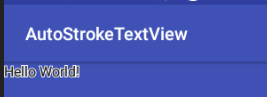
4.结果显示
转载于:https://www.cnblogs.com/zhangmiao14/p/9538879.html
本文来自互联网用户投稿,文章观点仅代表作者本人,不代表本站立场,不承担相关法律责任。如若转载,请注明出处。 如若内容造成侵权/违法违规/事实不符,请点击【内容举报】进行投诉反馈!