类微信界面 01
1.设计目标
类微信界面
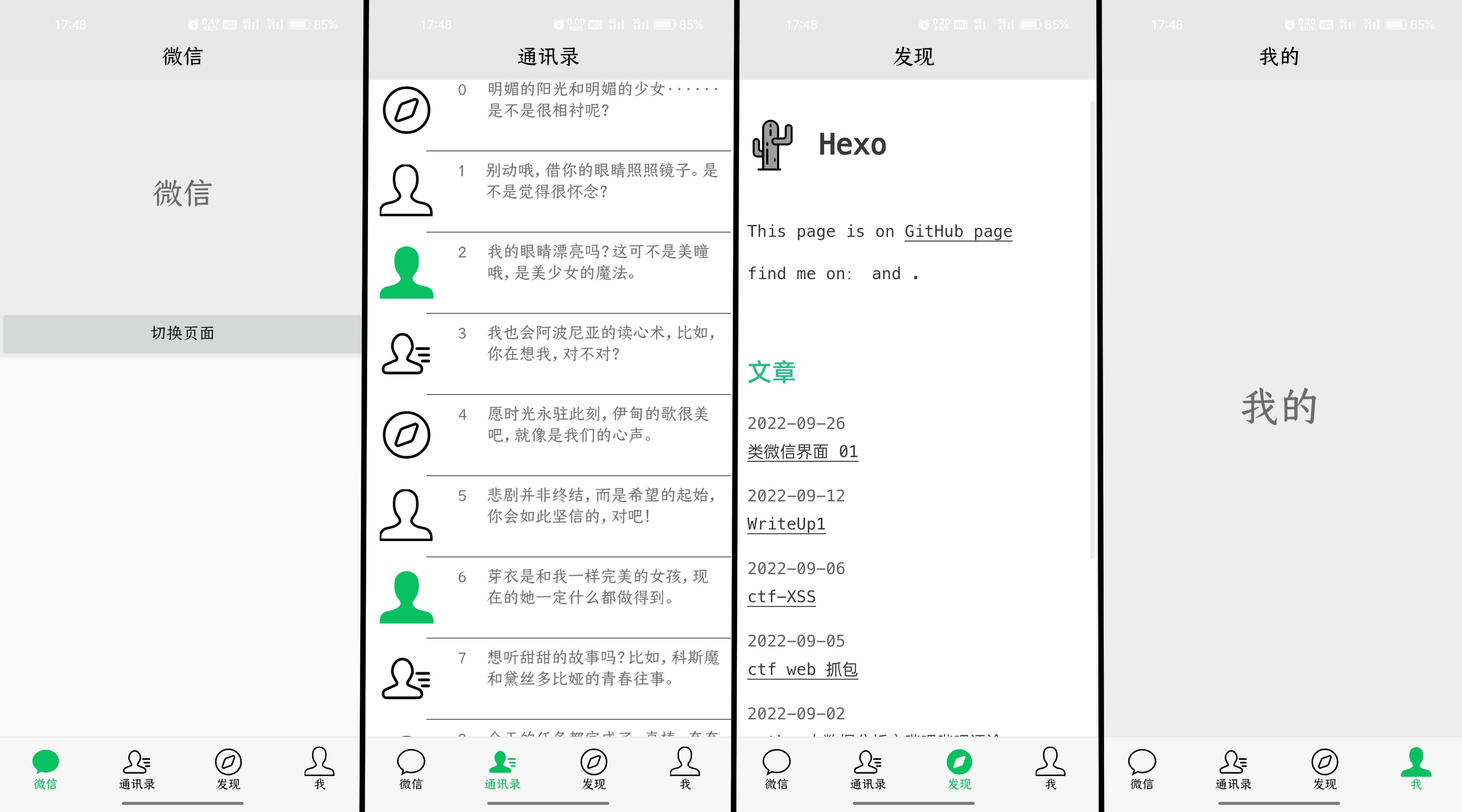
Fragment实现4个tab的切换,顶部显示当前所处页面,下方四个按钮分别为微信,通讯录,发现,我的。
2.功能说明
按下按钮以绿色显示其他以黑色显示同时切换页面和顶部的标题栏。按下其他按钮,首先让所有图标变为黑色再让点击的图标变为绿色

3.代码解析
创建4个tab页面tab01.xml~tab04.xml
一个top.xml作为顶部标题栏
一个tab.xml作为底部
activity_main如下布局
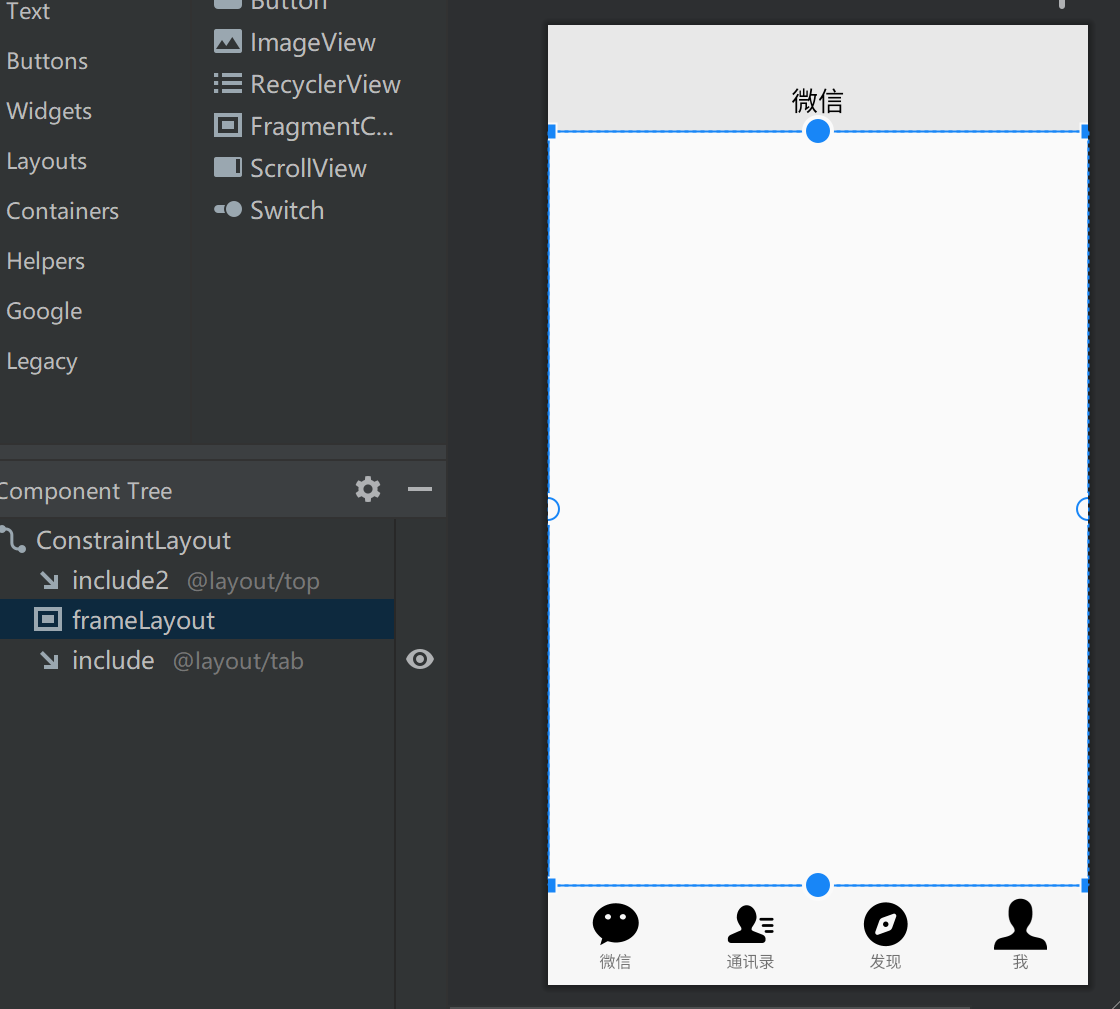
定义全局的变量,包含底部四图文,4个fragment等
public class MainActivity extends AppCompatActivity implements View.OnClickListener {private ImageView imageView1,imageView2,imageView3,imageView4;private TextView textView1,textView2,textView3,textView4;private Fragment fragment1, fragment2, fragment3, fragment4;private LinearLayout linearLayout1, linearLayout2, linearLayout3, linearLayout4;private FragmentManager manager;...
event_init()函数,先根据id来找到页面元素,定义4个linearLayout的监听
private void event_init(){linearLayout1 = findViewById(R.id.LinearLayout1);linearLayout2 = findViewById(R.id.LinearLayout2);linearLayout3 = findViewById(R.id.LinearLayout3);linearLayout4 = findViewById(R.id.LinearLayout4);linearLayout1.setOnClickListener(this);linearLayout2.setOnClickListener(this);linearLayout3.setOnClickListener(this);linearLayout4.setOnClickListener(this);//四个svgimageView1=findViewById(R.id.imageView1);imageView2=findViewById(R.id.imageView2);imageView3=findViewById(R.id.imageView3);imageView4=findViewById(R.id.imageView4);//四个文字textView1=findViewById(R.id.textView1);textView2=findViewById(R.id.textView2);textView3=findViewById(R.id.textView3);textView4=findViewById(R.id.textView4);}fragment_init()函数
创建4个fragment实例使用.add()方法添加4个fragment,,hide()方法隐藏后3个,防止重叠
private void fragment_init(){fragment1 = new Fragment1();fragment2 = new Fragment2();fragment3 = new Fragment3();fragment4 = new Fragment4();Log.d("ffff","init");manager = getSupportFragmentManager();FragmentTransaction transaction = manager.beginTransaction().add(R.id.frameLayout, fragment1).add(R.id.frameLayout,fragment2).add(R.id.frameLayout,fragment3).add(R.id.frameLayout,fragment4).hide(fragment2).hide(fragment3).hide(fragment4);transaction.commit();}
Activity初始化时执行这两个函数
protected void onCreate(Bundle savedInstanceState) {super.onCreate(savedInstanceState);setContentView(R.layout.activity_main);event_init();fragment_init();}
点击事件监听之前先定义hideall()函数用于隐藏所有的fragment
与rebu()函数,用于恢复底部图片文字的初始颜色
private void hideall(FragmentTransaction transaction){transaction.hide(fragment1).hide(fragment2).hide(fragment3).hide(fragment4);Log.d("ffff","hide");}
private void rebu(){imageView1.setImageResource(R.drawable.ic___wx);textView1.setTextColor(0xFF000000);imageView2.setImageResource(R.drawable.ic___txl);textView2.setTextColor(0xFF000000);imageView3.setImageResource(R.drawable.ic___fx);textView3.setTextColor(0xFF000000);imageView4.setImageResource(R.drawable.ic___me);textView4.setTextColor(0xFF000000);}
onClick事件监听
@Overridepublic void onClick(View view) {switch (view.getId()) {case R.id.LinearLayout1:select(1);break;case R.id.LinearLayout2:select(2);break;case R.id.LinearLayout3:select(3);break;case R.id.LinearLayout4:select(4);break;default:break;}}private void select(int i) {TextView textView_top = findViewById(R.id.textView_top);FragmentTransaction transaction = manager.beginTransaction();hideall(transaction);switch (i) {case 1:transaction.show(fragment1);textView_top.setText("微信");rebu();imageView1.setImageResource(R.drawable.ic___wx_this);textView1.setTextColor(0xFF07C060);Log.d("show","case1");break;case 2:transaction.show(fragment2);textView_top.setText("通讯录");rebu();imageView2.setImageResource(R.drawable.ic___txl_this);textView2.setTextColor(0xFF07C060);Log.d("show","case2");break;case 3:transaction.show(fragment3);textView_top.setText("发现");rebu();imageView3.setImageResource(R.drawable.ic___fx_this);textView3.setTextColor(0xFF07C060);Log.d("show","case3");break;case 4:transaction.show(fragment4);textView_top.setText("我的");rebu();imageView4.setImageResource(R.drawable.ic___me_this);textView4.setTextColor(0xFF07C060);;break;default:break;}transaction.commit();}
swich 根据点击的LinearLayout执行select()
在select()中i对应4个点击
TextView textView_top = findViewById(R.id.textView_top);
获取顶部标题栏id
在swish之前都先调用hideall()函数隐藏所有fragmenthideall(transaction);
在每个case中
.show(fragment);显示对应fragment.setText()切换对应标题rebu();清空图片文字的颜色状态- .
setImageResource(),setTextColor()切换对应颜色图片与文字
4.运行展示截图
5.源码仓库地址
Github:https://github.com/2412322029/Applicationtest
具体MainActivity:
https://github.com/2412322029/Applicationtest/blob/master/app/src/main/java/com/example/applicationtest/MainActivity.java
本文来自互联网用户投稿,文章观点仅代表作者本人,不代表本站立场,不承担相关法律责任。如若转载,请注明出处。 如若内容造成侵权/违法违规/事实不符,请点击【内容举报】进行投诉反馈!