将matlab作的图导入到latex的方法 matlab2tikz
现在几乎绝大多数的论文都会有仿真,并且需要作图来直观表现算法性能。本文介绍一种将matlab作的图导入到latex的方法。
-
打开如下网址:matlab2tikz 的github 地址
-
网址界面如下,点击下图一中的clone and download 或者 图二中的
update manually对matlab2tikz 进行下载。
-
解压zip 文件,并在matlab 中选择
set path,将src\添加至路径
-
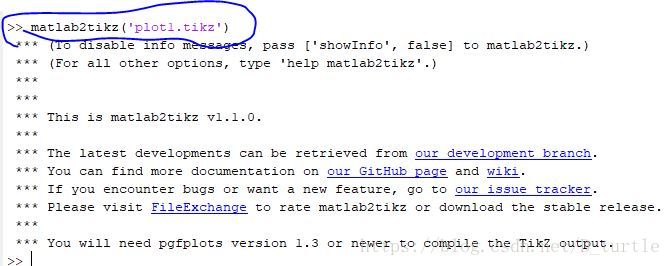
运行matlab 程序,生成图片,在commond window 输入命令
matlab2tikz('plot1.tikz')如下图所示 -
在matlab 所运行程序的当前目录下,生成如下文件:
-
latex 文件所在目录下建一个名为tikz 的文件夹,将生成的tikz文件复制到tikz 文件夹下,并在latex中需添加如下代码:



\documentclass{article}\usepackage{pgfplots}\pgfplotsset{compat=newest}%% the following commands are needed for some matlab2tikz features\usetikzlibrary{plotmarks}\usetikzlibrary{arrows.meta}\usepgfplotslibrary{patchplots}\usepackage{grffile}\usepackage{amsmath}\newcommand{\tikzdir}[1]{tikz/#1.tikz}%% you may also want the following commands%\pgfplotsset{plot coordinates/math parser=false}%\newlength\figureheight%\newlength\figurewidth\begin{document}\begin{figure}[h!]\centering\inputtikz{plot1}\end{figure}
\end{document}
- 生成图片如下,放大不会改变清晰度,比截图要更严谨更准确。

本文来自互联网用户投稿,文章观点仅代表作者本人,不代表本站立场,不承担相关法律责任。如若转载,请注明出处。 如若内容造成侵权/违法违规/事实不符,请点击【内容举报】进行投诉反馈!