Unity制作SurvivalShooter游戏
控制Player移动:
public float speed;
private void FixedUpdate()
{float moveHorizontal = Input.GetAxis("Horizontal");/*水平方向的移动输入,左右*/float moveVertical = Input.GetAxis("Vertical");/*垂直方向上的移动输入,前后*/Vector3 movement = new Vector3(moveHorizontal, 0.0f, moveVertical);/*movement中存放了各方向上移动的数据,是矢量*/movement = movement.normalized * speed ;/*规范化后movement长度由speed决定*/Rigidbody rigidbody = GetComponent();rigidbody.velocity = movement;
}
注意当Player撞到环境中的障碍物后会瞎J8乱动,在其Rigidbody中,将Rotation的x、y、z全部Freeze即可解决问题。
控制Camera跟随Player:
public GameObject player;
private Vector3 offset;
void Start () {offset = transform.position;
}
void LateUpdate () {transform.position = offset + player.transform.position;
}
Player Animator(动画状态机)设置:
Model里的Player自带分割好的动画,在它的Inspector中可进行动画的一些设置,但是对于何时进行何种动画,不同动画间的切换关系,要通过创建一个Animator组件,定义相关参数,在其中进行不同动画间的关联来控制。
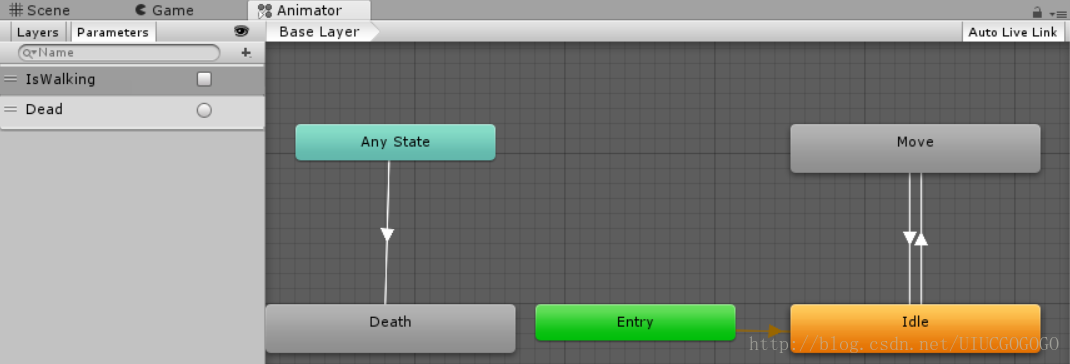
直接将各动画拖入Animator中,利用transition进行连线关联,点击这些连线,通过创建一些参数(Parameter)在Inspector中可控制在何种情况下进行何种动画的切换,注意里面Has Exit time不要勾选。
实现代码:
private void FixedUpdate()
{float moveHorizontal = Input.GetAxis("Horizontal");/*水平方向的移动输入,左右*/float moveVertical = Input.GetAxis("Vertical");/*垂直方向上的移动输入,前后*/Animator anim = GetComponent();bool walking = moveHorizontal != 0 || moveVertical != 0;anim.SetBool("IsWalking", walking);
}
Zom Animator(动画状态机)设置:
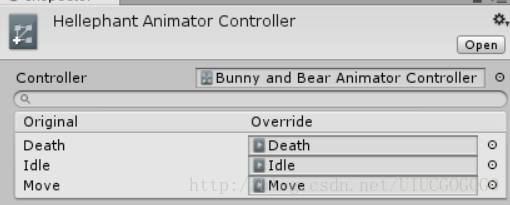
对于模型结构相同的对象,可以共用同一个Animator。
对于仅仅动作不同,但不同动作间逻辑联系完全相同的对象,可以创建一个Animator的Override,仅仅改变其中的具体动画即可。
控制Player永远面向鼠标指向:
int floorMask;
float camRayLength = 100F;/*经过主相机和鼠标位置的射线的极限长度*/
Rigidbody rigidbody;
void Awake () {floorMask = LayerMask.GetMask("Floor");rigidbody = GetComponent();/*在Awake中赋值一次,之后各方法中可直接调用rigidbody而无需赋值*/
}
private void FixedUpdate()
{Turning();
}
void Turning()
{Ray camRay = Camera.main.ScreenPointToRay(Input.mousePosition);/*定义一条从mainCamera到鼠标的射线*/RaycastHit floorhit;/*存储碰撞点信息的变量*/if(Physics.Raycast(camRay, out floorhit, camRayLength, floorMask))/*圣典:当光线投射与任何碰撞器交叉时为真,否则为假。即射线碰撞到了某个碰撞器*/{Vector3 playerToMouse = floorhit.point - transform.position;/*计算出Player与碰撞点的相对位置信息*/playerToMouse.y = 0f;/*只是平行于floor的旋转*/Quaternion newRotation = Quaternion.LookRotation(playerToMouse);/*Quaternion为四元数*/rigidbody.MoveRotation(newRotation);}
}
添加NavMeshAgent组价,控制Zom的自动导航:
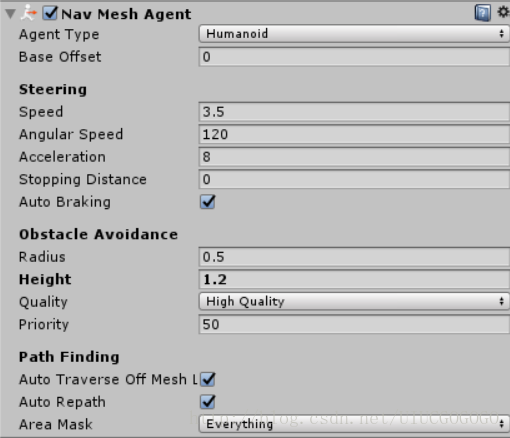
设置好Radius、Height,将Object完全包含在框架内。
打开Window->Navigation窗口,
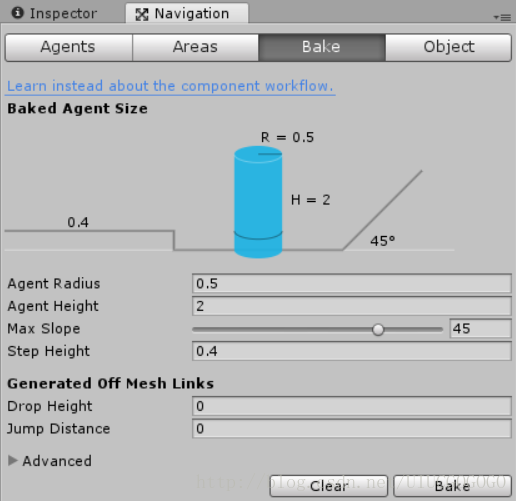
选择Environment(要勾选其Inspector中的Static),点击窗口中的Bake,
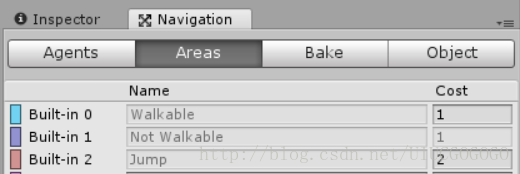
场景中能够行走的部分将为蓝色,不能行走部分将为紫色,取消勾选Show NavMesh,颜色会隐藏。
实现代码:
using System.Collections;
using System.Collections.Generic;
using UnityEngine;
using UnityEngine.AI;/*要定义NavMeshAgent变量,一定要有这一步*/
public class ZomMove : MonoBehaviour {
Transform player;
NavMeshAgent nav;
void Start () {player = GameObject.FindGameObjectWithTag("Player").transform;nav = GetComponent();
}
void Update () {nav.SetDestination(player.position);
}
}
实现Zom攻击和Player死亡
PlayerHealth:
public class PlayerHealth : MonoBehaviour {
public int startHealth = 100;
public int currentHealth;
PlayerMove playermove;
Animator anim;
bool isDead;/*是否死亡*/
bool damaged;/*是否受攻击*/
void Start () {playermove = GetComponent();/*在开头声明,在Start里初始化,如此在后面的所有方法中均可直接调用*/anim = GetComponent();currentHealth = startHealth;
}
public void TakeDamage(int amount)
{damaged = true;//受伤后画面变红的代码currentHealth = currentHealth - amount;if (currentHealth <= 0 && !isDead)/*血量为零且没有运行过死亡函数*/{Death();}
}
void Death()
{isDead = true;//死亡后黑屏代码anim.SetTrigger("Dead");/*播放死亡动画*/playermove.enabled = false;/*禁用掉PlayerMove脚本,无法继续控制Player移动*/
}
}
ZomAttack:
public float timeBetweenAttacks=0.5f;/*攻击间隔*/
public int attackDamage=10;/*攻击伤害*/
Animator anim;/*当Player死亡后Zom由Move切换为Idle*/
GameObject player;/*攻击谁*/
PlayerHealth playerHealth;/*调用该脚本中的TakeDamage方法*/
ZomHealth zomHealth;
bool playerInRage;/*用来判断Player是否进入攻击范围*/
float timer;/*计时器*/
void Start () {//变量的初始化anim = GetComponent();player = GameObject.FindGameObjectWithTag ("Player");playerHealth = player.GetComponent();/*脚本也算作组件,语句最后的()不要忘*/zomHealth = GetComponent();
}
private void OnTriggerEnter(Collider other)/*进触发器*/
{if(other.gameObject==player)/*这的gameObject绝对不能丢*/{playerInRage = true;}
}
private void OnTriggerExit(Collider other)/*出触发器*/
{if (other .gameObject== player)/*因吹斯听*/{playerInRage = false;}
}
void Attack()
{timer = 0f;/*每次发起攻击计时器清零*/if (playerHealth.currentHealth > 0){playerHealth.TakeDamage(attackDamage);}
}
void Update () {timer = timer + Time.deltaTime;/*从此刻开始计时*/if (playerInRage && timer >= timeBetweenAttacks){Attack();}if (playerHealth.currentHealth <= 0)/*当Player死亡让Zom变为Idle状态*/{anim.SetTrigger("Dead");}
}
利用Player的Death动画事件实现其“复活”:
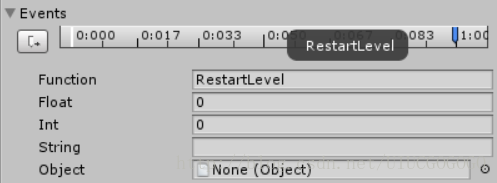
意思就是到了那个时间点将调用函数RestartLevel。
代码:
void RestartLevel()
{Application.LoadLevel(Application.loadedLevel);/*调入当前已经调用的场景*/
}
实现Player攻击
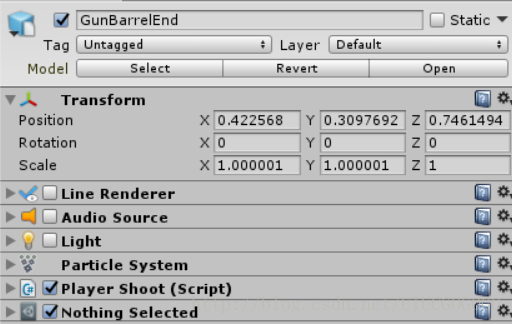
public int damagePerShot = 20;
public float timeBetweenBullets = 0.15f;/*射击间隔*/
public float range = 100f;/*射击范围*/
float timer=0;/*计时器,控制子弹发射频率*/
Ray shootRay;/*射线*/
RaycastHit shootHit;/*保存射线碰撞的结果*/
int shootableMask;/*可射击区域,注意要将环境和Zoms的Layer设置为Shootable才行*/
ParticleSystem gunParticles;/*粒子效果*/
LineRenderer gunLine;
Light gunLight;
AudioSource gunAudio;
float effectsDisplayTime = 0.2f;
void Start () {shootableMask = LayerMask.GetMask("Shootable");gunParticles = GetComponent();gunLine = GetComponent();gunLight = GetComponent();gunAudio=GetComponent();
}
void Update () {timer = timer + Time.deltaTime;/*计时*/if (Input.GetButton("Fire1") && timer >= timeBetweenBullets && Time.timeScale != 0){Shoot();}if (timer >= timeBetweenBullets * effectsDisplayTime)/*如果发射子弹,在一定时间后将所有特效禁用*/{DisableEffects();}
}
public void DisableEffects()
{gunLight.enabled = false;/*禁用光效*/gunLine.enabled = false;/*禁用线渲染器*/
}
void Shoot()
{timer = 0f;/*每一次发射子弹立即将计时器清零*/gunLight.enabled = true;/*默认为禁用状态,只有在调用Shoot函数时启用*/gunParticles.Stop();/*粒子处于何种状态也不清楚,所以直接先禁用再播放*/gunParticles.Play();gunAudio.Play();gunLine.enabled = true;gunLine.SetPosition(0, transform.position);/*设置线渲染器第一个端点的位置为枪口*/shootRay.origin = transform.position;/*设置射线发射点的位置*/shootRay.direction = transform.forward;/*设置射线方向为枪口方向(Z)由鼠标决定*/if(Physics.Raycast(shootRay,out shootHit, range, shootableMask))/*如果射线在range内碰撞到了什么东西*/{ZomHealth zomHealth = shootHit.collider.GetComponent();/*由碰撞信息得到Zom的脚本*/if (zomHealth != null)/*射线碰到的是Zom*/{zomHealth.TakeDamage(damagePerShot);}gunLine.SetPosition(1, shootHit.point);/*不管碰到的是谁,第二个端点必是碰撞点*/}elsegunLine.SetPosition(1, shootRay.origin+shootRay.direction * range);/*在range内什么也没碰到*/
}
}
AudioSource具体设置如图
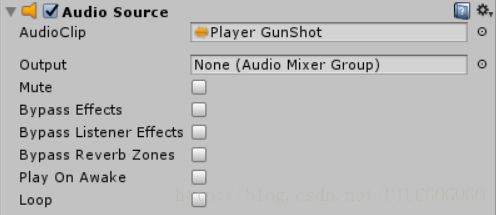
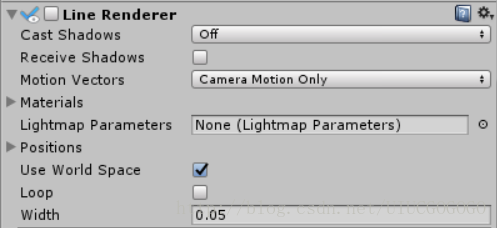
在之前随着Player跟着鼠标转向,GunBarrelEnd的Z轴总是指向同一个方向不能实时指向鼠标方向,原来是LineRenderer中未勾选use world space选项。
生成怪物波:
public GameObject Zom1;
public GameObject Zom2;
public GameObject Zom3;
public GameObject Position1;
public GameObject Position2;
public GameObject Position3;
public int ZomCount;
public float startWait=2f;
void Start()
{StartCoroutine(ZomWaves());/**协程调用*/
}
// Update is called once per frame
IEnumerator ZomWaves()
{/**函数要成为协同程序,必须返回IEnumerator,且在调用时要协程调用*/yield return new WaitForSeconds(startWait);/**暂停代码而不暂停游戏,这个方法只有在协同程序中可用*/for (int i = 0; i < ZomCount; i++){Instantiate(Zom1, Position1.transform);Instantiate(Zom2, Position2.transform);Instantiate(Zom3, Position3.transform);yield return new WaitForSeconds(1f);}
}
在脚本中声明了变量,如果是本Object的组件则在Awake或Start中初始化,若是其他Object则直接拖入Inspector中
UI制作
人物受伤后画面闪烁红色,血条
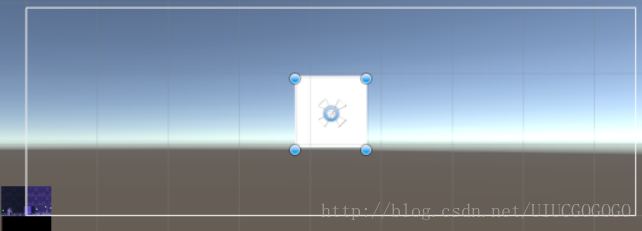
这个UI窗口就是指Game窗口。
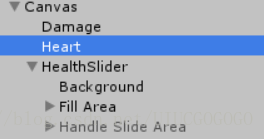
实现代码:
public int startHealth = 100;
public int currentHealth;
PlayerMove playermove;
Animator anim;
bool isDead;/*是否死亡*/
bool damaged;/*是否受攻击*/
PlayerShoot playerShoot;
AudioSource playerDeath;
AudioSource playerHurt;
public Slider healthSlider;
public Image damage;
public float flashSpeed = 5f;
public Color flashColor = new Color(1f, 0f, 0f, 0.1f);/*初始化为红色*/
void Start () {playermove = GetComponent();/*在开头声明,在Start里初始化,如此在后面的所有方法中均可直接调用*/anim = GetComponent();currentHealth = startHealth;playerShoot = GetComponentInChildren();playerDeath = GetComponent();playerHurt = GetComponent();
}
private void Update()
{healthSlider.value = currentHealth;if(damaged){damage.color = flashColor;/*如果受攻击使画面变红*/}else{damage.color = Color.Lerp(damage.color, Color.clear, flashSpeed * Time.deltaTime);/*如果没受攻击使画面恢复*/}damaged = false;/*damaged默认为假*/
}
public void TakeDamage(int amount)
{damaged = true;//受伤后画面变红的代码playerHurt.Play();currentHealth = currentHealth - amount;if (currentHealth <= 0 && !isDead)/*血量为零且没有运行过死亡函数*/{Death();}
}
播放死亡动画
创建新的Imagine和Text,选中Canvas,在Window->Animation中创建动画。
再在AnimationController(Animator)中对动画进行设置。在Canvas中添加新的脚本来控制切换动画的参数,代码如下:
Animator anim;
PlayerHealth playerHealth;
public GameObject player;/*别漏了这一步*/
void Start () {anim = GetComponent();playerHealth = player.GetComponent();/*通过此种方法可以直接引用其他脚本中的变量*/
}
void Update () {if(playerHealth.isDead){anim.SetTrigger("GameOver");}
}
本文来自互联网用户投稿,文章观点仅代表作者本人,不代表本站立场,不承担相关法律责任。如若转载,请注明出处。 如若内容造成侵权/违法违规/事实不符,请点击【内容举报】进行投诉反馈!