Echarts中级直角坐标图(多横轴,多纵轴,多网格),干货
需求描述
注:
第一次正式写博客.
主要目的是:记录自己所学所会的技术.
次要目的是:贯彻互联网开源精神(瞎扯的)分享技术\及特定问题解决方案.
需求更简单,就是接到一个朋友的求职,帮忙制作一个折线图模板,因为他要用.
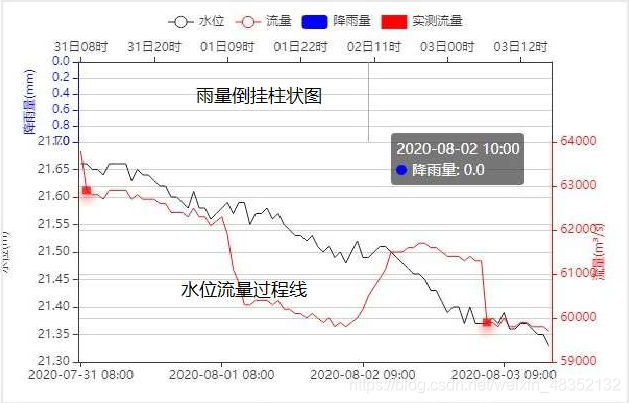
需求图:
我设计的模板效果图:
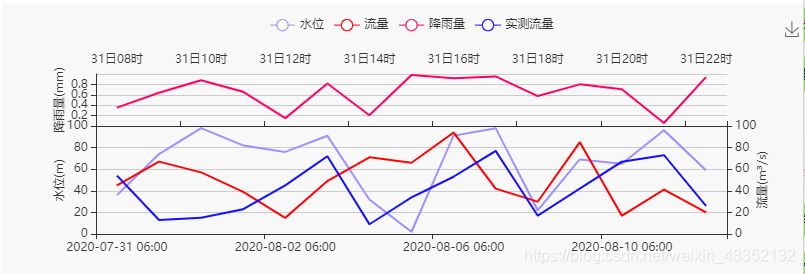
还原的比较简陋,大佬们不要笑话,小白们挑自己所需的关键点学习;
使用前端技术
- Vue(正在学习中,目前只会用一点基础功能,在此图中属于画蛇添足强行使用)
- Echarts
- html
- 等
上代码
内容不算规范,注释尽可能写全.
个人觉得知识点有:
- ECharts 3 多 grid 组件 使用
- 多纵轴配置
- 好像没了
代码中跟多注解是在CSDN的MD编辑器中后加的,如果复制后报错,请删除或调整注解
一些相同的,注解就没有写,
自我感觉写的挺好,哈哈哈
<div id="VueDivTestLK"><div id="TestLK" style="height:280px;">div>div>
<script>var vm = new Vue({ //初始化vue实例el: '#VueDivTestLK', //绑定vue模板data: { //以下arr01到arr04是生成0-100的随机数,模拟数据arr01: [Math.floor(Math.random() * (100 + 1)), Math.floor(Math.random() * (100 + 1)), Math.floor(Math.random() * (100 + 1)), Math.floor(Math.random() * (100 + 1)), Math.floor(Math.random() * (100 + 1)), Math.floor(Math.random() * (100 + 1)), Math.floor(Math.random() * (100 + 1)), Math.floor(Math.random() * (100 + 1)), Math.floor(Math.random() * (100 + 1)), Math.floor(Math.random() * (100 + 1)), Math.floor(Math.random() * (100 + 1)), Math.floor(Math.random() * (100 + 1)), Math.floor(Math.random() * (100 + 1)), Math.floor(Math.random() * (100 + 1)), Math.floor(Math.random() * (100 + 1))],arr02: [Math.floor(Math.random() * (100 + 1)), Math.floor(Math.random() * (100 + 1)), Math.floor(Math.random() * (100 + 1)), Math.floor(Math.random() * (100 + 1)), Math.floor(Math.random() * (100 + 1)), Math.floor(Math.random() * (100 + 1)), Math.floor(Math.random() * (100 + 1)), Math.floor(Math.random() * (100 + 1)), Math.floor(Math.random() * (100 + 1)), Math.floor(Math.random() * (100 + 1)), Math.floor(Math.random() * (100 + 1)), Math.floor(Math.random() * (100 + 1)), Math.floor(Math.random() * (100 + 1)), Math.floor(Math.random() * (100 + 1)), Math.floor(Math.random() * (100 + 1))],arr03: [Math.floor(Math.random() * (100 + 1)), Math.floor(Math.random() * (100 + 1)), Math.floor(Math.random() * (100 + 1)), Math.floor(Math.random() * (100 + 1)), Math.floor(Math.random() * (100 + 1)), Math.floor(Math.random() * (100 + 1)), Math.floor(Math.random() * (100 + 1)), Math.floor(Math.random() * (100 + 1)), Math.floor(Math.random() * (100 + 1)), Math.floor(Math.random() * (100 + 1)), Math.floor(Math.random() * (100 + 1)), Math.floor(Math.random() * (100 + 1)), Math.floor(Math.random() * (100 + 1)), Math.floor(Math.random() * (100 + 1)), Math.floor(Math.random() * (100 + 1))],arr04: [Math.random(), Math.random(), Math.random(), Math.random(), Math.random(), Math.random(), Math.random(), Math.random(), Math.random(), Math.random(), Math.random(), Math.random(), Math.random(), Math.random(), Math.random()],myChart: null //cearts实例对象,异步数据获取重新渲染会用到},mounted: function () { //vue提供的在页面加载完后会调用this.myChart = echarts.init(document.getElementById('TestLK')); //绑定echarts实例this.initialization(); //初始化echarts实例},methods: {initialization: function () {// 基于准备好的dom,初始化echarts实例var myVue = this;var myChart = this.myChart// 绘制图表myChart.setOption({tooltip: { //本坐标系特定的工具设定trigger: 'axis'//坐标轴触发,主要在柱状图,折线图等会使用类目轴的图表},color: ['#a08fff', '#ff0003', '#130eff', '#ff0060'],//配置颜色legend: {data: ['水位', '流量', '降雨量', '实测流量']//配置正上方显示的标签},grid: [{//定义两个绘图网格 编号0开始bottom: '60%', //第一个绘图网格,离容器下侧的距离}, {top: '40%' //第二个绘图网格离容器上侧的距离。}],toolbox: { //图形右上角工具栏feature: {//工具配置项saveAsImage: {}//配置一个保存图片}}, xAxis: [{ //横轴,本例中有两个横轴type: 'category',//坐标轴类型,当前表示[类目轴,适用于离散的类目数据]。gridIndex: 0, //关联的网格图标序号position: 'top', //文字显示在图的上方data: ['31日08时', '31日09时', '31日10时', '31日11时', '31日12时','31日13时', '31日14时', '31日15时', '31日16时', '31日17时','31日18时', '31日19时', '31日20时', '31日21时', '31日22时']//显示字段内容}, {type: 'category',//同上gridIndex: 1,data: ['2020-07-31 06:00', '2020-07-31 18:00', '2020-08-01 06:00', '2020-08-01 18:00', '2020-08-02 06:00','2020-08-03 18:00', '2020-07-04 06:00', '2020-08-05 18:00', '2020-08-06 06:00', '2020-08-07 18:00','2020-08-08 06:00', '2020-07-09 18:00', '2020-08-10 06:00', '2020-08-11 18:00', '2020-08-12 06:00']}],yAxis: [{//纵轴设定/当前示例中有三个纵轴gridIndex: 0, //绑定网格的标号type: 'value',//类型[数值轴,适用于连续数据]。name: '降雨量(mm)', //名称position: 'left',//显示在图的左边nameRotate:90,//旋转90度nameLocation : 'middle',//显示在周的侧面nameGap : 30//与轴的距离}, {gridIndex: 1,type: 'value',name: '水位(m)',position: 'left',nameRotate:90,nameLocation : 'middle',nameGap : 30}, {gridIndex: 1,type: 'value',name: '流量(m³/s)',position: 'right',//显示在图的右侧nameRotate:90,nameLocation : 'middle',nameGap : 30}],series: [ //图中的数据{name: '水位', //数据名称type: 'line', //类型showSymbol: false, //是否显示 symbol, 如果 false 则只有在 tooltip hover 的时候显示。hoverAnimation: false,//是否开启 hover 在拐点标志上的提示动画效果data: myVue.arr01, //数据来源,这里是获取vue中定义的数组xAxisIndex: 1, //关联在那个横轴上,横轴的序号,从0开始yAxisIndex: 1 //关联在那个纵轴上,横轴的序号,从0开始}, {name: '流量',type: 'line',showSymbol: false,hoverAnimation: false,data: myVue.arr02,xAxisIndex: 1,yAxisIndex: 2}, {name: '实测流量',type: 'line',showSymbol: false,hoverAnimation: false,data: myVue.arr03,xAxisIndex: 1,yAxisIndex: 2},{name: '降雨量',type: 'line',showSymbol: false,hoverAnimation: false,data: myVue.arr04,xAxisIndex: 0,yAxisIndex: 0}]});}}})</script>
本文来自互联网用户投稿,文章观点仅代表作者本人,不代表本站立场,不承担相关法律责任。如若转载,请注明出处。 如若内容造成侵权/违法违规/事实不符,请点击【内容举报】进行投诉反馈!