面试官都惊了,你这Springboot 功底可以啊 ?
写在前面: 我是
「软测小刘」,这个昵称来源于我的生活,对测试保持激情,敢于探索 细心大胆。我热爱技术、热爱开源、热爱编程。技术是开源的、知识是共享的。
这博客是对自己学习的一点点总结及记录,如果您对 Java、算法 感兴趣,可以关注我的动态,我们一起学习。
用知识改变命运,让我们的家人过上更好的生活

文章目录
- 一、springboot入门(2.1.8)
- 1.导入依赖
- 2.主程序入口@SpingBootApplication
- 3.项目结构
- 二、配置文件
- 1.YAML语法
- 2.值的写法
- 字面量:普通的值(数字,字符串,布尔)
- 对象、Map(属性和值)(键值对)
- 数组(List、Set)
- 3.配置文件注入
- 4.@Value获取值和@ConfigurationProperties的区别
- 5.@PropertySource和@ImportResource
- 6.Profile
- 1.多Profile文件
- 2.yml支持多文档块方式
- 3.激活指定Profile
- 7.配置文件的加载位置
- 8.外部配置加载顺序
- 9.自动配置原理
- **1.自动配置原理:**
- 2.细节
- 1.@Conditional派生注解(Spring注解版原生的@Conditional作用)
- 三、日志
- 1.日志框架
- 2.SLF4J使用
- 1.如何在系统中使用SLF4J
- 2.遗留问题
- 3.SpringBoot日志关系
- 4.日志使用
- 1.默认
- 2.指定配置
- 5.切换日志框架
- 四、Web开发(*)
- 1.SpringBoot对静态资源的配置规则
- 2.模板引擎
- 1.引入Thymeleaf
- 2.thymeleaf使用
- 3.语法规则
- 4.SpringMVC自动配置原理
- 5.如何修改SpringBoot的默认配置
- 6.RESTFUL crud(*)
- 1)、默认访问首页
- 2)、国际化
- 3)、登录(*)
- 重定向:
- 请求转发:
- 总结(以此次项目为例)
- 4)、拦截器进行登录检查
- 5)、CRUD-员工列表
- 7、错误处理机制
- 1、SpringBoot默认的错误处理机制
- 2)、如果定制错误响应
- 1)、如何定制错误的页面:
- 2)、定制错误的json数据;
- 8、配置嵌入式Servlet容器
- 1)、如何定制和修改Servlet容器的相关配置;
- 2)、注册Servlet三大组件【Servlet、Filter、Listener】
- 3)、替换为其他Servlet容器
- 4)、原理
- 9、使用外置的Servlet容器
- 使用步骤:
- 原理:
- 10、日期处理+后台数据返回前台(*)
- 1)、多写一个get方法
- 2)、现在可以直接在属性名上加上
- 3)、sql语句转换
- 4)、前台转换
- 11、日期处理+前台的数据传给后台(*)
- 12、在tomcat运行war
- 1、带项目名(静态文件可能会不好使)
- 2、不带项目名
一、springboot入门(2.1.8)
1.导入依赖
SpringBoot的版本仲裁中心
<parent><groupId>org.springframework.bootgroupId><artifactId>spring-boot-starter-parentartifactId><version>2.1.8.RELEASEversion><relativePath />
parent>
spring-boot-starter-web:
spring-boot-starter:springboot的场景启动器
<dependency><groupId>org.springframework.bootgroupId><artifactId>spring-boot-starter-webartifactId>
dependency>
2.主程序入口@SpingBootApplication
@SpringBootConfiguration:Springboot的配置类;
标注在某个类上,表示这是一个 springboot的配置类;
@Configuration:配置类上来标注这个注解;
配置类------配置文件;配置类也是容器中的一个组件; @Component
@EnableAutoConfiguration:开启自动配置功能
@AutoConfigurationPackage:自动配置包
@Import(AutoConfigurationPackages.Registrar.class)
Spring的底层注解 @Import,给容器中导入一个组件;
将主配置类(@SpringBootApplication 标注的类)的所在包及下面所有组件扫描到 Spring 容器中;
@Import(AutoConfigurationImportSelector.class)
给容器导入组件
AutoConfigurationImportSelector:将所有需要导入的组件 以全类名的方式返回;这些组件就会被添加到容器中
会给容器中导入非常多的自动配置类(xxxAutoConfiguration);就是给容器中导入这个场景需要的所有组件,并配置好这些组件;
有了自动配置类,免去了手动配置的任务
3.项目结构
resources文件中目录结构:
static:保存所有的静态资源;js css images;(WebContent)templates:保存所有的模板页面;(spingboot默认jar包使用嵌入式的Tomcat)application.properties:Springboot应用的配置文件
二、配置文件
1.YAML语法
K:V表示一对键值对(空格必须有)
以空格的缩进来控制层级关系;只要是左对齐的一列数据都是同一层级的
2.值的写法
字面量:普通的值(数字,字符串,布尔)
k:v:字面直接来写;
字符串默认不用加上单引号或者双引号
“”:双引号;不会转义字符串里面的特殊字符;特殊字符会作为本身想表达的意思
‘’:单引号,会转移特殊字符,特殊字符最终只是一个普通的字符串数据
对象、Map(属性和值)(键值对)
k:v:
对象还是K:V的方式
friends:lastName: zhangsanage: 13
行内写法
friends: {lastName: zhangsan,age: 18}
数组(List、Set)
pets:- cat- dog- pig
行内写法
pets: [cat,dog,pig]
3.配置文件注入
@Component
@ConfigurationProperties(prefix = "person")
public class Person {Integer id;String name;
}
导入 spring-boot-configuration-processor,就有提示
<dependency><groupId>org.springframework.bootgroupId><artifactId>spring-boot-configuration-processorartifactId><optional>trueoptional>
dependency>
application.yml:
server:port: 8080person:id: 1name: zhangsan
build在idea中,IDEA maven项目默认不会把src下除 java文件外的文件打包到 classes文件夹下包含 **/*.xml,**/*.properties,**/*.yml,所以要加上build语句
<build><plugins><plugin><groupId>org.springframework.bootgroupId><artifactId>spring-boot-maven-pluginartifactId>plugin>plugins><resources><resource><directory>src/main/javadirectory><includes><include>**/*.propertiesinclude><include>**/*.xmlinclude><include>**/*.ymlinclude>includes><filtering>falsefiltering>resource><resource><directory>src/main/resourcesdirectory><includes><include>**/*.propertiesinclude><include>**/*.xmlinclude><include>**/*.ymlinclude>includes><filtering>falsefiltering>resource>resources>
build>
使用idea时,有些奇奇怪怪的错误,其实不是代码写错了,是idea有时候target下没有生成相应的编译文件
4.@Value获取值和@ConfigurationProperties的区别
@ConfigurationProperties@Value功能批量注入配置文件中的属性一个个指定松散绑定(松散语法)支持不支持SpEL不支持支持JSR303数据校验支持不支持复杂类型封装支持不支持
配置文件yml和properties都能获取到值;
如果只需要配置文件中的某项值,使用@Value
如果专门编写了一个JavaBean来和配置文件进行映射时,就直接使用 @ConfigurationProperties
5.@PropertySource和@ImportResource
package com.spring.config;import com.spring.pojo.Person;
import org.springframework.context.annotation.*;
import org.springframework.stereotype.Component;@ComponentScan("com.spring")@PropertySource("classpath:person.properties")
@Configuration
public class MainConfig1 {@Primary@Beanpublic Person person(){return new Person(3,"ls");}
}@ImportResource:导入Spring的配置文件,让配置文件里面的内容生效。
SpringBoot里面没有Spring的配置文件,自己编写的配置文件,不能自动识别;想让Spring的配置文件键生效; @ImportResource标注在主配置类上
@ImportResource(locations = {"classpath:beans.xml"})
导入Spring的配置文件
SpringBoot推荐给容器添加组件的方式:
1.配置类==>Spring配置文件
2.使用@Bean给容器添加组件
6.Profile
1.多Profile文件
编写主配置文件时,文件名可以是 application-{profile}.properties/yml
默认使用 application.properties的配置
2.yml支持多文档块方式
server:port: 8080person:id: 1name: 张三${random.uuid}spring:profiles:active: prodserver:port: 8081spring:profiles: devserver:port: 8082spring:profiles: prod
3.激活指定Profile
1.配置文件中指定 spring.profiles.active=dev
2.命令行:
--spring.profiles.active=dev,可以配置在程序参数
java -jar springboot-02-config-0.0.1-SNAPSHOT.jar --spring.profiles.active=dev
可以直接在测试的时候,配置传入命令行参数
3.虚拟机参数:
-Dspring.profiles.active=dev
7.配置文件的加载位置
!!!idea没有图标,没有自动提示就删掉(包括resources),重新创建 application.properties
file:./config/
file:./
classpath:./config/
classpath:./
优先级由高到低,高优先级的配置会覆盖低优先级的配置;
SpringBoot会从这四个位置加载全部主配配置文件
注意:file:./指项目路径,如果在聚合项目中,file:./指的是父项目,而不是子项目
可以通过 spring.config.location改变默认文件的位置
java -jar springboot-02-config-02-0.0.1-SNAPSHOT.jar --spring.config.location=D:/
8.外部配置加载顺序
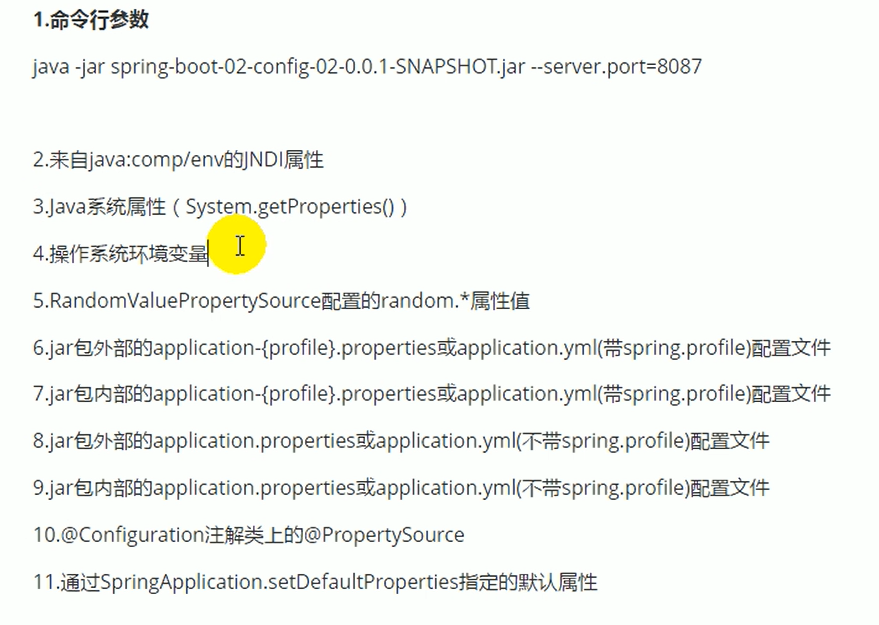
参考官方文档
9.自动配置原理
1.自动配置原理:
1)、SpringBoot启动的时候加载主配置类,开启了自动配置功能@EnableAutoConfiguration
2)、 @EnableAutoConfiguration作用
- 利用
AutoConfigurationImportSelector给容器中导入一些组件 - 可以查看
selectImports().getAutoConfigurationEntry()方法的内容 List;configurations = getCandidateConfigurations(annotationMetadata, attributes) SpringFactoriesLoader.loadFactoryNames(getSpringFactoriesLoaderFactoryClass(),getBeanClassLoader());
扫描所有jar包类路径下的 META-INF/spring.factories
把扫描到的这些文件的内容包装成properties对象
从properties中获取到EnableAutoConfiguration.class类对应的值,然后把它们添加在容器中 将类路径下META-INF/spring.factories里面配置的所有EnableAutoConfiguration的值添加到了容器中
# Auto Configure
org.springframework.boot.autoconfigure.EnableAutoConfiguration=\
org.springframework.boot.autoconfigure.admin.SpringApplicationAdminJmxAutoConfiguration,\
org.springframework.boot.autoconfigure.aop.AopAutoConfiguration,\
org.springframework.boot.autoconfigure.amqp.RabbitAutoConfiguration,\
每一个这样的 xxxAutoConfiguration类都是容器中的一个组件,都加入到容器中;用他们来做自动配置
3)、每一个自动配置类进行自动配置功能;
4)、以**HttpEncodingAutoConfiguration**为例解释自动配置原理;
@Configuration
@EnableConfigurationProperties(HttpProperties.class)
@ConditionalOnWebApplication(type = ConditionalOnWebApplication.Type.SERVLET)
@ConditionalOnClass(CharacterEncodingFilter.class)
@ConditionalOnProperty(prefix = "spring.http.encoding", value = "enabled", matchIfMissing = true)
public class HttpEncodingAutoConfiguration {private final HttpProperties.Encoding properties;public HttpEncodingAutoConfiguration(HttpProperties properties) {this.properties = properties.getEncoding();}@Bean@ConditionalOnMissingBeanpublic CharacterEncodingFilter characterEncodingFilter() {CharacterEncodingFilter filter = new OrderedCharacterEncodingFilter();filter.setEncoding(this.properties.getCharset().name());filter.setForceRequestEncoding(this.properties.shouldForce(Type.REQUEST));filter.setForceResponseEncoding(this.properties.shouldForce(Type.RESPONSE));return filter;}
}
根据当前不同的条件判断,决定这个配置类是否生效
一旦这个配置类生效;这个配置类就会给容器中添加各种组件;这些组件的属性从对应的properties类中获取,这些类的每一个属性是和主配置文件绑定的。
5)、所有在配置文件中能配置的属性都在xxxProperties中封装着
@ConfigurationProperties(prefix = "spring.http")
public class HttpProperties {private boolean logRequestDetails;private final Encoding encoding = new Encoding();
}
精髓:
1)、Springboot启动会加载大量的自动配置类
2)、先看需要的功能有没有Springboot默认写好的自动配置类;
3)、再看自动配置类中配置了哪些组件(只要有要用的组件,就不需要配置)
4)、给容器中自动配置类添加组件的时候,会从properties类中获取某些属性,我们就可以在配置文件中指定这些属性的值;
xxxxAutoCOnfiguration:自动配置类;
给容器中自动添加组件
xxxxProperties:封装配置文件中相关属性;
2.细节
1.@Conditional派生注解(Spring注解版原生的@Conditional作用)
作用:必须是 @Conditional指定的条件成立,才给容器中添加组件,配置类里面的所有内容才生效;
自动配置类必须在一定条件下才能生效;
怎么才能知道那些配置类能够生效;
debug=true
在application.properties添加debug=true
三、日志
1.日志框架
市面上的日志框架;
JUL;JCl(commons-logging);Jboss-logging;logback;log4j;slf4j;log4j2
高亮的是抽象层,其他是具体的实现
SpringBoot:底层是Spring框架,Spring框架默认是用JCL
SpringBoot选用的是slf4j和logback
2.SLF4J使用
1.如何在系统中使用SLF4J
开发的时候,不应该直接调用日志的实现类,而是调用日志抽象层的方法。
给系统导入slf4j的jar和logback的实现jar
import org.slf4j.Logger
import org.slf4j.LoggerFactorypublic class HelloWorld{public static void main(String[] args){Logger logger = LoggerFactory.getLogger(HelloWorld.class);logger.info("hello world");}
}
每一个日志的实现框架都有自己的配置文件。使用slf4j后, 配置文件还是做成日志实现框架本身的配置文件;
2.遗留问题
统一日志记录,即使是别的框架统一一起使用slf4j
1.将系统中其它日志框架先排除出去;
2.用中间包来替换原有的日志框架;
3.导入slf4j其他的实现
3.SpringBoot日志关系
如果要引入其他框架,一定要把这个框架的默认日志依赖移除掉;
SpringBoot能自动配置所有的日志,底层使用的是slf4j+logback方式记录日志。
4.日志使用
1.默认
Logger logger = LoggerFactory.getLogger(getClass());@Test
public void test(){logger.trace("这是trace日志...");logger.debug("这是debug信息...");logger.info("这是info日志...");logger.warn("这是warn日志...");logger.error("这是error日志...");
}
#设置日志级别
logging.level.com.springboot=trace
#在当前项目下生成日志
logging.file=springboot.log
#在控制台输出的日志格式
logging.pattern.console=%d{yyyy-MM-dd} [%thread] %-5level %logger{50} - %msg%n
#指定文件中输出日志格式
logging.pattern.file=%d{yyyy-MM-dd} ==main== [%thread] %-5level %logger{50} - %msg%n
2.指定配置
给类路径上放上每个日志框架自己的配置文件,就不使用SpringBoot的默认配置了;
logback.xml:直接就会被日志框架识别了,所以需要改名
logback-spring.xml:日志框架就不直接加载日志的配置项,由SpringBoot解析日志配置,可以试用SpringBoot的高级Profile功能
<springProfile>springProfile>
5.切换日志框架
四、Web开发(*)
1.SpringBoot对静态资源的配置规则
@Override
public void addResourceHandlers(ResourceHandlerRegistry registry) {if (!this.resourceProperties.isAddMappings()) {logger.debug("Default resource handling disabled");return;}Duration cachePeriod = this.resourceProperties.getCache().getPeriod();CacheControl cacheControl = this.resourceProperties.getCache().getCachecontrol().toHttpCacheControl();if (!registry.hasMappingForPattern("/webjars/**")) {customizeResourceHandlerRegistration(registry.addResourceHandler("/webjars/**").addResourceLocations("classpath:/META-INF/resources/webjars/").setCachePeriod(getSeconds(cachePeriod)).setCacheControl(cacheControl));}String staticPathPattern = this.mvcProperties.getStaticPathPattern();if (!registry.hasMappingForPattern(staticPathPattern)) {customizeResourceHandlerRegistration(registry.addResourceHandler(staticPathPattern).addResourceLocations(getResourceLocations(this.resourceProperties.getStaticLocations())).setCachePeriod(getSeconds(cachePeriod)).setCacheControl(cacheControl));}
}@Beanpublic WelcomePageHandlerMapping welcomePageHandlerMapping(ApplicationContext applicationContext) {WelcomePageHandlerMapping welcomePageHandlerMapping = new WelcomePageHandlerMapping(new TemplateAvailabilityProviders(applicationContext), applicationContext, getWelcomePage(),this.mvcProperties.getStaticPathPattern());welcomePageHandlerMapping.setInterceptors(getInterceptors());return welcomePageHandlerMapping;}
1)、所有/webjars/**,都去 classpath:/META-INF/resources/webjars/找资源;
webjars:以jar包的方式引入静态资源
2)、"/**"访问静态资源的任何路径(静态资源的文件夹)
"classpath:/META-INF/resources/",
"classpath:/resources/",
"classpath:/static/",
"classpath:/public/",
"/":当前项目的根路径, release2.1.8没有发现根路径
优先级:
META-INF>resources>static>public
http://localhost:8080/asserts/js/jquery-3.2.1.slim.min.js
3)、欢迎页;静态资源文件夹下的所有index.html页面;被"/**"映射;
localhost:8080/ 找index
private Resource getIndexHtml(String location) {return this.resourceLoader.getResource(location + "index.html");
}
templates下的index.html也可以找到
"classpath:/resources/index.html",
"classpath:/static/index.html",
"classpath:/public/index.html",
"classpath:/templates/index.html"
优先级从上到下,由高到低
4)、所有的**/favicon.ico都是在静态文件夹下找
@Configuration@ConditionalOnProperty(value = "spring.mvc.favicon.enabled", matchIfMissing = true)public static class FaviconConfiguration implements ResourceLoaderAware {private final ResourceProperties resourceProperties;private ResourceLoader resourceLoader;public FaviconConfiguration(ResourceProperties resourceProperties) {this.resourceProperties = resourceProperties;}@Overridepublic void setResourceLoader(ResourceLoader resourceLoader) {this.resourceLoader = resourceLoader;}@Beanpublic SimpleUrlHandlerMapping faviconHandlerMapping() {SimpleUrlHandlerMapping mapping = new SimpleUrlHandlerMapping();mapping.setOrder(Ordered.HIGHEST_PRECEDENCE + 1);mapping.setUrlMap(Collections.singletonMap("**/favicon.ico", faviconRequestHandler()));return mapping;}@Beanpublic ResourceHttpRequestHandler faviconRequestHandler() {ResourceHttpRequestHandler requestHandler = new ResourceHttpRequestHandler();requestHandler.setLocations(resolveFaviconLocations());return requestHandler;}private List<Resource> resolveFaviconLocations() {String[] staticLocations = getResourceLocations(this.resourceProperties.getStaticLocations());List<Resource> locations = new ArrayList<>(staticLocations.length + 1);Arrays.stream(staticLocations).map(this.resourceLoader::getResource).forEach(locations::add);locations.add(new ClassPathResource("/"));return Collections.unmodifiableList(locations);}}}
所有的**/favicon.ico都是在静态文件夹下找
这个功能感觉有时候会不太好使,可以再试试关闭默认图标
#关闭默认图标
#spring.mvc.favicon.enabled=false
2.模板引擎
JSP、Velocity、Freemarker、Thymeleaf
SpringBoot推荐的Thymeleaf :
语法更简单、功能更强大
1.引入Thymeleaf
<dependency><groupId>org.springframework.bootgroupId><artifactId>spring-boot-starter-thymeleafartifactId>
dependency>
springboot2.x版本后默认使用Thymeleaf3
2.thymeleaf使用
@ConfigurationProperties(prefix = "spring.thymeleaf")
public class ThymeleafProperties {private static final Charset DEFAULT_ENCODING = StandardCharsets.UTF_8;public static final String DEFAULT_PREFIX = "classpath:/templates/";public static final String DEFAULT_SUFFIX = ".html";}
使用:
1.导入thymeleaf的名称空间
<html lang="en" xmlns:th="http://www.thymeleaf.org">
3.语法规则
1)、th:任意html,替换原生的属性
2)、表达式
语法名称描述作用${…}Variable Expressions变量表达式取出上下文变量的值*{…}Selection Variable Expressions选择变量表达式取出选择的对象的属性值#{…}Message Expressions消息表达式使文字消息国际化,I18N@{…}Link URL Expressions链接表达式用于表示各种超链接地址~{…}Fragment Expressions片段表达式引用一段公共的代码片段
${…}:
1)、获取对象的属性、调用方法;
2)、使用内置的对象
3)、使用内置的一些工具对象
*{…}:和${…}在功能上一致
4.SpringMVC自动配置原理
SpringBoot自动配置好了SpringMVC
以下是SpringBoot对SpringMVC的默认配置:
- 自动配置了视图解析器ViewResolver(根据方法的返回值得到视图对象)
ContentNegotiatingViewResolver;组合了所有的视图解析器- 如何定制:可以自己个容器中添加一个视图解析器,自动的将其组合进来
- 自动注册了
Converter,GenericConverter,Formatter自己添加的格式化器转换器,只需要放在容器中即可 HttpMessageConverter:SpringMVC用来转换http请求和相应的;user—json; 自己添加的HttpMessageConverter,只需要放在容器中即可MessageCodesResolver:定义错误代码生成规则ConfigurableWebBindingInitializer:初始化WebDataBinder,请求数据==>JavaBean
5.如何修改SpringBoot的默认配置
模式:
1)、SpringBoot在自动配置很多组件的时候,先看容器中有没有用户自己配置的( @Bean, @Component);如果有就用用户配置的如果没有,才自动配置;如果有些组件可以有多个( VIewResolver)将用户配置的和自己默认的组合起来;
2)、扩展SpringMVC
@Configuration
public class MyMvcConfig implements WebMvcConfigurer {@Overridepublic void addViewControllers(ViewControllerRegistry registry) {registry.addViewController("/add").setViewName("success");}
}
容器中所有的 WebMvcConfigurer都会起作用
3)、Springboot中有非常多的xxxConfigurer,用它进行额外配置
4)、Springboot中有非常多的xxxCustomizer,用它进行额外配置
6.RESTFUL crud(*)
1)、默认访问首页
@Configuration
public class MyMvcConfig implements WebMvcConfigurer {@Overridepublic void addViewControllers(ViewControllerRegistry registry) {registry.addViewController("/abc").setViewName("success");registry.addViewController("/").setViewName("login");}@Beanpublic WebMvcConfigurer webMvcConfigurer(){return new WebMvcConfigurer(){@Overridepublic void addViewControllers(ViewControllerRegistry registry) {registry.addViewController("/login.html").setViewName("login");}};}
}
2)、国际化
SpringMVC:
1)、编写国际化配置文件;
2)、使用 ResourceBundleMessageSource管理国际化资源文件
3)、在页面使用fmt:message取出国际化内容
步骤:
1)、编写国际化配置文件,抽取页面需要显示的国际化消息
2)、Springboot自动配置好了管理国际化资源文件的组件;
@Configuration
@ConditionalOnMissingBean(value = MessageSource.class, search = SearchStrategy.CURRENT)
@AutoConfigureOrder(Ordered.HIGHEST_PRECEDENCE)
@Conditional(ResourceBundleCondition.class)
@EnableConfigurationProperties
public class MessageSourceAutoConfiguration {@Bean@ConfigurationProperties(prefix = "spring.messages")public MessageSourceProperties messageSourceProperties() {return new MessageSourceProperties();}
}
3)、去页面获取国际化的值;
<a class="btn btn-sm" th:href="@{/login.html(l='zh_CN')}">中文a>
<a class="btn btn-sm" th:href="@{/login.html(l='en_US')}">Englisha>
4)、注册 LocaleResolver
public class MyLocaleResolver implements LocaleResolver {@Overridepublic Locale resolveLocale(HttpServletRequest request) {String l = request.getParameter("l");Locale locale = Locale.getDefault();if (!StringUtils.isEmpty(l)){String[] split = l.split("_");locale = new Locale(split[0],split[1]);}return locale;}
}@Bean
public LocaleResolver localeResolver(){return new MyLocaleResolver();
}
3)、登录(*)
开发期间要想页面修改后实时生效
1.禁用模板引擎的缓存
2.ctrl+F9,重新编译
登录错误消息的提示
<p style="color:red" th:text="${msg}" th:if="${not #strings.isEmpty(msg)}">p>
登陆成功跳转的时候应该用重定向
重定向:

重定向时,正确的静态资源访问:

重定向可以跳转到相应的静态资源包下的html文件,但跳不到templates里
项目中静态资源包:
1.classpath:/resources/
2.classpath:/static/
3.classpath:/public/
请求转发:

请求转发时,错误的静态资源访问:
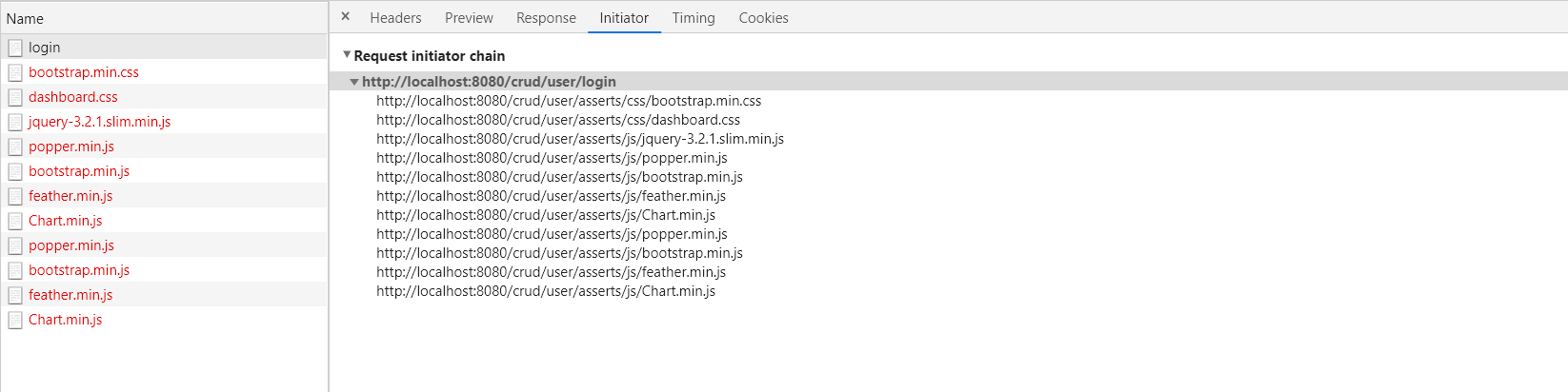
由于前面的请求是/user/login,所以不行
当只有一层时,

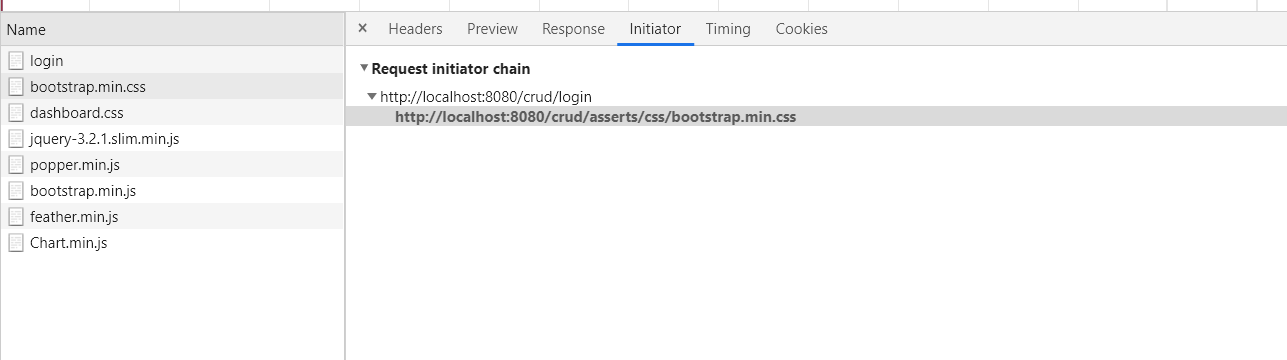
总结(以此次项目为例)
重定向请求转发静态资源访问路径无论如何都是localhost:8080/crud/xxx.css(项目路径+访问资源的路径)若原来的请求是/user/login,就是去掉一层目录后的目录,即localhost:8080/crud/user/xxx.css地址栏会变化不会变化哪里跳转在客户端即浏览器跳转在服务器内部跳转请求域中的数据是否会丢失会丢失不会丢失请求次数2次1次
4)、拦截器进行登录检查
@Bean
public WebMvcConfigurer webMvcConfigurer(){return new WebMvcConfigurer(){@Overridepublic void addViewControllers(ViewControllerRegistry registry) {registry.addViewController("/login.html").setViewName("login");}@Overridepublic void addInterceptors(InterceptorRegistry registry) {registry.addInterceptor(new LoginHandlerInterceptor()).addPathPatterns("/**").excludePathPatterns("/login.html","/","/user/login").excludePathPatterns("/asserts/**","/webjars/**");}};
}
一定要注意,springboot 1.5的不需要排除静态资源也可以访问,但是springboot2.x需要排除静态资源才能够访问
.excludePathPatterns("/asserts/**","/webjars/**");
5)、CRUD-员工列表
实验要求:
1)、RestfulCRUD:CRUD满足Rest风格:
URI:/资源名称/资源标识 HTTP请求方式区分对资源CRUD操作
普通CRUD(URI区分操作)RestfulCRUD查询getEmpemp—GET添加addEmp?xxxemp—POST修改updateEmp?id=xxx&xxxemp/{id}—PUT删除deleteEmp?id=1emp/{id}—DELETE
2)、实验的请求架构
功能
请求URI请求方式查询所有员工empsGET查询某个员工emp/{id}GET来到添加页面empGET添加员工empPOST来到修改页面(查出员工进行信息会写)emp/{id}GET修改员工empPUT删除员工emp/{id}DELETE
thymeleaf公共页面抽取
1.抽取公共片段
<nav class="navbar navbar-dark sticky-top bg-dark flex-md-nowrap p-0" th:fragment="topbar">nav>2.使用公共片段
<div th:insert="~{dashboard::topbar}">div>3.默认效果
th:insert的功能片段在div标签中
如果使用th:insert等用法,可以不用写~{}
[[~{}]] ; [(~{})]
三种引入功能片段的th属性:
th:insert:将公共片段插入到div标签中
th:replace:将声明引入的元素替换为公共片段
th:include:将被引入的片段的内容包含进这个标签中
引入片段的时候传入参数
<div th:replace="commons/bar::#sidebar(activeUri='main.html')">div>
###6)、CRUD-员工添加
提交 数据格式不对:生日 日期
2017.12.12 2017-12-12 2017/12/12
日期的格式化:SpringMVC将页面提交的值需要转换为指定的类型
2017-12-12-----Date 类型转换,格式化;
默认日期是按照/的方式,
spring.mvc.date-format=yyyy-MM-dd
更改日期格式,但还是只能有一种方式
7、错误处理机制
1、SpringBoot默认的错误处理机制
原理:
可以参照 ErrorMvcAutoConfiguration的错误处理自动配置;
给容器中添加了一下组件:
1、 DefaultErrorAttributes:
帮我们在页面共享信息
@Override
public Map<String, Object> getErrorAttributes(ServerRequest request, boolean includeStackTrace) {Map<String, Object> errorAttributes = new LinkedHashMap<>();errorAttributes.put("timestamp", new Date());errorAttributes.put("path", request.path());Throwable error = getError(request);HttpStatus errorStatus = determineHttpStatus(error);errorAttributes.put("status", errorStatus.value());errorAttributes.put("error", errorStatus.getReasonPhrase());errorAttributes.put("message", determineMessage(error));handleException(errorAttributes, determineException(error), includeStackTrace);return errorAttributes;
}
2、 BasicErrorController:处理默认/error请求
@Controller
@RequestMapping("${server.error.path:${error.path:/error}}")
public class BasicErrorController extends AbstractErrorController {@RequestMapping(produces = MediaType.TEXT_HTML_VALUE)public ModelAndView errorHtml(HttpServletRequest request, HttpServletResponse response) {HttpStatus status = getStatus(request);Map<String, Object> model = Collections.unmodifiableMap(getErrorAttributes(request, isIncludeStackTrace(request, MediaType.TEXT_HTML)));response.setStatus(status.value());ModelAndView modelAndView = resolveErrorView(request, response, status, model);return (modelAndView != null) ? modelAndView : new ModelAndView("error", model);}@RequestMappingpublic ResponseEntity<Map<String, Object>> error(HttpServletRequest request) {Map<String, Object> body = getErrorAttributes(request, isIncludeStackTrace(request, MediaType.ALL));HttpStatus status = getStatus(request);return new ResponseEntity<>(body, status);}
}
3、 ErrorPageCustomizer:
@Value("${error.path:/error}")
private String path = "/error";
4、 DefaultErrorViewResolver:
@Overridepublic ModelAndView resolveErrorView(HttpServletRequest request, HttpStatus status, Map<String, Object> model) {ModelAndView modelAndView = resolve(String.valueOf(status.value()), model);if (modelAndView == null && SERIES_VIEWS.containsKey(status.series())) {modelAndView = resolve(SERIES_VIEWS.get(status.series()), model);}return modelAndView;}private ModelAndView resolve(String viewName, Map<String, Object> model) {String errorViewName = "error/" + viewName;TemplateAvailabilityProvider provider = this.templateAvailabilityProviders.getProvider(errorViewName,this.applicationContext);if (provider != null) {return new ModelAndView(errorViewName, model);}return resolveResource(errorViewName, model);}
步骤:
一旦系统出现了4xx或5xx之类的错误; ErrorPageCustomizer就会生效(定制错误的相应规则);就会来到/error请求;就会来到 BasicErrorController处理;
1)、显示页面;去哪个页面是由**DefaultErrorViewResolver**解析得到的
protected ModelAndView resolveErrorView(HttpServletRequest request, HttpServletResponse response, HttpStatus status,Map<String, Object> model) {for (ErrorViewResolver resolver : this.errorViewResolvers) {ModelAndView modelAndView = resolver.resolveErrorView(request, status, model);if (modelAndView != null) {return modelAndView;}}return null;}
2)、如果定制错误响应
1)、如何定制错误的页面:
1)、 有模板引擎的情况下;error/状态码;
将错误页面命名为 错误状态码.html放在模板引擎文件下的error文件夹下;
发生此错误码的错误就会来到对应的页面;
可以试用4xx和5xx作为错误页面的文件名来匹配这种类型的所有错误,精确优先(优先寻找精确的状态码.html)
也可以将error.html放在templates下
页面能获取的信息:
timestamp:时间戳
status:状态码
error:错误提示
exception:错误对象
message:异常消息
errors:JSR303数据校验的错误都在这里
2)、 没有模板引擎(不用模板引擎),静态资源文件加下找;
3)、 以上都没有,就是默认来到SpringBoot的error页面;
2)、定制错误的json数据;
1)、自定义异常处理&返回定制json数据;
@ControllerAdvice
public class MyExceptionHandler {@ResponseBody@ExceptionHandler(UserNotExistException.class)public Map<String,Object> handleException(Exception e){Map<String,Object> map = new HashMap<>();map.put("code","user,not exist");map.put("message",e.getMessage());return map;}
}
2)、转发到/error进行自适应相应效果处理
@ExceptionHandler(UserNotExistException.class)
public String handleException(Exception e){Map<String,Object> map = new HashMap<>();map.put("code","user,not exist");map.put("message",e.getMessage());return "forward:/error";
}
3)、定制额外的相应数据,参照P44
@ExceptionHandler(UserNotExistException.class)
public String handleException(Exception e, HttpServletRequest request){Map<String,Object> map = new HashMap<>();request.setAttribute("javax.servlet.error.status_code",400);map.put("code","user,not exist");map.put("message",e.getMessage());return "error";
}
可以自定义页面跳转,也能够实现收到额外的相应数据
8、配置嵌入式Servlet容器
SpringBoot默认是用的嵌入的Servlet容器(Tomcat);
问题?
1)、如何定制和修改Servlet容器的相关配置;
1、修改和server有关的配置(ServerProperties[也是 EmbeddedServletContainerCustomizer])
server.xxx  #通用的Servlet容器设置
server.tomcat.xxx #tomcat的设置
2、编写一个~~ EmbeddedServletContainerCustomizer~~,2.x后改为 WebServerFactoryCustomizer,注入到IOC容器中
@Bean
public WebServerFactoryCustomizer webServerFactoryCustomizer(){return new WebServerFactoryCustomizer<ConfigurableWebServerFactory>() {@Overridepublic void customize(ConfigurableWebServerFactory factory) {factory.setPort(8080);}};
}
2)、注册Servlet三大组件【Servlet、Filter、Listener】
由于Springboot默认是以jar包的方式启动嵌入式的Servlet容器来启动Springboot的web应用,没有web.xml文件。
注册三大组件用以下方式
ServletRegistrationBean
@Bean
public ServletRegistrationBean servletRegistrationBean(){ServletRegistrationBean servletRegistrationBean = new ServletRegistrationBean(new MyServlet(),"/myServlet");return servletRegistrationBean;
}
FilterRegistrationBean
@Bean
public FilterRegistrationBean filterRegistration(){FilterRegistrationBean register = new FilterRegistrationBean(new MyFilter());register.setUrlPatterns(Arrays.asList("/hello","/myServlet"));return  register;
}
ServletListenerRegistrationBean
@Bean
public ServletListenerRegistrationBean mylistener(){ServletListenerRegistrationBean servletListenerRegistrationBean = new ServletListenerRegistrationBean(new MyListener());return servletListenerRegistrationBean;
}
SpringBoot帮我们自动SpringMVC的时候,自动注册SpringMVC的前端控制器;DispatcherServlet
2)、SpringBoot能不能支持其他的Servlet容器;
3)、替换为其他Servlet容器
Tomcat(SpringBoot默认使用)
jetty
<dependency><groupId>org.springframework.bootgroupId><artifactId>spring-boot-starter-webartifactId><exclusions><exclusion><artifactId>spring-boot-starter-tomcatartifactId><groupId>org.springframework.bootgroupId>exclusion>exclusions>
dependency><dependency><artifactId>spring-boot-starter-jettyartifactId><groupId>org.springframework.bootgroupId>
dependency>
undertow
<dependency><groupId>org.springframework.bootgroupId><artifactId>spring-boot-starter-webartifactId><exclusions><exclusion><artifactId>spring-boot-starter-tomcatartifactId><groupId>org.springframework.bootgroupId>exclusion>exclusions>
dependency><dependency><artifactId>spring-boot-starter-undertowartifactId><groupId>org.springframework.bootgroupId>
dependency>
4)、原理
https://note.clboy.cn/#/backend/springboot/configservletcontainer?id=%e6%9b%bf%e6%8d%a2%e4%b8%ba%e5%85%b6%e4%bb%96%e5%b5%8c%e5%85%a5%e5%bc%8fweb%e6%9c%8d%e5%8a%a1%e5%99%a8
9、使用外置的Servlet容器
嵌入式Servlet容器:应用打成可执行的jar
优点:简单、便携;
缺点:默认不支持JSP、优化定制比较复杂
外置的Servlet容器:外面安装Tomcat–应用war包的方式打包
使用步骤:
1)、必须创建一个war项目
2)、嵌入式的Tomcat指定为provided;
<dependency><artifactId>spring-boot-starter-tomcatartifactId><groupId>org.springframework.bootgroupId><scope>providedscope>
dependency>
3)、编写一个 SpringBootServletInitializer,并调用configure方法
public class ServletInitializer extends SpringBootServletInitializer {@Overrideprotected SpringApplicationBuilder configure(SpringApplicationBuilder builder) {return builder.sources(SpringbootWebJspApplication.class);}
}
原理:
jar包:执行SpringBoot主类的main方法,启动IOC容器,创建嵌入式的Servlet容器;
war包:启动服务器, 服务器启动Springboot应用【 SpringBootServletInitializer】,启动IOC容器;
Servlet3.0新规范
规则:
1)、服务器启动(web应用启动)会创建当前web应用里面每一个jar包里面 ServletContainerInitializer实例;
2)、 ServletContainerInitializer的实现放在jar包的 META-INF/services文件夹下,有一个名为 javax.servlet.ServletContainerInitializer的文件,内容就是 ServletContainerInitializer的实现类的全类名
3)、还可以使用 @HandlesTypes,在应用启动的时候加载我们感兴趣的类
流程:
1)、启动Tomcat
2)、 org\springframework\spring-web\5.1.9.RELEASE\spring-web-5.1.9.RELEASE.jar!\META-INF\services\javax.servlet.ServletContainerInitializer:
Spring的Web模块里面有这个文件: ** org.springframework.web.SpringServletContainerInitializer**
3)、 SpringServletContainerInitializer将 @HandlesTypes(WebApplicationInitializer.class)必做主的所有这个类型的类传入到onStartup方法的 Set;为这些 WebApplicationInitializer类型的类创建实例;
4)、每一个 WebApplicationInitializer都调用自己的onStartup;【 SpringBootServletInitializer】
5)、相当于 SpringBootServletInitializer的类会被创建对象,并执行onStartup方法;
6)、 SpringBootServletInitializer执行onStartup会 createRootApplicationContext创建容器;
protected WebApplicationContext createRootApplicationContext(ServletContext servletContext) {SpringApplicationBuilder builder = createSpringApplicationBuilder();builder.main(getClass());ApplicationContext parent = getExistingRootWebApplicationContext(servletContext);if (parent != null) {this.logger.info("Root context already created (using as parent).");servletContext.setAttribute(WebApplicationContext.ROOT_WEB_APPLICATION_CONTEXT_ATTRIBUTE, null);builder.initializers(new ParentContextApplicationContextInitializer(parent));}builder.initializers(new ServletContextApplicationContextInitializer(servletContext));builder.contextClass(AnnotationConfigServletWebServerApplicationContext.class);builder = configure(builder);builder.listeners(new WebEnvironmentPropertySourceInitializer(servletContext));SpringApplication application = builder.build();if (application.getAllSources().isEmpty()&& AnnotationUtils.findAnnotation(getClass(), Configuration.class) != null) {application.addPrimarySources(Collections.singleton(getClass()));}Assert.state(!application.getAllSources().isEmpty(),"No SpringApplication sources have been defined. Either override the "+ "configure method or add an @Configuration annotation");if (this.registerErrorPageFilter) {application.addPrimarySources(Collections.singleton(ErrorPageFilterConfiguration.class));}return run(application);
}
7)、Spring的应用就启动了,并创建IOC容器
public ConfigurableApplicationContext run(String... args) {StopWatch stopWatch = new StopWatch();stopWatch.start();ConfigurableApplicationContext context = null;Collection<SpringBootExceptionReporter> exceptionReporters = new ArrayList<>();configureHeadlessProperty();SpringApplicationRunListeners listeners = getRunListeners(args);listeners.starting();try {ApplicationArguments applicationArguments = new DefaultApplicationArguments(args);ConfigurableEnvironment environment = prepareEnvironment(listeners, applicationArguments);configureIgnoreBeanInfo(environment);Banner printedBanner = printBanner(environment);context = createApplicationContext();exceptionReporters = getSpringFactoriesInstances(SpringBootExceptionReporter.class,new Class[] { ConfigurableApplicationContext.class }, context);prepareContext(context, environment, listeners, applicationArguments, printedBanner);refreshContext(context);afterRefresh(context, applicationArguments);stopWatch.stop();if (this.logStartupInfo) {new StartupInfoLogger(this.mainApplicationClass).logStarted(getApplicationLog(), stopWatch);}listeners.started(context);callRunners(context, applicationArguments);}catch (Throwable ex) {handleRunFailure(context, ex, exceptionReporters, listeners);throw new IllegalStateException(ex);}try {listeners.running(context);}catch (Throwable ex) {handleRunFailure(context, ex, exceptionReporters, null);throw new IllegalStateException(ex);}return context;
}
10、日期处理+后台数据返回前台(*)
1)、多写一个get方法
person.java
public class Person {Integer id;String name;Date birth;@Overridepublic String toString() {return "Person{" +"id=" + id +", name='" + name + '\'' +", birth=" + birth +'}';}public Person(Integer id, String name, Date birth) {this.id = id;this.name = name;this.birth = birth;}public Person() {}public Integer getId() {return id;}public void setId(Integer id) {this.id = id;}public String getName() {return name;}public void setName(String name) {this.name = name;}public Date getBirth_test() {return birth;}public String getBirth() {return new SimpleDateFormat("yyyy-MM-dd HH:mm:ss").format(this.birth);}public void setBirth(Timestamp birth) {this.birth = birth;}
}
PersonController.java
@Controller
public class PersonController {@AutowiredPersonServiceImpl personService;@ResponseBody@RequestMapping("/getAllPersons")public List<Person> getAllPersons(){return personService.getAllPersons();}
}
返回给浏览器的数据
[{"id":1,"name":"zs","birth":"2020-08-11 00:00:00","birth_test":1597075200000},{"id":2,"name":"ls","birth":"2020-08-20 00:00:00","birth_test":1597852800000},{"id":3,"name":"ww","birth":"2020-08-28 00:00:00","birth_test":1598544000000}]
可以发现,返回的数据名和pojo中的get方法有关,有几个get方法就有几个返回的属性
例:getBirth_test返回birth_test
2)、现在可以直接在属性名上加上
上面是以前的处理方法
现在的Person.java
public class Person {Integer id;String name;@JsonFormat(timezone = "GMT+8", pattern = "yyyy-MM-dd HH:mm:ss")Date birth;@Overridepublic String toString() {return "Person{" +"id=" + id +", name='" + name + '\'' +", birth=" + birth +'}';}public Person(Integer id, String name, Date birth) {this.id = id;this.name = name;this.birth = birth;}public Person() {}public Integer getId() {return id;}public void setId(Integer id) {this.id = id;}public String getName() {return name;}public void setName(String name) {this.name = name;}public Date getBirth() {return birth;}public void setBirth(Timestamp birth) {this.birth = birth;}
}
@JsonFormat(timezone = "GMT+8", pattern = "yyyy-MM-dd HH:mm:ss")
或者在配置文件中配置
spring.jackson.date-format=yyyy-MM-dd HH:mm:ss
spring.jackson.time-zone=GMT+8
3)、sql语句转换
SELECT DATE_FORMAT( b.book_start_time,'%Y-%m-%d %H:%i:%s') book_start_time
4)、前台转换
templet: '{{ layui.laytpl.toDateString(d.createTime) }}'
###5)、常用日期时间类
java.sql.Date date1 = new java.sql.Date(new java.util.Date().getTime());
LocalDate localDate = date1.toLocalDate();
System.out.println(localDate);Calendar calendar = Calendar.getInstance();
SimpleDateFormat dateFormat = new SimpleDateFormat("yyyy-MM-dd HH:mm:ss");
String format = dateFormat.format(calendar.getTimeInMillis());
Timestamp timestamp = Timestamp.valueOf(format);
System.out.println(timestamp);LocalDateTime localDateTime = LocalDateTime.now();
System.out.println(localDateTime);
DateTimeFormatter dateTimeFormatter = DateTimeFormatter.ofPattern("yyyy-MM-dd HH:mm:ss");
String format1 = dateTimeFormatter.format(localDateTime);
System.out.println(format1);
Timestamp timestamp1 = Timestamp.valueOf(format1);
Timestamp timestamp2 = Timestamp.valueOf(localDateTime);System.out.println(timestamp1);
System.out.println(timestamp2);
11、日期处理+前台的数据传给后台(*)
前台传给后台日期的字符串,后台是无法用Date来映射的,要自己编写一个类型转换器,放入容器中
package com.custhitachi.managerment.converter;import java.util.Date;
import java.text.ParseException;
import java.text.SimpleDateFormat;import org.springframework.context.annotation.Configuration;
import org.springframework.core.convert.converter.Converter;@Configuration
public class StringToDateConverter implements Converter<String, Date>{@Overridepublic Date convert(String source) {if (source.equals("")) {System.out.println(1);return null;}else {SimpleDateFormat simpleDateFormat = new SimpleDateFormat("yyyy-MM-dd");Date date = null;try {date = simpleDateFormat.parse(source);} catch (ParseException e) {e.printStackTrace();}return date;}}}
或者入参的时候加上 @DateTimeFormat
也可以直接加在属性上
@DateTimeFormat(pattern = "yyyy-MM-dd")
@JsonFormat(pattern = "yyyy-MM-dd HH:mm:ss",timezone="GMT+8")
private Date symstarttime;
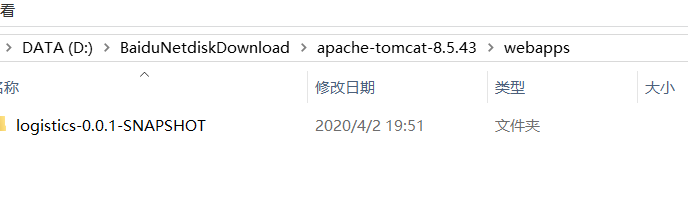
12、在tomcat运行war
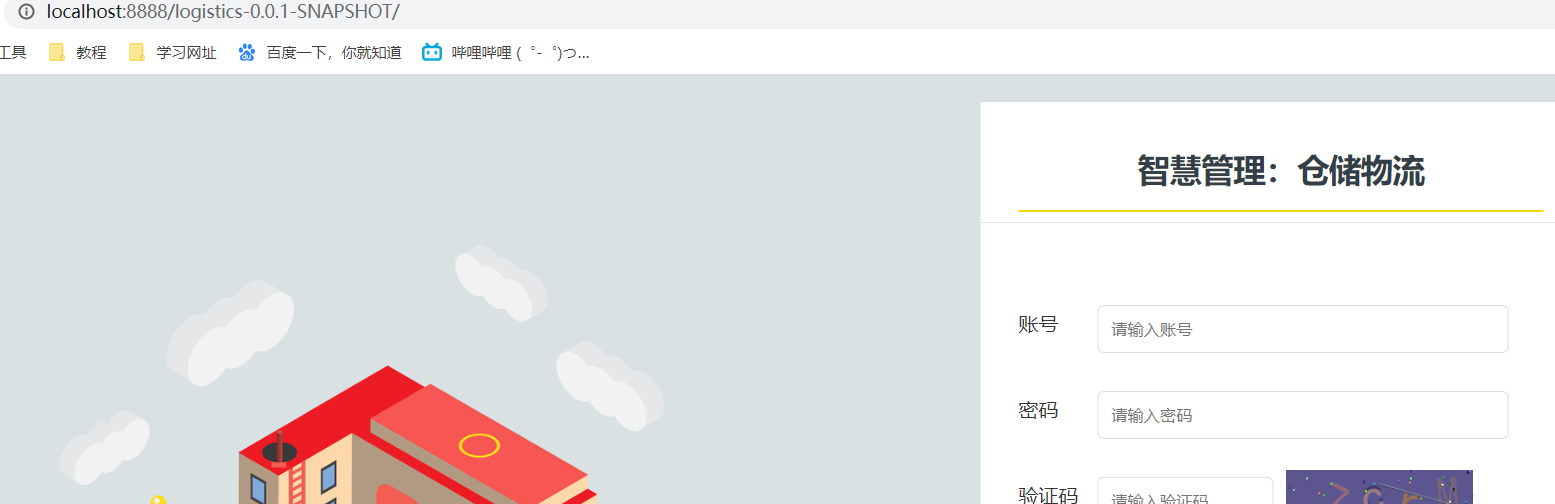
1、带项目名(静态文件可能会不好使)
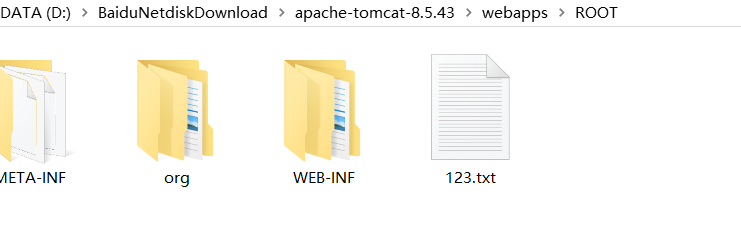
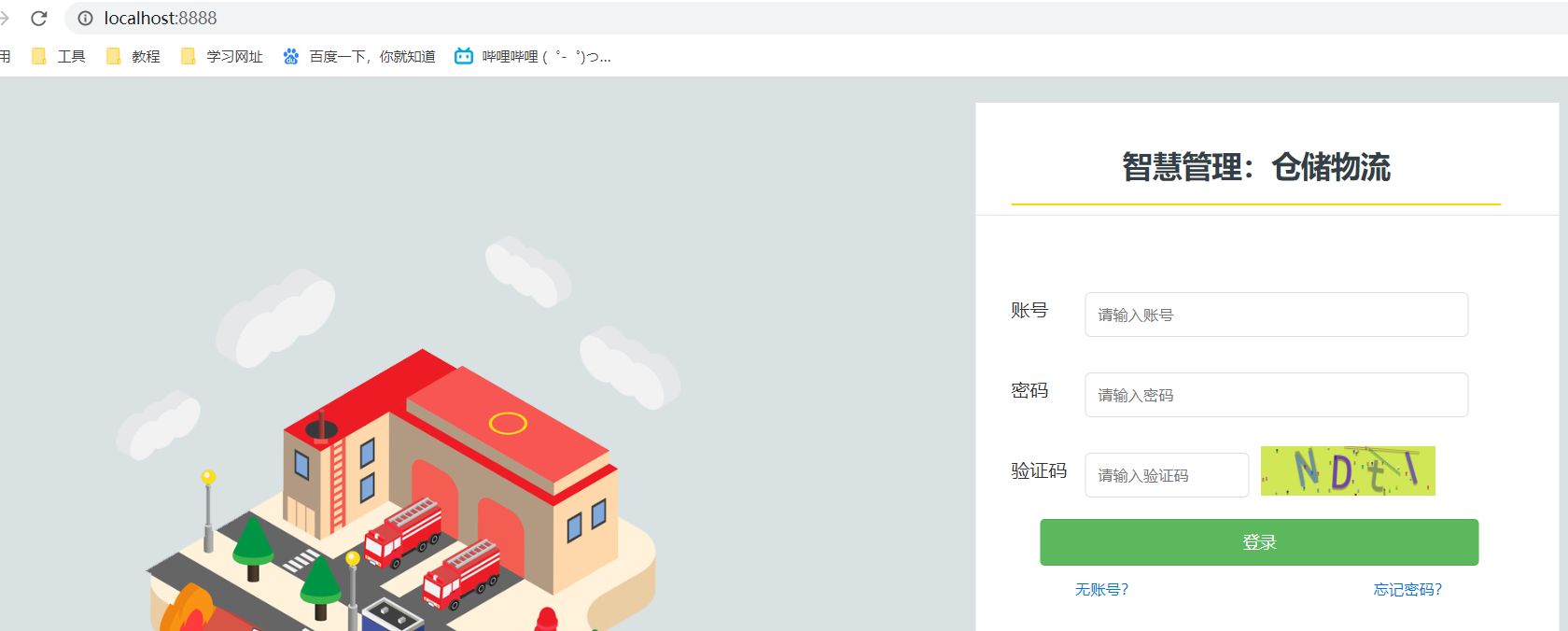
2、不带项目名
本文来自互联网用户投稿,文章观点仅代表作者本人,不代表本站立场,不承担相关法律责任。如若转载,请注明出处。 如若内容造成侵权/违法违规/事实不符,请点击【内容举报】进行投诉反馈!