angular4自适应navbar
说明
这个navbar是练习的时候做的最初版本,根据浏览器宽度来自动一个一个收缩navbar的标签,里面有许多不足之处 ,请各位大神多多指教。
完成图
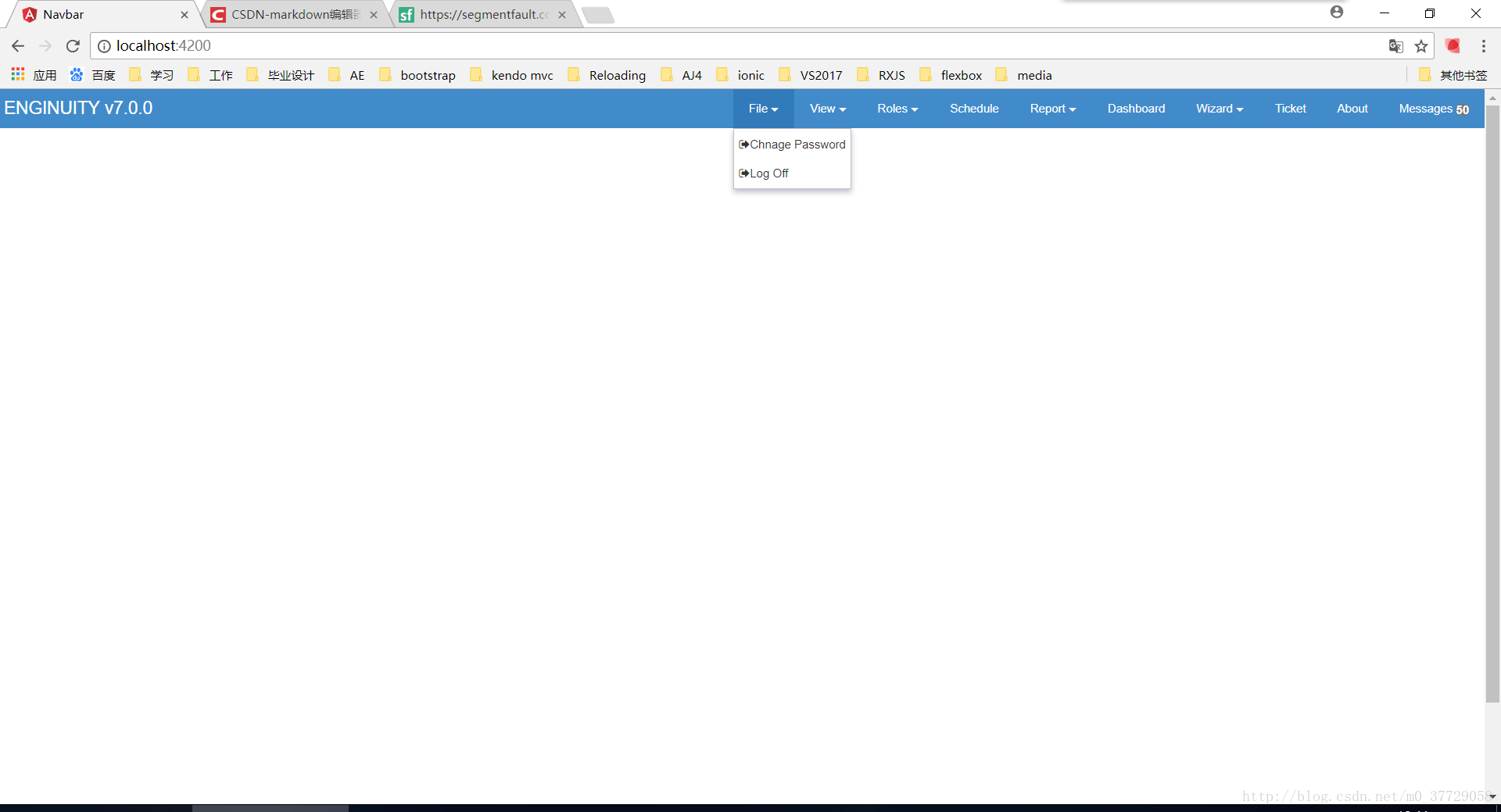
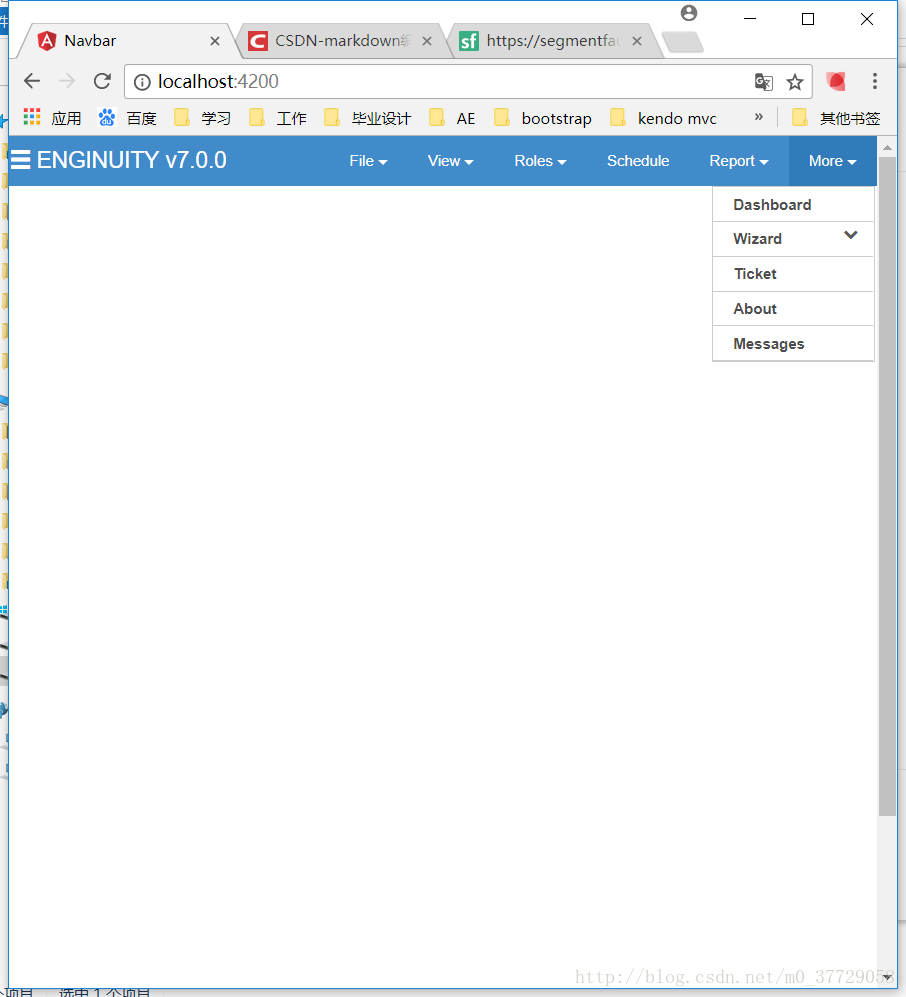
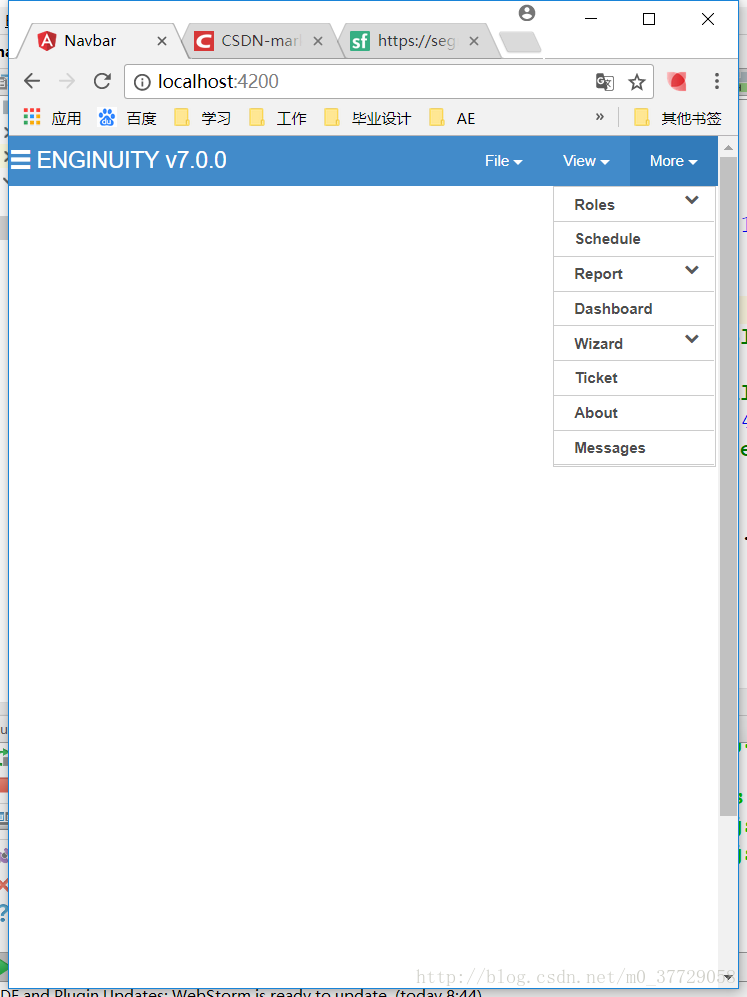
插件
所用插件为 JQ,BOOTSTRAP,fontawesome
navbar组件
navbar.component.ts
通过本地数组对navbar标签提供数据,通过JQ控制显示隐藏
import {AfterViewInit, Component, OnInit} from '@angular/core';
import * as $ from 'jquery';@Component({selector: 'app-navbar',templateUrl: './navbar.component.html',styleUrls: ['./navbar.component.css']
})
export class NavbarComponent implements OnInit, AfterViewInit {// navbar标签数组private arrs: Array = [{ 'name': 'File', 'detaill': ['Chnage Password', 'Log Off'] },{ 'name': 'View', 'detaill': ['Navigation', 'To-Do Bar', 'Page Information', 'Group Information']},{ 'name': 'Roles', 'detaill': ['HIMS Case Management', 'Head Start']},{ 'name': 'Schedule'},{ 'name': 'Report', 'detaill': ['General Report', 'Ad Hoc Reports', 'Ad Hoc Report Designer']},{ 'name': 'Dashboard'},{ 'name': 'Wizard', 'detaill': ['Wizard1', 'Exit Wizard Mode']},{ 'name': 'Ticket'},{ 'name': 'About'},{ 'name': 'Messages'},{ 'name': 'More', 'detaill': []},]constructor() {}ngOnInit() {}ngAfterViewInit(): void {// 导航栏右侧和下拉菜单控制$(function() {let Accordion = function(el, multiple) {this.el = el || {};this.multiple = multiple || false;// Variables privadaslet links = this.el.find('.link');// Eventolinks.on('click', {el: this.el, multiple: this.multiple}, this.dropdown);};Accordion.prototype.dropdown = function(e) {let $el = e.data.el;let $this = $(this);let $next = $this.next();$next.slideToggle();$this.parent().toggleClass('open');if (!e.data.multiple) {$el.find('.submenu').not($next).slideUp().parent().removeClass('open');}};let accordion = new Accordion($('#accordion'), false);$('.submenu li').click(function () {$(this).addClass('current').siblings('li').removeClass('current');});$('.navshow>li:not(:last-child)').mouseover(function () {$(this).children('div').removeClass('hidden');});$('.navshow>li:not(:last-child)').mouseout(function () {$(this).children('div').addClass('hidden');});$('.navshow>li:last-child').mouseover(function () {$('.whiteselectall').css('display', 'block');});$('.navshow>li:last-child').mouseout(function () {$('.whiteselectall').css('display', 'none');});returnfunc();});// 渲染navbar标签出现隐藏// 记录隐藏(出现)标签的数量let counts = 1;// 标签数组长度const arrleng = this.arrs.length;// 更改浏览器宽度触发window.onresize = function(){returnfunc();};// 多次执行修正出现的标签数量function returnfunc() {let flag1 = true;let flag2 = true;while ( flag1 || flag2) {changli();const winWidth = $(document.body).width();const leftwidth = $('.menuTitle').width();const rightwidth = $('.containerall .pull-right').width();flag1 = winWidth - 20 <= leftwidth + rightwidth && counts < arrleng;flag2 = winWidth - 250 > leftwidth + rightwidth && counts > 1;}}// 显示或隐藏标签function changli() {const winWidth = $(document.body).width();const leftwidth = $('.menuTitle').width();const rightwidth = $('.containerall .pull-right').width();// 隐藏if (winWidth - 20 <= leftwidth + rightwidth && counts < arrleng) {if ($('.navshow>li:last-child').css('display') == 'none') {$('.navshow>li:last-child').css('display', 'block');}$('.navshow>li:nth-last-child(' + (counts + 1) + ')').css('display', 'none');$('.whiteselectall>div>ul>li:nth-last-child(' + (counts + 1) + ')').css('display', 'block');counts++;}// 显示if (winWidth - 250 > leftwidth + rightwidth && counts > 1) {if ($('.navshow>li:last-child').css('display') == 'block' && counts == 2) {$('.navshow>li:last-child').css('display', 'none');$('.navshow>li:nth-last-child(' + (counts) + ')').css('display', 'block');}$('.navshow>li:nth-last-child(' + (counts + 1) + ')').css('display', 'block');$('.whiteselectall>div>ul>li:nth-last-child(' + (counts + 1) + ')').css('display', 'none');counts--;}}}}
navbar.component.html
<div class="row containerall"><div class="col-md-12"><div class="menuTitle" role="banner"><div style="float: left;"><span class="glyphicon glyphicon-menu-hamburger visible-xs visible-sm" style="line-height: 37px;cursor:pointer">span>div><div style="float: left;margin-left: 4px;">ENGINUITY v7.0.0div>div>
<div class="pull-right" style="margin:0;padding:0;"><ul class="navshow navbar-nav"><li *ngFor="let i of arrs; let index=index"   ><span class="lishow">{{i.name}}<span *ngIf="i.detaill != null"><span class="caret">span>span><span *ngIf="i.name == 'Messages'"><span class="badge">50span>span>span><div class="hidden"  *ngIf="i.detaill != null"><ul class="inli"><li *ngFor="let j of i.detaill"><a href="#"><span class="fa fa-sign-out">span>{{j}}a>li>ul>div><div *ngIf="i.name == 'More'" class="whiteselectall"><div class="account-l fl"><ul id="accordion" class="accordion"><li *ngFor="let arr of arrs"><div class="link"><i>i>{{arr.name}}<i *ngIf="arr.detaill != null" class="fa fa-chevron-down">i>div><ul class="submenu"><li *ngFor="let i of arr.detaill"><a>{{i}}a>li>ul>li>ul>div>div>li>ul>div>div>
div><div style="width: 100%;height: 800px">div>
navbar.component.css
*{margin: 0;padding: 0;
}
.containerall{background-color: #428bca;font-size: 14px;line-height: 1.42857143;color: #333;
}
.menuTitle{font-size: 18px;line-height: 40px;color: #fff;float: left;
}
.navshow{list-style: none;background-image: none;background-color: #428bca;vertical-align: bottom;border-style: none;
}
.navshow>li {float: left;vertical-align: top;zoom: 1;-webkit-box-sizing: content-box;box-sizing: content-box;text-align: -webkit-match-parent;
}
.inli{position: absolute;display: block;max-height: 332px;overflow: auto;position: absolute;font-size: 12px;font-style: normal;font-weight: 400;line-height: normal;background-color: white;border: 1px solid rgba(100, 100, 100, .4);-webkit-box-shadow: 0 3px 8px rgba(0, 0, 63, .25);box-shadow: 0 3px 8px rgba(0, 0, 63, .25);overflow: hidden;top: 40px;}
.inli a{text-decoration: none;color: #333333;
}
.whiteselectall{position: absolute;right: 2px;display: none;
}
.inli>li{vertical-align: top;-webkit-box-sizing: content-box;box-sizing: content-box;text-align: -webkit-match-parent;line-height: 20px;font-weight: 400;padding: 5px;
}
.lishow{display: block;height: 40px;padding: 0 16px;cursor: pointer;color: #fff;text-align: center;white-space: nowrap;font-size: 12px;line-height: 40px;
}
.navshow>li:last-child{display: none;
}
.whiteselectall>div>ul>li{display: none;
}
.showdown{position: absolute;right: 12px;left: auto;top: 12px;transition: all 0.4s ease;
}
.navshow>li:hover{background-color:#327bba;
}
.whiteselectall>div>ul>li:hover {background-color:#eeeeee;
}
.whiteselectall a{text-decoration: none;
}
.inli>li:hover{background-color:#eeeeee;
}
* {margin: 0;padding: 0;-webkit-box-sizing: border-box;-moz-box-sizing: border-box;box-sizing: border-box;}
ul{list-style: none;
}
a{text-decoration: none;
}/** =======================* Contenedor Principal===========================*/
.list-title{display: inline-block;width: 100%;max-width: 200px;border-top: solid 1px #ccc;border-left: solid 1px #ccc;border-right: solid 1px #ccc;background: #FFF;text-align: center;height: 60px;line-height: 60px;font-size: 20px;color: #428bca;font-weight: bold;cursor: pointer;
}
h1 {color: #FFF;font-size: 24px;font-weight: 400;text-align: center;margin-top: 80px;
}h1 a {color: #428bca;font-size: 16px;
}.accordion {width: 100%;max-width: 200px;border: solid 1px #ccc;background: #FFF;
}.accordion .link {cursor: pointer;display: block;padding: 5px 5px 5px 16px;color: #4D4D4D;font-size: 12px;font-weight: 700;border-bottom: 1px solid #CCC;position: relative;-webkit-transition: all 0.4s ease;-o-transition: all 0.4s ease;transition: all 0.4s ease;
}.accordion li:last-child .link {border-bottom: 0;
}
.accordion li{cursor: pointer;
}
.accordion li i {position: absolute;top: 3px;left: 12px;font-size: 12px;color: #595959;-webkit-transition: all 0.4s ease;-o-transition: all 0.4s ease;transition: all 0.4s ease;
}.accordion li i.fa-chevron-down {right: 12px;left: auto;font-size: 12px;
}.accordion li.open .link {color: #428bca;
}.accordion li.open i {color: #428bca;
}.accordion li.open i.fa-chevron-down {-webkit-transform: rotate(180deg);-ms-transform: rotate(180deg);-o-transform: rotate(180deg);transform: rotate(180deg);
}/*** Submenu-----------------------------*/
.submenu {display: none;background: #f5f5f5;font-size: 12px;
}.submenu li {border-bottom: 1px solid #d6d7dc;
}.submenu a {display: block;text-decoration: none;color: #666;padding: 12px;padding-left: 10px;-webkit-transition: all 0.25s ease;-o-transition: all 0.25s ease;transition: all 0.25s ease;
}.submenu a:hover ,.submenu li.current a{background: #428bca;color: #FFF;
}.whiteselectall{position: absolute;top:40px;right: 0px;width: 130px;height: 360px;z-index: 100;
}
.whiteselectall .k-menu .k-item, .whiteselectall.k-widget.k-menu-horizontal>.k-item{/*clear: both;*/float: none;
}
本文来自互联网用户投稿,文章观点仅代表作者本人,不代表本站立场,不承担相关法律责任。如若转载,请注明出处。 如若内容造成侵权/违法违规/事实不符,请点击【内容举报】进行投诉反馈!