Unity-在游戏中给你的项目添加广告-UnityAds
前言
这里选择使用UnityAds给你的项目添加可以使用的广告
为什么选择UnityAds:
首先Unity官方已经在中国添加了本土可以使用的广告,也就意味着再也不需要梯子才能浏览广告了,其次Unity内部添加广告的流程及其简单,基本上几步就可以解决,而且Unity内部自带这个组件,也不用麻烦的外部导入
流程
大致流程分为3步
1.加载广告组件
2.设置你自己的广告账户ID
3.实现广告加载流程
第一点,加载广告组件的方式有两种:
1.在unity内部点击Ctrl+0 快捷打开页面
2.在UnityPackageManager中搜索Advertisement,导入组件
首先你需要一个账号,在下面链接中注册账号与广告ID
Unity Gaming Services
注册好了之后进入这个页面:
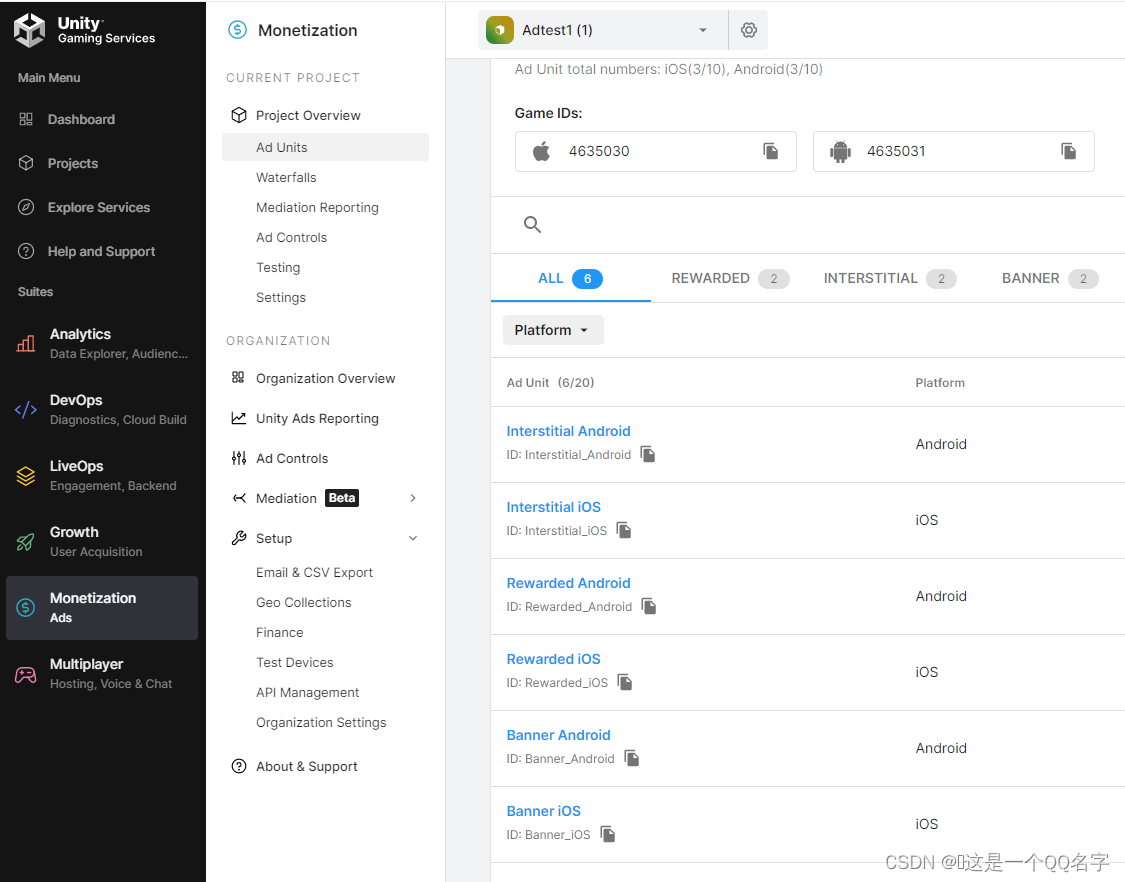
其中GameId为你初始化需要的ID也就是游戏连接你账户的ID
下面为三种广告,普通,激励和横幅广告,这里我们选择激励广告作为测试
官方文档描述的很清楚,这里只是复制的官方文档的代码
Unity Ads SDK API reference
举例使用:
using UnityEngine;
using UnityEngine.Advertisements;public class AdsInitializer : MonoBehaviour, IUnityAdsInitializationListener
{[SerializeField] string _androidGameId;[SerializeField] string _iOsGameId;[SerializeField] bool _testMode = true;[SerializeField] bool _enablePerPlacementMode = true;private string _gameId;void Awake(){InitializeAds();}public void InitializeAds(){_gameId = (Application.platform == RuntimePlatform.IPhonePlayer)? _iOsGameId: _androidGameId;Advertisement.Initialize(_gameId, _testMode, _enablePerPlacementMode, this);}public void OnInitializationComplete(){Debug.Log("Unity Ads initialization complete.");}public void OnInitializationFailed(UnityAdsInitializationError error, string message){Debug.Log($"Unity Ads Initialization Failed: {error.ToString()} - {message}");}}
using UnityEngine;
using UnityEngine.UI;
using UnityEngine.Advertisements;
using System.Collections;
public class RewardedAdsButton : MonoBehaviour, IUnityAdsLoadListener, IUnityAdsShowListener
{[SerializeField] Button _showAdButton;[SerializeField] string _androidAdUnitId = "Rewarded_Android";[SerializeField] string _iOsAdUnitId = "Rewarded_iOS";public Text text;string _adUnitId;void Awake(){// Get the Ad Unit ID for the current platform:_adUnitId = (Application.platform == RuntimePlatform.IPhonePlayer)? _iOsAdUnitId: _androidAdUnitId;//Disable button until ad is ready to show//_showAdButton.interactable = false;}IEnumerator Load(){while (true){if (!Advertisement.IsReady(_adUnitId)){LoadAd();}yield return new WaitForSeconds(20f);}}private void Start(){_showAdButton.onClick.AddListener(ShowAd);StartCoroutine(Load());}// Load content to the Ad Unit:public void LoadAd(){// IMPORTANT! Only load content AFTER initialization (in this example, initialization is handled in a different script).Debug.Log("Loading Ad: " + _adUnitId);Advertisement.Load(_adUnitId, this);//Invoke(nameof(ShowAd), 1f);}// If the ad successfully loads, add a listener to the button and enable it:public void OnUnityAdsAdLoaded(string adUnitId){Debug.Log("Ad Loaded: " + adUnitId);if (adUnitId.Equals(_adUnitId)){// Configure the button to call the ShowAd() method when clicked:_showAdButton.onClick.AddListener(ShowAd);// Enable the button for users to click:_showAdButton.interactable = true;}}// Implement a method to execute when the user clicks the button.public void ShowAd(){if (!Advertisement.IsReady(_adUnitId)){LoadAd();}//_showAdButton.interactable = false;ShowOptions options = new ShowOptions { resultCallback = HandleShowResult };//Advertisement.Show("rewardedVideo", options);// Disable the button: // Then show the ad:Advertisement.Show(_adUnitId, options);//print();}private void HandleShowResult(ShowResult result){_showAdButton.interactable = true;switch (result){//广告看完case ShowResult.Finished:print("广告加载成功");text.text = "Success";//广告看完了,给玩家奖励break;//跳过广告case ShowResult.Skipped:print("广告完全加载成功了吗啊");text.text = "Failed";break;case ShowResult.Failed:text.text = "Failed";print("广告完全加载成功了吗啊");break;}}// Implement the Show Listener's OnUnityAdsShowComplete callback method to determine if the user gets a reward:public void OnUnityAdsShowComplete(string adUnitId, UnityAdsShowCompletionState showCompletionState){if (adUnitId.Equals(_adUnitId) && showCompletionState.Equals(UnityAdsShowCompletionState.COMPLETED)){Debug.Log("Unity Ads Rewarded Ad Completed");// Grant a reward.// Load another ad:Advertisement.Load(_adUnitId, this);text.text = "SUccess";print("广告完全加载成功了吗啊");}}// Implement Load and Show Listener error callbacks:public void OnUnityAdsFailedToLoad(string adUnitId, UnityAdsLoadError error, string message){Debug.Log($"Error loading Ad Unit {adUnitId}: {error.ToString()} - {message}");// Use the error details to determine whether to try to load another ad.}public void OnUnityAdsShowFailure(string adUnitId, UnityAdsShowError error, string message){text.text = "Failed";Debug.Log($"Error showing Ad Unit {adUnitId}: {error.ToString()} - {message}");// Use the error details to determine whether to try to load another ad.}public void OnUnityAdsShowStart(string adUnitId) { text.text = "Strt"; }public void OnUnityAdsShowClick(string adUnitId) { text.text = "Click"; }void OnDestroy(){// Clean up the button listeners:_showAdButton.onClick.RemoveAllListeners();}
}
将两个脚本挂载,输入GameID然后添加Button按钮就可以直接使用了
本文来自互联网用户投稿,文章观点仅代表作者本人,不代表本站立场,不承担相关法律责任。如若转载,请注明出处。 如若内容造成侵权/违法违规/事实不符,请点击【内容举报】进行投诉反馈!